
Official statement
Other statements from this video 9 ▾
- □ Google favorisait-il vraiment le HTML au détriment du JavaScript pour l'indexation ?
- □ Les spinners de chargement peuvent-ils vraiment bloquer l'indexation de vos pages JavaScript ?
- □ Pourquoi l'indexation JavaScript prend-elle 3 à 6 mois après le crawl ?
- □ Pourquoi vos liens JavaScript ralentissent-ils la découverte de vos pages par Google ?
- □ Le JavaScript peut-il vraiment être indexé plus vite que l'HTML ?
- □ Tous les frameworks JavaScript sont-ils vraiment égaux face au crawl de Google ?
- □ Google ment-il sur le rendu JavaScript ou simplifie-t-il juste la vérité ?
- □ Faut-il vraiment corriger la technique avant de miser sur le contenu et les backlinks ?
- □ Pourquoi Google recommande-t-il de tester en conditions réelles plutôt que de croire la documentation ?
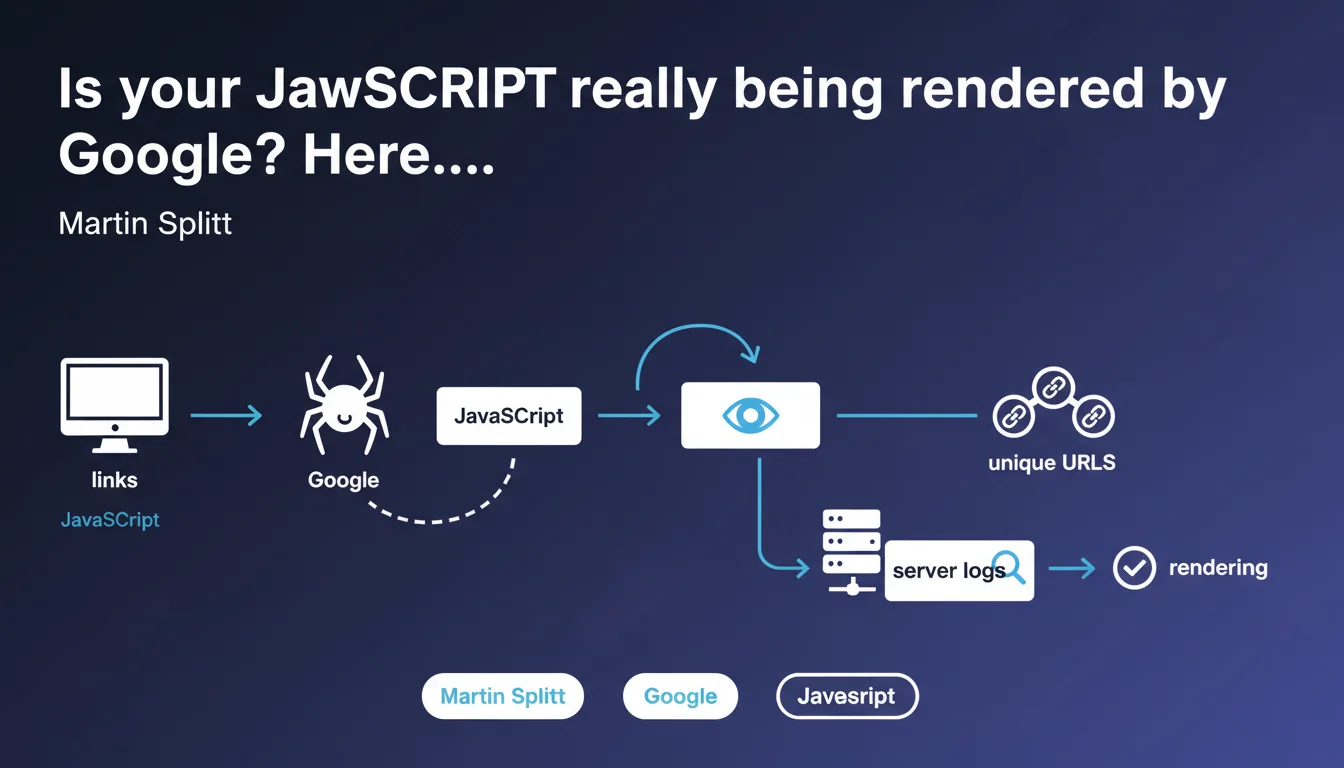
Google recommends creating links accessible only via JavaScript that point to unique URLs, then analyzing server logs to confirm that Googlebot accesses these target URLs. This simple technique allows you to concretely verify whether JavaScript rendering is working without relying on official tools that can sometimes be misleading.
What you need to understand
Why does Google recommend this method instead of using Search Console?
Because official tools don't always reflect real-world reality. Search Console and the URL inspection tool show an idealized snapshot, not necessarily what Googlebot does in production. Rendering times, blocked resources, intermittent errors — all of that can go unnoticed.
The honeypot method bypasses this problem: it tests Googlebot's actual behavior in its natural environment. If the link appears in your logs, that means the JavaScript was properly executed and the link was discovered. No interpretation, just facts.
How does this technique actually work in practice?
You inject via JavaScript a link to a unique URL — something like /test-js-render-abc123 — that doesn't exist anywhere else on your site. Not in the source HTML, not in the sitemap. Generated solely on the client side.
Next, you monitor your server logs. If Googlebot requests this URL, it's irrefutable proof that it executed the JavaScript, built the complete DOM, and followed the link. Simple, elegant, reliable.
What are the pitfalls to avoid with this approach?
First pitfall: creating a URL that could be discovered another way. If it ends up in an accessible JavaScript file, in cache, or another bot finds it, you'll get a false positive. The URL must be truly unique and generated on the fly.
Second pitfall: forgetting that crawling isn't instantaneous. Googlebot won't necessarily visit on the same day. You need patience and should check logs over several weeks to draw solid conclusions.
- Technique validated directly by Google for testing JavaScript rendering in production
- Relies on server log analysis, not on tools that can hide certain issues
- Requires creating truly unique URLs, never exposed anywhere else
- Crawl delay can be lengthy — don't expect immediate results
- Allows detection of cases where JavaScript is partially or poorly executed
SEO Expert opinion
Is this method really reliable across all types of websites?
On paper, yes. In practice? It depends on your architecture. If your site relies on a complex SPA framework with aggressive code-splitting, conditional lazy-loading, and external dependencies, Googlebot can fail to render without you knowing it.
The honeypot method detects whether one link is crawled, but it doesn't guarantee that all JavaScript content is correctly indexed. A link can pass while entire blocks of text or components remain invisible. It's a good smoke test, not an exhaustive audit. [To verify] on sites with heavy JavaScript dependency.
Why doesn't Google provide an official tool for this?
Good question. They have the inspection tool, the coverage report, the Mobile-Friendly Test — but nothing to validate JS rendering in real conditions. This DIY recommendation shows that even Google acknowledges the limitations of its own tools.
Let's be honest: if Search Console were 100% reliable, nobody would need to tinker with honeypots. The fact that Martin Splitt recommends this technique proves that discrepancies between the inspection tool and actual crawling are common.
What nuances should be added to this recommendation?
First nuance: this method confirms that Googlebot can render JavaScript, not that it will do so systematically. Crawl budget, indexing priorities, sporadic errors — all of that influences actual behavior.
Second nuance: a crawled link doesn't mean the content is indexed or that it ranks. You will have validated the rendering, not the quality of the content or its relevance in Google's eyes. Don't confuse crawling, indexation, and ranking — three distinct steps.
Practical impact and recommendations
How do you implement this honeypot test concretely?
Choose a representative page from your site — ideally one that already receives regular crawl traffic. Inject via JavaScript a link to a unique URL, for example /honeypot-test-[timestamp]. Make sure this URL doesn't return a 404 but a 200 with minimal content.
Configure your server logs to capture requests to this URL. If you're using a CDN or reverse proxy, verify that logs include the user-agent to distinguish Googlebot from other bots. Wait a few weeks and analyze.
What common mistakes should you avoid?
Classic mistake: using a URL that's already been crawled or is present in the sitemap. That invalidates the entire test. The URL must be strictly generated on the client side, never exposed anywhere else.
Another pitfall: not verifying that the link is actually in the DOM after JavaScript execution. Use the inspection tool to check that the link appears in the final rendered HTML — otherwise, even if Googlebot executes the JS, it won't find anything.
Third mistake: concluding too quickly. If Googlebot doesn't crawl the honeypot URL within a week, that doesn't mean it's not executing JavaScript. Maybe the page isn't a priority, or the crawl budget is saturated. Let it run for at least a month.
What should you do if Googlebot never crawls the honeypot URL?
Several hypotheses. Either JavaScript isn't executing properly — console errors, resources blocked by robots.txt, timeout. Or the page isn't crawled enough for Googlebot to discover the link. Or the link is technically present but not visible enough in the DOM.
Start by checking JavaScript errors in actual Search Console (not the inspection tool). Then test with the mobile usability testing tool. If everything seems OK but the honeypot still isn't working, dig into crawl budget and page depth.
- Create a unique honeypot URL, never exposed elsewhere (sitemap, source HTML, regular internal links)
- Inject the link via JavaScript only, on a page that's already regularly crawled
- Configure server logs to capture requests with Googlebot user-agent
- Verify with the inspection tool that the link appears properly in the rendered DOM
- Wait a minimum of 3-4 weeks before drawing conclusions
- Cross-reference results with other tools (Search Console, render logs, Lighthouse tests)
- If the test fails, audit JavaScript errors, robots.txt, and crawl budget
❓ Frequently Asked Questions
Cette méthode fonctionne-t-elle aussi pour tester le rendu JavaScript sur mobile ?
Combien de temps faut-il attendre pour que Googlebot crawle l'URL honeypot ?
Peut-on utiliser cette technique pour tester le rendu de contenu dynamique complexe ?
Faut-il supprimer l'URL honeypot après le test ou la laisser en place ?
Cette méthode peut-elle détecter les problèmes de rendu liés à des ressources tierces bloquées ?
🎥 From the same video 9
Other SEO insights extracted from this same Google Search Central video · published on 01/02/2023
🎥 Watch the full video on YouTube →
💬 Comments (0)
Be the first to comment.