
Official statement
Other statements from this video 10 ▾
- □ Le robots.txt a-t-il toujours été respecté par Google depuis sa création ?
- □ Pourquoi tous les crawlers Google utilisent-ils la même infrastructure de crawl ?
- □ Google ralentit-il vraiment son crawl pour protéger vos serveurs ?
- □ Pourquoi Google a-t-il multiplié ses crawlers depuis l'arrivée de Mediapartners-Google ?
- □ Pourquoi Google ignore-t-il robots.txt pour les actions utilisateur ?
- □ L'outil de test en direct de Search Console crawle-t-il vraiment votre site ?
- □ Googlebot supporte-t-il HTTP/3 pour crawler votre site ?
- □ Pourquoi Google réduit-il drastiquement son empreinte de crawl sur le web ?
- □ Le crawl de Google consomme-t-il vraiment le plus de ressources serveur ?
- □ Faut-il vraiment s'inquiéter du crawl budget avant 1 million de pages ?
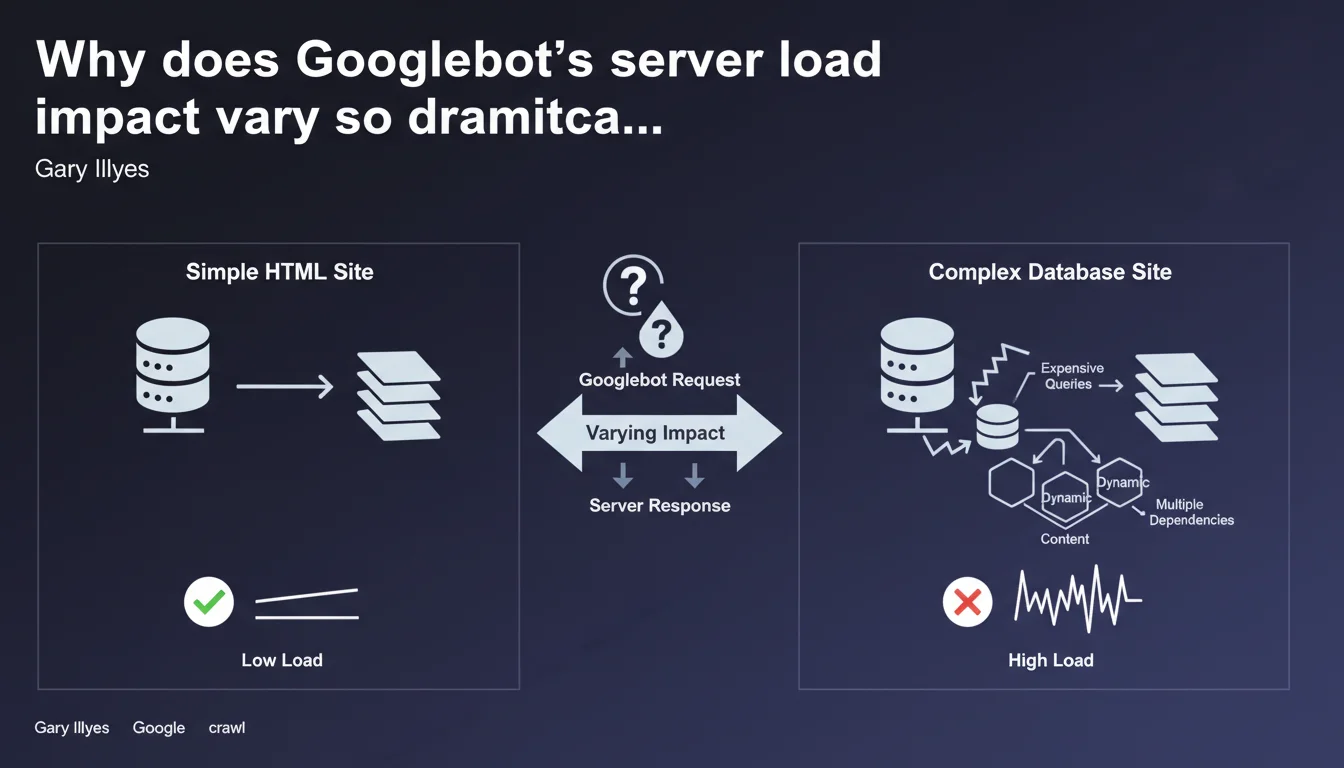
Gary Illyes reminds us that the impact of crawling on your servers depends primarily on your technical stack. Complex SQL queries or expensive operations generate far more load than a static HTML site, even with identical crawl volume. Crawl budget isn't just about quotas — it's also about infrastructure performance.
What you need to understand
What does Google mean by "server load" in this context?
When Googlebot crawls your site, each request triggers server-side operations: dynamic page generation, database calls, script execution, content aggregation. "Load" measures the CPU, memory, and I/O resources consumed to serve these pages to the bot.
A static HTML site? The server reads an already-generated file and sends it. A complex dynamic page? The server queries multiple SQL tables, compiles templates, executes business logic — and that costs. Much more.
Why is this distinction critical for SEO?
Because an overloaded server slows down, times out, or worse: returns 500/503 errors. Googlebot detects these signals and adjusts its crawl rate downward to avoid breaking your infrastructure. The result: certain pages get crawled less frequently, or even ignored.
If your site generates significant load per page, you burn through your crawl budget faster. Fewer pages crawled per session, less freshness in the index, potential impact on rankings for pages that change frequently.
What are the essential takeaways?
- Server load doesn't depend on the number of pages, but on the technical complexity of each generated page
- Expensive operations (slow SQL queries, synchronous API calls, complex aggregations) multiply the impact of crawling
- A static HTML site supports far higher crawl volume than a poorly optimized CMS
- Googlebot adjusts its crawl rate based on server responsiveness — not just theoretical quotas
- Optimizing backend performance becomes a direct SEO lever, not just a user experience comfort feature
SEO Expert opinion
Is this statement consistent with field observations?
Yes, absolutely. We regularly see WordPress or Magento sites with catastrophic page generation times — 2-3 seconds backend — getting throttled by Googlebot even though they have "only" 50,000 pages. Conversely, Next.js or Hugo sites running in pure static with 500,000 URLs get crawled without a hitch.
The problem is that many SEOs still think crawl budget only concerns large sites. Wrong. If your architecture is heavy, you're impacted even with 10,000 pages.
What nuances should we add to this statement?
Google isn't saying "avoid dynamic content." It's saying: control your technical complexity. A well-optimized dynamic page (Redis cache, indexed queries, asynchronous generation) can be as fast as an HTML file. The real problem is unoptimized legacy code, misconfigured CMSs, cascading plugins.
Another point — and Gary doesn't mention it here — server load concerns more than just crawling. It also impacts JavaScript rendering if Googlebot needs to execute heavy client-side code. There, your JS becomes the bottleneck, not your backend.
In which cases does this rule not apply strictly?
If you use a CDN with intelligent edge caching (Cloudflare, Fastly, etc.), Googlebot may hit the cache rather than directly soliciting your server. Perceived load drops drastically, even with dynamic content behind it.
Same for sites that generate pages at build time (JAMstack, SSG): once deployed, everything is static. Zero backend load, zero database requests during crawling. Gary's point no longer applies — your architecture has already absorbed the cost.
Practical impact and recommendations
What concrete steps should you take to reduce server load during crawling?
First: audit your backend generation times. Install an APM (New Relic, Datadog, Blackfire) and identify pages taking 1+ second to generate. These are your priorities. Look at slow SQL queries, synchronous API calls, unnecessary business logic loops.
Second: implement aggressive server-side caching. Varnish, Redis, opcache PHP — whatever fits your stack. The idea: serve pre-generated content to Googlebot, not recalculate the page on every hit. A properly configured cache divides load by 10, easily.
Third: go static where possible. Category pages, stable product sheets, editorial content — all this can be pre-rendered and served as flat files. Modern frameworks (Next.js ISR, Gatsby, Eleventy) enable intelligent dynamic/static mixing.
What mistakes should you absolutely avoid?
Never let Googlebot directly hit API endpoints or uncached admin pages. We still see sites with internal search URLs, unoptimized faceted filters, listing pages that fire 15 nested SQL queries — all of it indexable.
Also avoid underestimating the server-side JavaScript rendering impact. If you do React/Vue SSR without caching, each crawl triggers complete framework execution. Costly. Very costly.
How do you verify your site meets Google's expectations?
- Analyze your server logs: average response time per crawled URL, load spikes during Googlebot sessions
- Check the Crawl Statistics report in Search Console: if average response time exceeds 500ms, you have a problem
- Install APM monitoring to track slow SQL queries and backend bottlenecks
- Test your strategic pages with curl + time simulating Googlebot user-agent: Time to First Byte (TTFB) should stay under 200-300ms
- Verify your cache config: Redis/Varnish active, hit ratio above 80% for crawled pages
- Evaluate the interest in partial or full transition to static generation for stable content
❓ Frequently Asked Questions
Est-ce qu'un site statique HTML est toujours mieux crawlé qu'un site dynamique ?
Comment savoir si Googlebot ralentit à cause de ma charge serveur ?
Le cache CDN réduit-il la charge serveur perçue par Googlebot ?
Dois-je privilégier une architecture JAMstack pour améliorer mon crawl budget ?
Les requêtes SQL lentes impactent-elles vraiment le crawl Google ?
🎥 From the same video 10
Other SEO insights extracted from this same Google Search Central video · published on 29/05/2025
🎥 Watch the full video on YouTube →
💬 Comments (0)
Be the first to comment.