
Official statement
Other statements from this video 11 ▾
- □ 301 vs 302 : les redirections temporaires font-elles vraiment perdre du PageRank ?
- □ Pourquoi les redirections 307 et 308 sont-elles inutiles pour le SEO classique ?
- □ Faut-il vraiment abandonner les meta refresh pour vos redirections ?
- □ Les redirections JavaScript sont-elles réellement suivies par Google ?
- □ Faut-il vraiment rediriger chaque URL individuellement lors d'une migration de domaine ?
- □ Pourquoi les fusions et divisions de domaines provoquent-elles des fluctuations SEO prolongées ?
- □ Les redirections géographiques empêchent-elles vraiment l'indexation de vos contenus européens ?
- □ Faut-il abandonner les redirections géographiques pour préserver votre crawl budget ?
- □ Faut-il vraiment des redirections bidirectionnelles entre versions mobile et desktop pour éviter les problèmes d'indexation ?
- □ Pourquoi l'URL Inspection Tool affiche-t-il un code 200 même après redirection ?
- □ Faut-il vraiment utiliser des redirections 302 entre les versions mobile et desktop ?
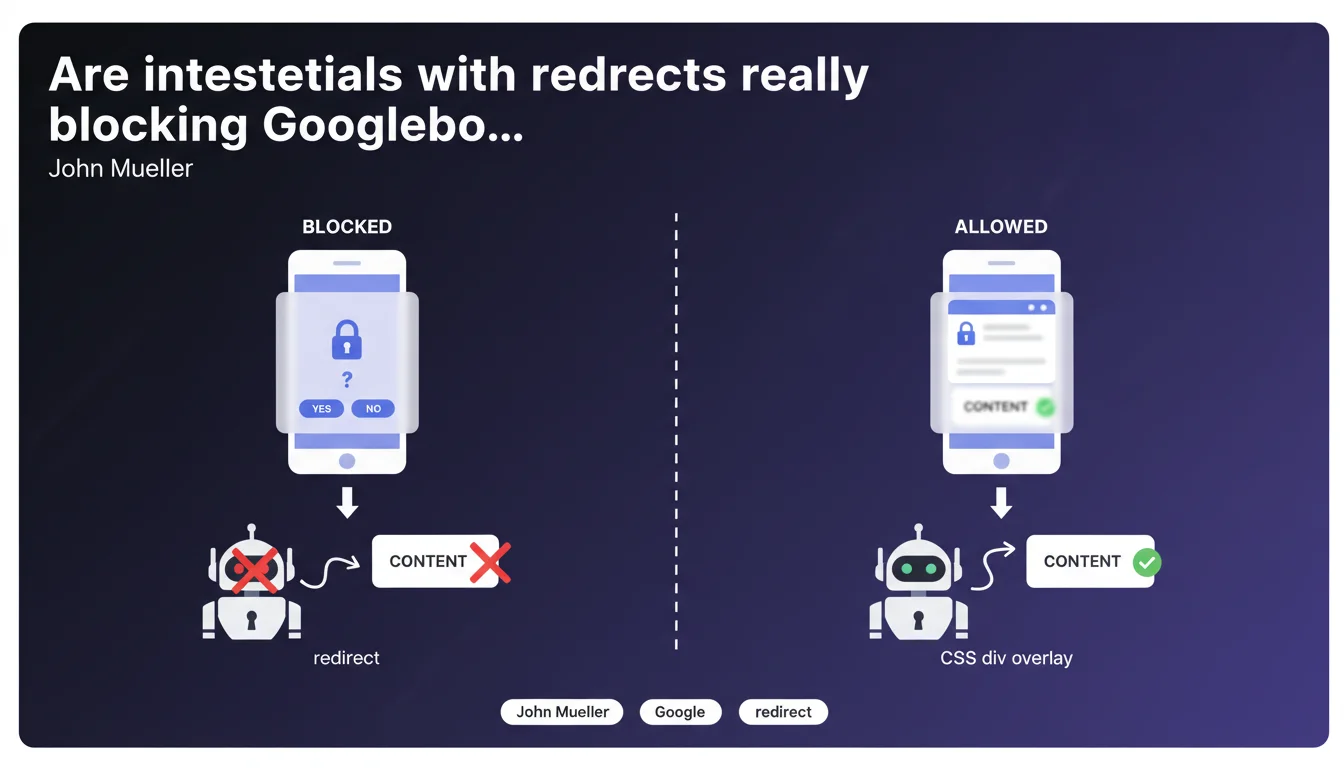
Googlebot cannot fill out forms. If your age verification or country verification interstitial uses a redirect, the crawler will never see the protected content. Solution: implement the interstitial as a CSS div overlay on top of the content, which remains accessible in the source code.
What you need to understand
Why can't Googlebot get past a redirect-based interstitial?
Googlebot's functionality is based on a simple principle: it follows links, analyzes source code, and interprets JavaScript to a certain extent. Filling out a form — checking a box, entering a birth date, selecting a country — goes beyond its current technical capabilities.
When an interstitial relies on a temporary (302) or permanent (301) redirect that waits for user action to switch to main content, Googlebot gets stuck on the verification page. It sees the interstitial, but not what's behind it.
What's the difference between a redirect and a CSS div for an interstitial?
A redirect sends the visitor to an intermediate URL (e.g., /age-verification) before sending them back to the requested page after validation. This verification URL becomes the only one visible to Googlebot.
A CSS div overlaid on the content displays a blocking screen visually on the client side, but the complete source code of the page remains accessible in the DOM. Googlebot reads the underlying HTML, even if the human user must first interact with the overlay.
Isn't there a risk this CSS approach could be seen as cloaking?
No, and this is where many people get it wrong. Cloaking means serving different content to Googlebot and users. Here, the same HTML code is sent to everyone — it's the visual behavior that differs, not the content.
Mueller explicitly validates this method. As long as the user and the robot receive the same HTML, conditional display on the client side via CSS or JavaScript poses no problem for Google.
- Googlebot does not fill out forms or click validation buttons
- Redirects block access to indexable content if they require user action
- An interstitial in CSS div leaves content accessible in the source code
- This technique is not considered cloaking by Google
- Applicable to age verification, geographic location checks, or cookie consent
SEO Expert opinion
Is this statement consistent with what we observe in practice?
Yes, completely. I've seen e-commerce sites lose 60-70% of their organic visibility after migrating to a poorly implemented age verification system. The pattern is always the same: a 302 redirect to /age-gate, a form that blocks access, and Googlebot only indexing this intermediate page.
The diagnosis is straightforward: Search Console shows covered but not indexed pages, and a crawl with the Googlebot user-agent reveals that the crawler stays stuck on the verification screen. The robot sees exactly what its limited behavior allows it to see — nothing more.
What nuances should be added to this recommendation?
First point: the CSS implementation must be clean. If your overlay loads the main content via a conditional AJAX request after validation, Googlebot risks seeing only an empty shell on first render. The content must be present in the initial HTML, even if hidden.
Second nuance — and this one is rarely mentioned: some content perhaps shouldn't be indexed at all. For sites subject to strict regulations (alcohol, tobacco, gambling), verifying that Google doesn't index your pages can be a deliberate strategy. In that case, the blocking redirect becomes an intentional choice, not an error.
In what cases isn't this CSS solution sufficient?
When validation must go through a backend system. If you need to verify the IP against a geolocation database or validate age against a third-party API before serving the content, a simple CSS div won't solve it — the server must decide what to send.
The workaround: implement user-agent detection logic on the server side. If it's Googlebot, serve the content directly without the interstitial. If it's a user, display the overlay and verify. Technically valid, as long as the final content is identical. [To verify] on edge cases where geographic personalization comes into play — the line between legitimate personalization and cloaking can become blurry.
Practical impact and recommendations
What should I do concretely if my site uses an interstitial with a redirect?
First step: audit the Googlebot journey. Use a tool like Screaming Frog with the Googlebot user-agent, or test directly via Search Console's URL inspection tool. If the robot stays stuck on /age-verification or similar, you have a problem.
Next, refactor the interstitial as a CSS/JavaScript overlay. The main content must be present in the HTML source, hidden by a div positioned with a higher z-index. The validation form remains visible to the user, but Googlebot reads the underlying content without being blocked.
Test thoroughly after migration: inspect a page via Search Console, verify that content appears in the rendered HTML code, and monitor indexation changes over 2-3 weeks. If pages drop from the index or Coverage reports errors, investigate immediately.
What mistakes should you avoid when implementing a CSS interstitial?
Classic mistake: loading the main content after validation via JavaScript. If your overlay triggers a fetch() that retrieves the real content once the user clicks, Googlebot will never see it. The initial HTML must contain all indexable content.
Another pitfall: blocking critical CSS or JS resources in robots.txt. If your script managing the overlay is blocked, Googlebot cannot correctly interpret the page, even if content is technically present.
Finally, don't confuse temporary concealment with deceptive content. The interstitial must have legitimate justification (legal compliance, minor protection). Using this technique to hide spam content or manipulate indexing exposes you to a manual penalty.
How do you verify your implementation is compliant?
- Crawl the site with Googlebot user-agent and verify main content appears
- Use the URL inspection tool in Search Console on several typical pages
- Check that the HTML source (View Source) contains all content, not just after JS execution
- Verify the absence of 301/302 redirects to an intermediate page in the Googlebot journey
- Ensure critical CSS/JS resources are not blocked in robots.txt
- Monitor Coverage and Index in Search Console for 2-3 weeks post-migration
- Test on mobile and desktop — some overlays behave differently depending on device
❓ Frequently Asked Questions
Un interstitiel en JavaScript pur pose-t-il le même problème qu'une redirection ?
Peut-on utiliser une redirection côté serveur en détectant Googlebot pour lui servir directement le contenu ?
Les interstitiels RGPD ou cookies sont-ils concernés par cette recommandation ?
Comment savoir si mon interstitiel bloque effectivement Googlebot ?
Un site peut-il volontairement bloquer Googlebot avec un interstitiel pour ne pas indexer certains contenus ?
🎥 From the same video 11
Other SEO insights extracted from this same Google Search Central video · published on 17/11/2022
🎥 Watch the full video on YouTube →
💬 Comments (0)
Be the first to comment.