
Official statement
Other statements from this video 6 ▾
- □ La vue cache de Google stocke-t-elle vraiment tout votre contenu ?
- □ Pourquoi Google bloque-t-il le JavaScript en cache et comment ça impacte votre crawl ?
- □ Pourquoi le cache Google de votre site JavaScript affiche-t-il une page vide ?
- □ Google Search Console affiche-t-il vraiment le rendu JavaScript qu'il indexe ?
- □ JavaScript et SEO : Google indexe-t-il vraiment votre contenu dynamique ?
- □ Un cache vide signifie-t-il un problème d'indexation sur un site JavaScript ?
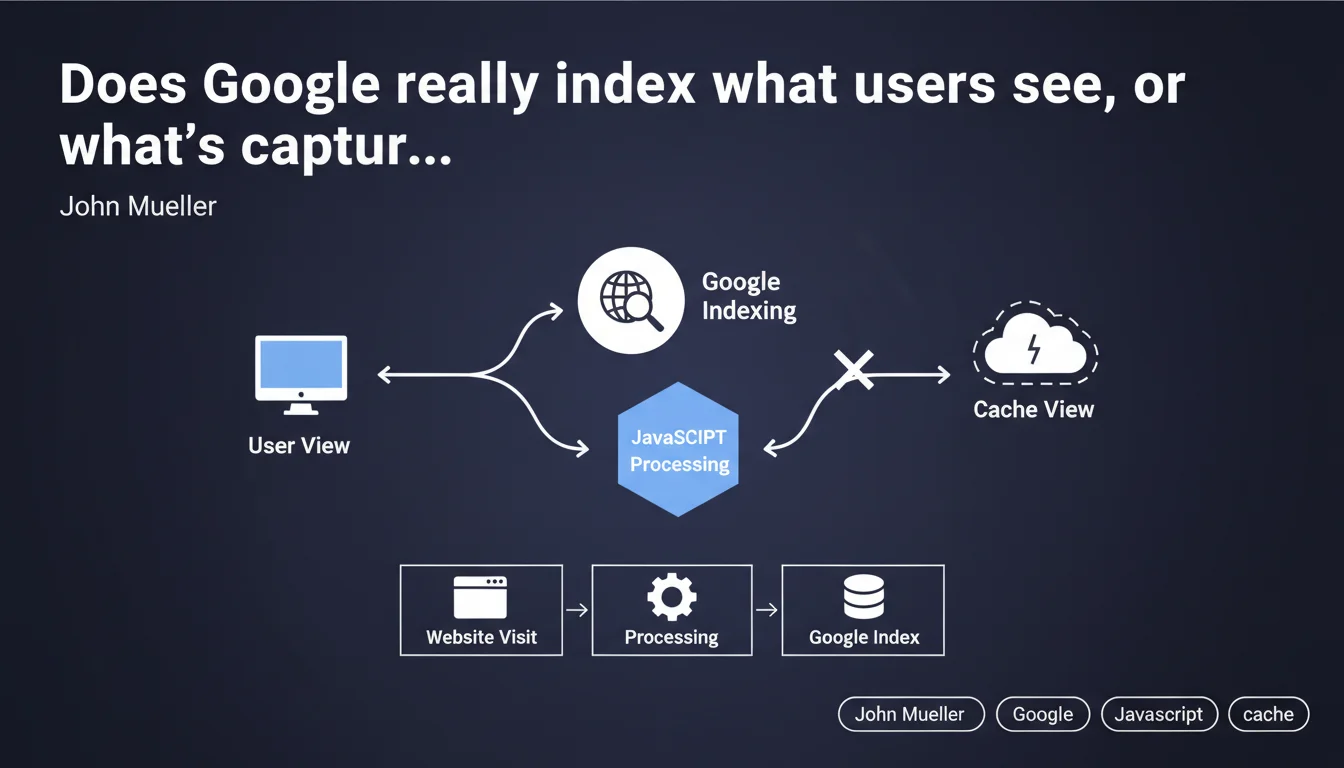
Google processes JavaScript separately during indexing and attempts to index what an actual visitor would see, not necessarily what appears in the cache view. This technical distinction means that client-side rendering can differ from what Googlebot initially records, with direct implications for the indexing rate of dynamic content.
What you need to understand
Why does Google separate JavaScript processing?
Googlebot operates in two distinct phases. First, it crawls and indexes raw HTML. Then, it queues pages containing JavaScript for later rendering in a headless browser (usually based on Chromium).
This separation creates a time lag — sometimes a few hours, sometimes several days — between the initial capture and final rendering. During this period, Google works with an incomplete version of your page.
What does "what a user would see" actually mean in practice?
Mueller argues that Google attempts to index the rendered version, the one visitors actually discover. But "attempts" is the operative word here. The success of this rendering depends on multiple factors: JavaScript execution time, console errors, blocked resources, timeouts.
The cache view — accessible via cache:yoursite.com — doesn't always accurately reflect what was indexed. It's an approximate representation, not an absolute source of truth for diagnosing JavaScript indexing issues.
How is this different from traditional static HTML?
With pure HTML, what Googlebot sees = what it indexes. Immediately. No queue, no deferred rendering, no uncertainty.
With JavaScript, you introduce a layer of complexity and unpredictability. Google must allocate computing resources to execute your code — and if your JS is poorly optimized or too heavy, rendering may fail partially or completely.
- Raw HTML is crawled first, before any JavaScript rendering
- JS rendering happens afterward, with variable delay depending on crawl budget
- Cache view is unreliable for diagnosing what's actually indexed
- JS errors can block indexing of content that's otherwise visible to users
- SSR or pre-rendering eliminates this dependency on deferred rendering
SEO Expert opinion
Is this statement consistent with real-world observations?
Yes and no. Google does attempt to render JavaScript — it's documented and observable through the rendering test tools in Search Console. But saying it indexes "what a user would see" is optimistic.
In practice, we regularly see cases where content that's perfectly visible on the client side never appears in the index. Common reasons: timeouts that are too short (Google won't wait indefinitely), console errors undetected in development but critical for Googlebot, external resources that fail to load in the rendering environment.
What nuances should we add to this claim?
Mueller doesn't specify when this rendering occurs or how much time Google allocates to execute your JavaScript. These parameters vary based on your crawl budget — a high-authority site benefits from faster and more generous rendering than a new blog.
The phrasing "attempts to index" is also revealing. Google tries, but guarantees nothing. If your JS depends on cookies, localStorage, user interactions, or temperamental third-party APIs, rendering may fail silently. [To verify]: Google doesn't publish accessible error logs for diagnosing these failures.
In what cases does this rule not apply?
If your critical content is generated purely client-side through complex JavaScript — for example, poorly configured SPA frameworks — Google may index an empty shell even after rendering. I've seen React/Vue sites where Googlebot indexed literally just the <div id="app"></div> tag.
Another problematic case: content loaded after interaction (clicks, infinite scroll, tabs). Google doesn't simulate these interactions. If your flagship product is in a hidden tab by default, it will never be indexed, regardless of JS rendering.
Practical impact and recommendations
What should you do concretely to secure indexing?
First, audit your JavaScript dependency. Identify which content is generated client-side: titles, descriptions, main body, internal links. If critical SEO elements are on this list, you have a potential problem.
Next, implement Server-Side Rendering (SSR) or pre-rendering. Next.js, Nuxt, Angular Universal — these tools exist specifically to serve complete HTML from the initial request. Googlebot indexes immediately, without waiting for hypothetical later rendering.
What mistakes should you absolutely avoid?
Never block JavaScript or CSS resources via robots.txt. Google needs them to render the page correctly. I still see too many sites blocking /assets/js/ out of habit — critical error.
Avoid poorly configured JS frameworks that serve a blank page before full loading completes. Initial HTML should contain at least basic semantic structure, not just an animated loader.
Don't use techniques of unintentional cloaking: if your JS detects a user-agent and serves different content to Googlebot, you risk a manual penalty. Google wants to see exactly what a standard Chrome user sees.
How do you verify that your site complies?
- Test each key template with the "URL inspection" tool in Search Console
- Compare raw HTML (view-source) and rendered HTML (Google tool) — critical content must appear in both
- Check the JavaScript console in the test tool: zero red errors tolerated
- Enable dynamic rendering if you can't migrate to SSR immediately
- Monitor indexing rate via the Indexing API or third-party tools — a sudden drop often signals a JS problem
- Audit Core Web Vitals: degraded LCP from blocking JS also impacts crawl budget
❓ Frequently Asked Questions
La vue cache Google reflète-t-elle ce qui est réellement indexé ?
Combien de temps Google attend-il pour rendre le JavaScript d'une page ?
Le rendu dynamique (dynamic rendering) est-il toujours acceptable pour Google ?
Si mon contenu apparaît dans l'outil de test d'URL, est-il forcément indexé ?
Les Single Page Applications (SPA) sont-elles incompatibles avec le SEO ?
🎥 From the same video 6
Other SEO insights extracted from this same Google Search Central video · published on 06/04/2022
🎥 Watch the full video on YouTube →
💬 Comments (0)
Be the first to comment.