
Official statement
Other statements from this video 11 ▾
- □ Does Google really index your PDFs, or does it transform them first?
- □ Does content weight really vary based on its location in HTML versus PDF?
- □ Does Google really depend on Adobe to properly index your PDFs?
- □ Does Google really index source code files the same way as regular text content?
- □ Why do raw source code files fail to rank properly in Google search results?
- □ Should you really stop storing all your PDFs in a single /pdfs/ folder?
- □ Does Google Really Never Index a Single Image Without a Hosting Page?
- □ Does Google really index images and videos separately from text content?
- □ Does Google really filter out personal data before indexing your pages?
- □ Does your file extension (.html, .php, .txt) really impact Google SEO rankings?
- □ Can you really get JSON and plain text files indexed in Google search results without metadata?
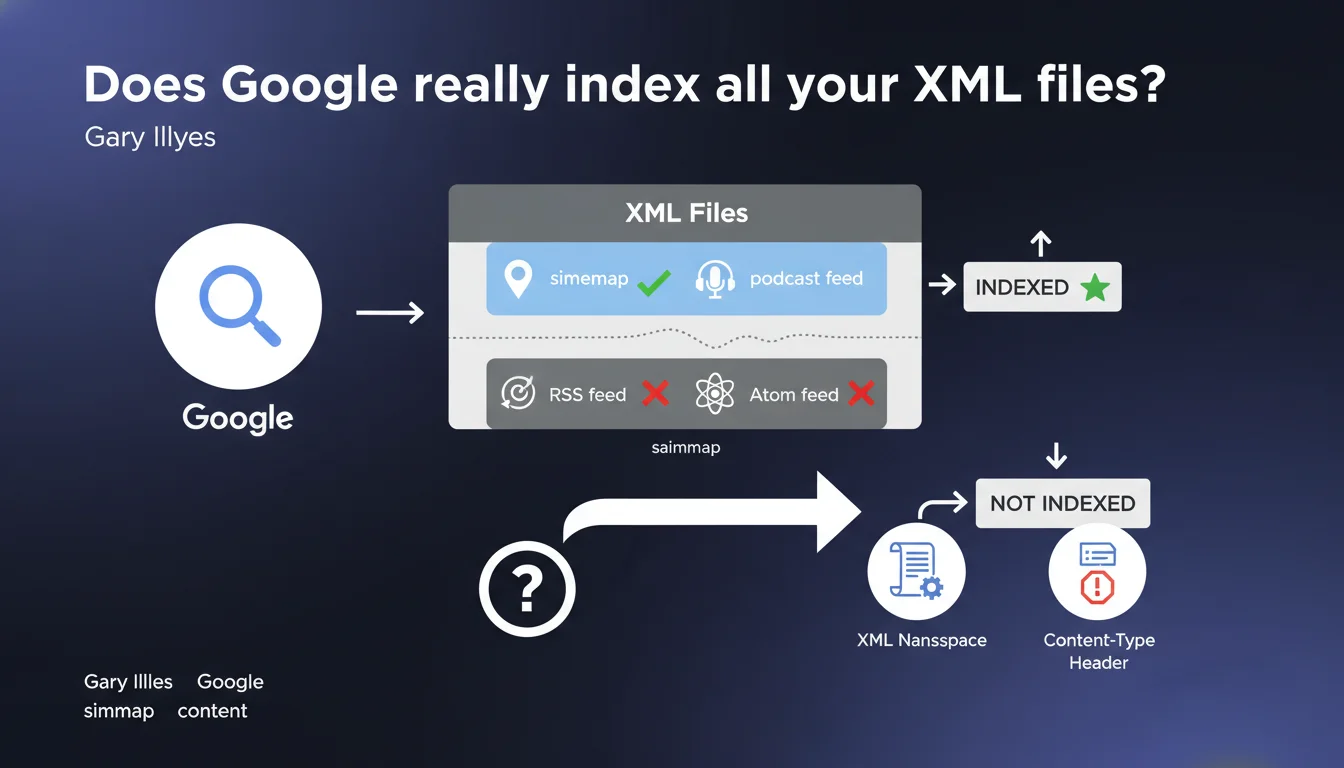
Google doesn't index all XML files uniformly. XML sitemaps and podcast feeds can be indexed, but RSS and Atom feeds are generally excluded. The deciding factor? The declared XML namespace and the content-type header sent by the server.
What you need to understand
Why does Google differentiate between XML file types?
The answer comes down to two words: editorial intent. An XML sitemap is designed for search engines — it's a metadata file meant for crawling. An RSS or Atom feed, on the other hand, serves to distribute content to aggregators, feed readers, and third-party applications.
Google distinguishes these formats by analyzing the XML namespace declared in the document's root tag. A sitemap uses xmlns="http://www.sitemaps.org/schemas/sitemap/0.9", while RSS uses xmlns="http://purl.org/rss/1.0/" or simply <rss version="2.0">. The engine reads this signature and decides whether or not to index the content.
What role does the content-type header play in all this?
The HTTP content-type is the second filter. If your server returns application/xml or text/xml, Google may consider the file indexable. However, an application/rss+xml or application/atom+xml explicitly signals that it's a syndication feed — and there, indexation is generally blocked.
In practical terms? Even if your RSS contains structured text, Google won't treat it like a regular HTML page. It will read it to detect URLs to crawl, but the file itself won't be considered an indexable resource.
Are podcast feeds a special case?
Yes — and that's the subtlety of this statement. Podcast feeds, often built on an RSS base with iTunes or Spotify extensions, can be indexed by Google Podcasts. But be careful: indexation doesn't happen in the classic web index; it feeds a dedicated index for audio content.
This means the same XML file can have two destinies depending on context: ignored for web search, but exploited for voice search or podcast applications.
- XML sitemaps are designed to be indexed by search engines
- RSS and Atom feeds are generally excluded from web indexation
- The XML namespace and content-type header determine how the file is processed
- Podcast feeds can be indexed in a dedicated index, not in the main web index
- The same XML format can therefore receive different treatment depending on its declared use
SEO Expert opinion
Is this statement consistent with real-world observations?
Overall, yes — but with important nuances. We do see that RSS feeds don't appear in SERPs as indexable pages. However, Google massively uses RSS feeds to discover fresh content, especially on news sites. It crawls them, extracts URLs, but doesn't index them as such.
The problem is that Gary Illyes doesn't clarify whether this rule applies to misconfigured RSS feeds that return a generic content-type like text/html. In that case, can Google accidentally index the file? [To verify] — no public data settles this question.
What are the implications for sites that expose multiple XML formats?
Many CMSs automatically generate sitemaps, RSS feeds, Atom feeds, even XML APIs. If your site exposes all of this without distinction, you risk diluting the signal sent to Google. A crawler that encounters five different XML files for the same content section might interpret that as duplicate or spam.
Let's be honest: most SEO audits never look at the HTTP header of XML files. We check that the sitemap exists, that it's submitted in Search Console, and we move on. But if your RSS feed is served with the wrong content-type, you're creating a surface for parasitic indexations.
Should you block RSS feeds in robots.txt?
Not necessarily. If Google isn't indexing them anyway, blocking them doesn't help — and it can even harm the quick discovery of new content. However, if you notice your feeds appearing in the index (via a site:yourdomain.com filetype:xml search), then you have a configuration problem.
In that case, first check the content-type header. If the server returns text/html or application/xml instead of application/rss+xml, fix that before touching robots.txt. Blocking a file that could have been excluded cleanly via HTTP headers is putting a band-aid on a wooden leg.
application/xml by default, which can change Google's behavior.Practical impact and recommendations
What should you check on your site right now?
First step: identify all publicly exposed XML files. Main sitemap, sectional sitemaps, RSS feeds, Atom, podcasts, public APIs. List them with their full URLs.
Next, test the content-type header of each one. Use curl on the command line (curl -I https://yoursite.com/feed.xml) or a tool like Postman. Note the value of the Content-Type field. If you see text/html on an RSS feed, you have a problem.
Finally, check the XML namespace in the source code. Open each file and look at the root tag. A sitemap must declare xmlns="http://www.sitemaps.org/schemas/sitemap/0.9", an RSS must have <rss version="2.0"> or an RSS 1.0 namespace. If the namespace is missing or generic, Google may misinterpret the file.
How do you prevent Google from accidentally indexing an XML file?
The cleanest solution: configure the content-type header at the server level. On Apache, add to your .htaccess:
AddType application/rss+xml .rss
AddType application/atom+xml .atom
On Nginx, in your vhost config:
location ~* \.rss$ {
    add_header Content-Type application/rss+xml;
}
If you're using WordPress, Drupal, or another CMS, verify that the plugin or module generating the feeds is sending the correct header. Some poorly coded themes force text/html on all endpoints, including feeds.
Should you include RSS feeds in the XML sitemap?
No. A sitemap lists URLs of indexable content, not metadata files. Including https://yoursite.com/feed.xml in your sitemap serves no purpose — and it can even muddy the signal sent to Google.
However, if you have an image sitemap or a video sitemap generated automatically, verify they don't contain references to feeds. Some WordPress plugins break this logic and create hybrid sitemaps that mix pages, posts, and feeds.
- List all public XML files on your site
- Check the content-type header of each file (curl -I or Postman)
- Control the XML namespace in the source code
- Configure the server to return the correct content-type (Apache, Nginx, CDN)
- Never include RSS feeds in the main XML sitemap
- Test indexation with a
site:yourdomain.com filetype:xmlsearch - Document the configuration for future migrations or CMS changes
❓ Frequently Asked Questions
Google peut-il indexer mon flux RSS si je ne fais rien ?
Un sitemap XML mal configuré peut-il être ignoré par Google ?
Les podcasts feeds apparaissent-ils dans les résultats de recherche classiques ?
Faut-il bloquer les flux RSS dans le robots.txt ?
Comment vérifier le content-type header d'un fichier XML ?
🎥 From the same video 11
Other SEO insights extracted from this same Google Search Central video · published on 08/09/2022
🎥 Watch the full video on YouTube →
💬 Comments (0)
Be the first to comment.