
Official statement
Other statements from this video 16 ▾
- □ Does Google really apply the same weight to every single one of your backlinks?
- □ Does the position of internal links really impact your SEO rankings?
- □ Does Google really categorize websites into rigid, fixed types?
- □ Does NAP consistency really impact local SEO rankings, or is it just about the Knowledge Graph?
- □ Is Your Business Data Contradicting Itself? How Conflicting Information Between Your Website and Google Business Profile Hurts Your Local SEO
- □ Are reciprocal links really risk-free for your SEO strategy?
- □ Does keyword frequency really influence your Google rankings?
- □ Why does Google refuse to index part of your site even when it's technically perfect?
- □ Do emojis in title tags and meta descriptions really boost your SEO rankings?
- □ Does the Search Console API really show the exact same data as your web interface?
- □ Why aren't your FAQs showing up in rich results despite correct markup?
- □ Should you really reuse the same URL for seasonal pages every year?
- □ Do Core Web Vitals really have no impact on crawling and indexation?
- □ Does Google really reset your site's evaluation when migrating from a subdomain to a primary domain?
- □ Does the .edu domain extension really boost your SEO rankings?
- □ Are geo-redirects really blocking your content from getting indexed by Google?
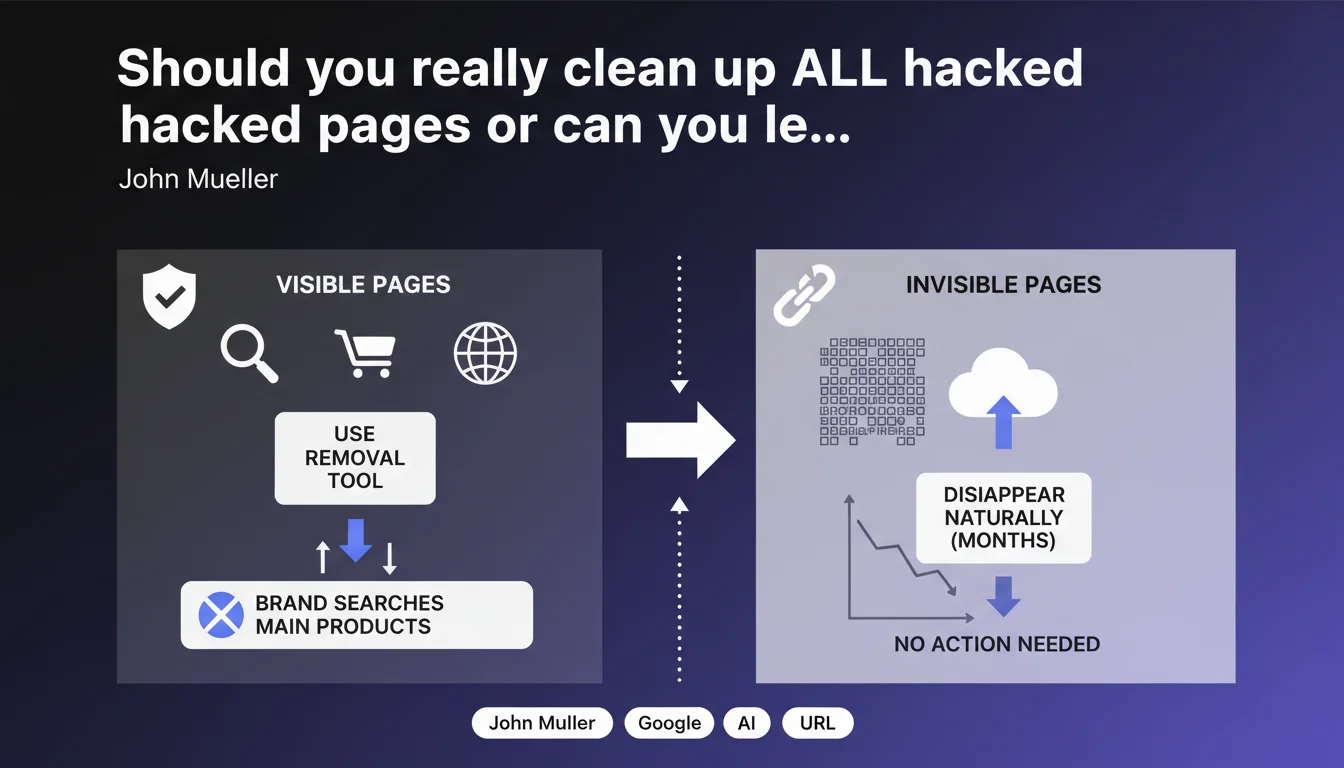
Google recommends actively cleaning only the visible pages affected by malware (brand searches, main products) and using the removal tool. The thousands of hacked invisible URLs will disappear naturally within a few months without intervention. No point wasting time on content no one sees.
What you need to understand
Why does Google make this distinction between visible and invisible pages?
Google's logic is based on a principle of resource efficiency. When a site suffers a massive hack generating thousands of parasitic pages, manually cleaning each URL can take weeks or even months. Yet the majority of these pages receive no traffic and only harm the site's overall indexation.
By prioritizing strategic pages — those that appear in brand searches, flagship products, or main entry points — you immediately protect the site's visibility and reputation. The rest is just index cleanup, which Google can handle progressively on its own.
How does Google make these hacked pages disappear without manual intervention?
Once the malware is eliminated and pages are cleaned up, returning 404 or 410 codes, Googlebot will progressively recrawl them. Upon discovering they no longer exist, it will remove them from the index. This process typically takes a few months, depending on the site's crawl frequency and the volume of URLs involved.
The URL removal tool accelerates the removal of the most visible pages, but it's not designed to handle thousands of entries at once — hence this recommendation for selective targeting.
What exactly does "invisible to users" mean in this context?
These are pages that generate zero organic traffic, don't appear in any strategic searches, and aren't linked from important sections of the site. Generally, these are URLs created in bulk by malicious scripts, indexed by Google but completely outside the normal user journey.
If these pages have never received visits, aren't ranking for relevant keywords, and disappear as soon as you clean up the malicious code, their actual impact is almost null — except for clogging the index.
- Prioritize visible pages: brand, flagship products, main entry points
- Use the URL removal tool to accelerate removal of strategic pages
- Let Google deindex naturally the thousands of invisible URLs within a few months
- Don't waste time manually cleaning up what has zero user impact
- Ensure malware is fully eliminated and pages return 404/410 codes
SEO Expert opinion
Is this pragmatic approach really risk-free for the site?
In principle, yes — provided the malware cleanup is complete. If traces of malicious code remain, even on invisible pages, Google can maintain a penalty or distrust signal. The real danger is believing you can completely ignore the problem under the guise that certain pages aren't visited.
Another nuance: pages that are "invisible" today can become visible tomorrow if Google decides to surface them in the index for unexpected queries. I've seen cases where hacked pages generated traffic on peripheral searches, admittedly low, but enough to damage the site's reputation. [To verify] depending on the nature of the hack and your industry.
In what cases doesn't this rule apply completely?
If the hack generated toxic backlinks or if hacked pages were shared on forums, social networks, or third-party sites, their presence in the index may persist longer than expected. In this case, active cleanup via Search Console and targeted disavowal may be necessary.
Similarly, sites with high authority or sensitive history cannot afford to leave thousands of hacked URLs lying around, even invisible ones. Brand reputation and user trust come before time savings.
What's the practical limit of this recommendation?
Google doesn't specify what it means by "a few months." In my experience, this can range from 2 to 6 months depending on your site's crawl frequency and the volume of URLs involved. For an e-commerce site with limited crawl budget, this timeframe can stretch even further — and during this time, your index remains polluted.
Another point: the URL removal tool has volume limitations. If you have tens of thousands of hacked pages, even targeting the most visible ones can become tedious. In these cases, a temporary robots.txt file or server-level blocking can speed up the process — but be careful not to block legitimate site sections.
Practical impact and recommendations
What should you do concretely after malware cleanup?
First, identify high-traffic pages affected by the hack: brand searches, flagship products, main landing pages. Use Search Console to spot hacked URLs still generating impressions or clicks. These are your absolute priorities.
Next, submit these URLs via the URL removal tool in Search Console. Don't try to process thousands of entries at once — focus on the 50 to 100 most critical pages. For the rest, make sure they return proper 404 or 410 codes and let Google deindex them naturally.
How do you verify that cleanup is really complete?
Examine your server logs carefully to detect suspicious requests or crawl attempts on hacked URLs. If Googlebot continues visiting these pages heavily, it means they're still in the index or backlinks point to them.
Use site:yourdomain.com commands with keywords typical of the hack (viagra, casino, pharma, etc.) to identify pages still indexed. If results appear, accelerate their removal via the dedicated tool or strengthen server-level cleanup.
What mistakes should you avoid in post-hack management?
Don't block all hacked URLs via robots.txt before they're deindexed. This prevents Googlebot from verifying they return a 404 and can slow their removal from the index. Keep them accessible until they disappear, then optionally block recurring patterns.
Also avoid massively redirecting hacked pages to your homepage or other site sections. Google may interpret this as an attempt at soft 404 or manipulation. A clean 404 is better than a questionable redirect.
- Identify high-traffic pages affected (brand, flagship products)
- Submit these priority URLs via the removal tool in Search Console
- Verify all hacked pages return 404 or 410 codes
- Monitor server logs for persistent suspicious requests
- Use site: commands with hack-related keywords to track still-indexed URLs
- Don't block hacked URLs via robots.txt before their deindexation
- Avoid mass redirects to the homepage
- Wait a few months for Google to naturally clean up invisible URLs
❓ Frequently Asked Questions
Combien de temps faut-il à Google pour désindexer les pages hackées invisibles ?
L'outil de suppression d'URLs a-t-il des limites de volume ?
Dois-je bloquer les URLs hackées via robots.txt après le nettoyage ?
Que faire si mon site a reçu une pénalité manuelle suite au hack ?
Comment identifier les pages hackées encore indexées ?
🎥 From the same video 16
Other SEO insights extracted from this same Google Search Central video · published on 30/01/2022
🎥 Watch the full video on YouTube →
💬 Comments (0)
Be the first to comment.