
Official statement
Other statements from this video 7 ▾
- □ Does Google really treat internal links as a UX signal for Googlebot?
- □ Does Googlebot really discover your pages through internal links?
- □ Why is the HTML <a> element with an href attribute absolutely essential for Google's crawling?
- □ Why does Google insist that links should remain real HTML links?
- □ Is meaningful anchor text still a decisive SEO lever in 2024?
- □ Is your internal linking strategy hurting your SEO more than it helps?
- □ Why does Google keep emphasizing internal links as the backbone of site crawlability and content discovery?
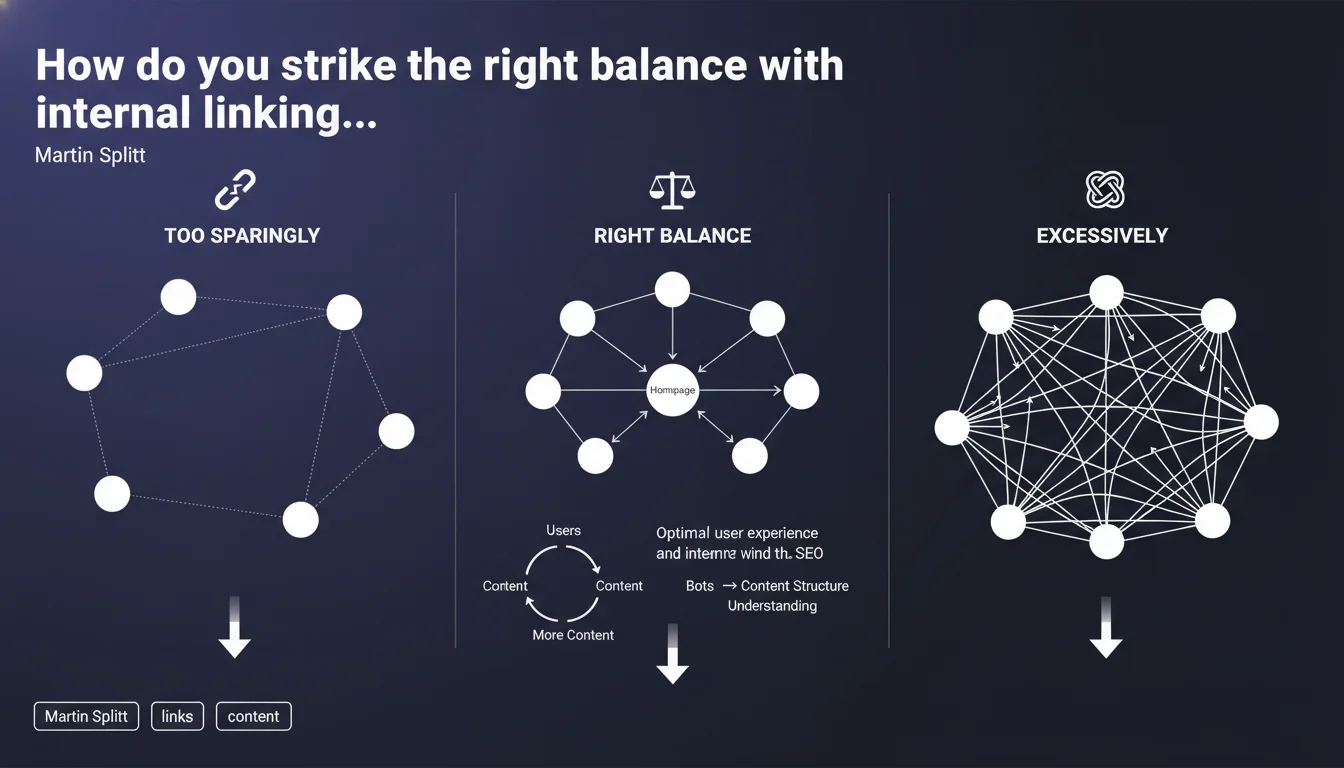
Google emphasizes that effective internal linking relies on balance: too few links risk poor crawlability and content misunderstanding, while too many dilute PageRank and create spam signals. The key? Use internal links strategically to guide both users and search bots toward your most important content.
What you need to understand
Why does Google insist on this balance?
Internal linking architecture is a fundamental structural lever. It guides bot crawling, distributes internal PageRank, and helps users navigate your site. But it's a double-edged sword.
Too many internal links create noise: bots waste crawl budget, SEO juice gets diluted, and user experience becomes confusing. Too few, and you leave strategic pages invisible or underutilized. Google is reinforcing a simple principle here—one that's often misapplied in practice.
What counts as a "reasonable" volume of internal links?
Google deliberately doesn't provide a magic number—and that's intentional. What's "reasonable" varies based on site size, structure, and content depth. A 50-page blog has different needs than an e-commerce site with 100,000 SKUs.
The idea is to prioritize contextual relevance: every link should deliver real value, either by enriching content for users or reinforcing semantics for bots. Mass-generated automated links (like linking every keyword instance to the same page) often backfire.
How does this principle apply in practice?
Concretely, this means ranking your strategic pages by importance and concentrating internal links on them. Your most important pages should receive more internal links from contextually related pages. Less strategic pages may receive fewer or no internal links if they're purely informational or minor transactional assets.
Avoid footer link bloat, overcrowded sidebars, or automated "related content" sections linking to 20 random articles. Focus on in-content links anchored to relevant terms, limited to 2-4 per article depending on length.
- Too few internal links: orphaned pages, incomplete crawling, wasted PageRank on strategic pages
- Too many internal links: PageRank dilution, user confusion, over-optimization spam risk
- Ideal balance: contextual, relevant links hierarchized by editorial strategy
- No universal rule in absolute numbers: adapt based on site size and structure
SEO Expert opinion
Is this guidance actually actionable?
Let's be honest: it's vague. "Reasonable," "balance," "not too few or too many"—no hard thresholds, no concrete examples. [To be verified] in the field through A/B testing and log analysis.
In reality, what constitutes balance depends heavily on industry, site type, and editorial strategy. A news outlet publishing dozens of articles daily can't follow the same rules as a 15-page corporate site. Google generalizes here to avoid locking itself into overly strict rules—understandable, but frustrating for those seeking specific KPIs.
What nuances should you apply to link volume?
Field experience shows that context trumps raw quantity. A 2,000-word article can contain 10 internal links if each is relevant and enriches the discussion. Another article of 500 words with 3 poorly chosen links can be problematic.
SEO tools like Screaming Frog and Oncrawl can identify pages with outrageous link-to-content ratios. If a page has 50 links for 300 words, there's a clear problem. But acceptable thresholds aren't universal—they depend on page type (hub, article, product page).
When doesn't this rule apply strictly?
Hub or pillar pages can legitimately contain more internal links because their role is structuring a semantic cluster. Similarly, a FAQ page can link to dozens of resources without issue if it serves users.
Conversely, transactional pages (product pages, landing pages) should drastically limit outbound links to prevent attention leakage and conversion loss. Here, the balance tilts toward "less is better." Tailoring internal link strategy to each page's role in the funnel is essential.
Practical impact and recommendations
How do I audit internal link quantity on my site?
Start with a full crawl using Screaming Frog or Oncrawl. Export data on outbound links per page and cross-reference with content volume (word count). Flag abnormally overloaded or under-linked pages.
Next, manually verify contextual relevance: open a sample of 10 pages and check whether internal links add real value. If you encounter auto-generated links to irrelevant pages, that's a red flag.
What mistakes should you avoid in internal linking?
Don't fall into the trap of blanket automated linking. Linking every keyword instance to the same page creates noise and dilutes impact. Instead, use 2-3 well-placed, contextual links per article.
Also avoid footer and sidebar link dumps: Google often weights these as less relevant. Focus your efforts on in-body links, naturally integrated into the editorial flow.
What strategy should you adopt to optimize internal linking?
Prioritize your pages: identify your strategic pages (those driving traffic, conversions, or targeting high-value keywords). Build an internal linking structure that strengthens their authority by linking from contextually related pages.
For large sites, structure around semantic clusters: a pillar page receives links from satellite pages, then redistributes to your most strategic assets. Avoid random or purely technical links (pagination, filters).
- Crawl your site to identify pages with excessive or insufficient outbound links
- Audit contextual relevance of existing internal links
- Disable or limit auto-generated "related content" modules lacking relevance
- Rank strategic pages and build a linking structure supporting them
- Prioritize in-body links on natural, varied anchor text
- Limit footer and sidebar links to essentials (legal, main navigation)
- Monitor crawl patterns (logs) and strategic page rankings after optimization
❓ Frequently Asked Questions
Combien de liens internes maximum par page ?
Les liens dans le footer comptent-ils autant que ceux dans le contenu ?
Faut-il supprimer les modules automatiques de liens connexes ?
Comment savoir si mon site a trop de liens internes ?
Les pages orphelines nuisent-elles vraiment au SEO ?
🎥 From the same video 7
Other SEO insights extracted from this same Google Search Central video · published on 23/07/2024
🎥 Watch the full video on YouTube →
💬 Comments (0)
Be the first to comment.