
Official statement
Other statements from this video 11 ▾
- □ Is old content really killing your search rankings?
- □ Can old content still rank well despite its age?
- □ Should you really fix broken links in your older content?
- □ Should you really add warning banners to your older content pieces?
- □ Should you really update all your old content for SEO?
- □ Should you really let your old articles stay with their original mistakes?
- □ Should you really delete outdated content instead of simply marking it as deprecated?
- □ Why does Google discourage crypto-redirects for your site migrations?
- □ Should you really stop adding dates to your titles just to make them look fresh?
- □ Should you redirect or create an explanatory page when discontinuing a tool?
- □ Is auditing your documentation regularly really essential to maintain strong SEO performance?
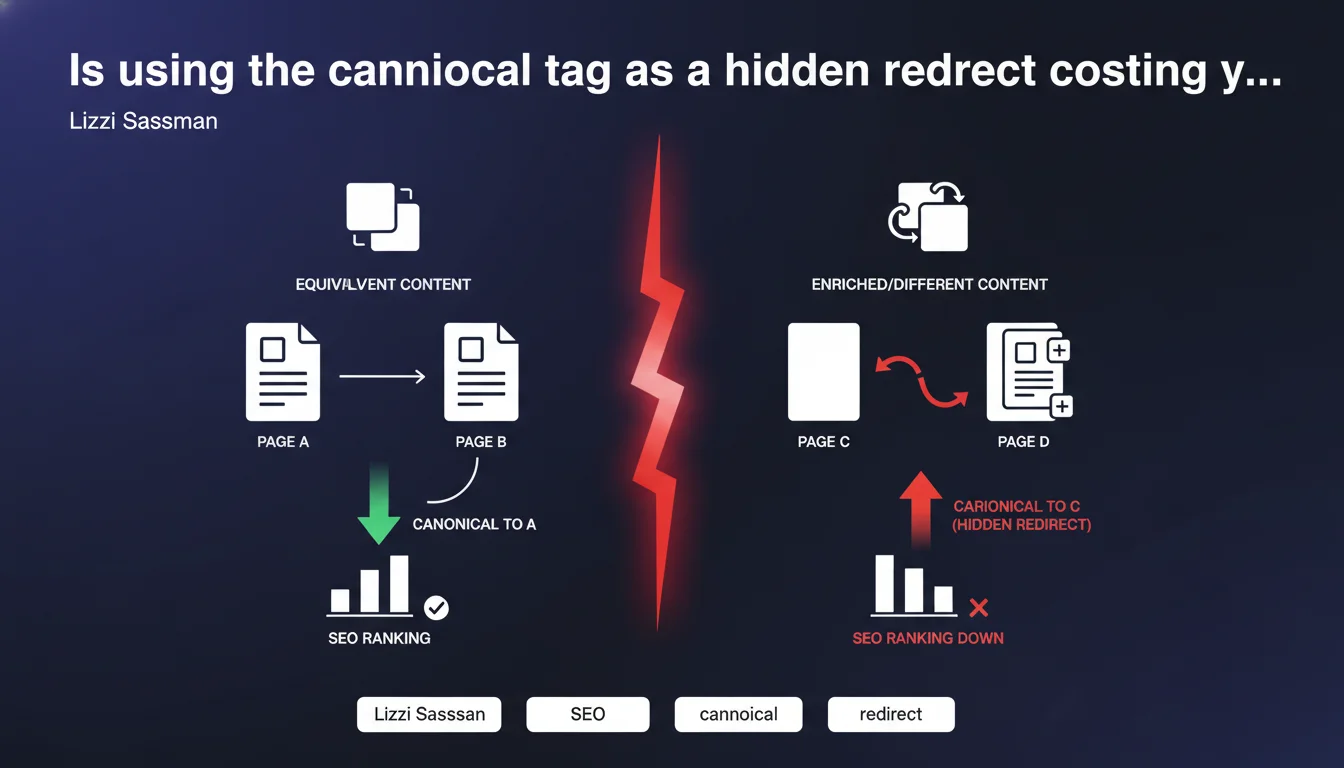
Google states that the canonical tag must point to strictly equivalent content, not an enriched or different version. Using it as a disguised redirect to push traffic to a more complete page is manipulation and risks being ignored entirely. Only 301 redirects are appropriate for different content.
What you need to understand
Lizzi Sassman is reminding us here of a principle that many SEO practitioners seem to have forgotten or deliberately worked around. The canonical tag is not a redirect tool — it's a consolidation signal for duplicate or nearly identical content.
Some SEO professionals use it to point toward an "improved" version of a page, thinking they can transfer link equity this way. Bad calculation.
What's the difference between equivalent content and enriched content?
Equivalent content means both versions answer the same user intent with the same level of detail. Tolerated differences include: URL parameters, mobile/desktop variants, and sorting order on product pages.
Enriched content? A page that provides additional information, extra sections, or media absent from the source version. If your page A is a summary and page B is a comprehensive report, they are not equivalent.
Why does this practice create problems?
Google interprets the canonical tag as a preference instruction between duplicates. When the two pages diverge too much, the algorithm can simply ignore the signal or choose a different URL than the one you specified.
Even worse: this manipulation can be read as an attempt to deceive the search engine, especially if repeated at scale. The consequences range from complete ineffectiveness to a degradation of algorithmic trust in your technical signals.
What does the official documentation actually say?
The Search Central Documentation specifies that the canonical should point to "the version you want to appear in search results" among duplicate or highly similar pages. It mentions nothing about using it to consolidate toward different content.
- Canonical = duplicate consolidation, not equity transfer to something else
- Source and target pages must address the same intent with the same information level
- Google can ignore the tag if content diverges too much
- This practice offers no guarantee of ranking transfer
- A 301 redirect remains the only valid option for non-equivalent content
SEO Expert opinion
Is this statement consistent with real-world observations?
Yes, and it's even a much-needed reminder. We regularly see in SEO audits websites that use the canonical as a "soft redirect" — particularly for technical reasons where a proper redirect is difficult to implement.
The problem: Google doesn't always follow these "creative" canonicals. In some cases, it indexes both versions. In others, it chooses the opposite URL from the one designated. Result: confusion in the index, crawl budget dilution, contradictory signals.
What nuances should be applied to this rule?
Let's be honest — the line between "equivalent" and "slightly enriched" remains blurry. Google provides no numerical threshold: how many additional words or sections before content is no longer equivalent? [To verify]: no official data on this point.
In practice, minor variations tend to pass: adding a short FAQ, a lightweight comparison table, or a few explanatory paragraphs generally doesn't break the canonical. But as soon as structure or intent changes, the signal becomes fragile.
Another nuance: e-commerce sites massively use canonical for product pages with filters. As long as the target page remains the main product sheet without substantial additions, it works. But pointing to a larger parent category? Risky.
In which cases is this error most common?
It's often found on pages where proper redirects are impossible for business reasons: third-party modules generating URLs, rigid e-commerce platforms, temporary pages that can't be deleted.
Some CMS platforms even encourage this bad practice by offering an editable "canonical URL" field without warnings or validation. Result: junior SEO practitioners who think they're doing the right thing by "merging" obsolete pages toward active ones.
Practical impact and recommendations
What should you concretely do if you're using canonical as a redirect?
First step: audit your current canonicals. Extract all canonical tags from your site and compare source/target pairs. If content differs beyond cosmetic adjustments, replace with a 301 redirect.
Second step: prioritize. Not all misused canonicals have equal impact. Focus first on those affecting pages with organic traffic or significant backlinks.
What errors must you absolutely avoid?
Never canonicalize an obsolete or off-topic page toward an active page "because something has to be done with it." If content is no longer relevant, choose a proper 301 or 410 response.
Also avoid canonical chains: page A canonicalizing to B, which itself canonicalizes to C. Google rarely follows beyond the first hop, and you create unnecessary technical inconsistency.
Another classic trap: canonicalizing to a URL with parameters or an anchor. The canonical should point to a clean, stable URL, ideally one already receiving your main backlinks.
How do you verify your configuration is compliant?
Use Google Search Console to identify indexed URLs versus those declared canonical. If you see massive divergences in the "Coverage" report, it's often a sign that Google is ignoring your canonicals.
On the crawl side, verify that Googlebot can properly access canonicalized pages and that response time is acceptable. A canonical to a slow or robots.txt-blocked page is as ineffective as a bad redirect.
- Extract all canonical tags and compare source/target content
- Replace with 301 redirects when content diverges
- Prioritize pages with high traffic or significant backlinks
- Check for the absence of canonical chains (A → B → C)
- Monitor in Search Console for gaps between indexed URLs and declared canonicals
- Test accessibility and speed of canonicalized pages
- Document each correction to prevent regressions during migrations
❓ Frequently Asked Questions
Peut-on utiliser la canonical entre deux pages avec des titres différents ?
Une canonical cross-domain vers du contenu enrichi est-elle acceptée ?
Que se passe-t-il si Google ignore ma balise canonical ?
Les AMP et versions mobiles nécessitent-elles une canonical vers la version desktop ?
Combien de temps faut-il pour qu'une correction de canonical soit prise en compte ?
🎥 From the same video 11
Other SEO insights extracted from this same Google Search Central video · published on 09/05/2024
🎥 Watch the full video on YouTube →
💬 Comments (0)
Be the first to comment.