
Official statement
Other statements from this video 11 ▾
- □ Does a 302 redirect really cause you to lose PageRank compared to a 301?
- □ Are 307 and 308 redirects really pointless for classic SEO?
- □ Should you really ditch meta refresh redirects, or does Google actually handle them just fine?
- □ Does Google really follow JavaScript redirects the same way as server-side redirects?
- □ Do you really need to redirect every single URL individually during a domain migration?
- □ Why do domain mergers and divisions trigger extended SEO ranking swings?
- □ Are geographic redirects really preventing your European content from being indexed?
- □ Are geographic redirects killing your crawl budget? Here's what Google recommends instead
- □ Are interstitials with redirects really blocking Googlebot from indexing your content?
- □ Do you really need bidirectional redirects between mobile and desktop versions to avoid indexing issues?
- □ Should you really be using 302 redirects between mobile and desktop versions?
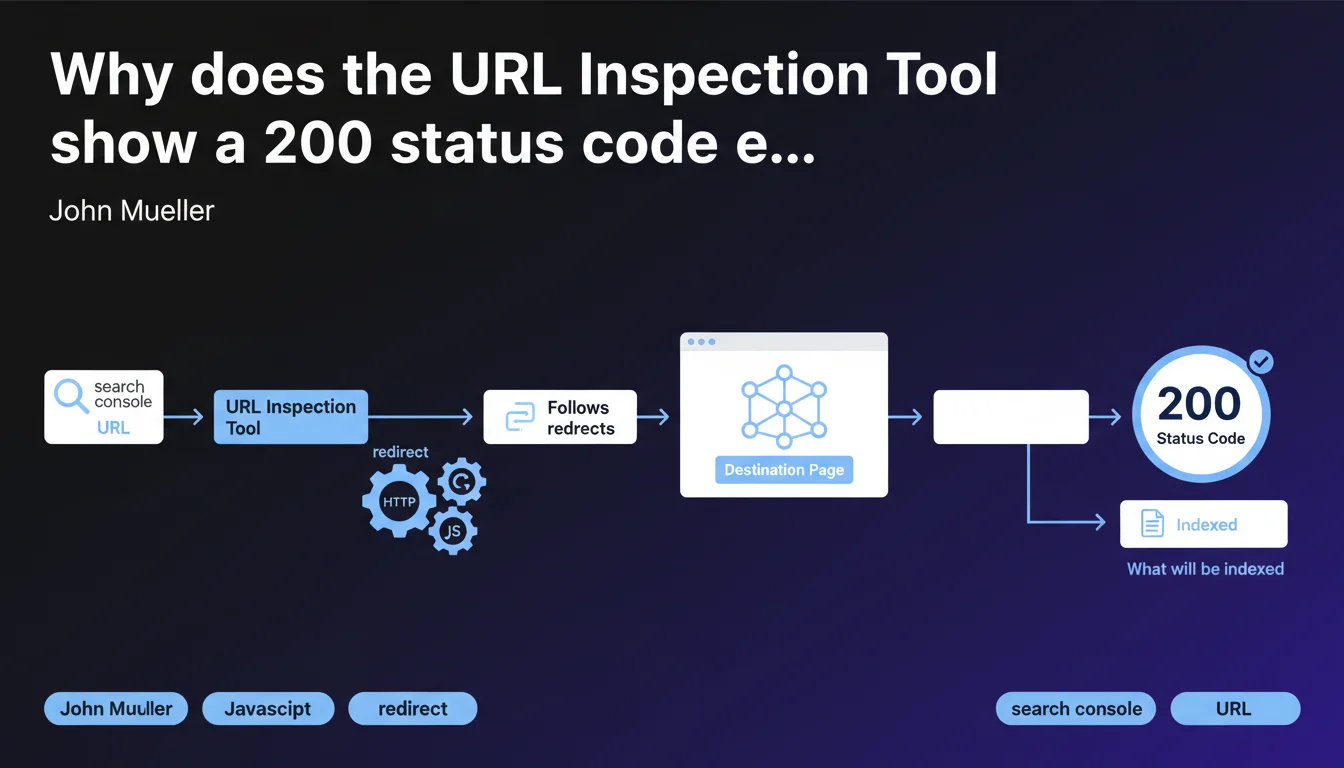
The URL Inspection Tool in Search Console consistently displays a 200 status code for the final URL after redirect, because it shows what will actually be indexed by Google. The tool automatically follows HTTP and JavaScript redirects to present the real destination page, not the initial URL.
What you need to understand
John Mueller's statement sheds light on a behavior of the URL Inspection Tool that can be surprising at first glance. When you test a URL that redirects, the tool doesn't display the redirect status code (301, 302, 307, etc.), but directly a 200 code corresponding to the final page.
This logic is explained by the very purpose of this tool: to show what Googlebot actually indexes. A redirect is not indexed — it's the destination page that is.
Which redirects are affected by this behavior?
The tool follows all classic HTTP redirects (301, 302, 307, 308) as well as JavaScript redirects. Regardless of the technical method used, if Googlebot can follow the redirect chain, the URL Inspection Tool will do the same.
This means that a well-implemented JavaScript redirect will be treated exactly like a server redirect from the inspection perspective. But beware — this is not a validation that all your JS redirects work correctly in all contexts.
What exactly does the tool show after following the redirect?
The tool displays the full rendering of the final page, as Googlebot sees it. You get the screenshot, the rendered source code, the loaded resources — everything that allows you to verify that the destination page is crawlable and indexable.
This is precisely why the returned code is always 200: you're no longer diagnosing the redirect itself, but the page that results from it.
- The URL Inspection Tool always displays the status of the final indexable page, not that of the redirect
- HTTP redirects (301, 302, etc.) and JavaScript are automatically followed
- The 200 code displayed corresponds to the destination page, not the initially tested URL
- This tool serves to validate what will be indexed, not to diagnose redirect issues
SEO Expert opinion
Is this logic consistent with the reality of crawling?
Yes, and it's actually quite transparent on Google's part. The tool faithfully reproduces the behavior of Googlebot when facing redirects. In reality, a properly configured redirect transmits PageRank and indexes the target page, not the source URL.
The problem is that this logic can hide inefficient redirect chains. If you have three successive redirects before reaching the final page, the URL Inspection Tool will show you just the last one — with a nice 200 code — without flagging the crawl budget loss or the increased loading time.
What nuances should be noted in practice?
Let's be honest: this tool is not designed to diagnose redirect problems. It tells you "here's what Google indexes in the end", not "here's how it gets there". To analyze your redirects in detail, you need to use complementary tools.
A crawler like Screaming Frog or OnCrawl will show you intermediate status codes, chains, and loops. The URL Inspection Tool, meanwhile, acts as if everything is fine as long as the final page is accessible. [To verify]: Google does not specify how many redirect hops the tool can follow before giving up.
Are JavaScript redirects really equivalent to HTTP redirects?
On paper, yes — from the perspective of final indexing. But in reality, a JavaScript redirect remains slower and more fragile than a server redirect. It depends on JavaScript rendering, so a second wave of crawling, and can fail if the JS doesn't execute correctly.
The fact that the URL Inspection Tool follows them doesn't mean they're recommended. It's just confirmation that Googlebot knows how to handle them — under ideal conditions.
Practical impact and recommendations
How do you verify that a redirect is properly configured?
Don't rely solely on the URL Inspection Tool. Use a complete SEO crawler to identify redirect chains, loops, and response times. A final 200 code doesn't guarantee optimal configuration.
Also test with network tools (browser Developer Tools, curl) to see intermediate status codes. A direct redirect (source → destination) is always preferable to a chain of multiple hops.
What errors should you avoid when implementing redirects?
Never create unnecessary redirect chains. Each hop increases crawl time and dilutes the PageRank transmitted. A redirect should point directly to the final page, not to another URL that redirects itself.
Also avoid mixing HTTP and JavaScript redirects without valid reason. If you can do a 301 server redirect, it's always the best option — faster, more reliable, better understood by all bots.
- Use a SEO crawler to audit all your redirects and detect chains
- Verify that each redirect points directly to the final page, with no intermediary
- Prioritize 301 server redirects over JavaScript redirects when possible
- Test your redirects with multiple tools (URL Inspection Tool + crawler + network tools)
- Monitor response times: a redirect should not significantly slow down crawling
- Document your redirect plan during migrations to avoid cascading errors
The URL Inspection Tool shows you what will be indexed, not how Google gets there. It's a final validation tool, not a technical diagnostic tool. For a high-performing redirect architecture, combine multiple analysis methods.
Managing redirects at scale, particularly during migrations or redesigns, requires specialized expertise to avoid traffic loss and crawl budget issues. If your project involves complex technical challenges or a significant volume of URLs to redirect, the support of a specialized SEO agency can prove decisive in securing your rankings and optimizing authority transmission.
❓ Frequently Asked Questions
Pourquoi l'URL Inspection Tool n'affiche-t-il pas le code de statut de ma redirection 301 ?
Comment savoir si ma chaîne de redirections pose problème ?
Les redirections JavaScript sont-elles vraiment aussi efficaces que les redirections HTTP ?
Un code 200 dans l'URL Inspection Tool garantit-il que ma redirection est optimale ?
Combien de redirections successives l'URL Inspection Tool peut-il suivre ?
🎥 From the same video 11
Other SEO insights extracted from this same Google Search Central video · published on 17/11/2022
🎥 Watch the full video on YouTube →
💬 Comments (0)
Be the first to comment.