
Official statement
Other statements from this video 9 ▾
- □ Should a technical SEO audit really go beyond crawlability and indexation?
- □ Is your technical SEO audit actually missing what really matters?
- □ What are the technical priorities Google really wants you to audit first?
- □ Are you really leveraging Google Search Console's crawl data to boost your indexation strategy?
- □ Should you really worry about a spike in 404 errors in Google Search Console?
- □ Is your SEO audit actually helping you—or wasting resources on irrelevant checks?
- □ Should you really implement every recommendation your SEO audit tools suggest?
- □ How can you prioritize your SEO fixes without wasting endless time and resources?
- □ Why does your technical SEO audit fail without involving the dev team?
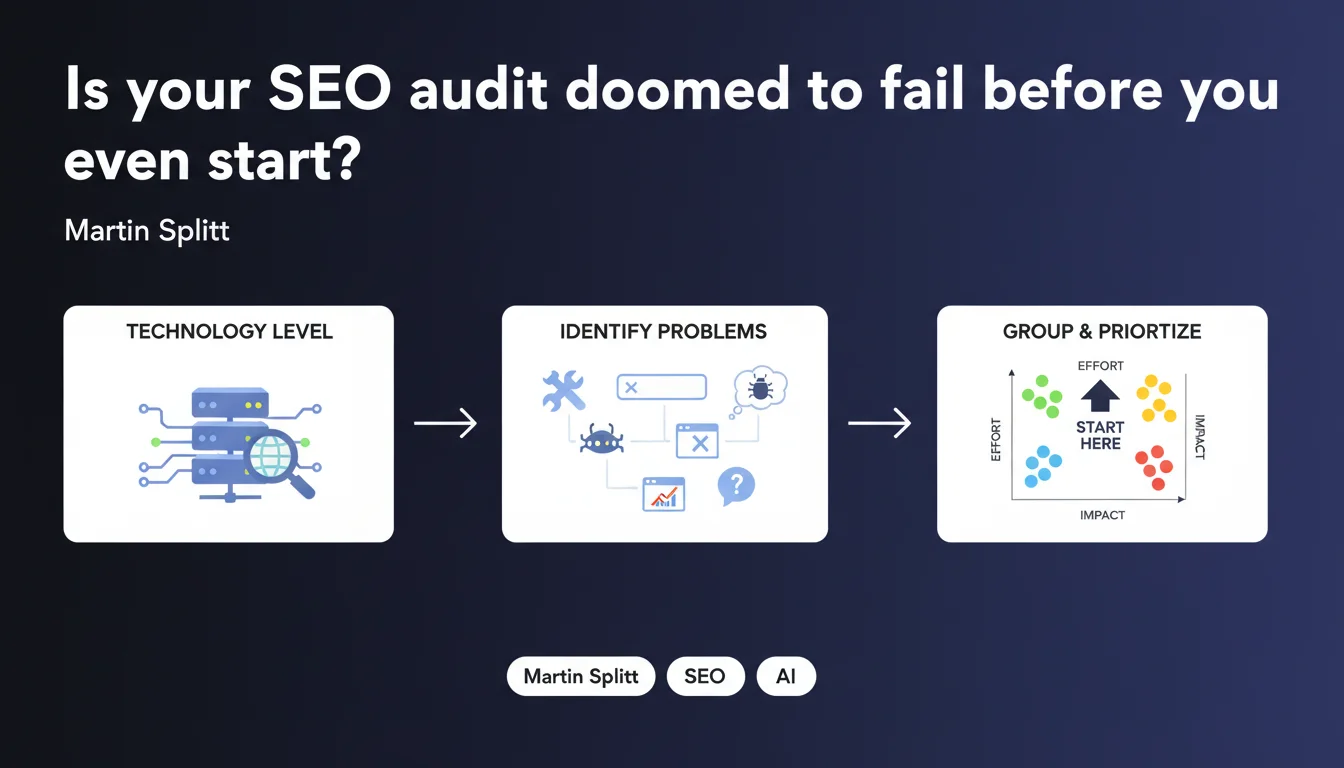
Google is clear: a meaningful SEO audit begins by understanding your site's technical architecture (CMS, framework, rendering method...) before launching crawlers. Only then should you group detected issues by actual effort and real impact on that specific tech stack. Without this preliminary phase, you're wasting time fixing false positives or overlooking genuine blockers.
What you need to understand
Why should your site's technology come before the audit tool?
Because an audit tool crawls, detects, reports — but it doesn't contextualize. A Screaming Frog or Oncrawl will flag hundreds of errors without knowing if your site is a monolingual WordPress, a Next.js in SSR mode, or a React SPA with client-side hydration.
Martin Splitt says it plainly: understanding your technical foundation lets you interpret alerts correctly. A 404 generated by an infinite pagination React system doesn't get fixed the same way as a 404 on a static site.
What does "grouping by effort and impact" actually mean in practice?
Once problems are identified, they're not all equal. Some require a full refactor (heavy, risky), others just a config tweak (fast, safe).
Google recommends prioritizing fixes by crossing two axes: the cost (dev time, testing, risk) versus the payoff (indexable pages, Core Web Vitals signals, crawl budget freed up). It's common sense — but applied methodically, not by guesswork.
Which technical signals should you analyze first?
Before crawling, ask yourself the right questions about your tech stack: server-side or client-side rendering? JavaScript hydration? Aggressive CDN caching? Custom routing system?
These answers determine which tools to use, which User-Agents to test, and most importantly — which metrics to track. A generic audit on a Nuxt.js site in SSG mode looks nothing like an audit on a standard Shopify store.
- Rendering architecture: SSR, CSR, SSG, partial or full hydration
- CMS or framework: WordPress, Shopify, Next.js, Gatsby, custom PHP...
- Routing management: server-side routing, client-side routing, hash-based routing, session history
- Critical JavaScript dependencies: blocking third-party libraries, polyfills, lazy-loading
- Server configuration: redirects, HTTP headers, caching, CDN, .htaccess or Nginx rules
SEO Expert opinion
Are SEOs actually applying this approach in the real world?
Let's be honest: not nearly enough. Most audits start with a Screaming Frog or Botify crawl, then you export an Excel report with 300 rows of 404s, duplicate title tags, and missing alt text.
The catch? You don't know why these errors exist. Is it a misconfigured WordPress plugin? An e-commerce faceting system generating parasitic URLs? A JS framework that doesn't preload metadata? Without this understanding, you fix things at random — or worse, introduce new bugs.
What happens if you skip this technical understanding step?
You'll treat false positives as emergencies (like Shopify theme-generated canonicals that should never be touched) and ignore real blockers (like critical CSS files not loading before first paint).
And on prioritization — without knowing actual effort, you might recommend a full JavaScript refactor when a simple server config adjustment would have done the trick. Result: budget blown, timelines exploded, frustrated client.
When does this rule become truly critical?
The moment you move beyond basic WordPress. Headless CMS sites, JAMstack architectures, SPAs with client-side routing, custom e-commerce platforms — all demand thorough technical analysis upfront.
If you audit a Next.js site without knowing whether it uses getStaticProps, getServerSideProps, or a mix, you'll miss half the SEO challenges. And Google won't cut you any slack.
Practical impact and recommendations
What's your concrete first step before crawling?
Talk to the developers, review technical documentation, inspect the source code. Map out the complete stack: CMS, front-end framework, server, CDN, third-party tools (analytics, A/B testing, personalization).
Next, test rendering in different scenarios: regular browser, Google Search Console (URL Inspection), crawler bot, JavaScript disabled. Note the rendering differences — that's where the real issues hide.
How do you prioritize fixes without drowning in technical debt?
Build an impact/effort matrix. Rank each detected problem on two dimensions: how many pages it affects and how much organic traffic they generate (impact), versus how much dev time it requires and what regression risk it carries (effort).
Tackle quick wins first (high impact, low effort), then major structural work (high impact, high effort). Skip or defer anything that's low impact, regardless of effort.
What mistakes should you avoid during this technical analysis phase?
Don't rely solely on automated tools. Lighthouse or PageSpeed Insights won't tell you why your CLS is exploding — just that it is.
Never launch an SEO audit without talking to developers. They know the real constraints of the stack, architecture decisions, framework limitations. Without them, you risk recommending unworkable solutions.
- Map out the complete tech stack (CMS, framework, server, CDN, JS dependencies)
- Test rendering in multiple contexts (browser, bot, JavaScript off)
- Consult developers before running audit tools
- Group detected issues by type and site section
- Create an impact/effort matrix to prioritize fixes
- Address quick wins first (high impact, low effort)
- Document technical choices that explain certain alerts (to prevent recurring false positives)
- Plan regression testing after every technical fix
🎥 From the same video 9
Other SEO insights extracted from this same Google Search Central video · published on 06/11/2025
🎥 Watch the full video on YouTube →
💬 Comments (0)
Be the first to comment.