
Official statement
Other statements from this video 9 ▾
- □ Should a technical SEO audit really go beyond crawlability and indexation?
- □ Is your SEO audit doomed to fail before you even start?
- □ What are the technical priorities Google really wants you to audit first?
- □ Are you really leveraging Google Search Console's crawl data to boost your indexation strategy?
- □ Should you really worry about a spike in 404 errors in Google Search Console?
- □ Is your SEO audit actually helping you—or wasting resources on irrelevant checks?
- □ Should you really implement every recommendation your SEO audit tools suggest?
- □ How can you prioritize your SEO fixes without wasting endless time and resources?
- □ Why does your technical SEO audit fail without involving the dev team?
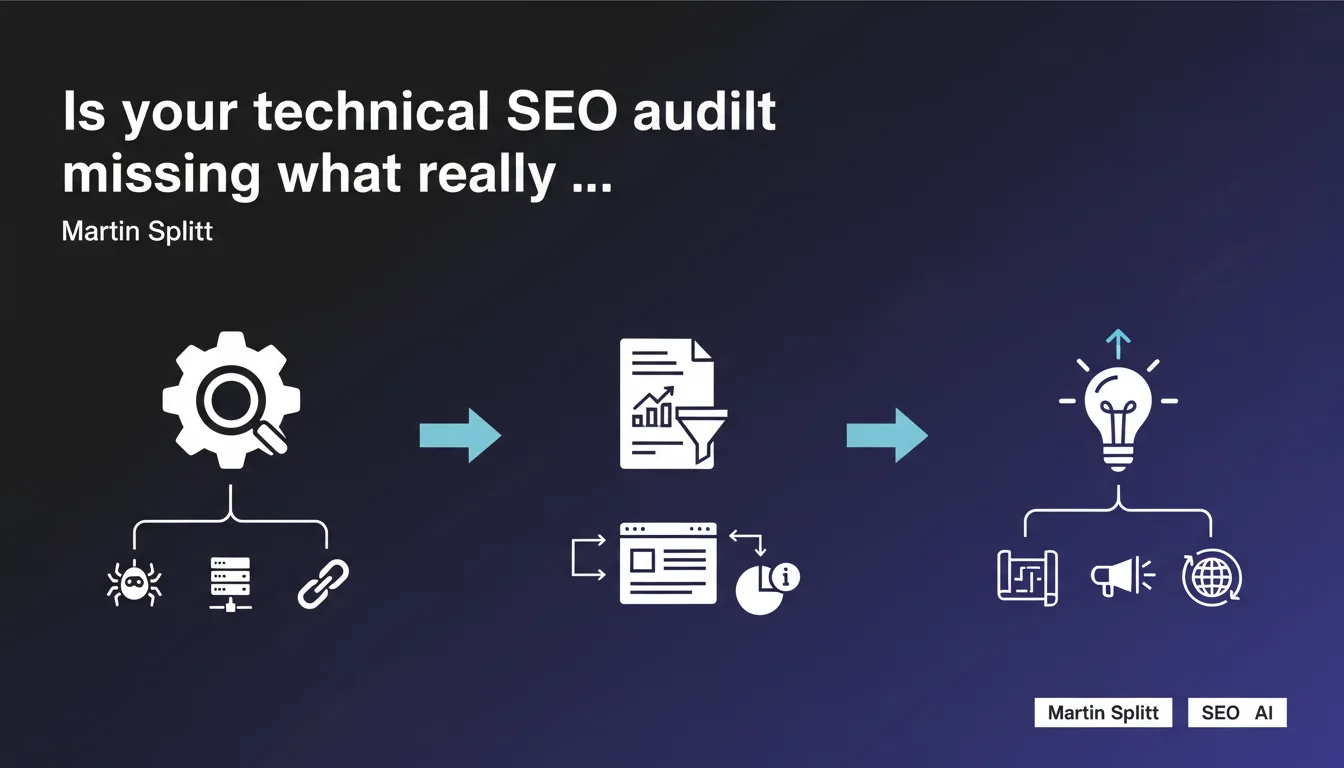
Martin Splitt reframes the concept of a technical audit: it's not just running tools and spitting out lists of problems. A proper audit chains together three phases — identifying potential issues, contextualizing data to your specific site, then formulating recommendations grounded in real needs. Without this structured approach, you're wasting time fixing things that don't actually matter.
What you need to understand
Is a technical audit really just running Screaming Frog?
No — and that's exactly where many practitioners go wrong. Crawling a site and dumping an Excel sheet with 10,000 404 errors is the first step. Nothing more.
Splitt insists on three distinct phases. The first is using tools to identify potential problems. Potential, because a tool doesn't know if that chained redirect on an orphaned page visited twice a year really deserves 3 hours of dev work.
Why does contextualizing data change everything?
Because a 50,000-product e-commerce site and a 200-article blog don't have the same priorities. The second phase — creating a report tailored to the site — involves sorting, prioritizing, and cross-referencing data with business objectives.
Duplicate content on a category generating 30% of revenue isn't the same as duplicate content on a "Legal Notice" page. Contextualizing means making sense of the raw numbers.
What does it mean to formulate suggestions based on real needs?
It means stopping copy-pasting generic recommendations. Every site has its own architecture, CMS, technical constraints, and history.
Recommending perfect silo-based internal linking when the site runs on a clunky proprietary CMS is completely disconnected from reality. Suggestions need to be actionable, prioritized by actual impact, and adapted to available resources — dev time, budget, in-house expertise.
- An audit doesn't stop at tools — they're the first step, not the final deliverable
- Contextualizing data helps you distinguish real problems from false positives
- Recommendations must be actionable and tailored to the site's specific constraints
- A solid audit ranks actions by expected business impact
- Generic suggestions without understanding the site's technical constraints are a waste of time
SEO Expert opinion
Is this approach actually being applied in the field?
Let's be honest — not enough. Too many technical audits still boil down to a commented Screaming Frog export in three lines. The client gets 200 red lines in a spreadsheet without knowing where to start.
Why? Because contextualizing requires analysis time, understanding the business model, and conversations with the client. It's less scalable than a standard audit template sold for $500. But that's what separates a real SEO consultant from a tool operator.
What nuances should we add to this statement?
Splitt mentions "potential problems" — that's crucial. Not every signal tools return is actually a problem. A page with a 2.5-second load time is a "problem" according to PageSpeed Insights. But if it converts at 8% and generates 40% of revenue, that might not be where the priority lies.
Another nuance: "real site needs." That assumes you have access to business data — traffic, conversions, revenue by page. If the client won't share or you don't have Analytics access, you're flying blind. In that case, proper contextualization becomes impossible.
When is this structured approach not enough?
When the site has deep structural problems — poor architecture, outdated CMS, technical debt accumulated over years. In those cases, the audit might be flawless, but recommendations run into technical or budget limitations.
Another limitation: sites undergoing migration or redesign. An audit captures a snapshot at time T, but if the site changes significantly within 3 months, recommendations become outdated before they're even implemented. In that case, you need ongoing advisory rather than a one-time audit.
Practical impact and recommendations
What should you concretely do to structure a technical audit?
First, clarify objectives with the client before you even launch a crawl. What are they after? More overall organic traffic, better conversions on specific pages, preparing a migration, recovering from a penalty? That shapes everything.
Next, cross-reference tool data (Screaming Frog, Oncrawl, Botify, Sitebulb) with Analytics and Search Console. A 404 URL receiving 5,000 clicks per month is a priority. An orphaned URL with zero traffic for 2 years, it's not.
Finally, rank recommendations across three axes: estimated SEO impact, technical complexity, and required resources. A quick win with low effort and high impact comes before a 6-month architecture overhaul.
What errors should you absolutely avoid in a technical audit?
First mistake: listing without prioritizing. An audit throwing 150 recommendations with no priority order is unusable. The client doesn't know where to start, so they do nothing.
Second mistake: ignoring the site's technical constraints. Recommending lazy loading on a CMS that doesn't support it natively is pointless. You need to validate feasibility with dev teams or know the CMS well enough to anticipate issues.
Third mistake: not measuring post-correction impact. An audit isn't one-and-done. You need to track KPIs before and after to validate that actions actually worked — and adjust if needed.
How do you verify that your audit follows these three steps?
Ask yourself these questions — does your audit include a section explaining the analysis methodology and tools used? If yes, first step validated.
Second check: is there a contextual analysis that connects detected problems to the site's actual performance (traffic, conversions, rankings)? If the audit stays purely technical without linking to business data, the second step is missing.
Third check: are recommendations prioritized and adapted to available resources? If all actions are at the same level or ignore CMS/team constraints, the third step isn't complete.
- Define business objectives before launching the technical audit
- Cross-reference crawl data with Analytics and Search Console for context
- Rank recommendations by SEO impact, technical complexity, and required resources
- Validate recommendation feasibility against CMS constraints and dev team capabilities
- Avoid flat lists without prioritization — they're unusable
- Track before/after KPIs to measure real impact
- Document the methodology used to make the audit reproducible
🎥 From the same video 9
Other SEO insights extracted from this same Google Search Central video · published on 06/11/2025
🎥 Watch the full video on YouTube →
💬 Comments (0)
Be the first to comment.