
Official statement
Other statements from this video 8 ▾
- □ Has mobile-first indexing really been a game-changer for SEO since 2016?
- □ Is the meta keywords tag still worth anything for SEO in 2025?
- □ Does using Google Analytics or Chrome really boost your SEO rankings?
- □ Why does Google normalize your HTML even when it's broken?
- □ How does Caffeine actually ingest Googlebot data into Google's search index?
- □ Should you really de-optimize certain pages to boost your SEO performance?
- □ Should you really optimize each Google removal tool differently for SEO?
- □ Why does Google document only one single meta tag in its official SEO guide?
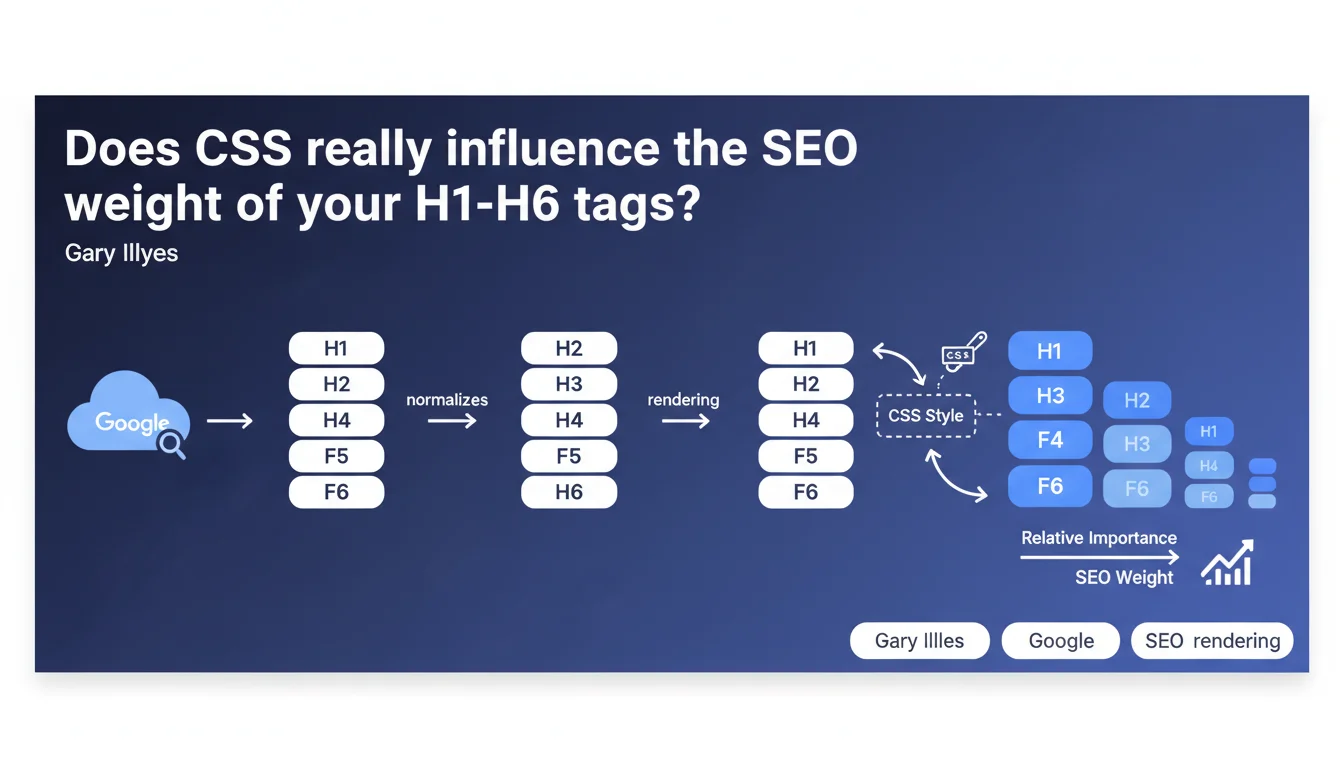
Google normalizes all header tags and uses CSS rendering to determine their relative importance. In practice: the visual hierarchy (sizes, weights, spacing defined in CSS) now influences how Google interprets your page's semantic structure. Say goodbye to the myth of the all-powerful single H1.
What you need to understand
What does this normalization of H tags mean?
Google no longer treats H1, H2, H3 tags as a rigid hierarchy where H1 would automatically be the strongest signal. Normalization means all levels are initially considered on equal footing.
It's then CSS rendering that allows Google to rebuild relative importance: an H3 styled at 32px bold will potentially carry more weight than an H1 at 14px light. The engine analyzes visual properties to infer what you, as the editor, consider important.
Why does Google rely on CSS rather than raw HTML?
Because the modern web is chaotic. JavaScript frameworks, poorly coded WordPress themes, CMSs that churn out H2s everywhere — all of this creates often incoherent HTML hierarchies.
By analyzing the applied styling, Google circumvents structural errors and gets closer to actual editorial intent. If you display a title in huge text, it's probably because it matters. Simple, pragmatic.
Which CSS elements does Google likely analyze?
Google hasn't revealed the full recipe, but we can deduce logical criteria: font-size, font-weight, margin/padding (vertical spacing suggesting a break), line-height, possibly even color and text-transform.
Anything that creates a perceptible visual hierarchy to human eyes becomes a signal for the bot. It's an alignment between UX and SEO: what guides the human eye also guides semantic crawling.
- Google first normalizes all H tags regardless of level
- CSS rendering then allows determination of each tag's relative importance
- Visual hierarchy (size, weight, spacing) becomes an SEO signal
- This approach compensates for frequent HTML structure errors across the web
- Editorial intent takes precedence over strict HTML semantics
SEO Expert opinion
Does this statement fundamentally change our SEO practices?
Yes and no. For those already practicing clean SEO with coherent hierarchy and thoughtful design, nothing changes. But it definitively buries certain misconceptions: the sacred single H1, the obsession with perfect markup at the expense of rendering.
Concretely? If you have three visually identical H2s followed by an H3 styled like a main title, Google will understand that this H3 is probably more important. It's a safeguard against poor implementations, but also a signal that UX matters as much as source code.
Can we afford to neglect HTML structure in favor of CSS?
Let's be honest: no. This statement doesn't give you permission to scatter H5s everywhere thinking a font-size:48px will save the day.
HTML remains the semantic backbone. CSS intervenes as a corrective, as a safety net, but a shaky HTML structure remains a signal of mediocre quality. Google reads the DOM first, then the rendering — in that order. Don't put the cart before the horse.
What are the edge cases where this rule becomes fuzzy?
Pure JavaScript sites (React, Vue without SSR) where the initial HTML is nearly empty. If Google must wait for full rendering to see your titles, you lose indexing responsiveness.
Dynamic dark/light themes also: if your styles change based on user context, which version does Google analyze? Probably the default theme, but we don't have certainty. And media queries: Google crawls primarily mobile-first, so it's your mobile CSS that counts — not the desktop one.
Practical impact and recommendations
What should you audit first on your pages?
First, verify the consistency between HTML hierarchy and visual hierarchy. Open a page, look at the titles: does their visual importance match their tag level? An H2 should never be visually overshadowed by an H4.
Second, test the actual rendering with the URL inspection tool in Search Console. Compare raw HTML and rendering: if titles only appear after JS hydration, they arrive too late. Google sees them, but with less weight.
What common errors can we now avoid?
Stop beating yourself up over a missing H1 if your main title is a well-styled H2. It's not optimal, but it's no longer catastrophic either.
Avoid arbitrary level jumps (H2 to H5) just because the design demands it. Use the right tags and adjust the CSS. And most importantly: don't hide text in CSS (display:none, visibility:hidden) thinking the H tag is enough — without visible rendering, no weight.
How do you verify your implementation is optimal?
Three simple but effective checks:
- Audit your pages with a rendering tool (Screaming Frog with JS rendering enabled, or directly Search Console)
- Compare HTML hierarchy (look at source code) with visual hierarchy (look at rendered page)
- Validate that your main titles have marked CSS differences: at least 20-30% size difference, bold vs normal
- Test rendering speed: if your styles take more than 2 seconds to apply, that's too slow
- Check consistency across mobile/desktop: both versions should have similar hierarchy, even if sizes differ
Google's statement officializes what the best SEOs were already practicing: coherent hierarchy between HTML and design. CSS becomes a complementary signal, not a workaround.
The complexity lies in cross-auditing — code, rendering, performance — and fine-tuning styles to reinforce semantic signals. If your site combines multiple frameworks, custom CMS, or legacy templates, identifying inconsistencies and fixing them can quickly become time-consuming.
In this context, engaging a specialized SEO agency that masters both technical aspects (rendering, performance) and editorial ones (content hierarchy) can accelerate compliance and guarantee sustainable implementation. You save time and avoid costly mistakes on aspects requiring cross-functional expertise.
🎥 From the same video 8
Other SEO insights extracted from this same Google Search Central video · published on 03/11/2025
🎥 Watch the full video on YouTube →
💬 Comments (0)
Be the first to comment.