
Official statement
Other statements from this video 8 ▾
- □ Le mobile-first indexing a-t-il vraiment changé la donne en SEO depuis 2016 ?
- □ La balise meta keywords sert-elle encore à quelque chose en SEO ?
- □ Utiliser Google Analytics ou Chrome améliore-t-il vraiment votre référencement ?
- □ Pourquoi Google normalise-t-il votre HTML même quand il est cassé ?
- □ Le CSS influence-t-il réellement le poids SEO de vos balises H1-H6 ?
- □ Faut-il vraiment dé-optimiser certaines pages pour améliorer ses performances SEO ?
- □ Faut-il vraiment optimiser différemment chaque outil de suppression Google ?
- □ Pourquoi Google ne documente-t-il qu'une seule balise meta dans son guide SEO officiel ?
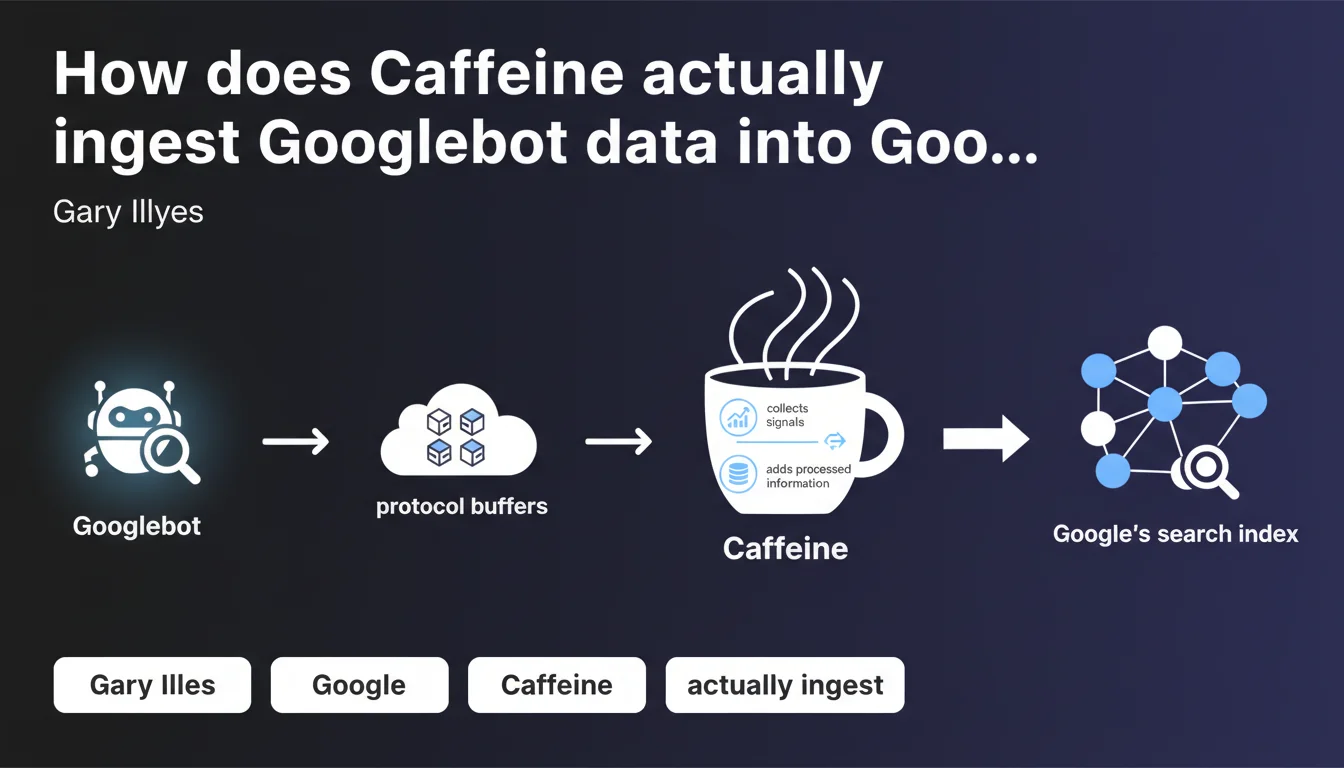
Caffeine is the name of Google's indexing system that processes protocol buffers generated by Googlebot. In practice, it collects crawl signals, normalizes the HTML retrieved, and feeds the search index with this structured data. This statement confirms the technical architecture of the pipeline between crawling and indexing.
What you need to understand
What exactly is Caffeine and why is Google reminding us about it now?
Caffeine is Google's indexing system — not the search engine itself, but the layer that digests what Googlebot brings back. Launched in 2010, it replaced the old system to enable faster and continuous indexing.
Gary Illyes's statement clarifies Caffeine's exact role: it ingests the protocol buffers produced by Googlebot. These protocol buffers are structured data files containing raw HTML, metadata, crawl signals — everything the bot has collected about a page.
What does Caffeine actually do with this data?
Caffeine executes three main operations. First, it collects signals — load time, redirects, HTTP status codes, internal and external links. Next, it normalizes the HTML: it fixes unclosed tags, restructures the DOM, removes unnecessary code.
Finally, it adds everything to the index — that massive database Google taps into to answer search queries. Without Caffeine, there's no indexing. Without indexing, there's no ranking.
Why discuss protocol buffers instead of raw HTML?
Protocol buffers are a serialization format developed by Google — more compact and faster to process than XML or JSON. Googlebot doesn't transmit raw HTML as-is to Caffeine; it encapsulates it in these optimized binary structures.
What does this change for us? Nothing directly — but it confirms that Google processes our pages in an industrial pipeline where each step has its own format. The HTML you publish is not what Caffeine ultimately reads.
- Caffeine is the indexing system, distinct from crawling (Googlebot) and ranking (ranking algorithms)
- It ingests protocol buffers, not raw HTML — data is transformed before indexing
- Its three roles: signal collection, code normalization, index feeding
- Any page not processed by Caffeine remains invisible in search results
SEO Expert opinion
Is this statement consistent with what we observe in practice?
Absolutely. We've known for a long time that Google normalizes HTML — which is why obsessing over perfect W3C validation is pointless. The DOM reconstructed by Caffeine is never strictly identical to your source code.
What's interesting here is the confirmation of the role of signals collected at the indexing stage itself. Caffeine doesn't just record text — it already aggregates technical metrics that will later feed into ranking algorithms. Server response time, crawl depth, code quality: all of this enters the index before we even talk about semantic relevance.
What nuances should we add to this pipeline vision?
Caffeine isn't a static system. Google has updated it continuously since 2010 — particularly to handle mobile-first, JavaScript rendering, Core Web Vitals. What Gary Illyes describes here is the basic principle, not necessarily the current state of the code.
Second nuance: HTML normalization can mask certain issues. An unclosed tag? Caffeine might correct it — but that doesn't guarantee the original semantic intent is preserved. If your <h1> is opened without being closed, Caffeine will make an arbitrary choice about the title's scope.
Where does this logic reach its limits?
Caffeine processes what Googlebot sends it — but if the bot doesn't crawl, Caffeine sees nothing. Sites with saturated crawl budget, pages blocked by robots.txt, infinite scroll content poorly implemented: all cases where the problem lies upstream.
Another limit: JavaScript rendering. Googlebot executes JS before sending data to Caffeine, but this process has its own constraints — timeout, compute budget, framework compatibility. If content doesn't appear in the rendered DOM, Caffeine will only index an empty shell.
Practical impact and recommendations
What do you need to check concretely on your site?
Start with URL inspection in Search Console — the "HTML" tab shows you what Google actually indexed. Compare it with your source code: if elements are missing, it's either a crawl issue or a JavaScript rendering problem.
Next, track critical HTML errors that could disrupt normalization: incorrectly nested tags, duplicate attributes, inconsistent data structures. An HTML validator remains useful — not to aim for perfection, but to detect gross anomalies.
What errors should you absolutely avoid?
Never count on Caffeine to "fix" bad code. Normalization isn't magic — it follows rules, but those rules don't always match your intentions. A poorly closed <title> can lead to arbitrary text truncation.
Second error: ignoring the technical signals collected. Caffeine records far more than text — HTTP codes, redirects, response speed. A slow or unstable server leaves a trace in the index, even if content is good. These signals influence future crawling and, indirectly, ranking.
How can you ensure indexing happens correctly?
Monitor the coverage reports in Search Console. Pages crawled but not indexed? Often a sign that Caffeine received the data but judged it insufficient — duplicate content, low quality, internal cannibalization.
Also use the rich results test and inspection tool to verify that your structured data is properly ingested. Caffeine processes them just like HTML — if they're malformed, they can be ignored or misinterpreted.
- Compare source code and indexed HTML via URL inspection
- Fix structural HTML errors that disrupt parsing
- Verify that JavaScript content displays properly in the rendered DOM
- Monitor server response times — Caffeine records these signals
- Regularly audit crawled but not indexed pages
- Test structured data to ensure proper ingestion
🎥 From the same video 8
Other SEO insights extracted from this same Google Search Central video · published on 03/11/2025
🎥 Watch the full video on YouTube →
💬 Comments (0)
Be the first to comment.