
Official statement
Other statements from this video 8 ▾
- □ Que se passe-t-il réellement quand Google vous inflige une action manuelle ?
- □ Un site hors ligne peut-il vraiment détruire votre trafic de toutes les sources (et pas seulement Google) ?
- □ Pourquoi une balise noindex provoque-t-elle une baisse de trafic progressive et non brutale ?
- □ Les Core Updates provoquent-elles vraiment des changements progressifs plutôt que des chutes brutales ?
- □ Comment analyser correctement une baisse de trafic SEO sans se tromper de diagnostic ?
- □ Faut-il vraiment analyser tous les onglets de Search Console pour diagnostiquer une baisse de trafic ?
- □ Pourquoi devriez-vous arrêter d'analyser votre trafic SEO de manière globale ?
- □ Pourquoi Google ajoute-t-il des annotations dans Search Console et comment les interpréter ?
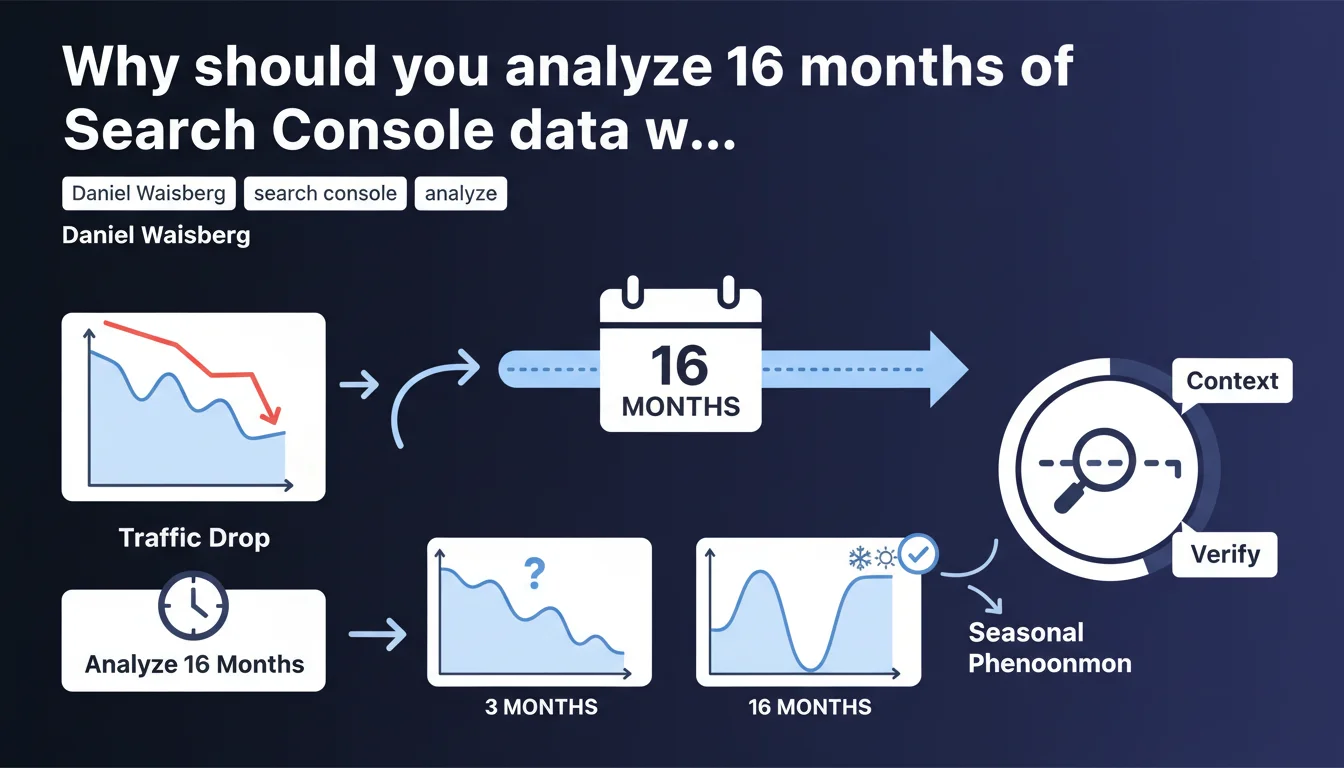
Google recommends extending your analysis to 16 months in Search Console to diagnose a traffic decline. This timeframe allows you to distinguish between a real penalty and a simple seasonal variation. Too many SEOs panic over normal fluctuations simply because they lack sufficient historical perspective.
What you need to understand
Why 16 months instead of 12 or 6?
The logic behind this 16-month period is based on covering at least two complete seasonal cycles. One annual cycle is 12 months — but to effectively compare the current year with the previous one, you need to extend beyond by a few months.
Concretely, if you notice a decline in March, you need to be able to compare March Year N with March Year N-1, but also observe what happened before and after to detect a recurring pattern. With 16 months, you capture normal seasonal variations and isolate real anomalies.
What's the difference compared to analyzing 3 or 6 months?
A short window amplifies noise and masks underlying trends. If your traffic drops 30% in February but this decline happens every year, a 6-month analysis will make you believe there's a technical or algorithmic issue.
With 16 months, you immediately see that February Year N-1 showed the same decline. Result: you don't waste time chasing a phantom penalty. Google wants you to stop confusing seasonality with penalties.
Which types of sites are particularly affected?
Any site with strong seasonal components: fashion e-commerce, tourism, personal finance (tax returns), gardening, winter sports, etc. Even a B2B site can experience variations based on corporate budget cycles.
News sites or pure-play SaaS platforms with stable traffic year-round are less impacted, but the exercise remains useful for detecting slow drifts that go unnoticed over short periods.
- Extend your analysis to minimum 16 months to contextualize any traffic decline
- Compare the same periods year over year to isolate seasonality
- Don't confuse normal cyclical variation with algorithmic penalties
- Adapt your analysis window to your site's profile (seasonal or not)
SEO Expert opinion
Is this recommendation consistent with observed practices?
Absolutely. In the field, the vast majority of botched SEO diagnostics are based on observation windows that are too short. A client panics because their traffic dropped 40% in January — except their business is tied to year-end holidays and January is structurally weak.
Waisberg isn't reinventing anything here; he's simply reminding people of basic methodological hygiene that too many practitioners neglect under pressure. Let's be honest: how many times have you seen an SEO audit limited to the last 3 months?
What nuances should be added?
16 months is a minimum for comprehensive diagnosis. But if you're called in urgently after an 80% drop in 48 hours, there's no need to wait for 16 months of data: it's clearly a technical incident or deindexation.
The 16-month rule applies to gradual or moderate declines where the cause isn't obvious. It doesn't replace immediate technical analysis in case of obvious crashes. [To verify]: Google doesn't specify whether this window applies to very new sites (less than one year of data).
In which cases does this rule not apply?
New sites with less than 16 months of history: you work with what you have, period. Sites with recent migrations or major redesigns: before and after aren't directly comparable — segment your periods.
Finally, if you detect an obvious technical bug (robots.txt blocking, accidental noindex), there's no need to go back 16 months to diagnose it. Fix it first, analyze later.
Practical impact and recommendations
How do you implement this recommendation in Search Console?
Open the Performance report, click on the date selector, and choose "Compare". Configure a 16-month rolling range and compare it with the equivalent previous period. Observe the curves month by month to identify recurring patterns.
Don't just look at the overall graph. Segment by query type, by page, by country if relevant. A decline can be seasonal on one keyword segment and structural on another.
What mistakes should you avoid during analysis?
Don't compare a 16-month period with the 16 months that follow if you haven't completed the cycle yet. You risk comparing apples with oranges. Stick to coherent rolling windows.
Another trap: interpreting a decline as seasonal when it's masking a cumulative technical problem. If this year's seasonal decline is more pronounced than last year's, dig deeper. Seasonality doesn't exclude an underlying issue.
What do you do if the decline isn't seasonal?
Then you switch to classic technical and editorial diagnostic mode: crawl audit, Core Web Vitals analysis, verification of algorithmic updates during the period, examination of lost backlinks, evaluation of content quality.
Cross-reference Search Console data with Google Analytics and your server logs to identify where the leak is: crawl, indexing, rankings, or CTR. Each layer requires a different answer.
- Configure a 16-month view in Search Console in comparison mode
- Segment the analysis by keyword category and by strategic page
- Verify data consistency over the entire period (no tracking breaks)
- Distinguish normal seasonal variation from progressive degradation
- Cross-reference GSC with Analytics and logs for comprehensive diagnosis
❓ Frequently Asked Questions
Peut-on utiliser une fenêtre plus longue que 16 mois ?
Que faire si mon site a moins de 16 mois d'historique ?
Cette règle s'applique-t-elle aussi à Google Analytics ?
Comment distinguer saisonnalité et pénalité algorithmique ?
Faut-il analyser 16 mois même pour une hausse de trafic ?
🎥 From the same video 8
Other SEO insights extracted from this same Google Search Central video · published on 29/03/2023
🎥 Watch the full video on YouTube →
💬 Comments (0)
Be the first to comment.