
Official statement
Other statements from this video 5 ▾
- □ Faut-il vraiment optimiser les Core Web Vitals pour ranker sur Google ?
- □ Faut-il vraiment arrêter de sur-optimiser les Core Web Vitals ?
- □ Faut-il vraiment réduire l'usage de JavaScript pour améliorer votre SEO ?
- □ Faut-il vraiment supprimer toutes les redirections de votre site ?
- □ La vitesse du site est-elle vraiment un facteur de classement Google ?
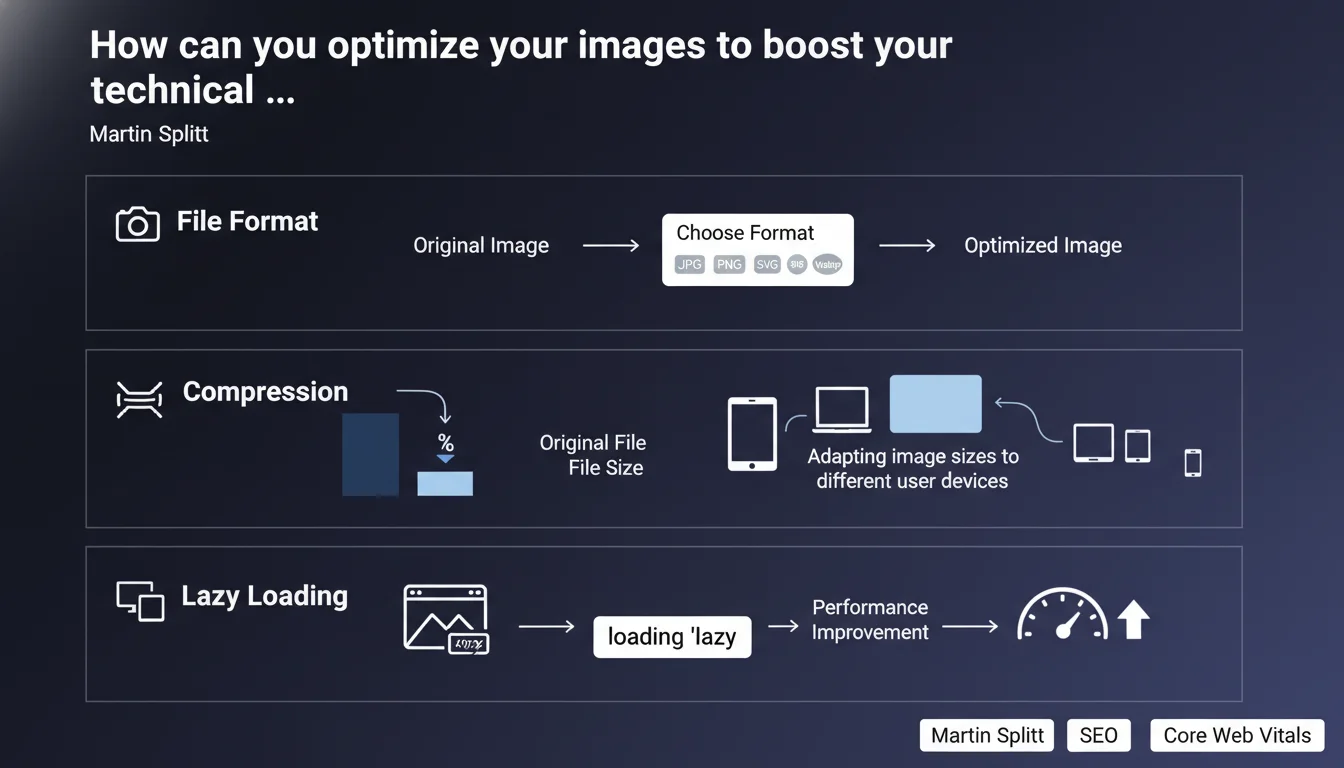
Google emphasizes that image optimization rests on three pillars: appropriate file format, intelligent compression, and responsive sizing. Lazy loading is recommended for images outside the initial viewport to improve performance — a ranking factor confirmed through Core Web Vitals.
What you need to understand
Why does Google insist on image optimization?
Images represent on average 50 to 70% of the total weight of a web page. Their impact on Core Web Vitals — particularly LCP (Largest Contentful Paint) — is direct and measurable.
Martin Splitt reminds us here of the fundamentals: file format, compression, and responsive sizing. Nothing revolutionary, but that's precisely where the majority of websites still fail.
What is lazy loading and how does it work?
The HTML attribute loading='lazy' tells the browser to defer loading images located outside the initial viewport. The browser only downloads these images when the user scrolls towards them.
In practice? A page with 50 images immediately loads only the 3 or 4 visible on screen. The rest waits. Result: reduced initial load time, less data transferred on first display, better Core Web Vitals scores.
What file formats does Google recommend?
Google doesn't explicitly mention WebP or AVIF in this statement, but these modern formats offer superior compression rates compared to JPEG and PNG — up to 30% savings without perceptible quality loss.
Format choice depends on image type: WebP for photos, SVG for logos and icons, PNG only if transparency is essential and WebP isn't supported (an increasingly rare case).
- Appropriate format: prioritize WebP/AVIF for photos, SVG for vector elements
- Intelligent compression: find the balance between file size and visual quality — an 80% quality JPEG is often indistinguishable from 100%
- Responsive: serve different image sizes based on the device (srcset, sizes)
- Lazy loading: apply loading='lazy' to all images outside the initial viewport
- Explicit dimensions: always specify width and height to avoid CLS (Cumulative Layout Shift)
SEO Expert opinion
Is this recommendation consistent with real-world observations?
Absolutely. PageSpeed Insights and Lighthouse audits consistently identify images as the first optimization lever. On e-commerce sites with hundreds of product visuals, the impact on LCP can reach 40 to 60% improvement.
Native lazy loading (loading='lazy') now benefits from near-universal browser support (95%+ according to Can I Use). No more need for third-party JavaScript libraries that added their own weight and complexity.
What nuances should be added to this statement?
First point: never apply loading='lazy' to images in the initial viewport — hero image, logo, first product visual. It delays their display and degrades LCP. Google doesn't mention it here, but this is a common mistake observed on 30% of audited sites.
Second nuance: compression isn't just about numbers. A JPEG compressed to 50% can be perfect for an ambient background photo, disastrous for a product visual with embedded text. Context dictates the acceptable threshold.
Third point — and Google remains strangely silent on this: CDNs with automatic optimization (Cloudflare, Imgix, Cloudinary) do this work on the fly. If you manage a site with 10,000+ images, manual optimization isn't sustainable. [To verify]: does Google prefer server-side/CDN optimization or source code optimization?
In what cases doesn't this rule apply?
On ultra-short pages (one-page landing pages), lazy loading can be counterproductive. If all your images are visible without scrolling, deferring their loading brings nothing — on the contrary, it adds unnecessary detection logic.
For images critical above the fold, forget lazy loading. Load them as a priority, ideally via preload: <link rel="preload" as="image" href="hero.webp">.
Practical impact and recommendations
What should you do concretely on your site?
Start with an audit of existing images. Identify those weighing more than 100 KB, those served in the wrong format (PNG for photos), those without explicit dimensions. PageSpeed Insights gives you a ready-to-use list.
Then, automate. If you're on WordPress, plugins like ShortPixel or Imagify convert and compress on the fly. If you're building from scratch, integrate an image optimization service into your build pipeline (imagemin, sharp).
What mistakes should you avoid at all costs?
Don't compress the same image multiple times — each pass degrades quality. Always keep a high-resolution source version and generate variants from it.
Don't use oversized images resized with CSS. A 3000x2000px photo displayed at 300x200px wastes bandwidth. Serve adapted sizes via srcset and sizes.
Avoid complex JavaScript solutions for lazy loading if native support suffices. Fewer dependencies = fewer points of failure.
How do you verify that your optimizations work?
- Run PageSpeed Insights on your main pages — the "Opportunities" section should be empty or nearly empty for images
- Verify that LCP doesn't point to a lazy-loaded image (use the Performance tab in Chrome DevTools)
- Check that above-the-fold images do NOT have the loading='lazy' attribute
- Test on mobile and desktop: is the correct format being served? The correct size?
- Measure total image weight transferred on first load (Network tab filtered on "Img") — ideally under 500 KB for a standard page
❓ Frequently Asked Questions
Faut-il appliquer loading='lazy' sur toutes les images du site ?
WebP est-il vraiment indispensable ou JPEG suffit-il encore ?
Comment définir le bon taux de compression sans dégrader la qualité visible ?
Les images SVG doivent-elles aussi être lazy-loadées ?
Que faire si mon CMS génère automatiquement des images non optimisées ?
🎥 From the same video 5
Other SEO insights extracted from this same Google Search Central video · published on 18/09/2024
🎥 Watch the full video on YouTube →
💬 Comments (0)
Be the first to comment.