
Official statement
Other statements from this video 11 ▾
- □ Faut-il vraiment compter sur les service workers pour le SEO ?
- □ Googlebot peut-il indexer un site qui dépend de service workers pour afficher son contenu ?
- □ Googlebot ignore-t-il vraiment les service workers sur votre site ?
- □ Comment diagnostiquer les problèmes d'indexation causés par les service workers dans Search Console ?
- □ La console JavaScript révèle-t-elle vraiment les problèmes de rendu critiques pour le SEO ?
- □ Pourquoi la collaboration avec les développeurs est-elle la clé pour débloquer les problèmes d'indexation ?
- □ Faut-il vraiment injecter des console.log pour diagnostiquer les échecs de rendu côté Googlebot ?
- □ Pourquoi les service workers peuvent-ils rendre votre contenu invisible pour Googlebot ?
- □ Faut-il vraiment vérifier le HTML rendu dans Search Console pour diagnostiquer vos problèmes d'indexation ?
- □ Votre page indexée mais invisible : problème technique ou simplement mal classée ?
- □ Comment désactiver un service worker pour diagnostiquer des problèmes SEO ?
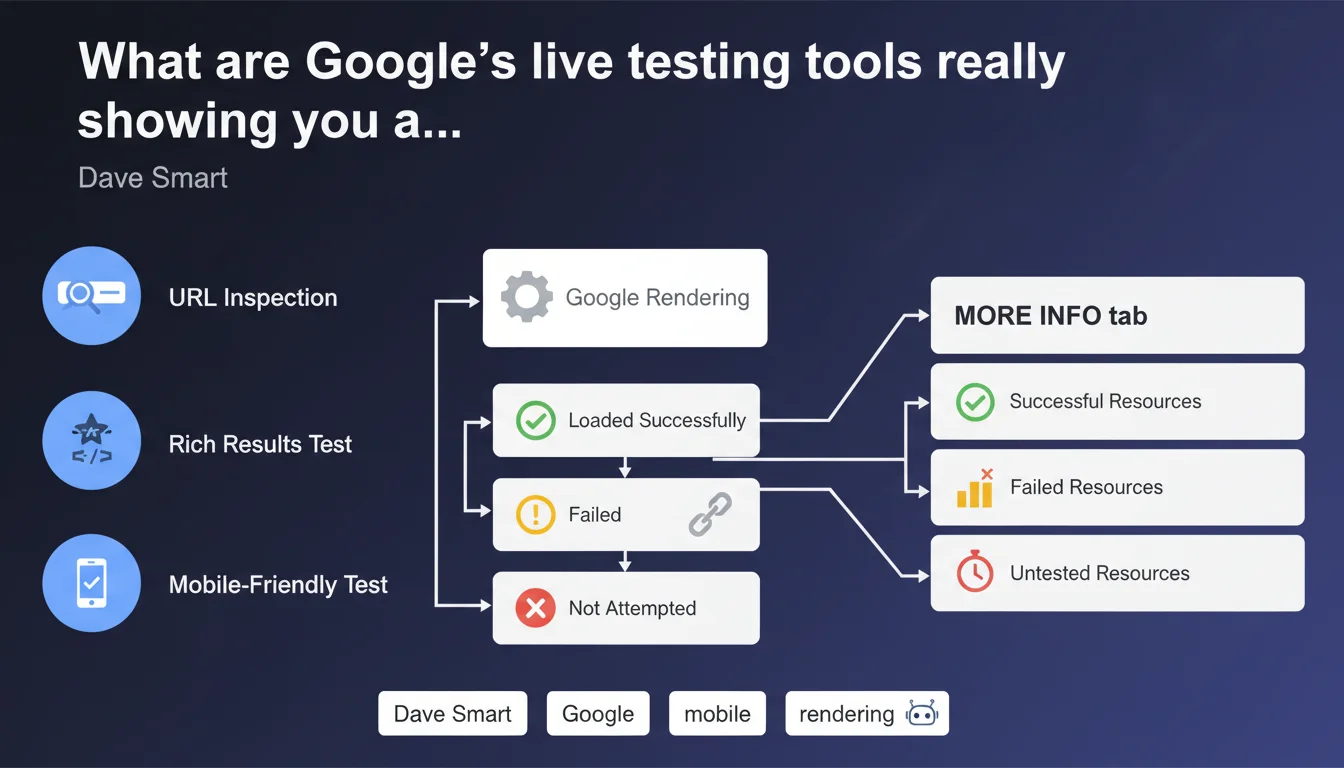
Google confirms that its live testing tools (URL Inspection, Rich Results Test, Mobile-Friendly Test) expose in the 'More Info' tab all resources loaded, failed, or not attempted during rendering. This visibility allows you to precisely identify what Googlebot actually sees — and more importantly what it misses — when crawling your pages.
What you need to understand
What exactly do these testing tools reveal?
The 'More Info' tab in Google's live testing tools (URL Inspection in Search Console, Rich Results Test, Mobile-Friendly Test) displays three categories of resources: those that were successfully loaded, those that failed, and those that Googlebot didn't even attempt to load.
This level of granularity changes everything. You no longer guess why your page looks bad in the rendering preview — you see exactly which CSS was blocked, which script timed out, which image fell through the cracks.
Why is this information critical for SEO?
Rendering on Googlebot's side doesn't always match rendering in a browser. A page can display perfectly in Chrome and be completely broken for Google if certain resources are blocked (robots.txt, timeout, server error).
These tools expose the gap between what you see and what Google indexes. If a script critical to displaying your main content fails, Google may index an empty page — and you won't know without consulting this data.
What's the difference between a failed resource and one not attempted?
A failed resource means Googlebot tried to load it but encountered a problem: timeout, 4xx/5xx error, invalid SSL certificate. A resource not attempted means the bot decided not to load it at all — often due to robots.txt blocking or an internal priority rule.
The distinction matters: a failure can be fixed on the infrastructure side, while a non-attempt reveals a configuration problem or crawl priority issue.
- Testing tools expose three resource states: loaded, failed, not attempted
- The 'More Info' tab allows you to pinpoint rendering blockers precisely
- Googlebot rendering can differ radically from browser rendering
- Resources not attempted often signal robots.txt blocks or bot priority choices
- This data prevents guessing why a page isn't being indexed correctly
SEO Expert opinion
Is this transparency new or simply underutilized?
Google has exposed this data for several years, but the vast majority of SEOs never consult it. The 'More Info' tab is buried in the interface — and many stop at the rendering screenshot without digging deeper. Result: indexing problems go unnoticed for months.
The real issue? These tools test a snapshot at a single moment in time. Production Googlebot may encounter different conditions: server load, network latency, variable crawl priority. The revealed data is only an indicator, not absolute truth. [Verify] across multiple tests spaced over time.
When can these tools mislead you?
Some sites use deferred scripts or aggressive lazy loading: content only appears after user interaction. The testing tool captures initial rendering — and wrongly concludes the content is absent, when it actually loads fine in production.
Another trap: third-party resources. If your page depends on a CDN or external API that times out during testing, the tool reports a failure — but in production, the resource loads 99% of the time. Don't jump to conclusions based on a single test.
Is this approach consistent with real-world practices?
Yes, but with limitations. Testing tools reveal what Googlebot can see, not what it actually indexes. We regularly see pages that pass all tests but remain in 'Discovered, currently not indexed' — proof that rendering is only part of the puzzle.
Google's statement is factual: these tools do show loaded resources. What it doesn't say: this visibility guarantees nothing about final indexation. Clean rendering is a necessary condition, not a sufficient one.
Practical impact and recommendations
What should you prioritize checking in the 'More Info' tab?
Start by identifying critical resources that failed: CSS that structures the layout, JavaScript that displays main content, hero images carrying important alt text. If any of these fails, Googlebot rendering is compromised.
Next, analyze resources not attempted. Check your robots.txt: are you accidentally blocking essential scripts or CSS? Googlebot adheres strictly to this file — one misplaced line can break all rendering.
How do you fix detected errors?
For failed resources, trace the cause: server error (5xx), timeout (server overload or slowness), invalid SSL certificate, redirect loop. Fix on the infrastructure side, then re-test with URL Inspection.
For resources not attempted, unblock them in robots.txt if they're critical. Caution — don't unblock everything: some third-party resources (analytics, ads) are legitimately blocked to preserve crawl budget. Prioritize.
What routine should you adopt to monitor rendering?
Systematically test your new pages or templates before publishing. A theme change, new plugin, CDN migration — anything can break Googlebot rendering without you seeing it on the front end.
Automate if possible: some solutions allow you to test rendering via the Search Console API and alert on regression. The sooner you act, the less SEO impact you'll suffer.
- Test every new template or redesign with URL Inspection before going live
- Check the 'More Info' tab to identify failed and not-attempted resources
- Verify that robots.txt doesn't block critical CSS/JS for rendering
- Cross-reference testing tool results with server logs over several days
- Re-test after each fix to validate the correction
- Monitor third-party resource timeouts (CDN, APIs) and plan fallbacks
- Alert the dev team if critical scripts load too slowly for Googlebot
❓ Frequently Asked Questions
L'onglet 'More Info' est-il disponible dans tous les outils de test Google ?
Une ressource échouée empêche-t-elle systématiquement l'indexation ?
Pourquoi certaines ressources ne sont-elles jamais tentées par Googlebot ?
Faut-il tester chaque page individuellement ou un échantillon suffit-il ?
Les données 'More Info' sont-elles fiables à 100% ?
🎥 From the same video 11
Other SEO insights extracted from this same Google Search Central video · published on 01/11/2022
🎥 Watch the full video on YouTube →
💬 Comments (0)
Be the first to comment.