
Official statement
Other statements from this video 7 ▾
- □ Googlebot ignore-t-il vraiment le scroll et les interactions utilisateur ?
- □ Le DOM du navigateur reflète-t-il vraiment ce que Google indexe ?
- □ Les DevTools suffisent-ils vraiment pour déboguer vos problèmes SEO techniques ?
- □ Pourquoi les en-têtes de réponse HTTP sont-ils cruciaux pour votre référencement ?
- □ Pourquoi usurper le user agent de Googlebot dans votre navigateur ne sert à rien ?
- □ Pourquoi le diagramme en cascade de vos ressources révèle-t-il vos vrais problèmes de performance ?
- □ Pourquoi Google vérifie-t-il la présence du contenu dans le DOM plutôt que dans le HTML brut ?
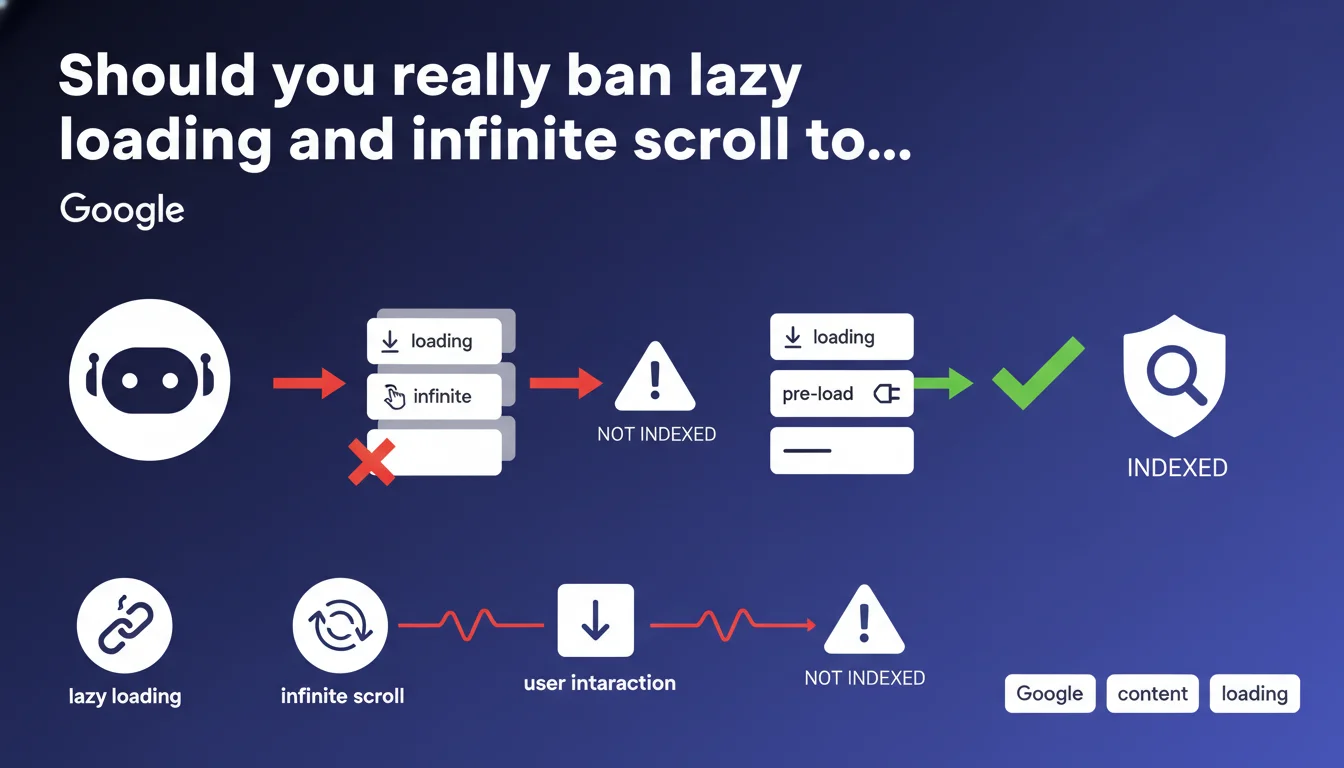
Google states that Googlebot can only index content loaded without user interaction like scrolling. In other words: goodbye to standard lazy loading, goodbye to infinite scroll — unless you find a technical alternative that makes content accessible to the bot. For content-rich sites with dynamic features, this is a major technical constraint.
What you need to understand
This statement highlights a fundamental technical limitation of Googlebot: it doesn't scroll, click, or interact with pages like a human does. If your content requires scrolling to load (lazy loading triggered by scroll, infinite pagination), Googlebot will probably never see it.
The issue mainly affects sites that rely on modern JavaScript techniques to optimize user-side performance. What improves the experience can paradoxically harm indexation.
Why does this limitation still exist?
Googlebot does execute JavaScript — true — but it doesn't simulate complete human behavior. No scrolling, no clicking on "Load more" buttons, no waiting to see if additional content appears.
This approach drastically limits the server resources needed to crawl billions of pages. Simulating full human interaction on every URL would be technically ruinous for Google.
What types of content are affected?
Image galleries with lazy loading, product lists that load as you scroll, dynamically loaded comments or reviews, blog articles with infinite pagination. Any content area whose rendering depends on a user action.
And that's where modern front-end frameworks (React, Vue, Next.js) create problems by implementing these patterns by default.
What is Google's official position on this topic?
Google asks developers to find a technical alternative to load this content in a way accessible to Googlebot. No specific guidance on how to achieve it — just the imperative: "figure it out".
- Googlebot doesn't interact with pages like a user does
- Content loaded on scroll or click is invisible to the bot
- Modern JavaScript frameworks often create this problem by default
- A technical solution exists — but Google doesn't detail it here
- It's up to developers to make their content crawlable
SEO Expert opinion
Is this rule really that strict in practice?
Let's be honest: Google has made enormous progress in JavaScript execution. But this statement reminds us that this progress has clear limits. Standard lazy loading — the kind that waits for a scroll event — remains a blind spot for Googlebot.
What's surprising is that Google continues to promote lazy loading for images (notably via the loading="lazy" attribute) while claiming you should avoid content loaded on scroll. This apparent contradiction deserves clarification. [To verify]
Do real-world observations confirm this statement?
Yes — and no. On sites with infinite pagination, we indeed observe that only content in the first "screen" gets indexed. Following products or articles, loaded on scroll, disappear from the index.
But some sites seem to work around this problem without visible technical modification. Why? Mystery. Either Google has undocumented exceptions, or these sites use pre-rendering techniques invisible to surface-level analysis.
What nuances should be applied to this rule?
The statement refers to "user interaction" broadly. But there are techniques to load dynamic content without interaction: Intersection Observer API with automatic loading once the element enters the virtual viewport, Server-Side Rendering (SSR), Static Site Generation (SSG), progressive hydration.
The real problem isn't JavaScript itself, but the loading trigger. If content loads automatically on first render — even via JS — Googlebot should see it. If it requires a scroll, click, or hover event, game over.
Practical impact and recommendations
What should you do concretely on an existing site?
First step: audit risk areas. Identify any content loaded on scroll, in infinite pagination, or behind a "See more" button. Then test with the URL Inspection tool in Search Console to see what Googlebot actually retrieves.
Second step: implement a viable technical solution. Classic options: full SSR, static generation, or pure HTML fallback for critical content. For e-commerce sites, this might mean replacing infinite scroll with traditional pagination using clickable links.
What mistakes should you absolutely avoid?
Don't assume that "Google crawls JavaScript now so we're fine". Yes, it crawls JS — but with strict constraints. Lazy loading on scroll remains a confirmed blind spot.
Another common mistake: testing only in Chrome developer mode. Just because it displays correctly in your browser doesn't mean Googlebot sees the same thing. Systematically use Search Console or tools like Screaming Frog in "JavaScript rendering" mode.
How do you verify your site is compliant?
Use the URL Inspection tool in Search Console on your critical pages. Compare the rendered HTML with what you see in the browser. If sections are missing in the Googlebot version, you have a problem.
Complement this with a Screaming Frog or OnCrawl crawl in JavaScript rendering mode. Verify that important content appears in the crawled DOM without requiring interaction.
- Audit all lazy loading and infinite scroll implementations
- Test each page type with the Search Console inspection tool
- Compare Googlebot rendering vs standard browser rendering
- Replace infinite scroll with traditional pagination with links
- Implement SSR or SSG for critical pages
- Document areas where dynamic content remains necessary
- Monitor indexation after each technical modification
This technical constraint may seem straightforward in theory, but its implementation on a complex site — particularly e-commerce or media — often requires delicate trade-offs between performance, user experience, and indexation. If you lack deep expertise in JavaScript rendering and front-end architecture, these optimizations can quickly become a headache. To guarantee compliant implementation without sacrificing performance, working with an SEO agency specialized in technical SEO can prove worthwhile — especially if your business depends heavily on organic traffic.
❓ Frequently Asked Questions
Le lazy loading d'images pose-t-il aussi problème pour Googlebot ?
Le Server-Side Rendering (SSR) résout-il définitivement ce problème ?
Peut-on garder le scroll infini pour l'UX et ajouter une pagination cachée pour les bots ?
Les sites qui utilisent du scroll infini et sont bien indexés font comment ?
L'Intersection Observer API peut-elle contourner cette limitation ?
🎥 From the same video 7
Other SEO insights extracted from this same Google Search Central video · published on 07/02/2023
🎥 Watch the full video on YouTube →
💬 Comments (0)
Be the first to comment.