
Official statement
Other statements from this video 6 ▾
- □ Google crawle-t-il vraiment le HTML rendu ou seulement le code source ?
- □ Le DOM dynamique modifié par JavaScript est-il vraiment pris en compte par Google ?
- □ Pourquoi Google indexe-t-il le HTML rendu plutôt que le HTML source ?
- □ Faut-il vraiment abandonner l'inspection de code source au profit de Search Console pour voir ce que Google indexe ?
- □ Pourquoi « Afficher le code source » ne montre-t-il pas ce que Google indexe vraiment ?
- □ Pourquoi le processus de rendu est-il crucial pour le référencement de vos pages ?
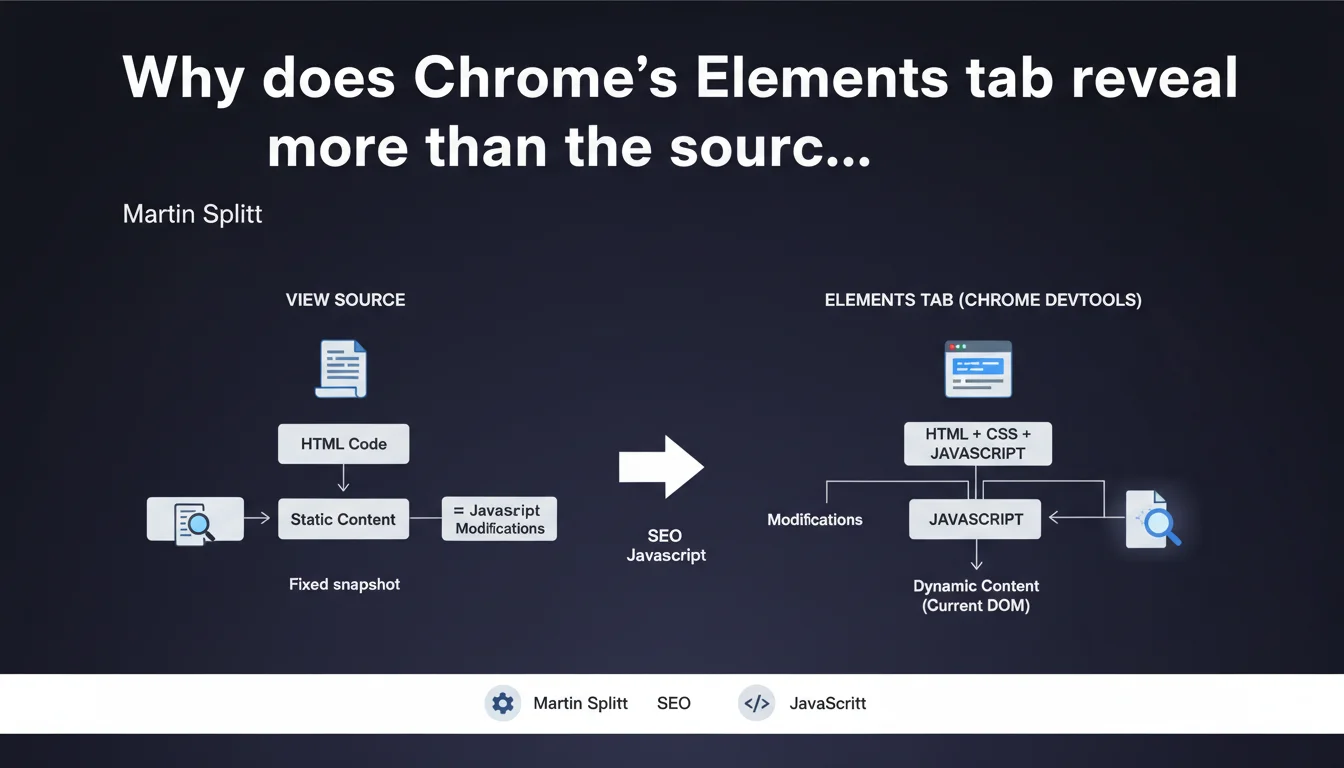
To analyze what Google truly sees on a page, the Elements tab in DevTools shows the DOM after JavaScript execution — unlike "View Source" which displays the raw initial HTML. It's the difference between the code sent by the server and what actually displays in the browser after JS manipulation.
What you need to understand
What's the real difference between View Source and the Elements tab?
View Source displays the raw HTML exactly as sent by the server — before any JavaScript execution. It's a static snapshot of the initial code.
The Elements tab in DevTools (Chrome) or its equivalent (Firefox, Safari) shows the live DOM, meaning the HTML structure as it exists in the browser after all JavaScript modifications. If your site loads content via JS, the Elements tab reflects these changes — View Source never does.
Why does Google emphasize this distinction so much?
Googlebot has been executing JavaScript for years, but it doesn't always see exactly what a user sees. The Elements tab lets you verify whether content manipulated via JS is actually present in the DOM at render time.
This is crucial for diagnosing indexation issues: if content only appears through late or conditional JS, View Source will never show it — but Elements will. And if Elements doesn't show it, Google probably won't see it either.
What are concrete use cases for an SEO?
Imagine an e-commerce site where product descriptions load via Ajax after user interaction. View Source will display an empty container. The Elements tab will reveal whether the content successfully injected into the DOM.
Another scenario: verifying that your dynamic meta tags (title, description generated via JS) are actually present in the DOM before Googlebot renders the page. If they don't appear in Elements, they don't exist for the search engine.
- View Source = initial code sent by the server, without JS
- Elements tab = current state of the DOM after JavaScript execution
- Use Elements to diagnose JS content indexation issues
- If an element doesn't appear in Elements, Googlebot probably won't see it
- Combine with the URL inspection tool (Search Console) to validate what Google actually renders
SEO Expert opinion
Is this distinction really reliable for diagnosing Googlebot behavior?
Yes and no. The Elements tab shows what your browser displays — with your configuration, cookies, and geolocation. Googlebot renders pages differently: no persistent cookies, generally US IP, stricter timeouts.
Result? Elements is a first indicator, but not an absolute truth. You need to cross-reference with the Search Console URL inspection tool, which shows the render exactly as Google saw it. [Verify] under real conditions before concluding a problem is fixed.
What common errors does this approach reveal?
Many sites load essential content after a delay (aggressive lazy loading, late React/Vue hydration). View Source shows nothing, Elements displays the content if you wait — but Googlebot doesn't wait indefinitely.
Another pitfall: some developers test with Elements after user interaction (click, scroll). Googlebot doesn't click or scroll automatically. If content only appears after these actions, it remains invisible to the engine. Elements alone isn't enough — you must test without interaction, just after initial load.
When is View Source still relevant?
For checking initial structured HTML: Open Graph tags, server-side injected Schema.org, critical structured data. If these elements are already present in View Source, that's ideal — Google sees them immediately, without waiting for JS rendering.
View Source is also useful for detecting cloaking or differences between server HTML and client DOM. If View Source shows content invisible in Elements, something's wrong — potentially JS masking or modifying content afterward.
Practical impact and recommendations
How do I concretely verify what Google sees on my site?
Open a page in private browsing to avoid cache or cookie bias. Launch Chrome DevTools (F12 or Cmd+Opt+I), Elements tab. Wait 5-6 seconds without interacting — that's roughly the average time Googlebot allows for rendering.
Compare with View Source (right-click > View page source). If critical elements (H1 tags, paragraphs, internal links, schema.org) only appear in Elements and not in View Source, they depend on JavaScript. Then verify with the URL inspection tool in Search Console to confirm Google actually sees them.
What if essential content doesn't appear in Elements?
First step: check the JavaScript logs in DevTools Console tab. JS errors, blocked resources, timeouts — anything preventing proper DOM rendering.
Second step: test the page with a Googlebot user-agent using tools like Screaming Frog or OnCrawl. Some sites serve different content based on user-agent, intentionally or not (misconfigured CDN, aggressive mobile detection).
If content only appears after user interaction (scroll, click), you need to redesign: prioritize a complete initial render or at minimum static HTML fallback for critical content.
What errors must you absolutely avoid?
- Never rely solely on View Source to diagnose indexation issues on a JS site
- Don't assume that if Elements shows content, Google sees it — always cross-reference with Search Console
- Avoid loading critical SEO content after more than 3-4 seconds of JS delay
- Don't test Elements after manual interaction (scroll, click) — Googlebot won't do that
- Don't ignore Console errors that prevent proper DOM rendering
- Never block essential JS/CSS resources needed for rendering in robots.txt
The Elements tab reveals the real DOM after JavaScript execution, unlike View Source which shows raw HTML. It's an essential diagnostic tool for any modern site, but it doesn't replace testing with Google's URL inspection tool.
The growing complexity of front-end architectures (React, Vue, Next.js, deferred hydration) makes these diagnostics technical. If you notice significant discrepancies between View Source and Elements, or if your content doesn't consistently appear in Google's rendering, a thorough technical audit is needed. In these cases, engaging a specialized technical SEO agency can accelerate identification and resolution of blocking issues, especially if your development teams aren't familiar with JavaScript rendering specifics for search engines.
❓ Frequently Asked Questions
L'onglet Elements montre-t-il exactement ce que Googlebot voit ?
Si mon contenu apparaît dans Elements mais pas dans View Source, est-ce un problème pour le SEO ?
Pourquoi certains éléments visibles à l'écran n'apparaissent-ils pas dans Elements ?
Dois-je éviter tout contenu chargé en JavaScript pour le SEO ?
Comment tester mon site comme si j'étais Googlebot ?
🎥 From the same video 6
Other SEO insights extracted from this same Google Search Central video · published on 06/07/2022
🎥 Watch the full video on YouTube →
💬 Comments (0)
Be the first to comment.