
Official statement
Other statements from this video 6 ▾
- □ Le DOM dynamique modifié par JavaScript est-il vraiment pris en compte par Google ?
- □ Pourquoi Google indexe-t-il le HTML rendu plutôt que le HTML source ?
- □ Faut-il vraiment abandonner l'inspection de code source au profit de Search Console pour voir ce que Google indexe ?
- □ Pourquoi « Afficher le code source » ne montre-t-il pas ce que Google indexe vraiment ?
- □ Pourquoi le processus de rendu est-il crucial pour le référencement de vos pages ?
- □ Pourquoi l'onglet Elements de Chrome révèle-t-il plus que le code source pour le SEO ?
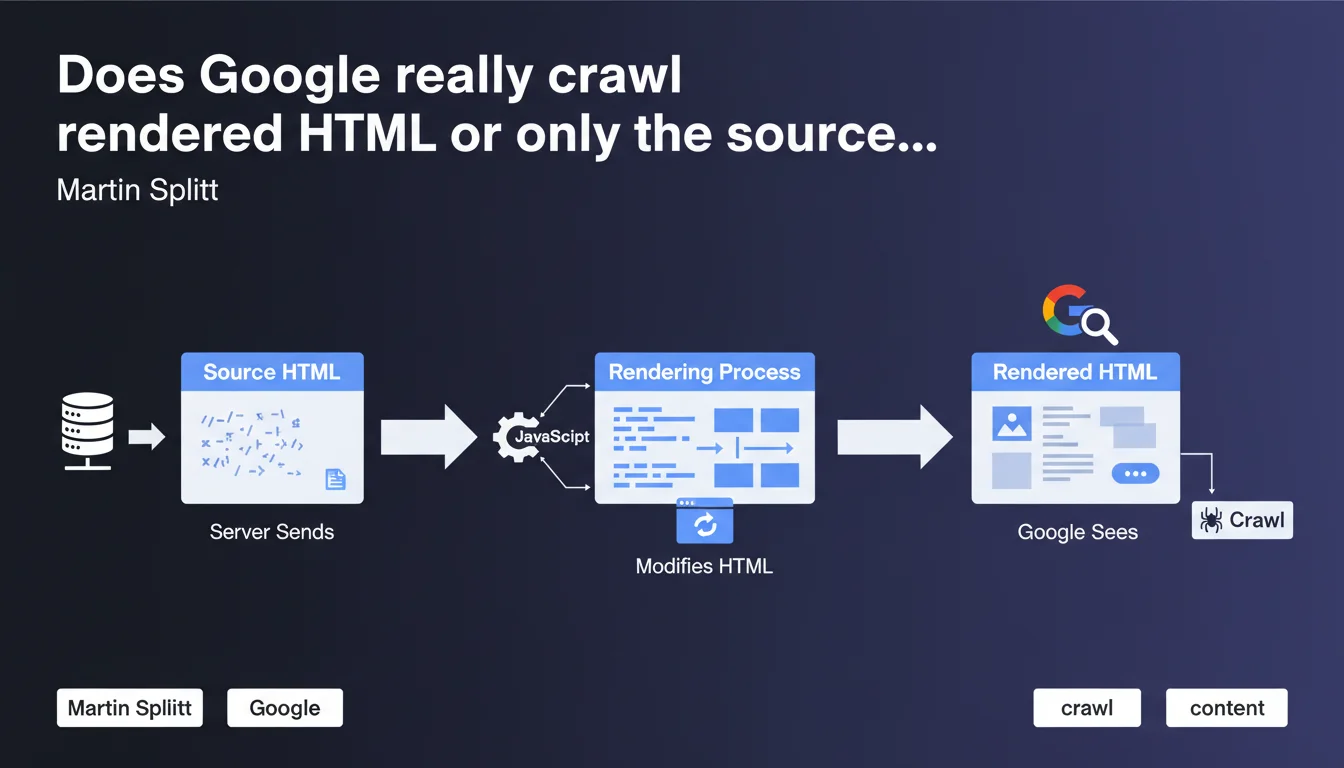
Google analyzes rendered HTML after JavaScript execution, not just the initial source code sent by the server. For sites using JavaScript to generate content, this distinction is critical: what you see in the source code can differ drastically from what Googlebot actually indexes.
What you need to understand
What is the difference between source HTML and rendered HTML?
The source HTML corresponds to the raw code sent by your server to the browser or Googlebot — this is what you see when you "View page source" in Chrome. The rendered HTML, on the other hand, is the final result after JavaScript has modified the DOM: adding content, removing elements, various transformations.
For a typical static website, these two versions are identical. But as soon as a modern framework (React, Vue, Angular) comes into play, the gap can become massive. Some pages send nearly empty source HTML, then inject all content via client-side JavaScript.
Why is Google clarifying this point now?
This clarification is not trivial — it definitively buries the myth that Googlebot merely accepts raw HTML without executing JavaScript. The rendering process is a distinct step from initial crawling, involving additional resources and potential delays.
Google wants SEO professionals to understand one simple thing: if your critical content exists only in rendered HTML, you are entirely dependent on Google's ability to execute your JavaScript correctly. And that's a gamble.
How does Google concretely process rendered HTML?
The process follows two distinct phases. First, Googlebot crawls the URL and retrieves the source HTML. Then — and this is crucial — the page enters a rendering queue where Google executes JavaScript using a version of Chrome (Chromium, to be precise).
Between these two steps, a delay can occur — sometimes a few hours, sometimes several days depending on available resources and your site's priority. During this time, only the source HTML is known to Google.
- The source HTML is crawled first, immediately
- JavaScript rendering occurs in a second phase, with variable delay
- Google indexes the final result after rendering, not the initial source code
- Blocked resources (CSS/JS) can prevent proper rendering
- Content loaded via lazy loading or user interactions may escape rendering
SEO Expert opinion
Does this statement really reflect what we observe in practice?
Yes and no. Google does indeed execute JavaScript, this is an established fact for years now. However, the quality and reliability of this rendering remain variable. We regularly observe cases where content present in rendered HTML is not indexed, or vice versa — content absent from the final render that persists in the index.
The real problem? Google says nothing about the conditions for rendering failure. Timeouts that are too short, blocked resources, unhandled JavaScript errors, external dependencies that fail — so many scenarios where rendering can fail silently. [To verify]: Google has never published metrics on rendering failure rates or applied timeouts.
What are the unspoken limitations of this statement?
Martin Splitt remains evasive on several critical points. How long does Google wait before considering a page "rendered"? What is the depth of JavaScript execution tolerated? Are user events (scroll, click) simulated?
Tests show that Google does not simulate user interactions — any content hidden behind a click or infinite scroll risks never being rendered. Similarly, aggressive lazy loading can be problematic if content is only triggered by scrolling.
Should you ban client-side JavaScript altogether?
No, and this is where many SEO professionals go wrong. JavaScript is not the enemy — the enemy is total dependence on JavaScript to display critical content. A well-architected React site with SSR (Server-Side Rendering) or statically pre-rendered content poses no problem.
The danger lies in poorly configured SPAs (Single Page Applications) that send empty HTML shells and build everything client-side. There, you are playing Russian roulette with indexation. Even if Google renders the page correctly 95% of the time, it's the remaining 5% that can kill your rankings.
Practical impact and recommendations
How to verify that Google sees your rendered HTML correctly?
Use the URL inspection tool in Google Search Console — it shows you exactly the rendered HTML as Googlebot perceives it. Compare it with your source HTML. If discrepancies appear, that's normal. If critical content is missing, that's problematic.
The "Test live URL" tool is even more powerful: it forces a fresh render in real time and displays any JavaScript errors. Scrutinize the "Coverage" section to detect blocked resources that could sabotage rendering.
What errors should you avoid to guarantee optimal rendering?
First common mistake: blocking CSS/JS resources in robots.txt. If Google cannot load your JavaScript files, it cannot render the page. Verify that all critical assets are crawlable.
Second pitfall: server timeouts that are too long. If your JavaScript makes API calls that take 10 seconds to respond, Google may abandon rendering before completion. Optimize your response times or switch to pre-rendering.
Third mistake: relying on user events to load content. Google does not scroll, click, or hover. Any content requiring human interaction will be invisible to the bot.
- Regularly check rendered HTML via Search Console for your strategic pages
- Unblock all CSS/JS resources in robots.txt
- Implement SSR or static pre-rendering for critical content
- Avoid aggressive lazy loading on priority content
- Test your pages with JavaScript disabled to identify critical dependencies
- Monitor JavaScript errors in Search Console (Coverage section)
- Optimize API response times to stay under rendering timeouts
- Use HTML fallbacks for essential content (progressive enhancement)
❓ Frequently Asked Questions
Google indexe-t-il le HTML source ou le HTML rendu ?
Combien de temps Google met-il pour rendre une page JavaScript ?
Dois-je abandonner JavaScript pour améliorer mon SEO ?
Comment vérifier que Google rend correctement mes pages ?
Google simule-t-il le scroll ou les clics lors du rendu ?
🎥 From the same video 6
Other SEO insights extracted from this same Google Search Central video · published on 06/07/2022
🎥 Watch the full video on YouTube →
💬 Comments (0)
Be the first to comment.