
Official statement
Other statements from this video 6 ▾
- □ Google crawle-t-il vraiment le HTML rendu ou seulement le code source ?
- □ Le DOM dynamique modifié par JavaScript est-il vraiment pris en compte par Google ?
- □ Faut-il vraiment abandonner l'inspection de code source au profit de Search Console pour voir ce que Google indexe ?
- □ Pourquoi « Afficher le code source » ne montre-t-il pas ce que Google indexe vraiment ?
- □ Pourquoi le processus de rendu est-il crucial pour le référencement de vos pages ?
- □ Pourquoi l'onglet Elements de Chrome révèle-t-il plus que le code source pour le SEO ?
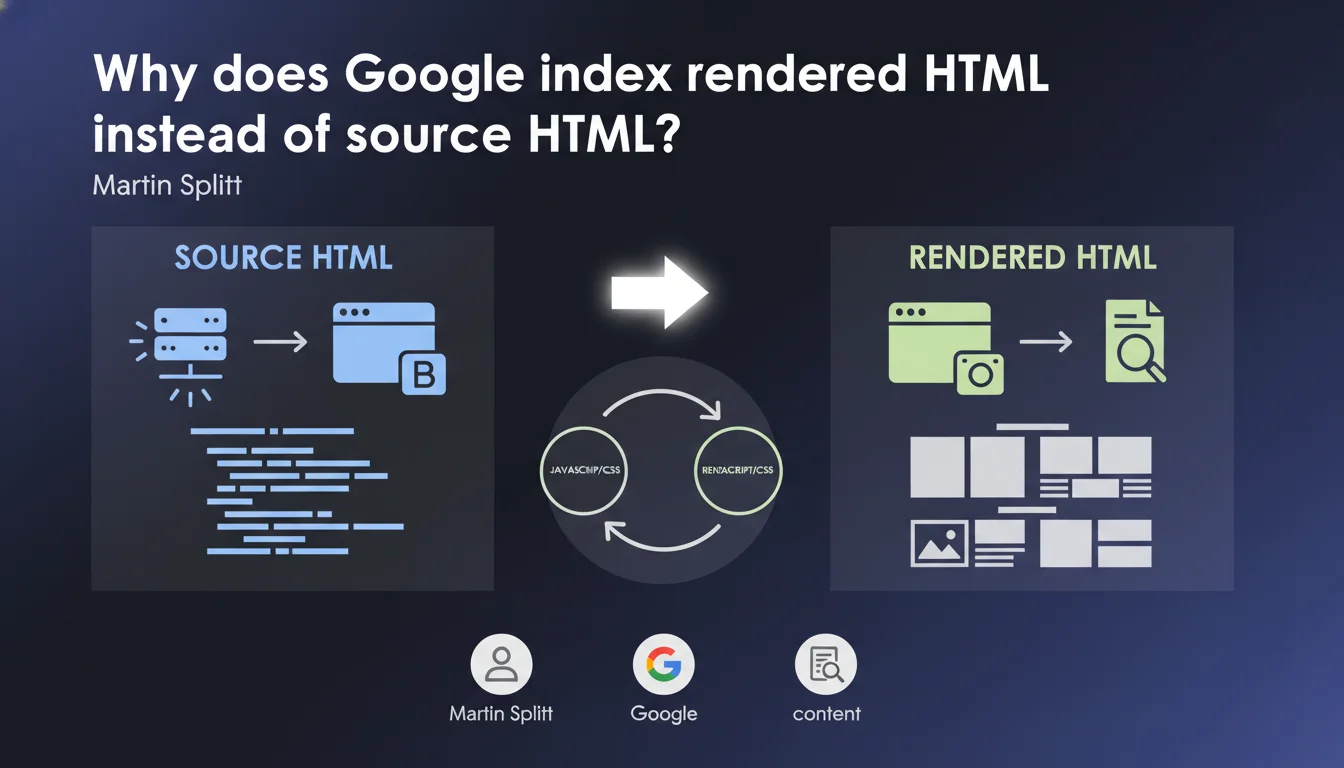
Google indexes rendered HTML (the DOM transformed into HTML), not source HTML (what the server initially sends). This technical distinction has major consequences for any site using JavaScript to display content. If your content displays on the client side, you absolutely must verify that Googlebot sees it in the final render.
What you need to understand
What is the concrete difference between source HTML and rendered HTML?
The source HTML corresponds to the raw code returned by your server when a browser (or bot) makes a request. This is what you see when you "View Page Source" in your browser.
The rendered HTML is the DOM snapshot after JavaScript has done its work: content manipulation, asynchronous loading, dynamic modifications. Google takes this snapshot at a specific moment in time — and that's what it indexes.
Why is this distinction problematic for SEO?
Because many modern sites (React, Vue, Angular, misconfigured Next.js) send nearly empty source HTML and build all content on the client side. If your server returns a <div id="root"></div> and the JavaScript handles the rest, Googlebot must execute that JavaScript to see your content.
The problem? JavaScript execution is not instantaneous, it's resource-intensive, and Google does not guarantee it will see everything if your JS is slow or buggy. Between source HTML and rendered HTML, there can be a huge gap — and that gap kills your indexation.
How does Google capture this rendered snapshot?
Google uses a headless browser (Chrome) to execute your JavaScript and generate the render. But be careful: this snapshot is taken at a specific moment, after a given delay. If your content loads late (aggressive lazy loading, slow API calls), it may never appear in the indexed snapshot.
- Source HTML = what your server initially sends, without JS execution
- Rendered HTML = DOM snapshot transformed into HTML after JavaScript execution
- Google indexes rendered HTML, not source — so content invisible in the render is invisible to Google
- JavaScript execution by Googlebot is not guaranteed to be instantaneous or exhaustive
- Sites serving empty content in source HTML take a major indexation risk
SEO Expert opinion
Is this statement consistent with observations in the field?
Yes, completely. We regularly observe React and Vue sites using CSR (Client-Side Rendering) that struggle to be indexed correctly. The "URL Inspection" tool in Search Console clearly shows the difference between source HTML and rendered HTML — and it's the rendered version that matters.
But there's a nuance: Google attempts to execute JavaScript, but that doesn't mean it always does so perfectly. Timeouts, JS errors, blocked resources (by robots.txt or CSP), slow external dependencies — all of this can prevent complete rendering. And when it fails, your content doesn't exist for Google.
What are the pitfalls this statement doesn't mention?
Martin Splitt doesn't discuss the delay between crawling and rendering. Google crawls the source HTML first, then queues up JavaScript rendering — this can take several days on a low crawl budget site. During that time, your content isn't indexed.
Another overlooked point: render instability. If your content changes between two snapshots (because it depends on an external API, an A/B test, a timestamp), Google might see different content on each pass. Result: inconsistency in indexation, even deindexation. [To verify]: Google doesn't communicate clearly about how frequently these snapshots are updated or their stability over time.
In what cases does this distinction become critical?
Three scenarios to watch closely:
- E-commerce sites in SPA: if your product pages load via JS, Google may see empty pages. I've seen entire catalogs lose their indexation because of this.
- Multilingual sites with JS: if language switches client-side without SSR, Google might index the wrong language or an inconsistent mix.
- Personalized/geolocation-based content: if your content varies by IP or user-agent, Google's snapshot might not reflect what the actual user sees.
Practical impact and recommendations
What do you need to verify concretely on your site?
First step: compare source HTML and rendered HTML. Open your site, hit "View Page Source", then look at the "Inspect Element" tab (live DOM). If your main content only exists in the second one, you have a problem.
Second verification: use the URL Inspection tool in Google Search Console. Look at the render screenshot and rendered HTML. Compare with what you see in normal navigation. If Google sees an empty or incomplete page, you're losing indexation.
What solutions should you adopt to avoid indexation issues?
If you're running pure CSR (Client-Side Rendering), switch to SSR (Server-Side Rendering) or SSG (Static Site Generation). Next.js, Nuxt, SvelteKit — all these frameworks allow you to serve already-rendered HTML on the server side. Your source HTML will directly contain the content, not an empty shell.
If you can't migrate immediately, implement pre-rendering for critical pages: use a service like Prerender.io or Rendertron to serve static HTML to bots. But be careful — this is a bandage solution, not a long-term strategy.
How do you ensure that Google's render is stable over time?
Set up monitoring of rendered HTML using tools like OnCrawl, Botify, or Screaming Frog (with JavaScript rendering enabled). Crawl your site regularly and compare rendered snapshots to detect content variations.
Also verify that your JavaScript doesn't generate silent errors that would prevent Googlebot from completing the render. Console errors can block JS execution by Googlebot without you knowing.
- Verify that your main content exists in source HTML, not just in JS render
- Use the URL Inspection tool in Search Console to see what Googlebot actually sees
- Regularly compare source HTML and rendered HTML on your strategic pages
- If you're running pure CSR, migrate to SSR or SSG to serve already-rendered HTML
- Set up monitoring of JavaScript rendering to detect regressions
- Test that your JavaScript executes without errors on bot side (not just on regular browsers)
- Avoid lazy loading for main content visible above the fold
❓ Frequently Asked Questions
Est-ce que Google indexe aussi l'HTML source ou uniquement le rendu ?
Combien de temps Google met-il pour rendre le JavaScript après le crawl initial ?
Le pre-rendering pour les bots est-il considéré comme du cloaking par Google ?
Comment vérifier rapidement si mon contenu est visible dans l'HTML rendu par Google ?
Un site en SSR (Server-Side Rendering) a-t-il toujours un avantage SEO sur du CSR ?
🎥 From the same video 6
Other SEO insights extracted from this same Google Search Central video · published on 06/07/2022
🎥 Watch the full video on YouTube →
💬 Comments (0)
Be the first to comment.