
Official statement
Other statements from this video 6 ▾
- □ Does Google really crawl rendered HTML or only the source code?
- □ Does Google really index DOM changes made by JavaScript after the page loads?
- □ Why does Google index rendered HTML instead of source HTML?
- □ Should you really ditch source code inspection and switch to Search Console to see what Google actually indexes?
- □ Is your rendering process preventing Google from indexing your actual content?
- □ Why does Chrome's Elements tab reveal more than the source code for SEO?
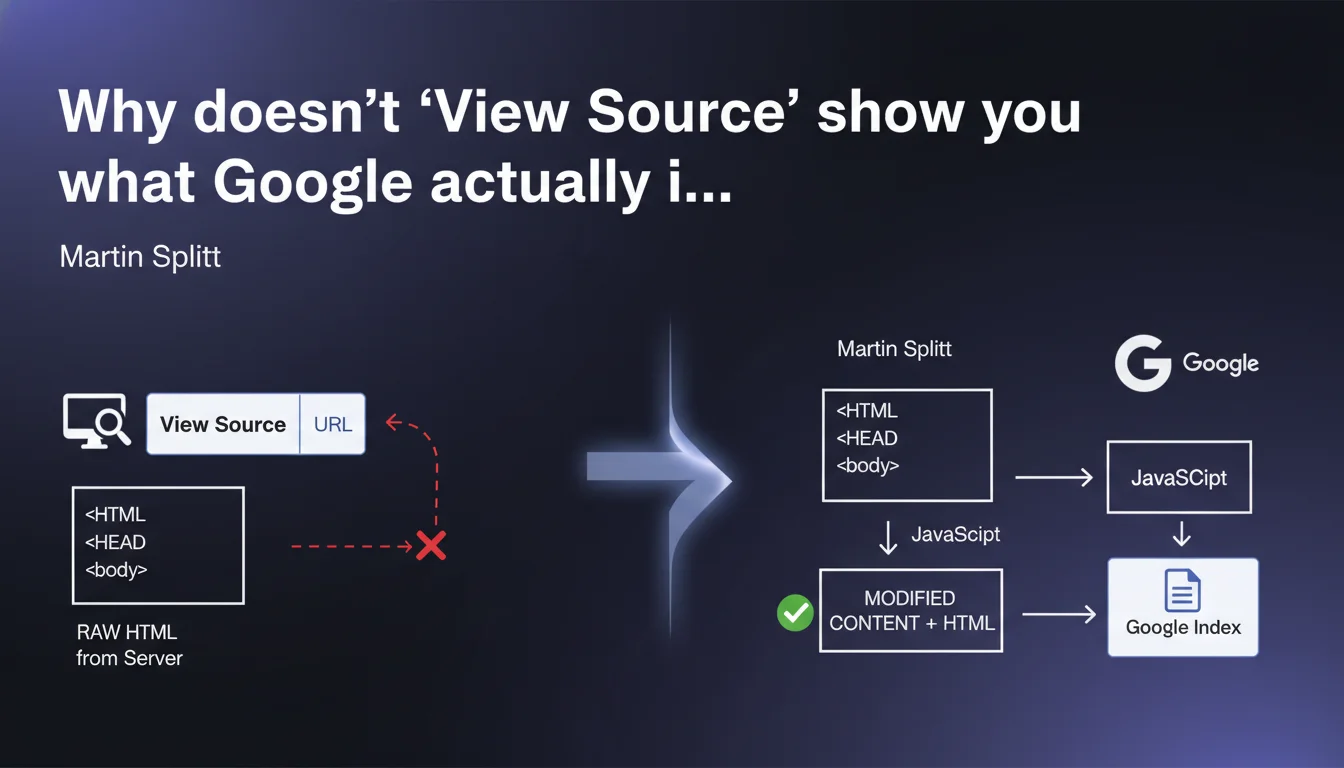
The raw HTML displayed via 'View Source' or 'view-source:' does not match the final DOM that Google indexes. Any content injected by JavaScript after the initial page load escapes this visualization. To diagnose what Googlebot actually sees, you need to rely on tools like the Google Search Console URL Inspection Tool or complete rendering tests.
What you need to understand
What's the difference between source HTML and rendered DOM?
The source HTML is the raw response sent by the server at the moment of the initial request. It's a frozen snapshot of the code before any client-side JavaScript execution.
The rendered DOM, on the other hand, is the result of all transformations applied by the browser: script execution, DOM manipulation, asynchronous content loading. This final state is what Google analyzes during indexing, especially for JavaScript-heavy sites (React, Vue, Angular).
Why does this distinction create problems in SEO?
Many practitioners still rely on 'view-source' to verify the presence of critical tags: title, meta description, heading tags, text content. If these elements are injected dynamically by JavaScript, they won't appear in the source code — but Google may very well see and index them.
Conversely, content visible in the source but hidden by JavaScript (display:none applied after loading) may be ignored or devalued by Google. The gap between these two views of the site creates blind spots in standard SEO audits.
How does Google handle JavaScript rendering?
Googlebot uses a rendering engine based on Chromium (formerly based on a Chrome version). It executes JavaScript, waits for the DOM to stabilize, then indexes the final result. This process introduces a delay — the "indexing wave" — which can delay the indexing of JS-based content compared to static HTML.
The problem: not all scripts are executed reliably. JavaScript errors, timeouts, resources blocked by robots.txt, missing dependencies… so many pitfalls that can cause rendering to fail.
- Source HTML is what the server sends immediately.
- Rendered DOM is the result after complete JavaScript execution.
- Google indexes the rendered DOM, not the raw source HTML.
- 'View Source' is no longer sufficient to diagnose the real indexability of a modern site.
- JavaScript errors can prevent Google from seeing content that is visible to users.
SEO Expert opinion
Does this statement reflect real-world reality?
Yes, but with important nuances. Google does index the rendered DOM, but the quality of rendering varies depending on site complexity and resources allocated to crawling. On massive e-commerce sites or SaaS platforms, we regularly observe discrepancies between what the inspection tool shows and what is actually indexed.
A frequent case: a product displayed correctly in the inspection tool but never indexed in production, often due to rendering quotas or timeouts on Googlebot's side. [To verify]: Google doesn't publicly communicate precise limits on the time allocated to JS rendering per page, making diagnostic work purely empirical.
What errors does this lack of knowledge cause?
Many SEO audits still miss critical issues because they rely on crawlers that don't render JavaScript — or render it poorly. Result: incorrect recommendations ('add a title to the HTML' when it's injected via JS and works) or, worse, invisible content being overlooked.
Another classic trap: validating page indexation via 'view-source' when critical content depends on an asynchronous API call that regularly fails on Googlebot's side. The site appears to work, but Google indexes empty shells.
Should you abandon static HTML altogether?
No. Let's be honest: static HTML remains the most reliable approach for guaranteeing fast and predictable indexation. When possible, injecting critical content directly server-side (SSR, pre-rendering) eliminates any dependency on JS rendering and associated uncertainties.
JavaScript isn't a problem in itself — Google handles it fairly well in 2025. But it introduces an extra layer of complexity and potential failure points that you can avoid by returning to SSR or static site generation (SSG) where appropriate.
Practical impact and recommendations
How do you verify what Google actually sees?
Forget 'view-source'. Use the URL Inspection Tool in Google Search Console. It simulates complete Googlebot rendering and displays the final DOM, including screenshots. It's the absolute reference for diagnosing JavaScript-related indexation issues.
Supplement with third-party tools capable of rendering JS: Screaming Frog in JavaScript mode, OnCrawl, Botify… Be aware, however: their rendering engine is never strictly identical to Google's. In case of doubt, Search Console is the authority.
What errors should you avoid during audits?
Never rely solely on a non-JS crawl to validate the indexability of a modern site. It's the best way to miss critical content or, conversely, to recommend unnecessary fixes.
Another frequent error: testing indexation on a dev environment where JS works perfectly, without verifying that the same resources (CDN, API, third-party JS files) are accessible to Googlebot in production. Result: total discrepancy between what you see and what Google indexes.
- Use the URL Inspection Tool in Google Search Console to see the DOM rendered by Google.
- Compare the source HTML (view-source) and final DOM (DevTools > Elements) to identify content injected by JS.
- Verify that all critical JS resources are accessible (not blocked by robots.txt or CORS headers).
- Test rendering with a JS crawler (Screaming Frog, OnCrawl) in addition to Search Console.
- Monitor JavaScript errors in Search Console (Coverage tab > Excluded).
- For e-commerce sites or high-traffic sites, prioritize SSR or pre-rendering on strategic pages (category pages, product sheets).
- If persistent gaps exist between expected rendering and actual indexation, audit timeouts, crawl quotas, and blocked resources.
❓ Frequently Asked Questions
Est-ce que Google indexe toujours le contenu injecté par JavaScript ?
L'outil d'inspection d'URL montre un rendu parfait, mais la page n'est pas indexée. Pourquoi ?
Faut-il bloquer JavaScript dans robots.txt pour forcer Google à indexer le HTML source ?
Le SSR est-il obligatoire pour un site JavaScript ?
Peut-on se fier à Screaming Frog pour vérifier ce que Google indexe ?
🎥 From the same video 6
Other SEO insights extracted from this same Google Search Central video · published on 06/07/2022
🎥 Watch the full video on YouTube →
💬 Comments (0)
Be the first to comment.