
Official statement
Other statements from this video 4 ▾
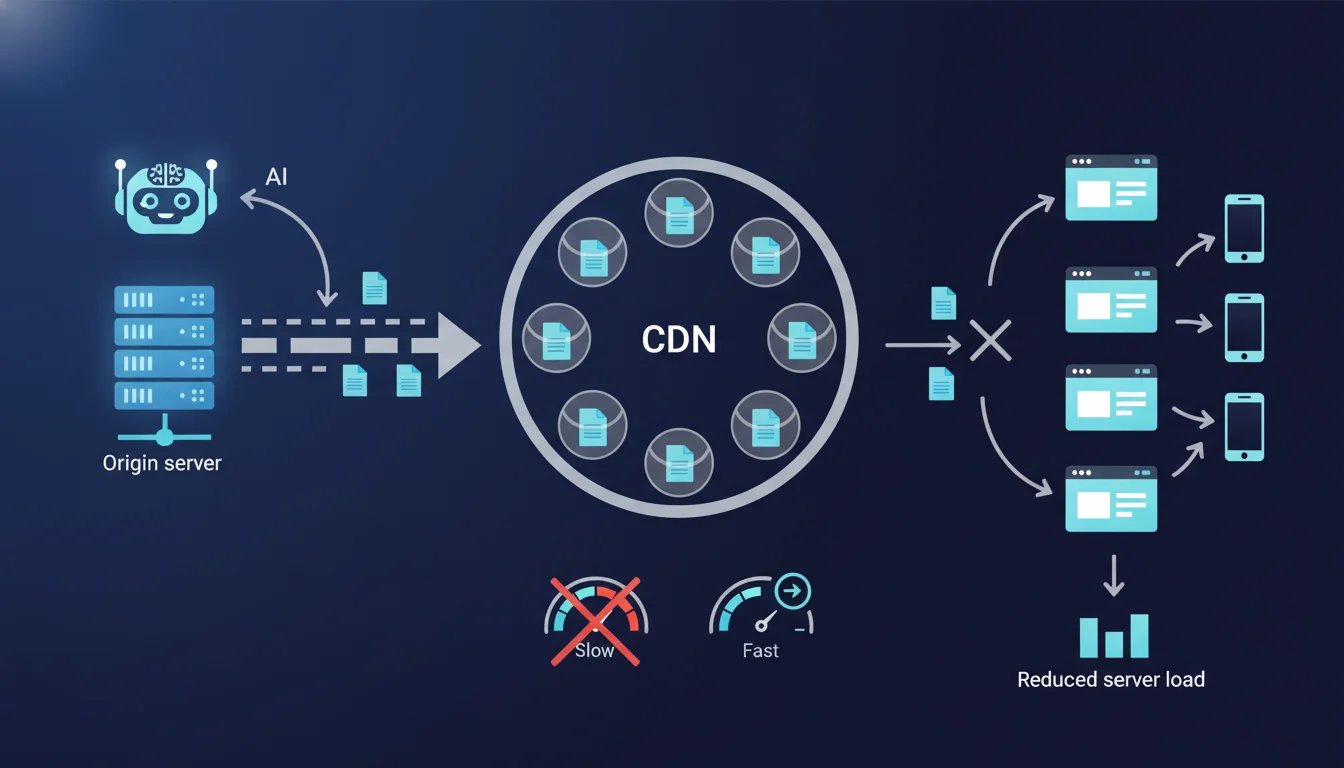
Google confirms that CDNs must first fetch resources from the origin server before caching them. This initial phase creates a full server load, sometimes exceeding it if the CDN multiplies requests. For a high-traffic site or a fragile server, this first wave can lead to critical slowdowns or even timeouts that harm crawling.
What you need to understand
What really happens during the first access to a resource via CDN?
When a user or Googlebot requests a page that has never been served by your CDN, it must first fetch it from your origin server. The CDN acts as an intermediary: it receives the request, sees that the resource does not exist in its cache (a cache miss), queries your server, retrieves the response, stores it locally, and then sends it back to the requester.
This process is seamless once the cache is warm, but the initial filling phase directly exposes your infrastructure. If your server takes 800 ms to generate a complex page, the CDN doesn't change anything during the first hit: the user waits 800 ms + network latency.
Why can this initial load become problematic?
A CDN distributes its points of presence (PoP) across multiple continents. Each PoP maintains its own cache. If your site receives worldwide traffic simultaneously, you may suffer from dozens of parallel cache misses from different PoPs requesting the same resource.
In concrete terms: if 15 PoPs discover a new page at the same time, your server receives 15 concurrent requests. For a fragile backend (shared hosting, undersized database), this is equivalent to an unintentional mini DDoS.
The phenomenon worsens during a massive deployment: new site version, complete CDN cache purge, URL redesign. The cache empties, and the first wave of Google crawl or user traffic hits your origin with the force of a site without a CDN.
Can the CDN protect my server during this phase?
Some CDNs offer cache shield or origin shielding features: an intermediate PoP acts as a unique proxy between all edge servers and your origin. The multiple cache misses converge to this shield, which only sends one request to your server.
However, not all CDNs enable this by default, and some hosts offer basic CDNs without this protection. If your infrastructure cannot tolerate spikes, you need to check this configuration before launching the CDN in production.
- Cache miss: first request to a resource that has never been served by the CDN, which directly calls the origin server
- Cache shield: mechanism for pooling cache misses among PoPs to limit server load
- Mass invalidation: complete purge of the CDN cache that forces a total re-filling, equivalent to launching a new site
- Geographically dispersed PoPs can generate simultaneous requests to the origin if no shield exists
- An undersized server can fail during the initial filling despite the presence of a CDN
SEO Expert opinion
Does this statement reflect the real-world situation of CDN deployments?
Yes, and that’s even an understatement. I have seen CDN migrations crash production WordPress servers because no one anticipated the simultaneous filling of 40 Cloudflare PoPs. The site was running fine without a CDN (low traffic, European users), but once activated, Googlebot triggered global crawling via several edge servers.
The issue goes beyond simple CPU load. Poorly indexed databases explode under concurrent requests, PHP sessions saturate, MySQL connections hit their max_connections. The CDN does not protect against a flawed application architecture.
When does this rule become really critical?
Three typical cases deserve extreme vigilance. First case: e-commerce sites with dynamic catalogs and personalization. Each product URL generates a complex database request; if 20 PoPs request 500 product sheets simultaneously, that’s 10,000 SQL queries in a few seconds.
Second case: redesigns with a massive URL change. Google discovers thousands of new pages at once. If the CDN cache is empty, the initial crawl hits the origin directly. [To verify]: some observe that Google temporarily intensifies crawling after detecting a redesign, which could exacerbate the load.
Third case: sites hosted on shared or low-end VPS hosting. I/O and RAM limits make it impossible to absorb a spike. Activating a CDN without a shield on this type of infrastructure essentially shifts the bottleneck without resolving it.
What nuances should be added to Google's assertion?
Google does not specify that some modern CDNs implement predictive prefetching: they analyze traffic and pre-fill the cache of popular resources even before a user requests them. Cloudflare offers Argo Smart Routing, Fastly has similar algorithms.
Another blind spot: cache warming strategies. Before switching real traffic, you can script an internal crawler that navigates the site via the CDN to gradually fill the cache. This smooths out the load and avoids a sudden spike. Google doesn't mention it, but it’s a common practice among professionals.
Practical impact and recommendations
What should be checked before activating a CDN on a production site?
Start with a server capacity audit. Run a load test with a tool like k6 or Locust: simulate 50 simultaneous requests on your heaviest pages. If the server shows signs of weakness (increased TTFB, 503 errors), the CDN will worsen the problem during the initial filling.
Then check if your CDN offers an origin shield and enable it. At Cloudflare, it's a paid option (Enterprise plan or via Argo). At Fastly, it's native but requires explicit configuration. A well-placed shield geographically can divide the load on your origin by 10.
How to orchestrate a CDN deployment without breaking the server?
Adopt a progressive approach. Start by caching only static assets (CSS, JS, images): they generate little server load and allow testing the CDN mechanism without risk. Once the cache is warm on these resources, gradually expand to HTML pages.
If you are migrating a large site, use a cache warming script before pointing the DNS to the CDN. Crawl your sitemap via the CDN CNAME with a delay between requests to avoid saturating the origin. Screaming Frog can do this by configuring a custom user-agent and appropriate throttling.
Monitor server metrics during the 48 hours following activation: CPU load, MySQL queries per second, average TTFB. If you detect a drift, increase the CDN cache TTLs to reduce the revalidation frequency.
What signals indicate a cache filling issue?
The first signal: a sudden spike in TTFB visible in Search Console (Core Web Vitals report) or in your CDN logs. If the median TTFB jumps from 300 ms to 1.2 s after activating the CDN, it’s a sign that the origin is struggling.
The second signal: sporadic 503 or 504 errors in the logs. The CDN attempts to fetch the page, but the server times out. These errors are reported to Google and can temporarily degrade crawling. The third signal: an abnormally low cache hit rate in the CDN analytics (below 70% after 24 hours of activation).
- Enable origin shield if available to pool cache misses among PoPs
- Test server capacity with a load test before CDN deployment
- Start by caching only static assets, then gradually expand
- Use a cache warming script to pre-fill the CDN before DNS switch
- Monitor TTFB, cache hit rate, and 5xx errors for 48 hours post-activation
- Increase cache TTLs if the server shows signs of overload
❓ Frequently Asked Questions
Le CDN améliore-t-il vraiment le SEO si le serveur d'origine est lent ?
Combien de temps faut-il pour qu'un cache CDN soit considéré comme chaud ?
Tous les CDN proposent-ils un origin shield par défaut ?
Un serveur mutualisé peut-il supporter le remplissage d'un CDN multi-PoP ?
Le cache warming manuel peut-il pénaliser le crawl budget Google ?
🎥 From the same video 4
Other SEO insights extracted from this same Google Search Central video · duration 8 min · published on 11/11/2026
🎥 Watch the full video on YouTube →
💬 Comments (0)
Be the first to comment.