
Official statement
Other statements from this video 11 ▾
- □ Le JavaScript est-il vraiment un frein aux performances SEO de votre site ?
- □ Pourquoi trop de fichiers JavaScript nuisent-ils à vos performances SEO ?
- □ PageSpeed Insights révèle-t-il vraiment les problèmes JavaScript critiques pour votre SEO ?
- □ Faut-il vraiment regrouper ses fichiers JavaScript pour améliorer son SEO ?
- □ Faut-il vraiment limiter le nombre de domaines pour charger vos fichiers JavaScript ?
- □ Comment éliminer le JavaScript inefficace qui plombe vos Core Web Vitals ?
- □ Les passive listeners peuvent-ils vraiment booster vos Core Web Vitals ?
- □ Pourquoi le JavaScript non utilisé plombe-t-il vos Core Web Vitals même s'il n'est jamais exécuté ?
- □ Le tree shaking JavaScript est-il vraiment efficace pour améliorer les performances SEO ?
- □ Faut-il vraiment compresser tous vos fichiers JavaScript pour améliorer votre SEO ?
- □ Pourquoi Google insiste-t-il sur les en-têtes de cache pour JavaScript ?
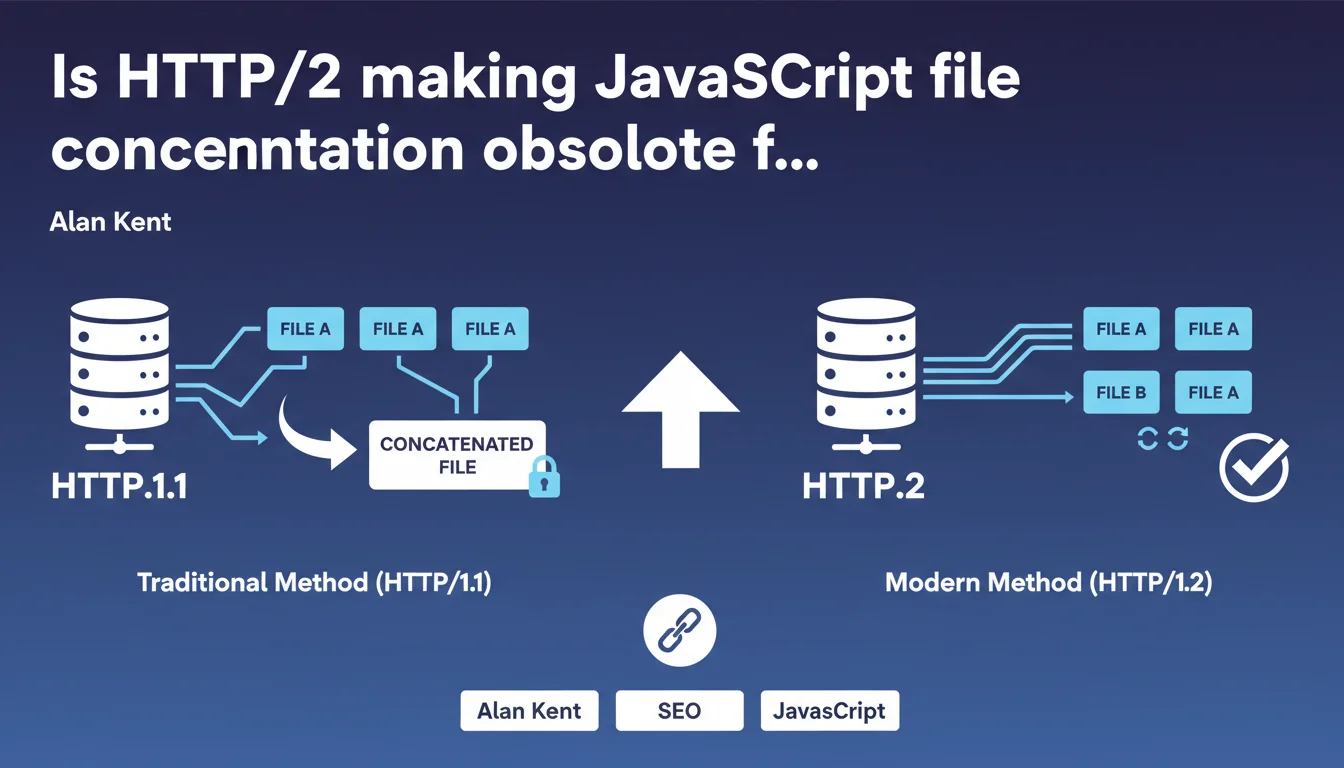
Google claims that HTTP/2 naturally improves the download of multiple small JavaScript files, making the traditional concatenation practice unnecessary. The protocol optimizes parallel loading, which should theoretically improve performance without having to merge your resources. But it's worth verifying in which cases this claim actually holds up.
What you need to understand
Why is Google highlighting HTTP/2 for JavaScript?
HTTP/1.1 imposes a strict limit: maximum six parallel connections per domain. Each file queues up. The more separate scripts you have, the more time the browser wastes waiting. The classic solution? Concatenate all your JS into one large file.
HTTP/2 changes the game with multiplexing. A single TCP connection carries multiple data streams in parallel. Theoretically, loading 10 small files becomes as fast as loading one large one. Google has been pushing this protocol for years — this statement fits into that logic.
What does this actually change for my performance?
On HTTP/1.1, merging 20 JS files into a single one eliminated repeated network latency. With HTTP/2, this step becomes technically unnecessary. Each file travels on the same pipe, without creating new TCP negotiations.
The other advantage: cache granularity. If you modify a function in one giant concatenated file, the browser has to download everything again. With separate files under HTTP/2, only the modified script invalidates the cache. For sites with frequent updates, that's far from negligible.
What are the technical prerequisites to take advantage of it?
Your server must support HTTP/2. Most modern hosting providers offer it by default — but verify it. A CDN like Cloudflare or Fastly activates it automatically. Without it, this whole discussion is moot.
The protocol also requires HTTPS. No SSL certificate, no HTTP/2. If you're still on plain HTTP, you have other priorities before thinking about JS optimization.
- HTTP/2 eliminates the 6 parallel connection limit of HTTP/1.1
- Multiplexing allows multiple files to load simultaneously on a single TCP connection
- File separation improves browser cache management
- Mandatory prerequisites: HTTP/2-capable server and active SSL certificate
SEO Expert opinion
Is this claim aligned with real-world observations?
Yes and no. HTTP/2 works — benchmarks prove it. But the performance gap isn't always spectacular. On a site with 5-6 light JS files, the difference is marginal. On a heavy application with 50+ scripts, you start to see measurable gains.
The problem? Google doesn't quantify anything here. No numbers, no thresholds. Just "improves performance." For a practitioner who needs to convince a client or prioritize optimizations, that's thin. [To verify] on your own infrastructure before refactoring your entire build.
What nuances should be added to this recommendation?
HTTP/2 doesn't solve everything. If your JS files are poorly optimized — rendering-blocking code, no defer/async, no minification — the protocol won't change anything. You'll just load garbage faster.
Another point: some CDNs or server configurations implement HTTP/2 partially. I've seen cases where Server Push was disabled, limiting potential gains. And then there are old browsers — less than 5% of traffic, sure, but they fall back to HTTP/1.1.
In what cases is concatenation still relevant?
For sites with very low script volume (say, 2-3 files), concatenating remains a valid option. The cost of managing multiple files sometimes outweighs the gain of granular caching. Let's be pragmatic: if your build workflow is already in place and works, no need to break everything.
However, for modern JavaScript applications (React, Vue, Angular), bundlers like Webpack or Vite already generate optimized chunks. There, HTTP/2 integrates naturally into a code splitting strategy. But that requires architecture thought through in advance.
Practical impact and recommendations
What should you verify first on your infrastructure?
First step: confirm that your server is actually using HTTP/2. Open Chrome DevTools, Network tab, and look at the "Protocol" column. If you see "h2", you're good. If it's "http/1.1", contact your hosting provider or activate the module on your server.
Next, check your SSL certificate. HTTP/2 only works over HTTPS. An expired or misconfigured certificate breaks everything. Use SSL Labs for a complete diagnosis — it's free and reliable.
Should you modify your JavaScript build strategy?
If you're currently concatenating all your scripts into one bundle, test a multi-file approach. Separate your third-party dependencies (jQuery, libraries) from your business code. Enable cache-busting via file hashing. Measure the impact on your Core Web Vitals.
For sites under CMS (WordPress, Drupal), some plugins manage this optimization automatically. But beware false friends: I've seen "HTTP/2 ready" extensions that break more than they fix. Favor proven solutions, and always test in pre-production.
How do you measure the real impact on your SEO performance?
Don't rely solely on PageSpeed Insights. Use WebPageTest with real conditions (3G, 4G, different browsers). Compare Time to Interactive and First Contentful Paint before/after HTTP/2 activation. If the gain is under 10%, question whether it's a priority.
Also monitor your Core Web Vitals in Search Console. Google has never explicitly said that HTTP/2 improves ranking — but faster pages help. It's indirect, but measurable over the long term.
- Verify the protocol used in DevTools ("Protocol" column)
- Confirm SSL certificate validity and configuration via SSL Labs
- Test a multi-file strategy with cache-busting via hash
- Measure impact with WebPageTest under real conditions (3G/4G)
- Monitor Core Web Vitals evolution in Search Console for at least 30 days
- Audit CMS plugins/modules that claim to optimize HTTP/2
❓ Frequently Asked Questions
HTTP/2 fonctionne-t-il sur tous les navigateurs ?
Dois-je arrêter complètement la concaténation de mes fichiers JS ?
HTTP/2 améliore-t-il directement mon classement dans Google ?
Comment activer HTTP/2 sur mon serveur ?
HTTP/3 rend-il HTTP/2 obsolète pour le SEO ?
🎥 From the same video 11
Other SEO insights extracted from this same Google Search Central video · published on 17/05/2022
🎥 Watch the full video on YouTube →
💬 Comments (0)
Be the first to comment.