
Official statement
Other statements from this video 11 ▾
- □ Does Google really index your PDFs, or does it transform them first?
- □ Does content weight really vary based on its location in HTML versus PDF?
- □ Does Google really depend on Adobe to properly index your PDFs?
- □ Does Google really index source code files the same way as regular text content?
- □ Why do raw source code files fail to rank properly in Google search results?
- □ Should you really stop storing all your PDFs in a single /pdfs/ folder?
- □ Does Google Really Never Index a Single Image Without a Hosting Page?
- □ Does Google really index images and videos separately from text content?
- □ Does your file extension (.html, .php, .txt) really impact Google SEO rankings?
- □ Does Google really index all your XML files?
- □ Can you really get JSON and plain text files indexed in Google search results without metadata?
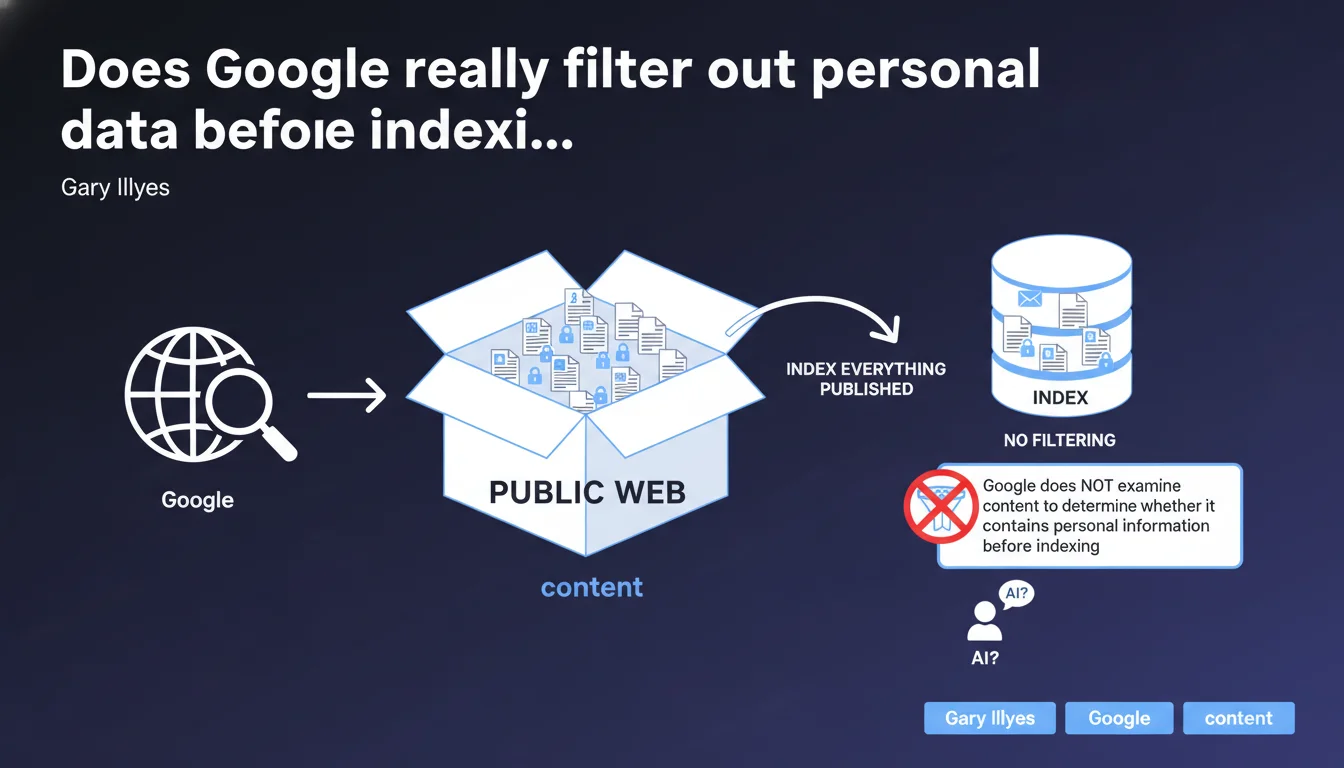
Google indexes all content accessible on the public web without any prior analysis of whether information is private. If a document containing personal data is uploaded to a publicly accessible server, it will be indexed like any other page. Responsibility for protecting sensitive content rests solely with the site owner, not the search engine.
What you need to understand
Does Google perform editorial filtering on indexed content?
The answer is no, absolutely not. Google's crawler has no semantic analysis mechanism designed to identify sensitive information before indexing. A PDF document containing social security numbers, an Excel file with banking details, or an HTML page listing medical data — if these resources are publicly accessible, they enter the index.
The indexing process works on a binary principle: accessible or not accessible. There is no grey area where Google evaluates the nature of content to decide whether it deserves to be indexed. This logic applies regardless of format — HTML, PDF, DOCX, XLSX.
What's the difference between "public" and "private" for Google?
Content is considered public as soon as it is technically crawlable: no robots.txt blocking, no authentication required, no noindex tag. Regardless of the site owner's original intention.
A frequent case: files uploaded to a directory like /uploads/ or /documents/ without protection. The webmaster thought these files were "private" because they weren't linked from the site. Except that an external link, a mention in an XML sitemap file, or discovery through a misconfigured directory is enough for Google to find them.
What are the legal implications of this indexing policy?
Google is clear on this: responsibility for protecting data rests with the webmaster, not the search engine. This is consistent with the current legal framework — a search engine is not considered a content host but a technical intermediary.
Under GDPR, it is the data controller (the person who puts the data online) who is liable. Google provides removal tools after the fact (Search Console, delisting request forms), but performs no preventive verification.
- No automatic filtering of personal information before indexing
- Full responsibility of the webmaster regarding protection of sensitive content
- Binary distinction: accessible = indexable, protected = non-indexable
- Removal tools available but only after indexing
SEO Expert opinion
Is this statement consistent with real-world observations?
Completely. We regularly see indexed data leaks: customer invoices, contracts, HR documents, accounting files. These cases never result from a "bug" in Google, but from misconfiguration on the server side — open directories, missing .htaccess, orphan files accessible by direct URL.
A recurring example involves WordPress sites with poorly configured document management plugins. Uploaded files become accessible via a predictable URL, no noindex is applied, and boom — indexing within 48 hours if crawling is active.
What nuances deserve to be mentioned?
Google does have detection mechanisms for certain types of content — child sexual abuse material, malware, phishing — but these filters relate to user security, not privacy protection in the GDPR sense. These are two distinct issues.
Furthermore, even though Google doesn't analyze content before indexing, certain signals can delay or limit indexation: low-authority sites, orphaned pages without incoming links, insufficient crawl budget. But this is never related to the sensitive nature of information — it's purely technical.
[To verify]: Gary Illyes doesn't clarify how Google handles cases where a mixed site contains both legitimate public content and poorly protected sensitive documents. Is there an impact on the domain's overall perception? No public data on this subject.
In what cases does this rule seem to cause problems?
The main blind spot concerns government websites, non-profit organizations, or small business sites managed by non-technical staff. These actors often ignore the implications of uploading a file to a public server. A meeting minutes document with names and addresses, an Excel file of members — indexed before anyone notices.
Another case: poorly secured customer portals. A member area accessible without authentication but "hidden" behind a non-linked URL — Google will eventually find it if someone shares the link or if a sitemap references it.
Practical impact and recommendations
How can you effectively protect sensitive content from indexing?
First measure: secure access at the server level. A .htaccess file (Apache) or an nginx rule to block public access to certain directories. No noindex here — you prevent HTTP access entirely.
Second lever: mandatory authentication for any space containing personal data. Google does not crawl zones protected by login. This is the most reliable barrier.
Third point: regularly audit accessible directories using a search like site:yourdomain.com filetype:pdf or filetype:xlsx. You'll immediately see what Google has indexed. If a sensitive document appears, urgent removal via Search Console and server blocking.
What critical mistakes must you absolutely avoid?
Mistake #1: relying solely on robots.txt to block indexing of sensitive files. A robots.txt blocks crawling but doesn't prevent indexation if the file is discovered via an external link. Google can index the URL without having crawled the content.
Mistake #2: uploading files without verifying their content. An automatically generated PDF can contain sensitive metadata, hidden comments, author information. Always clean files before publication.
Mistake #3: thinking that a document with "no links to it" remains invisible. If the URL is predictable (/uploads/2023/client-invoice-X.pdf), a bot or human can guess it. Security through obscurity never works for long.
What checklist should you apply to secure an existing site?
- Audit all public directories via
site:and filetype searches - Configure .htaccess or nginx to block access to sensitive folders (/uploads, /documents, /clients)
- Implement authentication for any space containing personal data
- Verify that your robots.txt file doesn't block already-indexed URLs (they will remain in the index)
- Clean metadata from all uploaded files (PDF, Office, EXIF images)
- Use Search Console to request urgent removal of any already-indexed sensitive URL
- Implement a policy for generating non-predictable URLs (tokens, UUIDs) for uploaded files
- Train site contributors in best practices for publishing documents
❓ Frequently Asked Questions
Google peut-il indexer un fichier PDF uploadé dans un répertoire non linké ?
Un robots.txt suffit-il à bloquer l'indexation de documents sensibles ?
Combien de temps faut-il pour qu'un document sensible soit désindexé après une demande via Search Console ?
Les espaces clients protégés par un simple paramètre d'URL sont-ils sécurisés contre l'indexation ?
Google supprime-t-il automatiquement les contenus signalés comme contenant des données personnelles ?
🎥 From the same video 11
Other SEO insights extracted from this same Google Search Central video · published on 08/09/2022
🎥 Watch the full video on YouTube →
💬 Comments (0)
Be the first to comment.