
Official statement
Other statements from this video 10 ▾
- □ Faut-il baliser les programmes de fidélité pour améliorer ses résultats enrichis ?
- □ Pourquoi Google abandonne-t-il 7 types de données structurées et que faut-il faire maintenant ?
- □ Faut-il maintenir les données structurées si Google arrête d'en afficher certaines ?
- 4:56 Pourquoi Google refuse-t-il de s'engager sur l'avenir des AI Overviews ?
- 6:24 Pourquoi Google n'indexe-t-il pas toutes vos pages et comment l'anticiper ?
- 8:48 Peut-on empêcher Google de nous positionner sur certains mots-clés ?
- 9:56 La qualité d'une page suffit-elle pour garantir son indexation ?
- 9:56 Combien de temps Google met-il vraiment à reconnaître les changements SEO ?
- 12:00 Faut-il vraiment compter le nombre exact d'URLs de son site ?
- 15:15 Faut-il vraiment soumettre son sitemap tous les jours ?
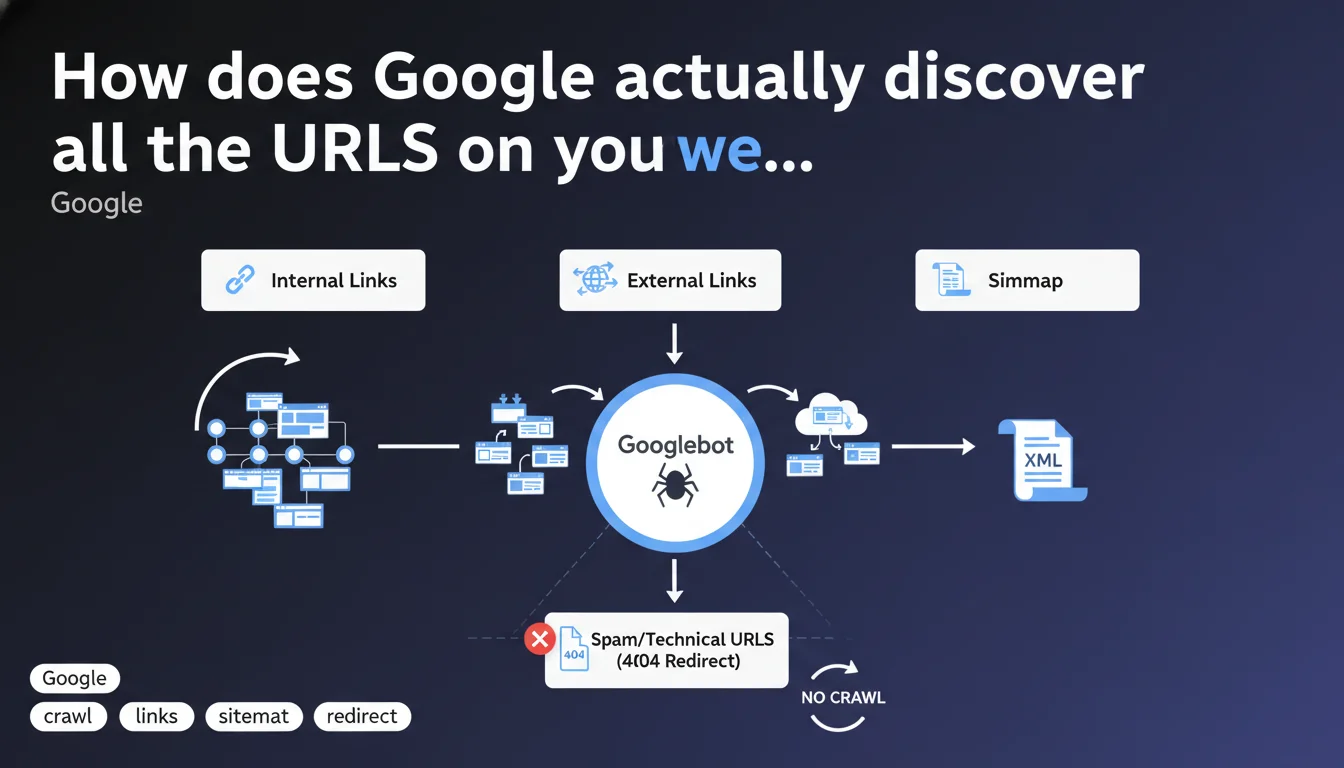
Google crawls URLs through three main channels: internal links, external links, and sitemaps. There's no need to panic about spam or technical URLs that Google detects, especially if they lead to 404 pages. The search engine manages the sorting itself.
What you need to understand
What are the three modes Google uses to discover URLs?
Google identifies pages to index through three distinct mechanisms: crawling internal links present on your site, detecting external links (backlinks) pointing to your pages, and reading your XML sitemaps. These three channels work in parallel and complement each other.
In practice? A page can be discovered by Google even if it doesn't appear in your sitemap, as long as an internal or external link leads to it. Conversely, a URL present only in the sitemap will be crawled, but with a potentially different priority depending on external signals.
Why does Google say you shouldn't worry about spam URLs being crawled?
This nuance targets website owners who panic when they see technical or parasitic URLs appearing in Search Console crawl reports. Google is signaling that the mere fact that a URL is crawled does not mean it will be indexed.
If these URLs redirect to 404s or 410 codes, Google treats them as non-existent over time. The engine adjusts its behavior: no wasting crawl budget on dead ends that persist. Let's be honest — this is an attempt to reassure webmasters who monitor their logs like paranoids.
What changes for a well-structured site?
Nothing fundamental if your architecture is clean. Sites with coherent internal linking, up-to-date sitemaps, and rigorous management of redirects and 404 errors have no reason to change their approach.
The problem arises more for sites with thousands of automatically generated URLs, uncontrolled facets, or spam injected into parameters. There, Google is essentially saying: "We crawl, we see, we ignore if it's pollution."
- Google uses three main sources to discover your URLs: internal links, backlinks, sitemaps.
- Crawling a spam or technical URL does not mean automatic indexation.
- Pages returning 404 or 410 status codes are gradually removed from the active crawl scope.
- No need to manually block each parasitic URL if it leads nowhere — Google handles it.
SEO Expert opinion
Does this statement align with real-world observations?
Yes, broadly speaking. We indeed observe that Google crawls absurd URLs — endless GET parameters, session IDs, URLs injected by bots. These URLs appear in coverage reports but disappear quickly if they return HTTP errors.
However — and this is where it gets tricky — Google doesn't specify how quickly it adjusts its crawl behavior in the face of these dead ends. On a large e-commerce site with thousands of dynamic facets, the engine may continue crawling useless URLs for weeks, even months, before adjusting its resource allocation. [To be verified]: the notion of "no need to worry" remains unclear for high-volume sites.
What nuances should be made depending on the site type?
For a classic WordPress blog or a website with a few dozen pages, this statement is perfectly valid. The trio of internal links + backlinks + sitemap is more than sufficient. No risk of crawl budget saturation.
However, on a marketplace platform, classifieds site, or media outlet with infinite pagination, the situation is radically different. Technical URLs (filters, sorts, poorly managed pagination) can monopolize a significant portion of the crawl budget. Saying "Google handles it on its own" becomes insufficient — you must intervene with targeted robots.txt rules, canonicals, and a meticulously cleaned sitemap.
Should you really ignore spam URLs crawled by Google?
Not always. If these URLs appear in your backlinks (classic negative SEO spam), Google says it ignores them — but observing their persistence in logs remains useful for detecting an attack. A sudden spike in parasitic URLs may signal a security breach or saturation attempt.
Moreover, some webmasters report that Google continues to crawl URLs blocked in robots.txt or returning 410 codes for months. Why? [To be verified]: either an abnormally long adjustment delay, or periodic re-evaluation to check if HTTP status has changed. Google says nothing about this.
Practical impact and recommendations
What should you concretely do to optimize URL discovery?
First step: audit your internal linking structure. Ensure each strategic page is accessible within 3 clicks maximum from the homepage, and no important content relies solely on the sitemap for discovery. Internal linking remains the most powerful lever for directing Googlebot.
Next, clean up your sitemap. Remove non-canonical URLs, redirects, and pages blocked in robots.txt. A polluted sitemap dilutes the signal and slows discovery of priority content. Google reads it, but it doesn't clean up after you.
Finally, monitor your incoming backlinks. Use Search Console to identify toxic links or parasitic URLs that third parties point to. Even if Google says it ignores them, a massive influx can signal an underlying problem.
What mistakes should you avoid in managing technical or spam URLs?
Classic mistake: blocking already-indexed URLs in robots.txt. Result: Google can no longer crawl these pages to detect their HTTP status, they remain in the index with an empty snippet. Prefer a 410 Gone or a 301 redirect to a relevant page if the URL was already indexed.
Another trap: neglecting dynamic GET parameters. If your CMS generates URLs with sorting, filtering, or infinite pagination, configure URL parameters in Search Console or use systematic canonicals. Letting Google "figure it out" on a site with 50,000 products is playing Russian roulette with your crawl budget.
- Audit your internal linking structure to guarantee optimal accessibility of strategic pages.
- Clean your XML sitemap: remove redirects, canonicals, blocked pages.
- Monitor parasitic URLs in logs and Search Console — even if Google says it ignores them.
- Never block already-indexed URLs in robots.txt — use a 410 Gone or redirect instead.
- Configure dynamic URL parameters to avoid crawl duplication.
- Regularly test your backlinks to detect negative SEO spam.
How can you ensure Google crawls your site efficiently?
Check the coverage report in Search Console. Identify URLs discovered but not crawled: if they accumulate, it's a sign your crawl budget is saturated or poorly allocated. Then prioritize high-value pages through linking and sitemap strategy.
Analyze your server logs to identify crawl patterns: does Googlebot frequently return to useless URLs? Does it ignore entire sections? This data often reveals inconsistencies invisible in Search Console.
❓ Frequently Asked Questions
Google crawle-t-il toutes les URLs présentes dans mon sitemap ?
Dois-je bloquer en robots.txt les URLs spam que Google crawle ?
Les backlinks vers des URLs inexistantes nuisent-ils au SEO ?
Combien de temps Google met-il à arrêter de crawler une URL en 404 ?
Le maillage interne est-il plus important que le sitemap pour la découverte ?
🎥 From the same video 10
Other SEO insights extracted from this same Google Search Central video · published on 26/06/2025
🎥 Watch the full video on YouTube →
💬 Comments (0)
Be the first to comment.