
Official statement
Other statements from this video 7 ▾
- □ Is Looker Studio really the best way to track your SEO performance?
- □ Are you structuring your SEO data visualizations correctly to actually maximize your analytics insights?
- □ Why does Google recommend analyzing Search Console data in 7-day increments?
- □ Why does Google recommend simplified visualizations for SEO monitoring?
- □ How can you analyze Search Console performance for Discover and Google News separately?
- □ Why are regular expressions the game-changer for analyzing your Search Console data in Looker Studio?
- □ Why does Google really emphasize clicks and CTR so heavily in Search Console?
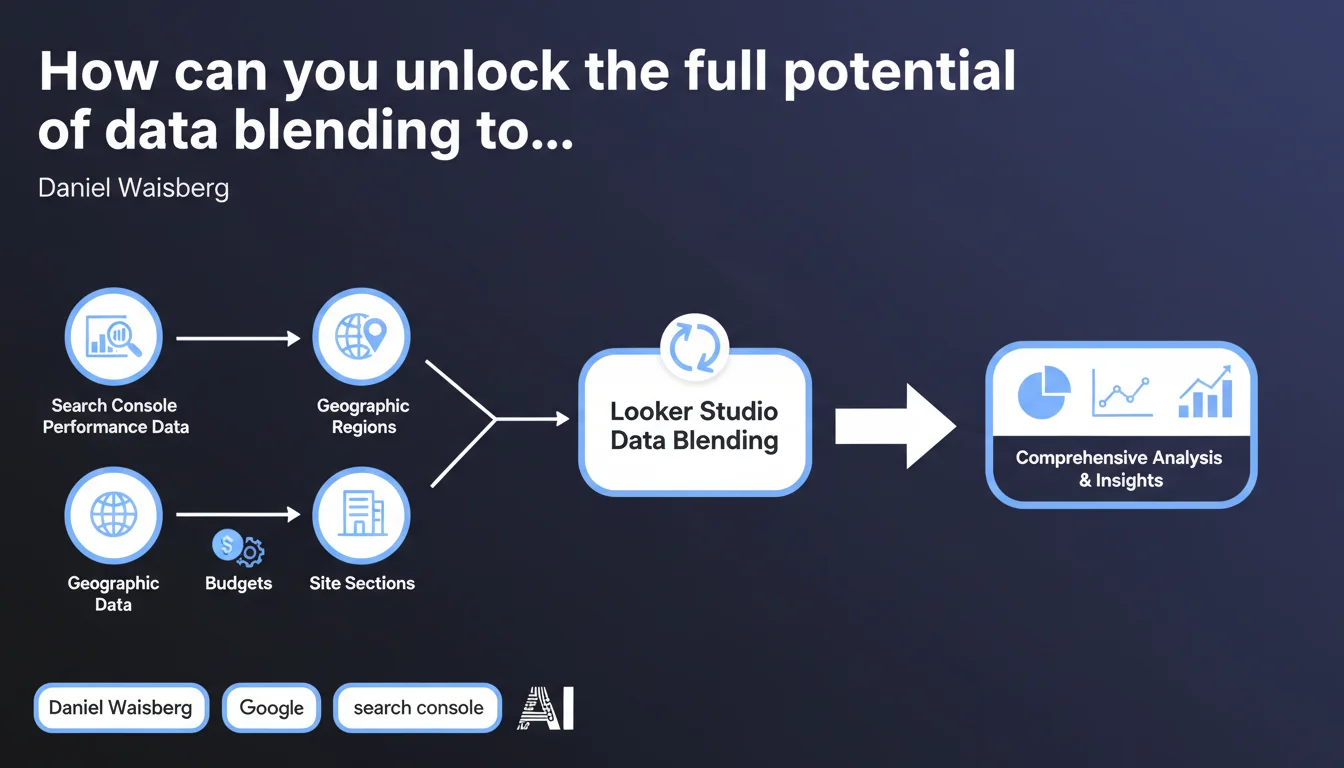
Google reminds us that Looker Studio enables you to combine Search Console data with other sources through data blending. This opens the door to analyses that cross organic performance, marketing budget, geographic segmentation, and page typology — blind spots you'll miss if you only rely on native GSC reports.
What you need to understand
Why has this feature existed for so long but remains underutilized?
The data blending feature in Looker Studio (formerly Data Studio) is nothing new. It lets you cross-reference tables from different connectors — GSC, Analytics, CSV files, SQL databases, CRMs. The problem? Most SEO teams stick with prefabricated reports and miss out on this merge capability.
Google highlights this feature for one simple reason: Search Console alone doesn't tell the whole story. It gives you clicks, impressions, CTR, and average position. But it doesn't tell you which type of page performs best, what budget you're allocating to which region, or which site section generates the most revenue per click. That's where blending comes in.
What data sources can meaningfully enrich your GSC?
In practice, you can blend GSC with pretty much anything. The most common use cases include: site sections (blog, e-commerce, support), page typologies (product sheets, category pages, landing pages), geographic data (region, city, language), budget data (SEO investment, cost per acquisition by channel), business data (revenue, conversion rate, average order value).
The idea is straightforward: isolate segments that are performing well or underperforming, then adjust your strategy. If your blog section captures 60% of impressions but generates only 5% of revenue, you have an alignment problem — either editorial strategy or transactional targeting.
- Data blending: native Looker Studio feature to merge multiple data sources
- GSC alone = incomplete view: it measures organic visibility, not business impact or strategic segmentation
- Priority use cases: site sections, geography, budget, page typology, conversion data
- End goal: move from descriptive analysis ("how many clicks?") to prescriptive analysis ("where should we invest?")
Does setting this up require complex technical infrastructure?
No, and that's precisely the appeal. Looker Studio is free, the GSC connector is native, and blending configures in just a few clicks via the interface. You create a "blend" data source, choose your join key (e.g., URL, country, device), and merge.
The real complexity lies elsewhere: in the quality of your third-party data. If you want to blend with site sections, you need a clean mapping (URL → section). If you want to integrate budget data, you need a table updated monthly. It's less a technical problem than a matter of rigor in data collection and structuring.
SEO Expert opinion
Does Google's recommendation truly reflect advanced field practices?
Yes, but with a gap. Mature SEO teams have been using blending for years — or they export everything to BigQuery and run analyses in SQL. What Google presents here is the accessible version for less technical profiles.
The real issue is that many teams don't even know what to blend. They have access to the feature, but they lack the analytical framework. Result: they build useless dashboards that cross 12 metrics with no clear objective. [To verify] that Google's communication comes with concrete use cases — otherwise it remains feature name-dropping without added value.
What are the technical limitations of data blending in Looker Studio?
First limitation: cardinality. If your GSC contains 50,000 URLs and you blend it with a CSV file of 100 rows (site sections), no problem. But if you try to blend two 100,000-row tables with imprecise join keys, you'll blow through quotas and get partial results.
Second limitation: sampling. Looker Studio can sample data if volume is too high, especially when you apply complex filters or segments. Result: your numbers won't be exact. To work around this, you need to use BigQuery and do the blending upstream.
In what cases does GSC blending add no value?
Let's be honest: if your site has 200 pages and you already have a clear picture of what's performing, blending is wasted time. You don't need to cross 12 sources to know your homepage captures 40% of traffic.
Blending becomes useful beyond a certain structural complexity: multilingual sites, multi-region sites, product catalogs with thousands of SKUs, diverse editorial ecosystems. If you're in that situation, then yes, blending GSC with your business segments becomes strategic. Otherwise, you're spending time building dashboards to impress clients rather than optimizing.
Practical impact and recommendations
How do you set up a relevant blend between GSC and your business data?
First, identify the business question you want to answer. Example: "Which site sections generate the most organic traffic but convert the least?" Next, determine your join key: in this case, URL or page category.
Prepare a clean external table (Google Sheets, CSV, database) containing at minimum: URL, section, typology, target region, allocated budget. Import it into Looker Studio, create a blend with GSC using URL as the common key. Apply filters and calculated metrics to isolate anomalies.
- Define a specific analytical objective before creating a blend (avoid "just in case" dashboards)
- Choose a reliable join key (URL, country, device) and verify it's present in both sources
- Clean third-party data upstream: no duplicates, no URLs with parameters if GSC aggregates them
- Test the blend on a reduced sample before rolling out across the entire site (avoid cardinality issues)
- Document the blend logic so your team understands what's being crossed and why
- Automate third-party data feeds (via API or scripts) to avoid manual updates
What common mistakes should you avoid when blending GSC data?
Classic mistake: using an inconsistent join key. If your GSC shows "example.com/page" and your CSV contains "/page" (without domain), the join fails. Another trap: blending data from different periods — GSC over 3 months, budget file over 6 months.
Second mistake: not managing null values. If a URL exists in GSC but is absent from your mapping file, Looker Studio may exclude it from the report or classify it as "(not set)". Result: you lose part of your traffic in the analysis without realizing it.
How do you validate that your blend produces consistent results?
First check: compare the totals. If your GSC shows 100,000 clicks for the period and your blend only returns 60,000, some URLs didn't match. Check join cardinality and orphaned URLs.
Second check: cross-reference with another source (Analytics, server logs) to validate consistency. If your blend says the "blog" section captures 80% of traffic but GA4 says 40%, there's a mapping or segmentation problem. Never trust a single source without counter-verification.
❓ Frequently Asked Questions
Le data blending dans Looker Studio est-il limité en volume de données ?
Quelle est la meilleure clé de jointure entre GSC et une source externe ?
Peut-on automatiser l'alimentation des données tierces dans Looker Studio ?
Le blending GSC remplace-t-il une vraie stack analytics avec BigQuery ?
Comment gérer les URLs orphelines lors d'un blend ?
🎥 From the same video 7
Other SEO insights extracted from this same Google Search Central video · published on 15/03/2023
🎥 Watch the full video on YouTube →
💬 Comments (0)
Be the first to comment.