
Official statement
Other statements from this video 11 ▾
- □ Can you really rely on service workers for SEO success?
- □ Can Googlebot actually index a website that relies on service workers to display its content?
- □ Does Googlebot really ignore the service workers on your site?
- □ How can you use Search Console to uncover hidden indexation problems caused by service workers?
- □ What are Google's live testing tools really showing you about your site's rendering issues?
- □ Can the JavaScript console really uncover critical rendering issues that hurt your SEO?
- □ Is developer collaboration really the breakthrough you need to unlock indexation problems?
- □ How can service workers accidentally hide your entire content from Googlebot?
- □ Should you really verify rendered HTML in Search Console to diagnose your indexation issues?
- □ Your page is indexed but invisible: is it a technical issue or simply outranked by competitors?
- □ Is your service worker secretly sabotaging your Google rankings?
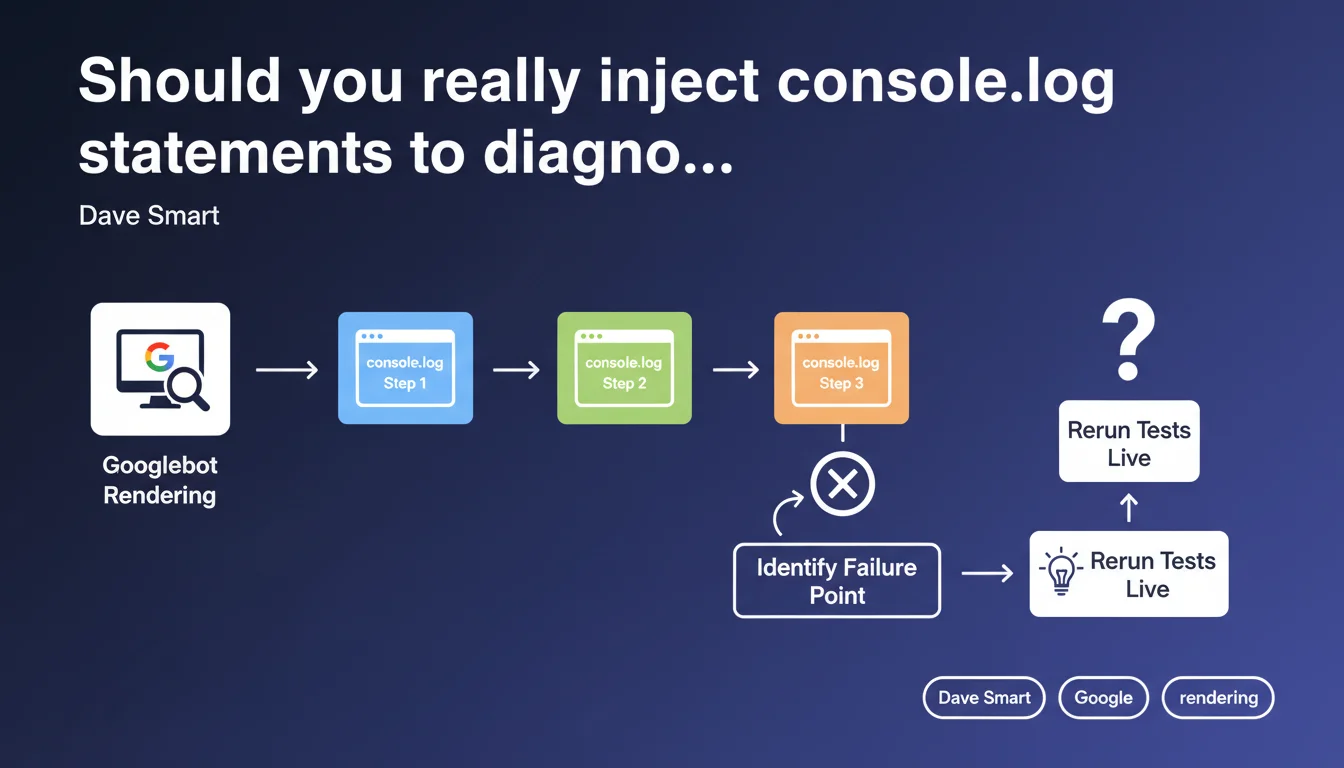
Google recommends adding console.log statements at each step of the loading process to identify where a site fails during JavaScript rendering. Developers can then rerun tests live (Search Console, testing tools) to see exactly where the process stops and blocks indexation.
What you need to understand
Why does Google emphasize this debugging technique?
Googlebot executes JavaScript to index dynamic content. But sometimes rendering crashes — and there's no way to know why without instrumenting the code.
Dave Smart suggests adding console.log statements at strategic points: at DOM startup, after fetching critical data, when mounting key components. Then, you run the site through Search Console's URL testing tool or a headless crawler, and check the logs in the "Console" panel of the rendering.
What types of rendering failures can you detect this way?
Classic cases: resources blocked by robots.txt, uncaught CORS errors, API timeouts, scripts that crash before displaying main content.
The console.log allows you to trace the exact path: if the last log shown is "Fetch API OK" and "Main component render" is missing, you know the problem lies between the two.
- Blocked resources: if an essential script returns 403 or 404, rendering stops dead
- Uncaught JavaScript errors: an exception in a critical module breaks the entire chain
- Network timeouts: the bot waits for a fetch for X seconds, then gives up
- Missing dependencies: a module that loads another module that loads another… and one link breaks
Does this method replace traditional monitoring tools?
No — it's a one-time diagnostic complement. A tool like Screaming Frog or Oncrawl + JavaScript Rendering tells you a problem exists, but rarely why exactly.
Console.log statements enable granular tracing, step by step, especially for complex React/Vue/Angular applications where rendering goes through multiple asynchronous phases.
SEO Expert opinion
Is this approach really practical in production?
Deploying console.log statements in production source code to debug Googlebot? Technically yes, but beware of pollution. If you trace 50 steps, logs become unreadable.
Best practice: add conditional logs via a flag (user-agent, GET parameter, environment variable). For example, log only if the UA contains "Googlebot" or if a ?debug=1 parameter is passed. Otherwise, you'll drown your real front-end errors in noise.
What limitations should you know about Googlebot rendering?
Google enforces a 5-second timeout for initial rendering (First Meaningful Paint). If your app takes 6 seconds to display content, console.log will tell you where it gets stuck — but that won't change the fact that the bot abandons.
Another point: Googlebot doesn't wait indefinitely for asynchronous network requests. If your content loads via a fetch that takes 8 seconds, even with perfect logs, the content won't be indexed. [To verify]: Google has never published clear documentation on exact timeouts by resource type.
How do you ensure logs are properly captured by Google?
Use the live URL testing tool in Search Console, not the "Inspected URL" version which uses cache. The live version runs Googlebot in real time and displays console logs in the "More info > JavaScript Console" tab.
Also verify with a local headless crawler (Puppeteer, Playwright) that simulates Googlebot. If logs display locally but not in Search Console, it's likely a user-agent detection or IP geolocation issue.
Practical impact and recommendations
How do you implement this logging strategy without polluting the code?
Create a utility function logForBot(message, data) that checks the user-agent or a debug flag before logging. In dev, you log everything; in prod, only for Googlebot or a specific GET parameter.
Minimal example: if (navigator.userAgent.includes('Googlebot') || location.search.includes('debug=bot')) { console.log('[RENDER]', message, data); }
What are the critical steps to trace as a priority?
Don't trace 50 points — focus on known bottlenecks: JavaScript framework load, main data fetch, root component mount, indexable content display.
- Log at DOM startup (
DOMContentLoaded) - Log after critical data fetch (API, GraphQL, etc.)
- Log when mounting main components (React useEffect, Vue mounted, etc.)
- Log if an error is caught (global try/catch or error boundary)
- Log before and after long network calls (> 1s)
What do you do if logs reveal a network timeout?
If Googlebot gives up due to a long fetch, you have two options: server-side rendering (SSR, SSG) or drastic API response time reduction. No halfway measures — a timeout can't be "worked around" with browser caching, Googlebot doesn't always respect it.
In summary: Console.log statements are a surgical diagnostic tool for understanding where JavaScript rendering fails. They don't replace global monitoring, but provide valuable granularity on complex cases.
Implementation requires strict code discipline to avoid log pollution. If your site relies heavily on client-side JavaScript and you notice significant indexation gaps between raw HTML and final rendering, this technique can unlock opaque situations.
These technical optimizations often require cross-functional expertise in both development and SEO. If your team lacks resources or advanced JavaScript skills, partnering with an SEO agency specialized in JavaScript rendering can accelerate diagnosis and ensure lasting compliance — without compromising performance or code maintainability.
❓ Frequently Asked Questions
Les console.log ralentissent-ils le temps de rendu pour Googlebot ?
Search Console affiche-t-il tous les logs console ou seulement les erreurs ?
Peut-on utiliser cette méthode pour détecter du cloaking involontaire ?
Faut-il retirer les console.log une fois le problème résolu ?
Cette technique fonctionne-t-elle avec les frameworks SSR (Next.js, Nuxt) ?
🎥 From the same video 11
Other SEO insights extracted from this same Google Search Central video · published on 01/11/2022
🎥 Watch the full video on YouTube →
💬 Comments (0)
Be the first to comment.