
Official statement
Other statements from this video 5 ▾
- □ Pourquoi Google a-t-il open sourcé son parser robots.txt officiel ?
- □ Pourquoi votre robots.txt peut-il être interprété différemment par Search Console et Google Search ?
- □ Pourquoi Google a-t-il développé une version Java de son parser robots.txt ?
- □ Pourquoi Google considère-t-il votre fichier robots.txt comme une menace potentielle ?
- □ Pourquoi Google teste-t-il son parser robots.txt avec autant de rigueur ?
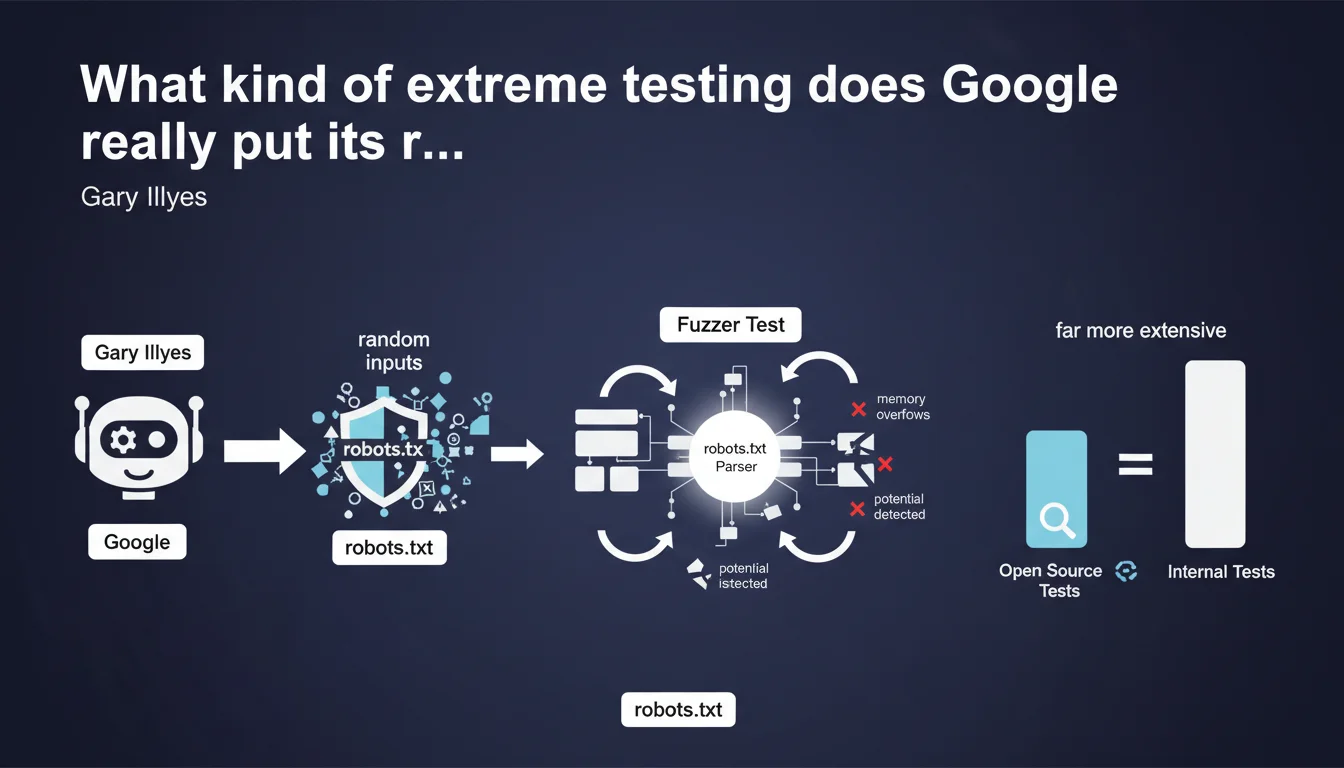
Google subjects its robots.txt parser to massive internal fuzzer tests that bombard the library with random inputs to detect bugs and security vulnerabilities. These tests are far more extensive than the open source version available publicly, meaning the production engine is significantly more resilient to malformed robots.txt files than what we can test ourselves.
What you need to understand
What exactly is a fuzzer test?
A fuzzer test is a robustness testing method that involves sending random, incorrect, or malformed data to a program to identify vulnerabilities. In the case of the robots.txt parser, Google generates thousands of variations of robots.txt files — some valid, others completely deformed — to see if the library crashes, fails, or exhibits security flaws.
The objective? Detect memory overflows, parsing errors that could block crawling, or potential exploits. It's a common practice in software development for critical components exposed to uncontrolled external inputs.
Why this emphasis on internal tests versus open source?
Gary Illyes emphasizes that public tests (those available in the GitHub repository of the robots.txt parser) represent only a fraction of actual test coverage. Internally, Google deploys much more aggressive fuzzing infrastructure, likely using tools like OSS-Fuzz or proprietary frameworks.
Concretely? If your robots.txt file contains syntax errors or unusual structures, there's a very strong chance that Google handles them correctly in production. The parser has been bombarded with millions of edge-case scenarios you wouldn't even imagine.
What are the implications for a production robots.txt file?
This statement tells us that Google has invested heavily in error tolerance in its parser. It doesn't mean you should slap together your robots.txt carelessly, but minor syntax errors probably won't break your crawl.
The parser will try to do its best to interpret directives, even if you've forgotten a space, used unusual characters, or mixed encodings. Let's be honest: it's reassuring, but it doesn't excuse you from proper testing.
- Fuzzer tests: technique of bombarding the parser with random inputs to detect bugs and vulnerabilities
- Massive internal tests: far more extensive than the publicly available open source version
- Error tolerance: Google's parser likely handles malformed syntax better than we think
- Memory overflows: primary target detected by these tests to prevent crashes and exploits
- No excuse to cut corners: parser robustness doesn't mean neglecting the quality of your robots.txt file
SEO Expert opinion
Does this transparency change our approach to robots.txt?
Not really. We already knew empirically that Google was tolerant of robots.txt errors — we regularly see poorly formatted files that don't block crawling. What this statement provides is official confirmation that this tolerance is intentional and massively tested.
The nuance? It tells us nothing about how Google interprets ambiguous directives. Tolerating broken syntax is one thing. Correctly understanding a poorly worded directive is another. If your file contains contradictory or unclear rules, the parser probably won't crash — but nothing guarantees it will do what you want.
Should we blindly trust this robustness?
No. And this is where Gary's statement can be misleading. Yes, Google massively tests its parser internally. But these tests look for crashes and security flaws, not logical interpretation errors.
A concrete example: if you write a Disallow rule with a typo in the path, the parser won't crash — it will just block the wrong path. The fuzzer test doesn't detect this type of business logic error. [To be verified]: we have no public data on the exact coverage of these tests or the scenarios they actually cover.
What does this statement tell us about Google's priorities?
That Google takes the security and stability of its crawling infrastructure very seriously. The robots.txt is an unauthenticated external entry point — any site can serve anything. It's a potential attack surface.
By investing heavily in fuzzing, Google protects itself against exploits that could compromise Googlebot or slow down global crawling. For us, this means accidental technical errors are unlikely to break anything. But it still doesn't dispense with rigorous functional validation.
Practical impact and recommendations
What should you actually do with this information?
Continue to validate your robots.txt with official tools — the robots.txt tester in Search Console and online validators. The fact that Google massively tests its parser doesn't exempt you from testing your own files.
Focus on the clarity of your directives rather than syntactic robustness. Google likely handles formatting errors well, but an ambiguous or contradictory directive will be interpreted according to the parser's logic — not necessarily your intention.
Which errors must you absolutely avoid?
Even with an ultra-robust parser, certain errors remain critical. Poorly escaped paths or incorrectly placed wildcards can block entire sections of your site without you noticing.
Contradictory directives (Allow then Disallow on the same path) are handled by specific priority rules — if you don't master them, the behavior can surprise you. And most importantly: a robots.txt that accidentally blocks critical resources (CSS, JS) directly impacts rendering and indexation.
How do you verify that your robots.txt is correctly interpreted?
Use the robots.txt tester in Search Console to verify that your critical URLs aren't blocked. Test multiple scenarios: product pages, categories, static resources.
Monitor crawl errors in Search Console. If Google encounters blocked resources that prevent rendering, you'll be alerted. Cross-check with server logs to identify actual crawl patterns versus what you think you've authorized.
- Validate robots.txt with the Search Console tester before each production deployment
- Test critical URLs individually to verify they aren't blocked
- Avoid contradictory or ambiguous directives — prioritize simplicity
- Verify that critical resources (CSS, JS, images) aren't accidentally blocked
- Monitor crawl errors in Search Console after each modification
- Cross-reference Search Console data with server logs to identify discrepancies
- Document the logic of each directive to facilitate future audits
❓ Frequently Asked Questions
Les fuzzer tests de Google garantissent-ils que mon robots.txt malformé sera correctement interprété ?
Puis-je accéder aux tests internes dont parle Gary Illyes ?
Est-ce que cela signifie que je peux bâcler mon robots.txt ?
Comment savoir si mon robots.txt contient des directives contradictoires ?
Quelle différence entre la version open source du parser et celle en production ?
🎥 From the same video 5
Other SEO insights extracted from this same Google Search Central video · published on 08/03/2023
🎥 Watch the full video on YouTube →
💬 Comments (0)
Be the first to comment.