
Official statement
Other statements from this video 5 ▾
- □ Pourquoi Google a-t-il open sourcé son parser robots.txt officiel ?
- □ Pourquoi Google a-t-il développé une version Java de son parser robots.txt ?
- □ Comment Google teste-t-il vraiment la robustesse de son parser robots.txt ?
- □ Pourquoi Google considère-t-il votre fichier robots.txt comme une menace potentielle ?
- □ Pourquoi Google teste-t-il son parser robots.txt avec autant de rigueur ?
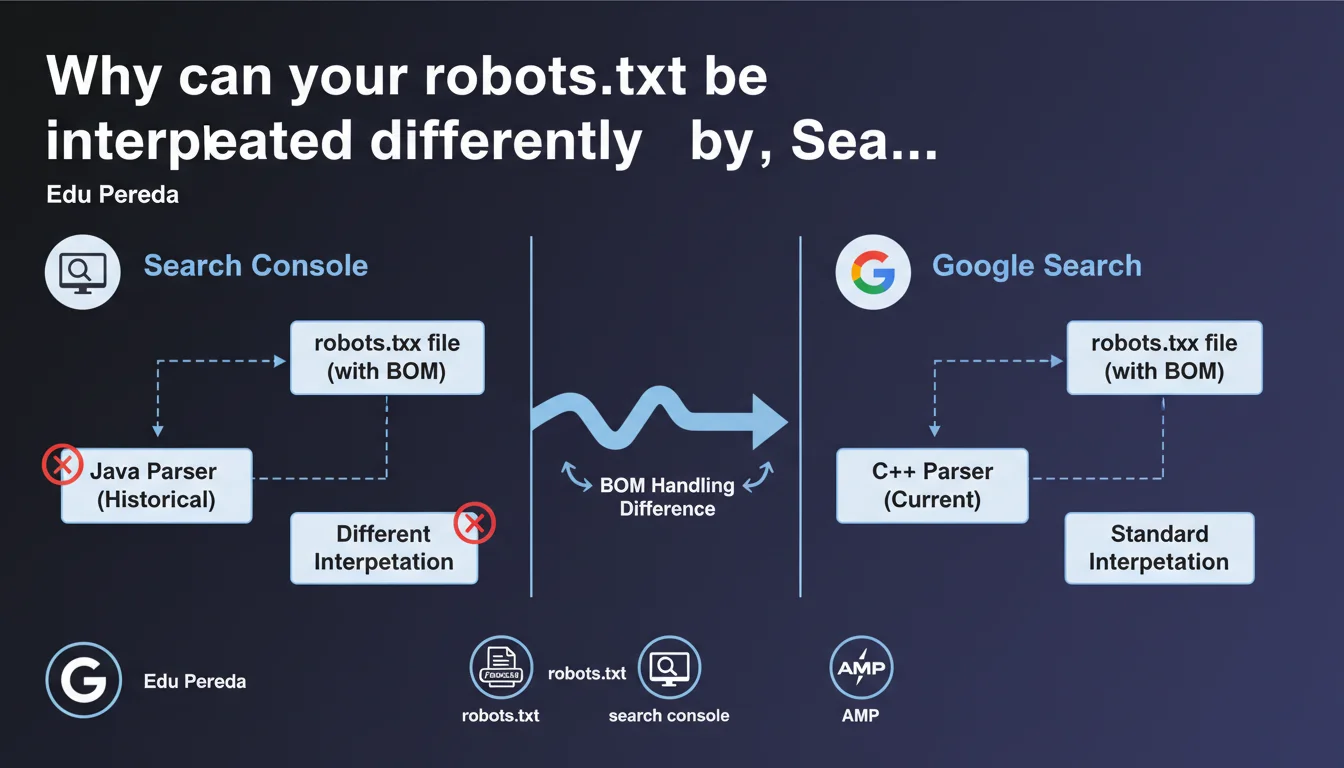
Search Console historically relied on a distinct Java-based robots.txt parser, separate from the C++ parser used by Google Search. This technical divergence caused interpretation differences — notably in how the BOM (Byte Order Mark) was handled. The same robots.txt file could therefore generate contradictory signals between the testing tool and the actual crawler behavior.
What you need to understand
Why two different implementations of the same tool?
Google Search relies on a robots.txt parser written in C++, optimized for speed and volume. Search Console, on the other hand, used a separate Java version, developed independently. This technical duality was not a deliberate choice to mislead SEOs — simply an infrastructure reality where different services use different languages.
The problem? The two parsers didn't always react the same way to the same instructions, particularly when faced with special characters or atypical file formats.
What is the BOM and why does it cause problems?
The Byte Order Mark (BOM) is an invisible sequence of bytes inserted at the beginning of a text file to indicate encoding (UTF-8, UTF-16...). Some text editors add it automatically.
The Java parser in Search Console could interpret the BOM differently from the C++ parser in Google Search. Result: a robots.txt file validated in Search Console could be partially or completely ignored by the actual crawler — or vice versa.
What other inconsistencies have been observed?
Beyond the BOM, divergences appeared in handling trailing spaces, malformed comments, or non-standard directives. The Java parser was sometimes more permissive, hiding errors that the C++ parser would flatly reject.
- The BOM could be ignored by one parser and not the other
- Superfluous trailing spaces did not have the same consequences
- Certain non-standard directives passed in Search Console but failed in production
- This inconsistency made the Search Console robots.txt testing tool partially misleading
SEO Expert opinion
Does this statement finally explain historical bugs?
Yes — and it's a welcome confirmation. For years, SEOs have reported inconsistent behavior between the robots.txt testing tool and actual crawl activity. Google often responded that "the file was properly formatted," even when entire sections were ignored in production.
This official statement confirms what we suspected: two different parsers = two different truths. The problem is that Google never publicly documented these divergences before Edu Pereda discussed them. [To verify]: Has this duality been resolved now, or does it persist in certain contexts?
Has Google unified the two parsers since?
Edu Pereda mentions that Search Console historically used a Java implementation. The past tense suggests convergence, but no precise details are given about the exact date or current state.
In practice, if you test a robots.txt today in Search Console, nothing formally guarantees that the parser used is strictly identical to the crawler's. It's better to cross-validate with real-world tests (server logs, Google Search Console Inspection Tool).
Should you still be wary of the Search Console robots.txt test?
Let's be honest: this tool remains useful for detecting gross errors. But it should never be your sole source of truth. If your robots.txt file contains complex directives, exotic encodings, or non-standard comments, always validate by observing the actual crawler behavior.
Practical impact and recommendations
What should you do if your robots.txt contains a BOM?
Remove it. Most modern text editors allow you to save in UTF-8 without BOM. On Windows, avoid Notepad for editing robots.txt files — prefer Notepad++, VSCode, or Sublime Text.
Check the encoding by opening the file in a hexadecimal editor. If you see EF BB BF at the beginning, it's a UTF-8 BOM. Delete those bytes.
How do you detect inconsistencies between Search Console and actual crawl behavior?
Systematically compare three sources: the Search Console robots.txt test, the Inspect URL tool (which shows whether a page is blocked), and your server logs. If Googlebot cannot access a URL that Search Console says is allowed, investigate.
Also use third-party tools like Screaming Frog or OnCrawl to simulate crawling with different parsers. Some tools better reproduce Googlebot's behavior than Search Console itself.
What safety rules should you apply to avoid pitfalls?
- Always edit robots.txt in UTF-8 without BOM, using a code editor
- Avoid superfluous trailing spaces
- Don't rely on Search Console as your only validation
- Cross-check with URL Inspection and server logs
- Test under real conditions after each critical modification
- Document any divergences observed between the tool and crawl
The historical inconsistencies between Search Console and Google's actual parser remind us of a simple rule: test, measure, and observe. Never rely on a single tool. If your technical architecture has specific characteristics (atypical encodings, advanced directives, multiple subdomains), validation can prove complex.
In such contexts, support from a specialized SEO agency helps secure your robots.txt files and avoid costly mistakes — especially during migrations or redesigns.
❓ Frequently Asked Questions
Le BOM dans robots.txt bloque-t-il systématiquement Googlebot ?
Google a-t-il unifié les deux parsers robots.txt ?
Peut-on faire confiance à l'outil de test robots.txt de Search Console ?
Comment vérifier si mon robots.txt contient un BOM ?
Quels autres caractères ou directives peuvent poser problème ?
🎥 From the same video 5
Other SEO insights extracted from this same Google Search Central video · published on 08/03/2023
🎥 Watch the full video on YouTube →
💬 Comments (0)
Be the first to comment.