
Official statement
Other statements from this video 11 ▾
- □ Why are more than 15% of Google searches completely new every day, and how should this reshape your SEO strategy?
- □ Is Google really sending more traffic to websites each year?
- □ Why is Google pushing domain-level verification in Search Console—and should you switch now?
- □ How long does it really take for your data to show up in Search Console after verification?
- □ Does Google really only index a single video per page?
- □ Is Google really indexing all your pages, or should you accept partial coverage?
- □ How does Google really index videos embedded on your web pages?
- □ Are video structured data really essential to appear in search results?
- □ Does Google Really Ignore Your Canonical Tag?
- □ Is Page Experience really the ranking factor Google claims it to be?
- □ Should you always validate fixes in Search Console to speed up re-crawling?
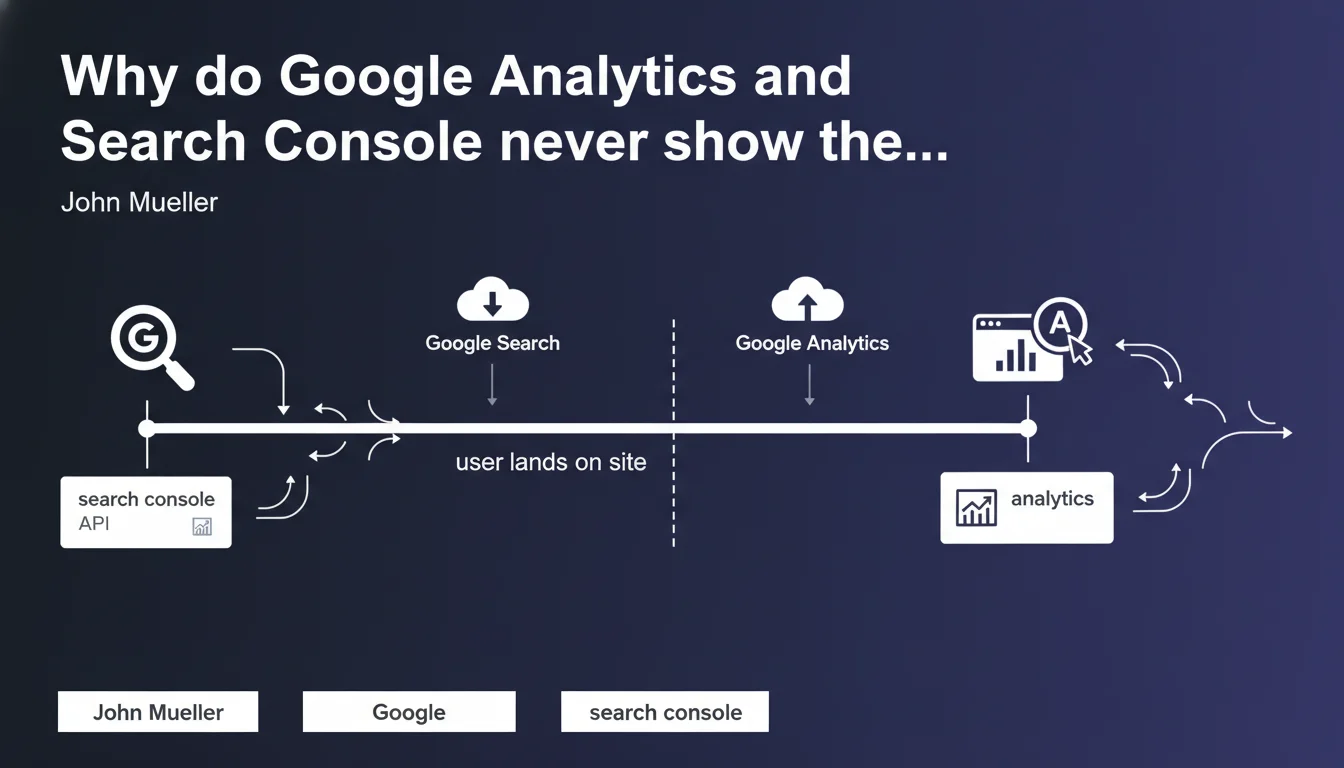
Google Search Console and its APIs measure everything that happens up to the moment a user clicks to visit your site — impressions, rankings, CTR in the SERPs. Google Analytics takes over once the user arrives on the page. The two tools therefore don't cover the same scope, and it's perfectly normal that they display different data.
What you need to understand
John Mueller reminds us here of a fundamental distinction that many clients — and even some practitioners — struggle to integrate. Search Console measures performance in Google search results, while Google Analytics records behavior after arrival on the site. The two don't speak the same language.
Concretely, if Search Console shows 1,000 clicks and Analytics 950 organic sessions, it doesn't mean one of them is lying. It's simply that the measurement scope differs — and there are leaks along the way.
Where does Search Console's responsibility begin and end?
Search Console records everything that happens within the Google ecosystem: impressions, average positions, clicks. The moment the user leaves the SERP to land on your site, Search Console has nothing more to say.
That's why you find data there on queries, pages that appear, organic CTR. But once the click happens, you enter Analytics territory.
Why does Analytics take over from there?
Analytics measures everything that happens after the page loads: session duration, page views, conversions, user journey. For a visit to be recorded in Analytics, the JavaScript tag must load — and that's where things often go wrong.
If the visitor closes the page before it fully loads, if their browser blocks the script, if your tag is poorly installed, Analytics sees nothing. Search Console, however, has already counted the click — hence the divergence.
What are the limitations of each?
- Search Console: sampling after 1,000 rows, data aggregated for a maximum of 16 months, no post-click behavioral data.
- Analytics: depends on tag loading, can be blocked by ad blockers or privacy settings, only sees what happens on your site.
- Normal discrepancies: server redirects, JavaScript errors, timezone differences, multiple sessions counted differently.
SEO Expert opinion
Is this distinction always so clear-cut in reality?
On paper, yes. In practice, it's murkier. Google Analytics 4, for example, introduces automatic events that approximate what Search Console measures (first_visit, session_start). But these events don't replace organic click data — they complement it.
The real trap is trying to directly compare the two tools. You can't expect them to show the same figures when they're not measuring the same thing. It would be like comparing a thermometer and a barometer.
What are the frequent causes of divergence between the two?
First case: server-side redirects. Search Console records a click to URL A, but the server redirects to URL B before the Analytics tag loads. Result: Search Console sees URL A, Analytics sees URL B. Inconsistency guaranteed.
Second case: users blocking JavaScript or closing the page before the tag fully loads. Search Console counts the click, Analytics sees nothing. This is particularly common on mobile with slow connections or poorly optimized pages.
Third case: session count differences. Analytics counts a 30-minute session by default (configurable). Search Console counts clicks. A user can click multiple times in the SERP during one session — Search Console sees multiple clicks, Analytics sees one session.
When does this statement become misleading?
When you apply it mechanically without looking at where the actual problem lies. If you observe a massive gap — say 30% or more — between Search Console clicks and Analytics sessions, it's not just « two different tools ». It's probably a technical issue: Analytics tag poorly installed, pages taking 10 seconds to load, cascading redirects.
Another point: this statement implies that the two tools are complementary, which is true. But it says nothing about the relative reliability of the data. Search Console can underestimate certain queries (anonymization, sampling), Analytics can overestimate certain sessions (bots poorly filtered). [To verify] in each context.
Practical impact and recommendations
How to leverage this distinction to improve your analysis?
Stop trying to reconcile the two tools at all costs. Use Search Console to diagnose performance in the SERPs: which pages appear, for which queries, with what CTR. If a page has 10,000 impressions and 50 clicks, you have a title or meta description problem — not a content issue.
Use Analytics to understand what happens after the click: bounce rate, session duration, conversion path. If you receive Search Console traffic but have a 90% bounce rate, the page doesn't match search intent — or it loads too slowly.
What errors should you avoid when interpreting the data?
Never say « Analytics shows 800 organic sessions but Search Console 950 clicks, so Google is hiding 150 visits from me ». No. The two don't measure the same thing, and there are legitimate leaks between the click and the recorded session.
Another common error: relying solely on Analytics to measure SEO performance. If your Analytics tag is broken, you're flying blind. Always cross-reference with Search Console — at minimum to verify that trends are moving in the same direction.
What concrete steps should you take to limit discrepancies?
- Verify that the Analytics tag loads before any JavaScript redirects. If you use GTM, check tag priority.
- Compare the URLs shown in Search Console and Analytics. If they don't match, you probably have a canonicalization or wild redirect issue.
- Filter bots in Analytics (spam referrers, phantom traffic). Search Console is already cleaned by Google.
- Segment your Analytics reports by precise source/medium (google / organic) to avoid mixing with « organic » traffic from other search engines.
- If you use UTM parameters on your campaigns, make sure they don't contaminate your organic traffic in Analytics.
❓ Frequently Asked Questions
Pourquoi Search Console affiche-t-il plus de clics qu'Analytics ne compte de sessions organiques ?
Peut-on faire confiance aux données de Search Console pour mesurer le trafic organique ?
Quel outil doit primer quand les deux se contredisent ?
Comment vérifier que mon tag Analytics capture bien tout le trafic organique ?
Faut-il utiliser les deux outils en parallèle pour un audit SEO complet ?
🎥 From the same video 11
Other SEO insights extracted from this same Google Search Central video · published on 12/05/2022
🎥 Watch the full video on YouTube →
💬 Comments (0)
Be the first to comment.