
Official statement
Other statements from this video 11 ▾
- □ Pourquoi 15% des requêtes Google sont-elles inédites chaque jour et qu'est-ce que ça change pour votre stratégie ?
- □ Google envoie-t-il vraiment plus de trafic vers les sites web chaque année ?
- □ Pourquoi Google pousse-t-il la vérification au niveau du domaine dans Search Console ?
- □ Combien de temps faut-il attendre avant de voir les données apparaître dans Search Console ?
- □ Pourquoi Google Analytics et Search Console ne montrent-ils jamais les mêmes chiffres ?
- □ Google n'indexe-t-il vraiment qu'une seule vidéo par page ?
- □ Google indexe-t-il vraiment toutes vos pages, ou faut-il accepter une couverture partielle ?
- □ Les données structurées vidéo sont-elles vraiment indispensables pour apparaître dans les résultats de recherche ?
- □ Pourquoi Google ignore-t-il parfois votre balise canonical ?
- □ La mise à jour Page Experience est-elle vraiment un critère de classement déterminant ?
- □ Faut-il systématiquement valider les corrections dans Search Console pour accélérer le re-crawl ?
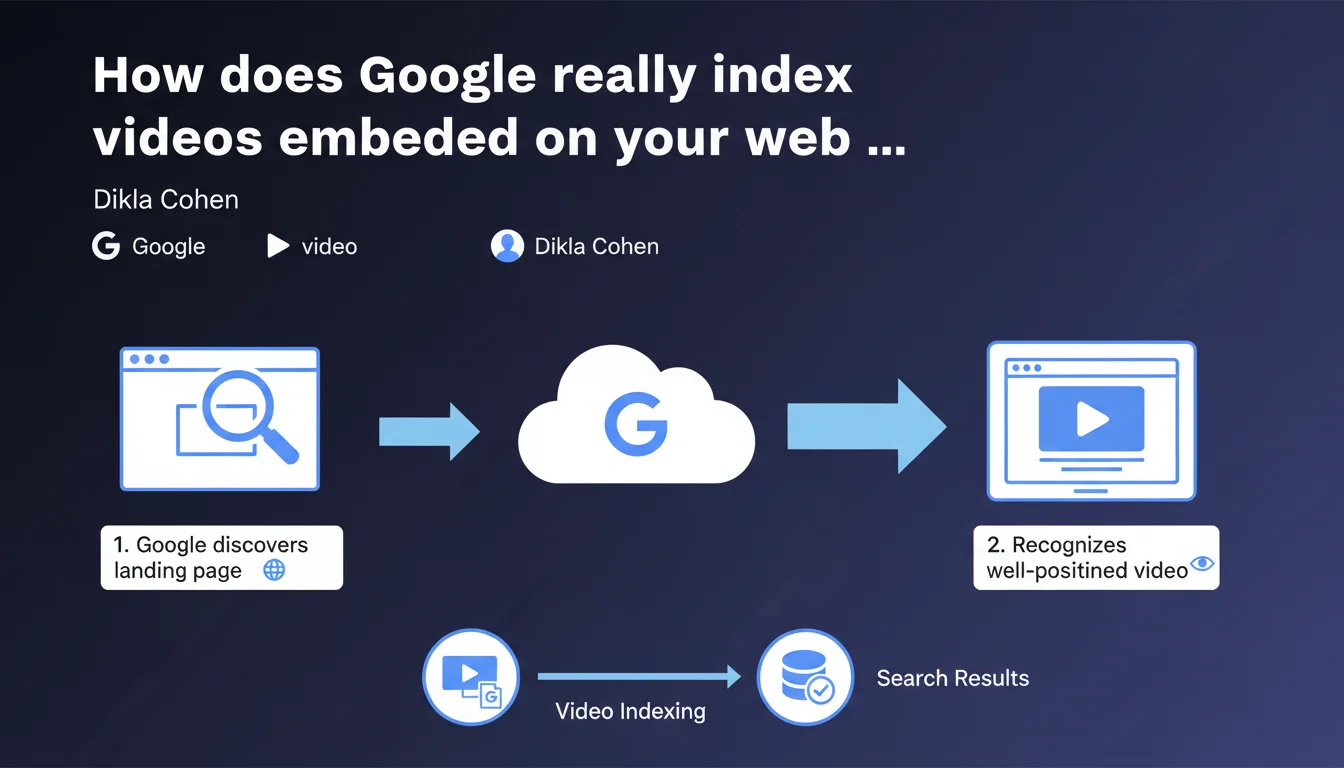
Google first indexes the landing page, then detects the presence of a video on that page. The video must be 'well positioned' — a vague criterion that raises questions about exact placement and required visibility. No special treatment for videos: they follow the standard page indexation process.
What you need to understand
What is Google's logic for video indexation?
Google does not crawl videos as autonomous entities. Indexation always begins with the web page that hosts the video. This page enters the index first, with its textual content, its tags, its structure. Only then does Google analyze the page to identify the presence of a video.
This two-step process means that a perfectly optimized video on an orphaned or poorly crawled page has no chance of appearing in search results. The quality of the landing page determines the discovery of the video.
What does 'well positioned' on the page mean?
Dikla Cohen mentions a video being 'well positioned' without defining this criterion. We can infer it refers to visibility and prominence: the video must be in the initial viewport, sufficiently large, not buried in a sidebar or lost at the bottom of the page.
In practice? Google probably expects the video to be a central element of the content, not a decorative accessory. But the absence of precise thresholds (minimum size, exact position) leaves room for wide interpretation.
Why this statement now?
This clarification reminds us of a fundamental principle often overlooked: videos do not float in a vacuum. Too many sites hope that YouTube or a CDN will do the indexation work for them. Google is setting the record straight: your page comes first.
It's also a signal for those who host videos without textual context, without schema.org VideoObject tags, without transcription. A video alone is not enough — it must be integrated into a content ecosystem.
- Video indexation depends on the indexation of its landing page
- The video must be 'well positioned' — a vague criterion but probably linked to initial visibility
- No special treatment for videos: they follow the same path as an image or text block
- The page context (titles, text, tags) conditions Google's understanding of the video
SEO Expert opinion
Is this statement consistent with real-world observations?
Yes, and it's even a welcome confirmation. We've observed for years that orphaned videos or those on pages blocked by robots.txt never appear in rich results. Sites that succeed with video SEO first care for the host page: clean URL, rich textual content, solid internal linking.
However, the term 'well positioned' remains [To be verified]. No public data specifies whether Google requires the video to be above the fold, or if it tolerates a lower position as long as the video remains prominent. This imprecision leaves room for experimentation — and errors.
What nuances should be added?
Google says 'like any other web page,' but that's a shortcut. A page with video requires specific signals to be understood: schema.org VideoObject tag, og:video meta tag, sometimes a dedicated video sitemap.
Let's be honest: a video without structured metadata risks going unnoticed, even if it's 'well positioned.' Google can detect a player, but without schema.org, it won't know the duration, exact title, or description. And that's where it gets stuck.
In what cases does this rule not apply?
YouTube and video platforms partly escape this logic. Google indexes YouTube videos directly through its own ecosystem, without depending as much on page quality. This is a privileged treatment that doesn't apply to self-hosted videos.
Another exception: videos embedded via iframe from an external CDN. Google may struggle to associate them with your page if schema.org tags are absent or incorrect. In this case, even a 'well positioned' video can remain invisible.
Practical impact and recommendations
What should you do concretely to optimize video indexation?
Start by auditing your landing pages. Verify they are crawlable, indexable, and offer textual context consistent with the video. A video on a page blocked by robots.txt or set to noindex has no chance.
Systematically add schema.org VideoObject markup with essential properties: name, description, thumbnailUrl, uploadDate, duration, contentUrl. This markup is what allows Google to understand what it's indexing.
What mistakes should you absolutely avoid?
Don't hide your videos in hidden tabs, accordions closed by default, or sections loaded with aggressive lazy loading. Google wants to see the video immediately accessible when the page loads.
Also avoid duplicating the same video across multiple pages without unique context. Google will choose a canonical page for this video — and it may not be the one you want to rank.
How do you verify your site is compliant?
Use the URL Inspection tool in Search Console to see how Google crawls your video pages. Verify that the video is detected and that metadata is properly read.
Check the Indexed Pages report and the Enhancements > Videos report in Search Console. If your videos don't appear there, Google either isn't seeing them — or doesn't judge them relevant enough.
- Audit of landing pages: crawlability, indexability, textual context
- Implementation of schema.org VideoObject on each page with video
- Video positioning in the initial viewport, without aggressive lazy loading
- Verification via Search Console (URL Inspection, Videos report)
- Creation of a video sitemap if you have a substantial catalog
- Avoid duplicating videos without unique context per page
❓ Frequently Asked Questions
Google indexe-t-il les vidéos YouTube différemment des vidéos auto-hébergées ?
Faut-il créer un sitemap vidéo pour chaque vidéo sur mon site ?
Que signifie concrètement « bien positionnée » pour une vidéo ?
Une vidéo sans schema.org VideoObject peut-elle quand même apparaître dans les résultats ?
Dois-je ajouter une transcription texte pour chaque vidéo ?
🎥 From the same video 11
Other SEO insights extracted from this same Google Search Central video · published on 12/05/2022
🎥 Watch the full video on YouTube →
💬 Comments (0)
Be the first to comment.