
Official statement
Other statements from this video 9 ▾
- □ Comment Google crawle-t-il vraiment vos pages web ?
- □ Comment Google découvre-t-il vraiment vos nouvelles pages ?
- □ Pourquoi Google ne découvre-t-il pas toutes les URLs de votre site ?
- □ Comment Googlebot décide-t-il quelles pages crawler sur votre site ?
- □ Googlebot ralentit-il volontairement sur votre site pour ne pas le surcharger ?
- □ Pourquoi Googlebot ignore-t-il une partie des URLs qu'il découvre ?
- □ Googlebot peut-il vraiment crawler le contenu derrière une page de connexion ?
- □ Faut-il vraiment un sitemap XML pour être indexé par Google ?
- □ Faut-il vraiment automatiser la génération de vos sitemaps ?
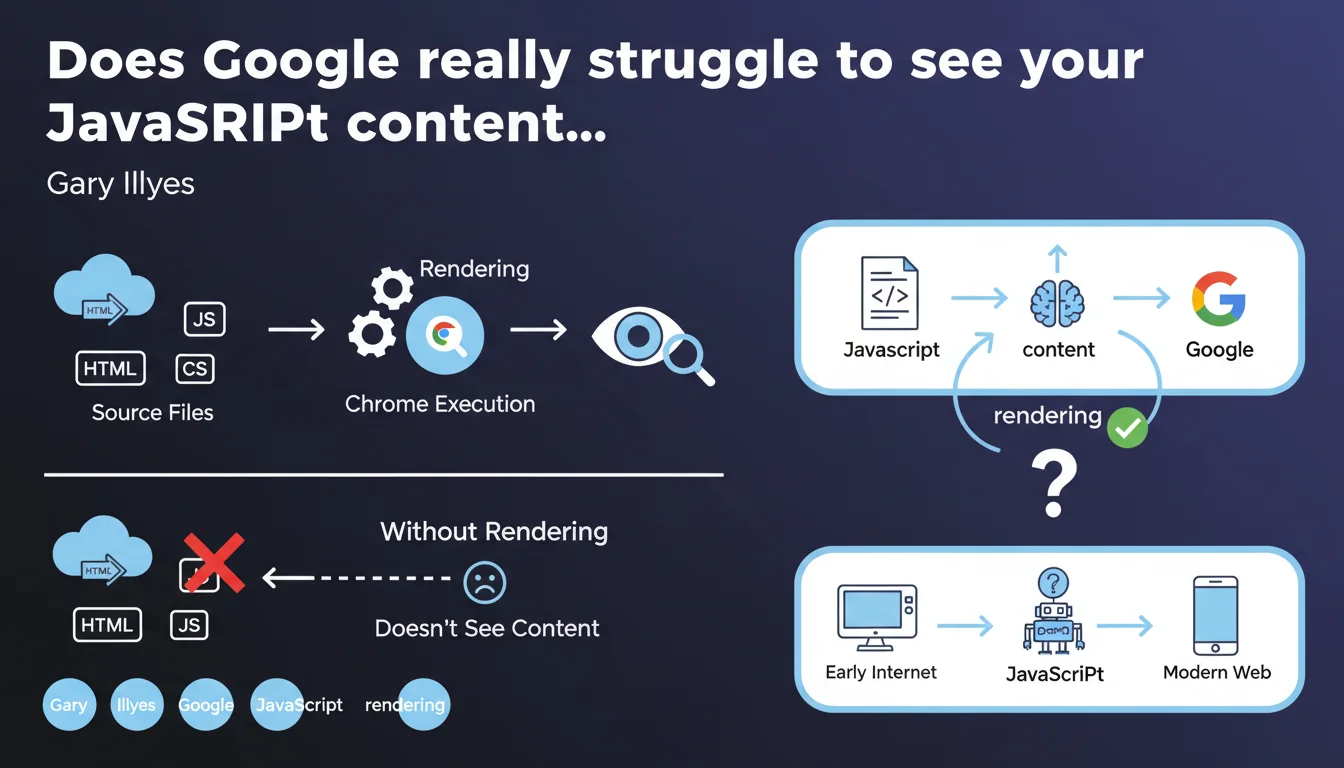
Google must execute the JavaScript on your page (rendering) to see the content it generates. Without this step, anything displayed dynamically remains invisible to the search engine. Gary Illyes reminds us that this transformation of HTML/CSS/JS into a visual page relies on a recent version of Chrome — and that it's an absolute prerequisite for indexing client-side content.
What you need to understand
What is rendering and why does Google need it?
Rendering is the process that transforms raw code (HTML, CSS, JavaScript) into a displayable web page. In practice, Google uses a recent version of Chrome headless to execute JavaScript and recreate what a user would see. Without this step, content injected by JS — menus, filters, dynamic text — simply doesn't exist for the bot.
This statement officially confirms a principle that practitioners know well: if your critical content depends on client-side JavaScript execution, you must accept that Google will go through a rendering phase. And this phase has its own constraints: delays, bottlenecks, possible execution errors.
Does Google see the source code or the rendered page?
It sees both, but at different times. First, Googlebot crawls the raw HTML. Then, if the page is deemed a priority, it enters the queue for rendering. This is where JavaScript executes and dynamic content appears. Between the two, there can be a gap of a few seconds… or several days.
This lag creates a risk: if your essential content only exists post-rendering, it may remain invisible for a variable amount of time. This is particularly critical for pages with high editorial velocity or e-commerce sites with fluctuating stock.
What types of content are affected?
Anything generated or modified by JavaScript on the client side: single-page applications (SPA), frameworks like React, Vue, Angular, but also simpler elements like accordions, product filters, or text areas loaded via lazy loading. If content only appears in the DOM after a script executes, it requires rendering.
- Googlebot first crawls the raw HTML, then queues up JavaScript rendering
- Rendering relies on a recent version of Chrome, so compatible with most modern APIs
- The delay between crawl and rendering can slow down indexing of dynamic content
- SPAs and JS frameworks are entirely dependent on this rendering phase
- All critical content should ideally be present in the initial HTML to avoid these delays
SEO Expert opinion
Does this statement reflect reality as observed in the field?
Yes, but with important nuances. Google does indeed render JavaScript — it's documented and observable via Search Console, Mobile-Friendly Test, or URL inspection. However, the timing is unpredictable. On high-authority sites or with generous crawl budgets, rendering can occur within seconds of crawling. On others, it might take days, or never happen at all for certain secondary pages.
Gary Illyes talks about a "recent version of Chrome," but doesn't specify the exact version or the update frequency. [To verify]: in practice, we sometimes observe discrepancies with very recent APIs. If your JavaScript code uses cutting-edge features, systematically test with Google's tools before deploying.
What are the blind spots in this statement?
First blind spot: the rendering budget. Google doesn't say how many pages it can or wants to render per site per day. We know a queue exists, but its prioritization logic remains unclear. Result: some pages can be crawled without ever being rendered if deemed low priority.
Second blind spot: JavaScript execution errors. If your code crashes during rendering (timeout, script error, failing external dependency), Google might index a partial or empty version of the page. And you won't necessarily know it, except by actively monitoring Search Console and server logs.
In what cases can you avoid rendering on Google's side?
If your critical content is present in the initial HTML — in other words, if you're doing server-side rendering (SSR) or static generation — Google doesn't need to execute JavaScript to access text, titles, meta tags. This is the most reliable scenario: no delays, no queues, no possible execution errors.
On the other hand, if you're using JavaScript to enhance UX (carousels, animations, non-critical lazy loading), rendering will still happen, but indexing won't depend on it. This is the most robust approach: essential content in SSR, enhancements on client-side.
Practical impact and recommendations
What should you do concretely if your site depends on JavaScript?
First step: audit what's visible without rendering. Disable JavaScript in your browser and navigate your site. Everything that disappears will be invisible to Googlebot during the initial crawl. If it's strategic content (product titles, descriptions, pricing), you have a problem.
Next, test Google-side rendering with the URL inspection tool in Search Console. Compare raw HTML and rendered HTML. Check for JavaScript errors in the "More info" tab. If any resources are blocked (CSS, JS external), fix immediately.
What errors should you absolutely avoid?
Never block critical resources (CSS, JavaScript) in robots.txt. This is still a common and catastrophic mistake: Google won't be able to execute the code, so it won't see the content. Also verify that your scripts don't depend on slow or unstable third-party resources — a timeout CDN can crash the entire rendering.
Another trap: SPAs without SSR fallback. If your React or Vue site only generates an empty HTML shell on the server side, you depend 100% on Google rendering. It's doable, but risky. Better to implement SSR or static generation (Next.js, Nuxt, etc.) to guarantee that content is accessible from the initial crawl.
How do you verify that your configuration is working correctly?
Implement regular monitoring: inspect your main pages in Search Console weekly, export server logs to spot crawls without subsequent rendering, monitor Core Web Vitals (poorly optimized JS also slows user experience). If you detect pages indexed with missing content, that's a warning signal.
- Disable JS in the browser to see what Googlebot sees during initial crawl
- Use the URL inspection tool to compare raw HTML and rendered HTML
- Verify that no critical CSS/JS resources are blocked in robots.txt
- Test strategic pages with the Mobile-Friendly Test to detect rendering errors
- Implement SSR or static generation for essential content
- Monitor server logs to identify pages crawled but never rendered
- Regularly audit Search Console to detect partial or empty indexed content
❓ Frequently Asked Questions
Google indexe-t-il une page avant ou après le rendering ?
Quelle version de Chrome utilise Googlebot pour le rendering ?
Peut-on forcer Google à rendre une page plus rapidement ?
Le rendering consomme-t-il du crawl budget ?
Que se passe-t-il si mon JavaScript plante lors du rendering ?
🎥 From the same video 9
Other SEO insights extracted from this same Google Search Central video · published on 22/02/2024
🎥 Watch the full video on YouTube →
💬 Comments (0)
Be the first to comment.