
Official statement
Other statements from this video 5 ▾
- □ Does GDPR delisting really work completely, or is Google still hiding your URLs from some searches?
- □ Does Google's cache really update automatically when you change a page?
- □ Why does Google reject delisting requests submitted with search links instead of direct URLs?
- □ Does Google really conduct a human review of every delisting request?
- □ Does Google really apply different delisting rules depending on where users are searching from?
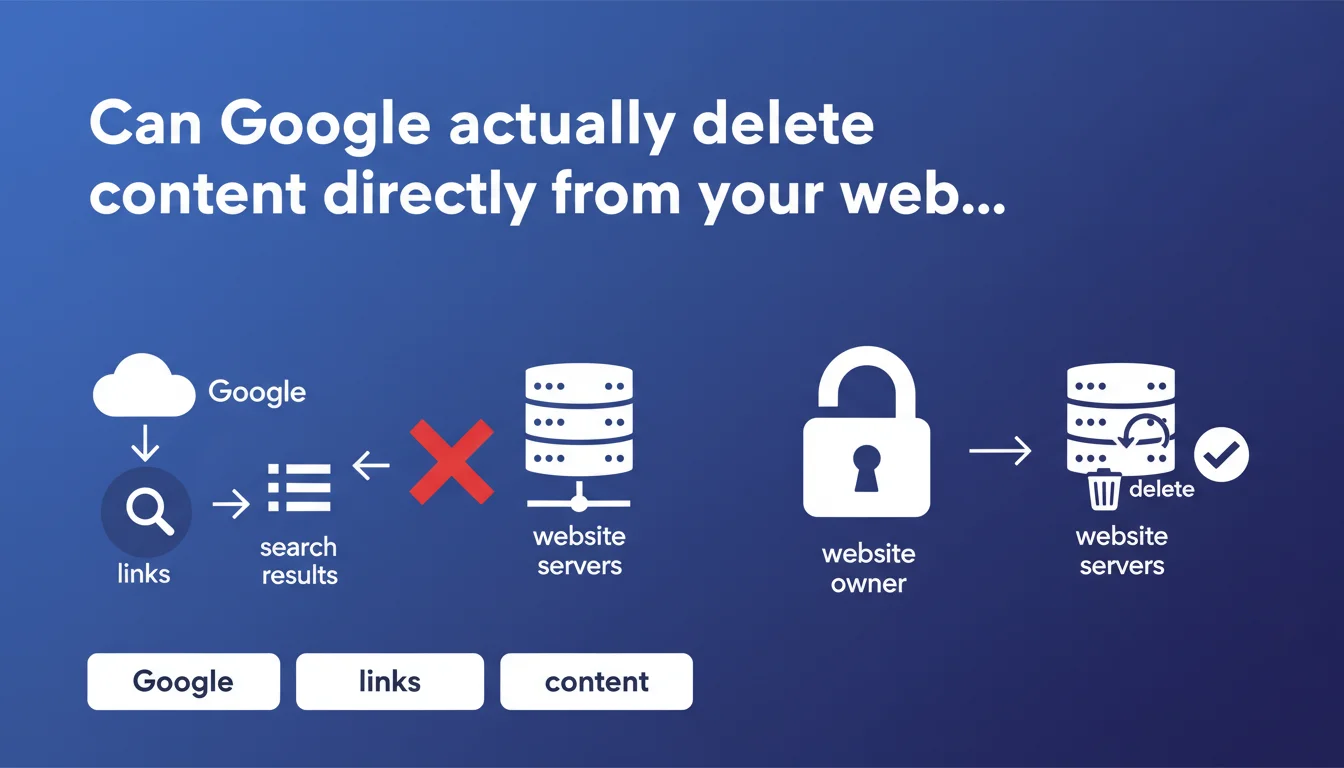
Google never removes content directly from your site — only you as the site owner can do that. Google can only remove links from its search results, but the source content remains intact on your servers. This distinction is fundamental to understanding the limits of Google's control over your digital property.
What you need to understand
What is the difference between deindexation and source content deletion?
Google operates at two distinct levels of action: deindexation (removal from search results) and physical content deletion. When Google removes a link from its SERPs, it simply stops displaying that result to users — the content remains physically hosted on your server.
This nuance is crucial for SEO professionals facing removal requests. Deindexed content continues to exist, consumes server resources, and can potentially be discovered through other means (direct links, social media, web archives).
Why does Google insist on this limitation of its role?
This statement protects Google legally. The company positions itself as a neutral intermediary that indexes content it does not control. By reminding everyone that it never touches source content, Google avoids being classified as a hosting provider or publisher — statuses that would imply much heavier legal responsibilities.
For site owners, this means any request for permanent deletion must go through your own servers. Google will never clean up for you — neither as a favor nor under external pressure.
In what cases does Google remove results without deleting the content?
Google deindexes content in several scenarios: DMCA requests for copyright infringement, right-to-be-forgotten requests (GDPR in Europe), court orders, reported illegal content, or severe algorithmic penalties. In all these cases, the source content remains accessible if someone knows the direct URL.
- Deindexation affects only visibility in Google results, not content existence
- Only the site owner can physically delete content from their servers
- Google never directly modifies files hosted on your infrastructure
- Deindexed content can reappear if conditions change (penalty lift, legal review)
- Archives (Wayback Machine, third-party caches) often preserve copies even after source deletion
SEO Expert opinion
Is this statement consistent with practices observed in the field?
Yes, absolutely. In 15 years of practice, I have never encountered a single case where Google modified or deleted content directly on a client's server. Tools like Search Console allow you to request temporary URL removal, but this is always an action on Google's index side, never on the origin server side.
The confusion often comes from site owners who conflate "disappearance from results" with "content deletion." When Google deindexes a page following a manual penalty, some believe Google has "erased" their content — when in reality it's simply invisible in the SERPs.
What nuances should be added to this claim?
Google can indirectly force deletion in certain regulatory contexts. For example, in Europe, a court decision can oblige a site to remove content under penalty of sanctions — Google merely verifies compliance. But technically, Google never executes the deletion itself.
Another nuance: caches and AMP versions. Google stores temporary copies of your pages (cache, AMP cache) that it controls and can remove. But these are copies — not source content. The distinction remains valid, even if it becomes blurred for the end user accessing a cached version.
What are the implications for urgent removal requests?
Let's be honest — this limitation can be frustrating in crisis situations. Defamatory content, a data breach, a major error: even if Google agrees to deindex quickly, the source content remains accessible and potentially viral through other channels.
The only effective solution combines three simultaneous actions: deletion at source (via FTP, CMS), express deindexation request via Search Console, and monitoring of third-party caches. Google cannot do this work for you — and that's where it gets stuck when time is critical.
Practical impact and recommendations
What exactly should you do when unwanted content appears in Google?
First priority action: delete the content at source on your server. Use your CMS, FTP access, or file manager to physically remove problematic pages. Returning a 404 or 410 (Gone) error is essential — it's the clearest signal to Google.
Next, use the URL removal tool in Search Console to accelerate removal from results. This request is typically processed within hours, but it's temporary (6 months). For permanent index removal, the content must remain inaccessible (404/410) or protected (noindex, authentication) on your server side.
What mistakes should you avoid when managing content to be deleted?
Never rely solely on robots.txt to block an already-indexed page. Robots.txt prevents future crawling but doesn't remove content from the index — worse, it prevents Google from seeing the page has disappeared. Use meta noindex temporarily instead, then delete completely.
Another classic mistake: mass-redirecting deleted content to the homepage. Google detects these soft 404s and often treats them as errors. If the content has no logical replacement, accept the 404 or 410 — it's cleaner.
- Physically delete content on your servers (FTP, CMS, database)
- Configure an HTTP 404 or 410 response for deleted URLs
- Request express removal via Search Console > Removals tool
- Verify that robots.txt doesn't prevent Google from detecting the deletion
- Clean up caches (Google Cache, AMP version, Wayback Machine if critical)
- Monitor backlinks pointing to deleted content to manage 301 redirects if needed
- Document deletion reasons for future reference (audit, litigation)
How should you structure a policy for managing obsolete content?
Implement a regular audit process to identify low-value or risky content. A spreadsheet with URLs, deletion reasons, dates, and actions taken simplifies tracking — especially on large sites with multiple contributors.
For sensitive sites (legal, medical, finance), a strict governance is essential: editorial validation, secure archiving before deletion, complete traceability. Google will never help you reconstruct content deleted by mistake — that responsibility is yours exclusively.
Web content deletion requires coordination between server actions and signals sent to Google. Contrary to popular belief, Google cannot delete content for you — only direct intervention on your servers guarantees permanent disappearance.
For organizations facing complex challenges (managing sensitive content at scale, coordinating technical/legal teams, reputational urgency), these processes can be tricky to orchestrate alone. Working with a specialized SEO agency helps structure a coherent strategy, avoid costly technical errors, and accelerate processing times — particularly valuable when every hour counts.
❓ Frequently Asked Questions
Si Google désindexe ma page, est-elle définitivement invisible ?
Combien de temps faut-il pour qu'une page supprimée disparaisse de l'index Google ?
Google peut-il refuser de désindexer un contenu que j'ai supprimé de mon serveur ?
Puis-je forcer Google à supprimer du contenu hébergé sur le site d'un tiers ?
Le cache Google est-il concerné par cette règle ?
🎥 From the same video 5
Other SEO insights extracted from this same Google Search Central video · published on 15/02/2022
🎥 Watch the full video on YouTube →
💬 Comments (0)
Be the first to comment.