
Official statement
Other statements from this video 11 ▾
- □ Pourquoi un photographe devrait-il investir dans un site web plutôt que miser uniquement sur Instagram ?
- □ Faut-il vraiment éviter les noms de marque génériques pour son SEO ?
- □ Search Console est-elle vraiment indispensable pour un site de photographie ?
- □ Pourquoi Google indexe-t-il mieux les galeries photo avec du texte descriptif qu'une image isolée ?
- □ Les réseaux sociaux peuvent-ils vraiment coexister avec votre site dans les résultats Google Images ?
- □ Publier ses images en premier garantit-il la canonicalisation sur Google ?
- □ Faut-il vraiment arrêter de filigraner vos images pour le SEO ?
- □ Faut-il vraiment créer une page dédiée pour chaque image de votre site ?
- □ Les images responsives suffisent-elles vraiment à améliorer votre ranking sur Google ?
- □ JPEG, WebP, AVIF : quel format d'image choisir pour le SEO en 2025 ?
- □ Pourquoi vos vidéos n'apparaissent-elles pas dans les résultats de recherche vidéo ?
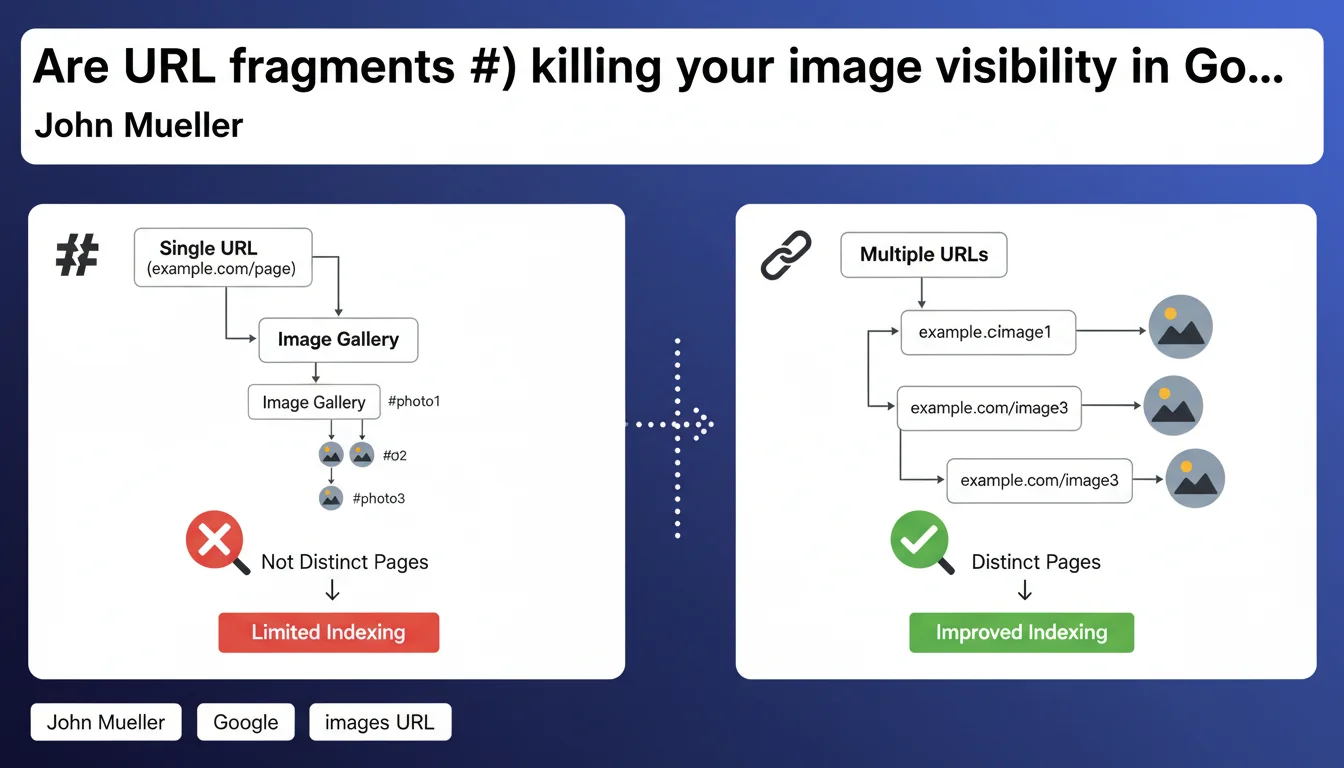
Google cannot index images displayed via URL fragments (#) as distinct landing pages. If you want each image to be discoverable individually in search results, you need to assign it a unique URL without a fragment. This is a technical constraint that directly impacts SEO strategy for e-commerce sites and photo galleries.
What you need to understand
What is a URL fragment and why does it cause problems?
A URL fragment is the part that follows the # symbol in a web address. Historically, fragments were used to point to a specific section of a page without reloading it — a kind of internal navigation.
The problem? Google's crawlers consider that site.com/product and site.com/product#image2 refer to the same resource. The fragment isn't sent to the server during the HTTP request. Googlebot therefore indexes only one page, not multiple image variations.
Why can't Google treat these URLs as separate pages?
Technically, fragments are interpreted client-side by the browser, not server-side. When Googlebot visits your page, it only sees one canonical URL, even if your JavaScript dynamically displays different images based on the fragment.
Result: it's impossible to create indexable landing pages for each image. Google Images won't be able to return a specific image — it will always return to the main page, where the user might not even see the image they're looking for.
What are the concrete consequences for image SEO?
Your images lose their SEO independence. Each visual cannot rank individually in Google Images with its own dedicated page. This is particularly damaging for e-commerce sites that present multiple colors or viewing angles of the same product.
Furthermore, user experience degrades: someone who clicks on an image in Google Images lands on a generic page, not directly on the visual they were seeking. The bounce rate skyrockets.
- Fragments # don't create distinct URLs for crawlers
- Google Images cannot index each image individually
- Users don't land on the image they searched for, degrading UX
- Each image must have its own unique URL to be discoverable
- Potential traffic from Google Images is severely limited
SEO Expert opinion
Is this recommendation really new?
No, and that's precisely what makes it interesting. Google has been hammering this principle for years, yet many sites continue to use fragments for their image galleries. Why? Because it's technically simpler to implement.
With a Single Page Application (SPA), manipulating fragments allows you to avoid page reloads — user experience remains smooth. But this technical convenience comes at an SEO cost that many still underestimate.
Are there cases where using fragments remains acceptable?
Let's be honest: if your goal is not to rank each image individually in Google Images, fragments can remain a viable option for internal navigation. For example, on a blog where images illustrate content but aren't themselves searchable.
But when it comes to e-commerce, professional photo galleries, or sites where images generate organic traffic — that's non-negotiable. Each strategic image must have its own URL.
What is the most effective technical alternative?
The classic approach remains the most robust: create a distinct HTML page for each image or product variation. Yes, this means more pages to generate, more content to manage — but it's what works.
For high-volume sites, a hybrid solution can be considered: use the History API (pushState) to modify the displayed URL in the browser without fragments, while dynamically loading content. But be careful — this approach requires rigorous implementation and server-side rendering (SSR) so that Googlebot sees each URL as a distinct page.
Practical impact and recommendations
What should be audited as a priority on your site?
Start by identifying all URLs containing a #symbol that serve to display different images. Pay particular attention to product galleries, portfolios, and category pages with filters.
Next, check in Google Search Console how many of these images generate impressions in the Performance tab (filtered for Google Images). If you notice little or no traffic from Google Images while your catalog is visually rich, that's a red flag.
How do you properly migrate to unique URLs?
The migration must be progressive and well-thought-out. Don't break all your URLs at once without planning redirects. Each old URL with a fragment should ideally point to the new clean URL via a 301 redirect — even though technically fragments aren't transmitted to the server, some analytics tools and referrers can preserve them.
For new URLs, structure them logically: /product/product-name/image-1/ or /product/product-name/red/ for variants. Each URL must have its own title, meta description, and schema.org markup adapted accordingly.
What tools should you use to validate image indexing?
Google Search Console's URL inspection tool remains your best ally. Test each new image URL to verify that Googlebot crawls it as a distinct page and that it detects the associated image.
Also use a crawler like Screaming Frog to map all your image URLs and ensure none contain fragments. Verify that each page generates a 200 status code, has correct canonical markup, and that the image is present in the initial HTML (not solely loaded via JavaScript).
- Identify all URLs with fragments (#) used for images
- Create a unique, clean URL for each image or product variant
- Implement 301 redirects from old structures if applicable
- Write unique text content for each image page
- Add appropriate meta tags (title, description) and schema.org markup
- Verify indexing via Search Console and an SEO crawler
- Monitor Google Images traffic evolution in the weeks following migration
- Avoid JavaScript lazy loading incompatible with Googlebot
Using URL fragments to display individual images is a common technical mistake that severely limits visibility in Google Images. Each strategic image must have a unique URL, contextual text content, and flawless technical markup.
This architecture overhaul can prove complex, especially on high-volume sites or those with legacy technical constraints. If the scope of work seems difficult to manage internally, engaging a specialized SEO agency allows you to secure the migration and avoid costly visibility errors.
🎥 From the same video 11
Other SEO insights extracted from this same Google Search Central video · published on 07/08/2025
🎥 Watch the full video on YouTube →
💬 Comments (0)
Be the first to comment.