
Official statement
Other statements from this video 14 ▾
- 5:33 Can you really control which image appears in Google's text search results?
- 7:30 Why do your Search Console reports keep contradicting each other?
- 8:40 Should you really upload your disavow list only on the current domain?
- 10:06 Is Google really ranking your internal pages above your category pages—and should you be worried?
- 11:21 Why does the public URL test fail so frequently in Search Console?
- 13:33 Does Google really prioritize content quality over technical optimization when facing the 'Crawled - not indexed' status?
- 15:15 Do 'Crawled – not indexed' pages really harm your entire website's visibility?
- 16:27 Why is Google treating your e-commerce category pages as duplicate content?
- 18:55 Does Google really interpret the intention behind your searches better than you think?
- 21:21 Do simple URLs really impact your Google rankings?
- 24:24 Are iframes in your <head> really killing your SEO?
- 26:06 How can you accurately verify redirect behavior for Googlebot?
- 28:06 Can a misconfigured 301 redirect actually block your pages from being indexed?
- 30:28 How can you control the date displayed in Google search results?
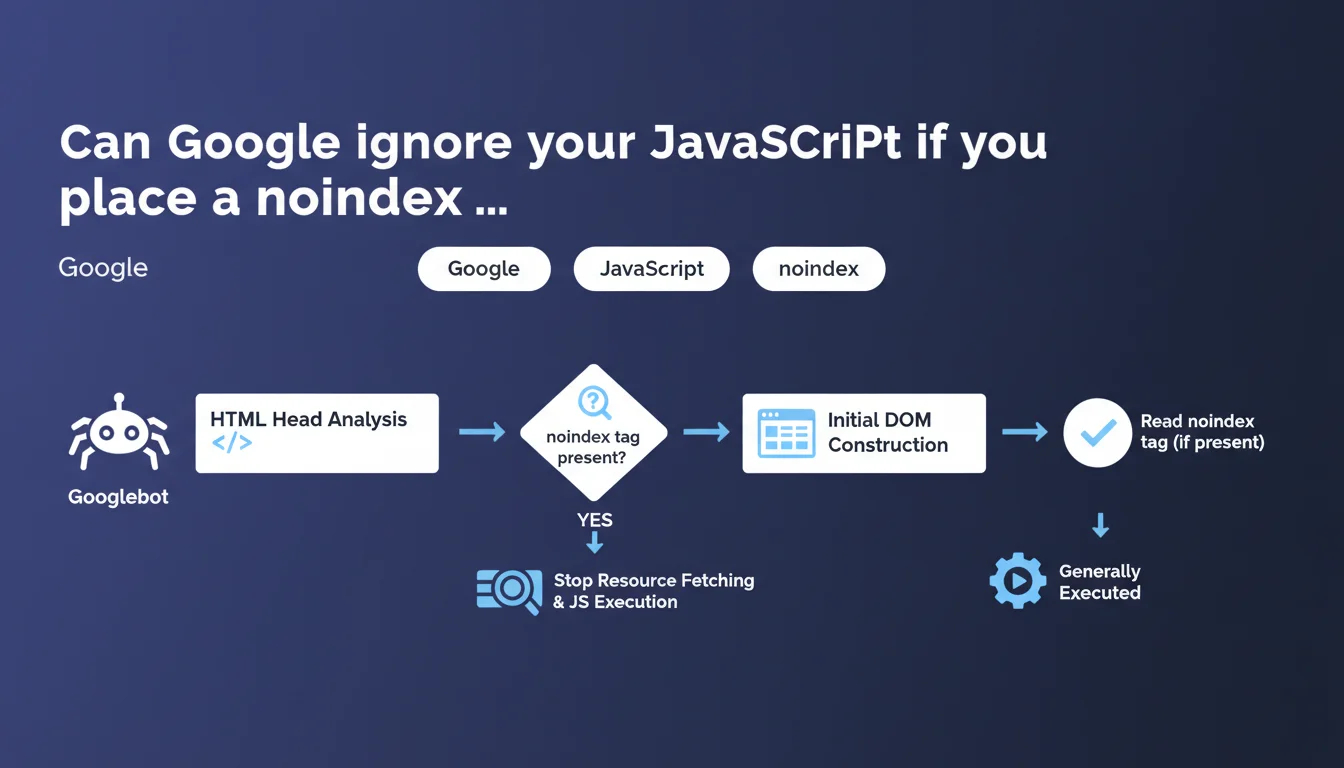
Googlebot detects the noindex tag as soon as it analyzes the HTML head section, before full JavaScript execution. If it's present, Google can interrupt resource fetching and JS rendering. The initial DOM construction is necessary to read this tag, so some JavaScript still executes.
What you need to understand
At what exact moment does Googlebot read the noindex tag?
Googlebot analyzes the noindex tag when it parses the <head> section of your raw HTML. There's no need to wait for the complete page rendering or execution of all your scripts.
Concretely, if your noindex is injected server-side in the initial HTML, Googlebot sees it immediately. If it's added via JavaScript, that's more nuanced — the initial DOM construction is necessary for the bot to read this directive.
Does Google really stop all processing when it sees a noindex?
Yes, but with a caveat. Google can stop fetching additional resources and complete JavaScript execution once the tag is detected. The key word here is "can" — it's not systematic.
The initial DOM construction is generally executed, which means some of your JS still runs. Google doesn't brutally cut off at the first byte of the head; it builds the minimal DOM to read critical tags.
What's the difference between static HTML and JavaScript for the noindex?
With static HTML, the noindex tag is immediately visible. Googlebot reads it without ambiguity; no rendering needed. This is the most reliable case.
With JavaScript, it depends on when injection happens. If your SPA framework adds the noindex after the first render, Google will probably detect it during initial DOM construction. But if your JS takes too long or crashes, you create a zone of uncertainty.
- The noindex is detected in the HTML head, not after complete rendering
- Google can interrupt resource fetching and complete JS execution once the noindex is found
- The initial DOM construction generally executes, so part of your JS runs
- A server-side noindex is more reliable than a noindex injected late in JavaScript
- If the noindex appears only after several seconds of JS, you're taking a risk
SEO Expert opinion
Is this statement consistent with what we observe in the field?
Overall, yes. Testing shows that Googlebot does detect noindex tags present in the initial HTML, even on JavaScript-heavy sites. But the phrasing "can stop" is deliberately vague.
We regularly observe noindex pages that still appear in crawl reports with resources loaded. Google doesn't specify the criteria that trigger this interruption or not. [To verify] : in what specific cases does Google continue loading everything despite the noindex?
What nuances should we add to this claim?
The phrase "initial DOM construction is necessary" is crucial. It means that if your noindex is injected by a heavy external script that takes 3 seconds to load, Google may not wait for it.
Second point: Google mentions "resource fetching." Concretely, this means that even with an early-detected noindex, part of the crawl budget has already been consumed loading the HTML and starting the DOM. It's not an immediate stop in the strict sense.
Let's be honest — this statement leaves too many gray areas for edge cases. If your site is a complex SPA with progressive hydration, you don't know exactly at what millisecond Google reads the noindex.
In what cases doesn't this rule apply?
If your noindex is added only after user interaction or a late asynchronous event, Google probably won't see it. Classic case: a noindex added after an API call that takes time.
Another problematic case: Single Page Applications where the head is dynamically reconstructed after the first render. If the noindex isn't in the initial HTML sent by the server, you're playing with fire.
Practical impact and recommendations
What should you concretely do to secure a noindex?
Inject the tag server-side in the raw HTML. This is the most reliable method, with no dependency on JavaScript. Your noindex is there from the first byte received by Googlebot.
If you use a JavaScript framework (Next.js, Nuxt, etc.), make sure the noindex is rendered during Server-Side Rendering or Static Site Generation. Not client-side only.
Systematically test with Google Search Console: URL inspection tool, "HTML" tab. Verify that Google sees your noindex in the returned source code.
What mistakes should you absolutely avoid?
Never rely on a noindex added by a third-party script (tag manager, misconfigured WordPress plugin) if it loads with a delay. Google may miss it.
Avoid hybrid configurations where the noindex sometimes appears in static HTML, sometimes in JavaScript depending on the route. This creates inconsistencies that Googlebot won't forgive.
Don't mix directives: a noindex in the head and a robots.txt that blocks crawling is counterproductive. Google needs to crawl the page to read the noindex.
- Prefer a noindex server-side in the initial HTML
- Test with Google Search Console's URL inspection tool
- Verify that the noindex is present in the raw source code, not just after rendering
- Avoid third-party scripts that inject the noindex late
- Don't block crawling via robots.txt if you want Google to read the noindex
- Document noindex pages to prevent deployment errors
How do you verify your configuration works?
Use curl or a raw HTTP fetch tool to retrieve the initial HTML. If the noindex doesn't appear in this response, it's arriving too late.
Then compare with JavaScript rendering in Google Search Console. If you see a discrepancy, that's a red flag. Google should see the noindex in both cases if your implementation is correct.
❓ Frequently Asked Questions
Googlebot exécute-t-il tout le JavaScript avant de lire le noindex ?
Un noindex ajouté uniquement en JavaScript est-il fiable ?
Faut-il bloquer le crawl via robots.txt si une page a un noindex ?
Comment tester si Google détecte bien mon noindex ?
Peut-on mettre un noindex uniquement dans les X-Robots-Tag HTTP ?
🎥 From the same video 14
Other SEO insights extracted from this same Google Search Central video · published on 05/03/2026
🎥 Watch the full video on YouTube →
💬 Comments (0)
Be the first to comment.