
Official statement
Other statements from this video 10 ▾
- □ L'accessibilité web est-elle devenue un critère SEO incontournable ?
- □ Pourquoi Google insiste-t-il autant sur le contraste des couleurs pour le SEO ?
- □ L'espacement et la structure du texte influencent-ils le classement Google ?
- □ Pourquoi l'ordre de tabulation au clavier impacte-t-il votre SEO ?
- □ Faut-il vraiment implémenter des skip links pour améliorer son SEO ?
- □ Pourquoi Google insiste-t-il sur l'indicateur de focus clavier visible ?
- □ Faut-il vraiment tester l'accessibilité avec les lecteurs d'écran natifs pour le SEO ?
- □ La taille du texte est-elle vraiment un critère de classement Google ?
- □ Pourquoi l'accessibilité améliore-t-elle vraiment la localisation SEO de vos contenus ?
- □ Pourquoi 90% des sites web échouent-ils sur les critères d'accessibilité et quel impact SEO ?
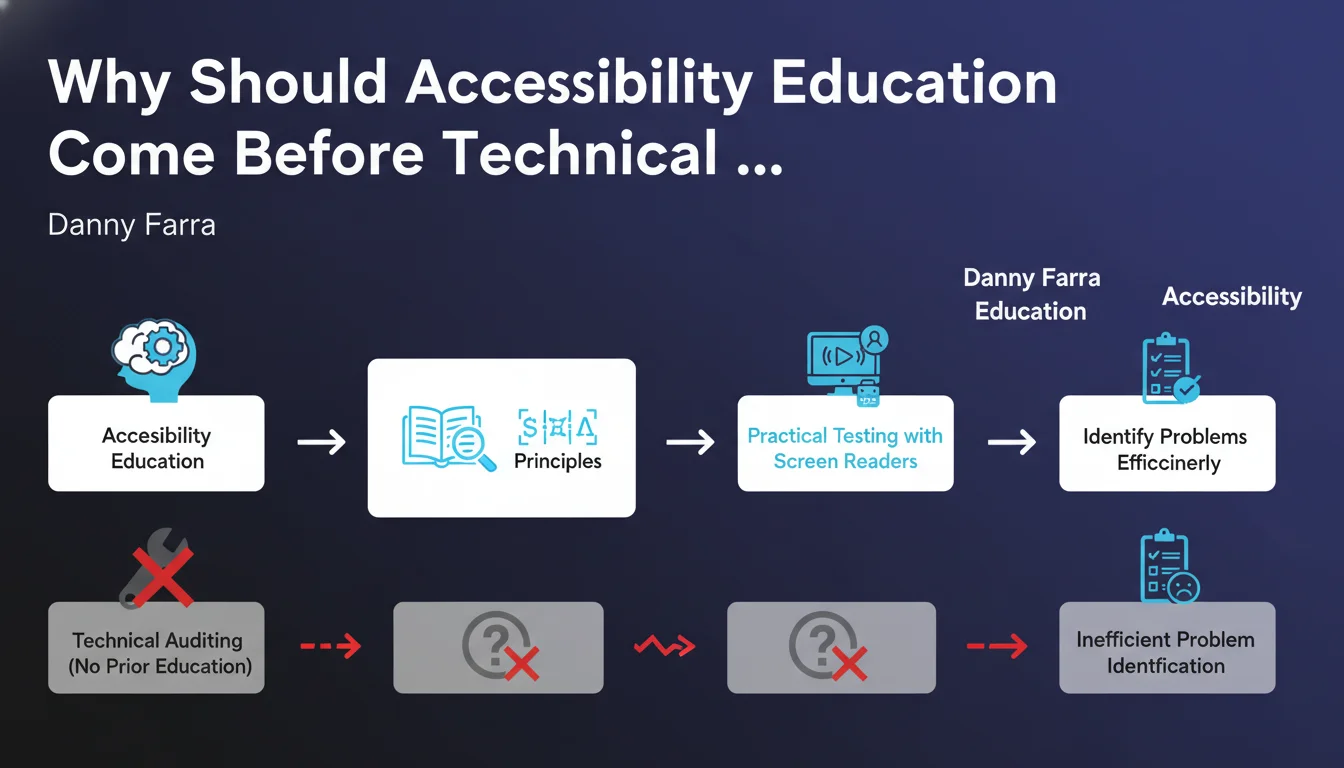
Google recommends mastering fundamental accessibility concepts before launching into an audit. Without this theoretical foundation, identifying concrete problems with screen readers becomes ineffective. Learning WCAG and ARIA principles is not optional — it's a prerequisite for any serious auditing approach.
What you need to understand
Why Does Google Insist on Prior Training?
Danny Farra raises a principle that seems obvious, yet many neglect it: you cannot audit what you do not understand. Launching a screen reader without knowing WCAG standards is like testing performance without understanding the DOM. You will detect anomalies, but you won't know how to prioritize or fix them.
Accessibility is not just a technical checklist. It is a set of design principles — perceivability, operability, understandability, robustness. Without this framework, an audit is limited to validating that alt tags exist, which falls far short of what's necessary.
What Fundamental Concepts Must You Master?
Google does not provide an exhaustive list, but the logic is clear. You must understand semantic HTML structure, ARIA roles, keyboard navigation, color contrast, and above all how a user with a disability actually interacts with a website.
Automated tools (Lighthouse, axe, WAVE) detect 20 to 30 percent of accessibility issues. The rest requires informed human analysis. This is where training comes in: it gives you the reference framework to interpret results and identify what robots cannot see.
Does This Approach Have a Direct SEO Impact?
Yes, but indirectly. Google has never confirmed accessibility as an explicit ranking factor. However, an accessible site is mechanically better structured — hierarchical headings, clean HTML semantics, clear navigation. Everything that helps a screen reader also helps Googlebot.
Core Web Vitals also benefit from an accessible structure: less unnecessary JavaScript, identifiable links and buttons, a lightweight DOM. Accessibility is not SEO, but it shares the same technical foundations.
- Auditing without training generates false positives and superficial fixes
- WCAG concepts are not optional — they structure every accessibility initiative
- Automated tools detect only a fraction of real problems
- Accessibility improves technical quality of the site, which indirectly benefits SEO
SEO Expert opinion
Is This Recommendation Realistic for SEO Teams?
Let's be honest: most SEO teams neither have the time nor budget to seriously train in accessibility. Clients want quick results, not WCAG certifications. Danny Farra's recommendation is valid in principle, but it underestimates organizational complexity.
In practice, many delegate auditing to automated tools, fix obvious errors, and move on. It's neither ideal nor compliant with Google's recommendations, but it's the compromise imposed by real-world constraints. [To verify] — Google has never specified the level of training required, nor published data on the measured impact of prior training on audit quality.
Is Accessibility Becoming a Ranking Factor?
No, and that's where Google's discourse remains unclear. They encourage accessibility for ethical reasons and user experience, but no official confirmation directly links accessibility to organic rankings. SEO gains are collateral: better architecture, better UX, fewer technical frictions.
What is certain is that behavioral signals (bounce rate, time on site, conversion rate) are affected by accessibility. A site that's unusable by keyboard or has unreadable contrast loses visitors. Google measures these signals, even if accessibility itself is not a direct factor.
What Nuances Should Be Added to This Statement?
Danny Farra speaks of auditing "with screen readers." This is an important test, but it is only a fraction of accessibility. A site can be perfectly vocalized and still inaccessible for colorblind users, people with cognitive disabilities, or keyboard-only users.
Another limitation: this approach assumes auditing comes after design. However, accessibility should be considered from the mockup stage. Training teams before coding is more efficient than training the auditor before testing. Google does not specify at what stage of the project this education should occur.
Practical impact and recommendations
How to Train Effectively Before an Audit?
No official certification needed to get started. The WCAG 2.1 guidelines are freely available, and resources like MDN or WebAIM guides cover the basics. Plan 10 to 15 hours to understand the 4 fundamental principles and Level A and AA criteria.
Then test with real screen readers: NVDA (Windows, free), VoiceOver (macOS/iOS, native), JAWS (Windows, paid but the standard). Do not rely solely on Chrome DevTools or Lighthouse — they do not replace real user experience.
What Errors Should You Avoid During an Accessibility Audit?
Do not limit yourself to alt tags. It's the most frequent fix, but it's just one point among dozens. Critical errors often involve keyboard navigation (no visible focus), forms (missing or poorly associated labels), and interactive zones coded in JavaScript without ARIA roles.
Another mistake: believing a Lighthouse score of 100 guarantees accessibility. Lighthouse detects automatable problems, not contextual ones. A button can have correct ARIA role and valid contrast but an incomprehensible label — no tool will detect it.
What Should You Do Concretely After This Statement?
If you manage multiple client sites, integrate a minimum training phase into your processes. You don't need to become a WCAG expert, but master the basics: HTML semantics, keyboard navigation, contrast, heading structure. Document this approach in your audit methodologies.
For high-stakes sites (e-commerce, public services, SaaS), consider a hybrid audit: automated tools + manual testing + real user testing in disability situations. It's more costly, but it's the only guarantee of genuine compliance.
- Train the team on WCAG 2.1 principles (minimum Level A and AA)
- Test with at least two different screen readers (NVDA + VoiceOver recommended)
- Verify complete keyboard navigation (tab, shift+tab, enter, space)
- Audit color contrast with tools like Contrast Checker
- Validate heading structure (H1-H6) and HTML semantics
- Do not rely solely on Lighthouse or similar scores
- Document fixes and their user impact, not just technical compliance
❓ Frequently Asked Questions
L'accessibilité est-elle un facteur de classement Google confirmé ?
Quels outils utiliser pour un audit d'accessibilité sérieux ?
Combien de temps faut-il pour se former aux bases de l'accessibilité ?
Un score Lighthouse de 100 garantit-il l'accessibilité du site ?
Faut-il tester avec plusieurs lecteurs d'écran ?
🎥 From the same video 10
Other SEO insights extracted from this same Google Search Central video · published on 11/08/2022
🎥 Watch the full video on YouTube →
💬 Comments (0)
Be the first to comment.