
Official statement
Other statements from this video 10 ▾
- □ Comment Google analyse-t-il vraiment votre contenu lors de l'indexation ?
- □ Google corrige-t-il vraiment vos erreurs HTML pour l'indexation ?
- □ Une balise non supportée dans <head> peut-elle vraiment casser toutes vos métadonnées SEO ?
- □ Comment Google choisit-il quelle page indexer parmi vos contenus dupliqués ?
- □ Comment Google regroupe-t-il vraiment les pages au contenu similaire ?
- □ Pourquoi Google accorde-t-il plus de poids à certains signaux SEO qu'à d'autres ?
- □ Comment Google choisit-il LA page canonique dans un cluster de doublons ?
- □ Google sert-il vraiment des versions alternatives de vos pages selon le contexte de recherche ?
- □ Comment Google décide-t-il vraiment si votre page mérite l'index ?
- □ Qu'est-ce que Google stocke vraiment dans son index pour une page canonique ?
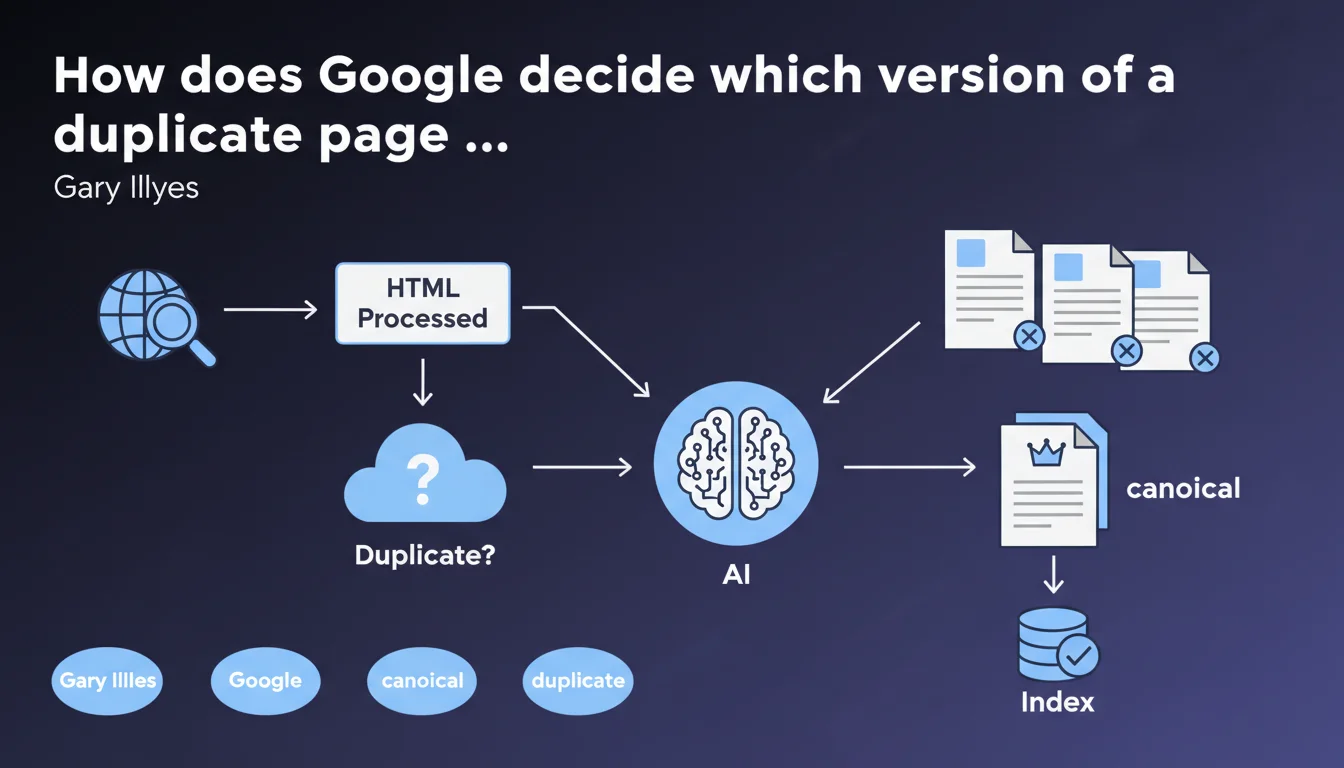
Google detects duplicate pages after processing the HTML, then selects a canonical version for the index. This canonicalization process occurs after crawling and content analysis. The version retained is not necessarily the one you designated via canonical tags.
What you need to understand
When exactly does Google detect duplicates?
Duplicate content detection occurs after HTML processing, not during the crawl. Google first crawls pages, analyzes their content, then compares versions to identify duplicates. This sequence matters: even a duplicate page consumes crawl budget before being discarded.
The exact timing of this comparison remains unclear. Google likely has multiple detection levels: an initial one during indexing, then periodic checks when content is updated or new URLs appear.
What exactly is the "canonical version"?
The canonical version is the URL that Google decides to keep in its index and present in search results. Other versions are known to Google but won't be shown to users — except in special cases related to geolocation or device type.
This selection is based on several signals: canonical tags, redirects, internal and external links, URL consistency in the sitemap, URL age. Google never guarantees respecting your canonical choice if other signals heavily point to a different URL.
What's the difference from a Panda filter or a penalty?
Canonicalization is not a punishment. It's a technical consolidation process. Google doesn't penalize your site for having duplicates — it simply chooses which version to serve.
The problem arises when Google canonicalizes to a URL you don't want indexed. You then lose control of your visibility. Unlike a penalty, there's no notification in Search Console, just an absence of results for certain URLs.
- Duplicate detection happens after HTML processing, not during crawl
- Google selects the canonical version itself based on multiple signals
- Your canonical tag is one signal among many, not an absolute directive
- Canonicalization is not a penalty but can affect your visibility if Google chooses poorly
- Other versions remain known to Google but typically don't appear in the SERPs
SEO Expert opinion
Does this statement contradict what we observe in practice?
No, it confirms what practitioners have observed for years. Google regularly ignores canonical tags when other signals are contradictory. I've seen dozens of cases where a site designates one URL as canonical but Google indexes a variant with parameters or without a trailing slash.
What's missing here is the relative weighting of signals. How much importance does Google give to the canonical tag versus internal links? Versus URL age? Versus direct traffic? [Needs verification]: no official documentation details this hierarchy.
Why doesn't Google specify the exact timing of detection?
Because vagueness serves its purposes. If Google detailed precisely when and how it detects duplicates, some webmasters would attempt to circumvent the system. The phrasing "once the HTML is processed" is intentionally broad.
In practice, we observe that Google can take weeks to consolidate multiple versions of the same page. During this period, different URLs can appear and disappear from the SERPs. This latency creates uncertainty that's harmful to sites restructuring their URLs.
Should we really trust canonicalization signals?
With caution. Google says it "selects" the canonical version, but never guarantees respecting your choice. The "URL Inspection" report in Search Console sometimes indicates a canonical URL different from the one you declared — without detailed explanation.
Let's be honest: Google reserves the right to ignore you. If your internal linking heavily points to a URL without a canonical tag, or if one version receives quality backlinks, Google may decide that's the version that matters. You then face a choice: fix all your signals or accept Google's selected canonical.
Practical impact and recommendations
What should you verify as a priority on your site?
First step: identify duplicate clusters. Use Screaming Frog or Sitebulb to detect similar content, URL variations (with/without www, http/https, trailing slash), paginated pages, AMP versions. Then export the declared canonical URLs.
Second step: compare these canonicals with those retained by Google via Search Console. The "URL Inspection" tool tells you the "Canonical selected by Google." If it differs from yours, dig deeper: do your internal links point to the right URL? Does your sitemap contain only the canonicals you want?
What mistakes must you absolutely avoid?
Mistake #1: Declare a canonical tag on page A pointing to page B, then do the reverse on page B pointing to page A. Google ignores these loops and chooses arbitrarily.
Mistake #2: Multiply versions of the same page (tracking parameters, sessions, filters) without consolidating via canonical or 301 redirects. You fragment your authority and dilute crawl budget.
Mistake #3: Point your internal links to non-canonical URLs. If you declare page-a as canonical but all internal links lead to page-a?ref=newsletter, Google doubts your consistency.
How do you ensure Google respects your canonicalization choices?
Consolidate all signals in the same direction. Canonical, 301 redirects, internal links, XML sitemap, hreflang attributes if multilingual — everything must point to the same canonical URL. The more coherent the signals, the less latitude Google has to ignore you.
Regularly monitor coverage reports in Search Console. Pages marked "Discovered, currently not indexed" or "Another page with appropriate canonical tag" indicate Google has discarded those URLs in favor of a canonical. Verify it's the one you want.
- Audit duplicate content via a crawler and identify all URL variations
- Compare declared canonicals with those retained by Google (Search Console)
- Consolidate internal links: point only to canonical URLs
- Clean up XML sitemap: exclude all non-canonical URLs
- Use 301 redirects for unnecessary variants (trailing slash, obsolete parameters)
- Avoid redirect chains and canonical loops
- Monitor coverage reports to detect canonicalization drift
❓ Frequently Asked Questions
Google respecte-t-il toujours la balise canonical que je déclare ?
Combien de temps faut-il à Google pour détecter et consolider les doublons ?
Les pages en double consomment-elles du crawl budget même si Google ne les indexe pas ?
Comment savoir quelle URL Google a retenue comme canonique ?
Peut-on forcer Google à indexer une URL spécifique plutôt qu'une autre ?
🎥 From the same video 10
Other SEO insights extracted from this same Google Search Central video · published on 04/04/2024
🎥 Watch the full video on YouTube →
💬 Comments (0)
Be the first to comment.