
Official statement
Other statements from this video 10 ▾
- □ Comment Google analyse-t-il vraiment votre contenu lors de l'indexation ?
- □ Google corrige-t-il vraiment vos erreurs HTML pour l'indexation ?
- □ Une balise non supportée dans <head> peut-elle vraiment casser toutes vos métadonnées SEO ?
- □ Comment Google choisit-il quelle version d'une page en double indexer ?
- □ Comment Google choisit-il quelle page indexer parmi vos contenus dupliqués ?
- □ Comment Google regroupe-t-il vraiment les pages au contenu similaire ?
- □ Pourquoi Google accorde-t-il plus de poids à certains signaux SEO qu'à d'autres ?
- □ Comment Google choisit-il LA page canonique dans un cluster de doublons ?
- □ Google sert-il vraiment des versions alternatives de vos pages selon le contexte de recherche ?
- □ Comment Google décide-t-il vraiment si votre page mérite l'index ?
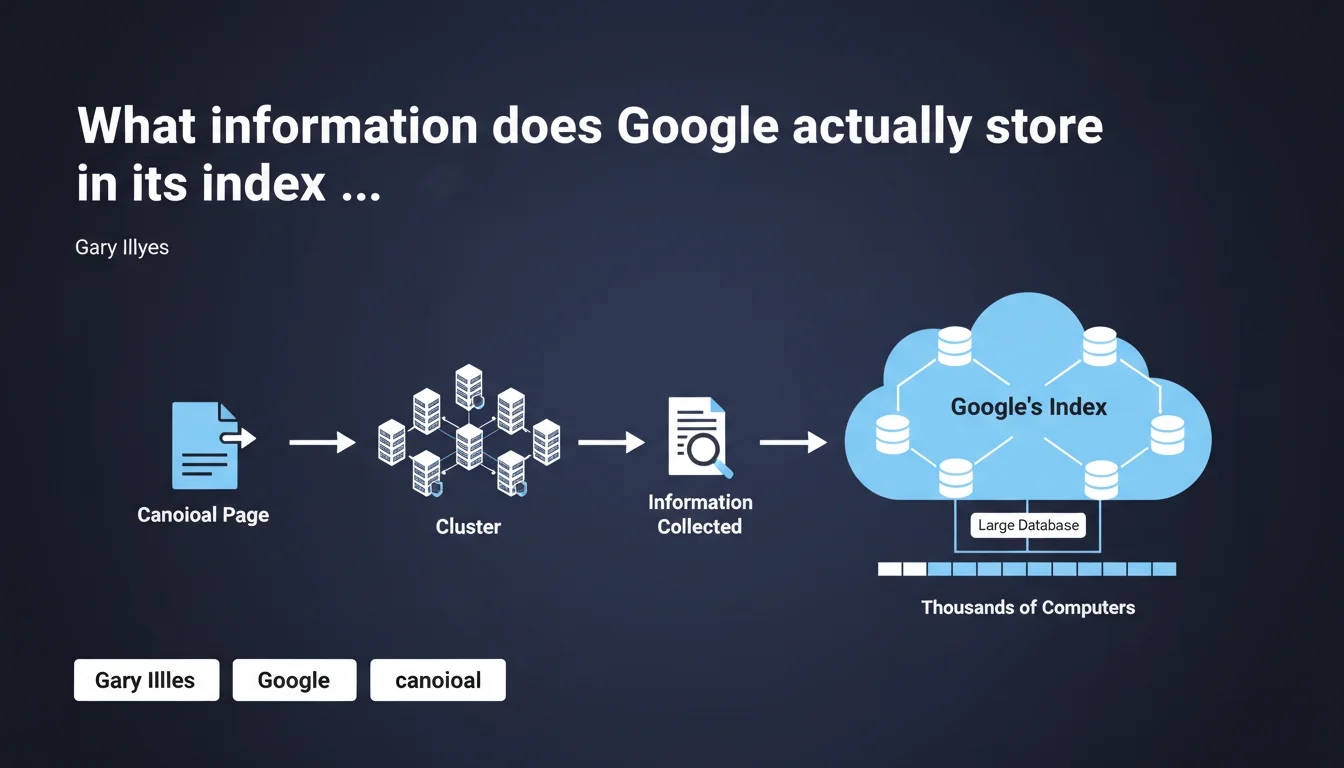
Google only stores information related to the indexed canonical page and its cluster of similar pages in its index. Google's index is a distributed database across thousands of machines, not a simple directory of pages. Understanding this mechanism is crucial to anticipate which version of your content will be retained and visible in the SERPs.
What you need to understand
What does Google mean by a "cluster" of canonical pages?
Google doesn't process each page in isolation. When it detects multiple URLs displaying identical or very similar content, it groups them together in what it calls a cluster.
This cluster includes the page designated as canonical (the one Google chooses as the representative of the group) and all its variations — URL parameters, mobile/desktop versions, paginated pages, syndicated content, etc.
Why does Google only store the canonical in the index?
Storing every variation of the same page would be a colossal waste of resources. Google's index contains hundreds of billions of pages: optimizing storage is an absolute technical necessity.
By keeping only the canonical version, Google drastically reduces data redundancy while maintaining important signals from the cluster — backlinks to variations, engagement metrics, technical signals.
Concretely, what information is stored?
Google stores everything that allows it to rank and serve the page in search results: text and structured content, metadata, quality signals (E-E-A-T), link profile, performance data (Core Web Vitals), modification history.
Cluster information — particularly backlinks pointing to non-canonical variations — is consolidated and attributed to the canonical page. This is why losing links to a redirected URL isn't catastrophic if Google understands canonicalization correctly.
- Google groups similar pages into clusters and designates one canonical per cluster
- Only the canonical page and consolidated cluster data are stored in the index
- Signals from variations (backlinks, engagement) are transferred to the canonical
- The index is a distributed database across thousands of servers — not a simple file
- This architecture explains why forcing an incorrect canonical can make a page disappear from results
SEO Expert opinion
Does this statement reveal anything genuinely new?
Honestly? Not really. SEO professionals already knew that Google consolidates signals around a canonical URL. What this statement brings is explicit confirmation of the underlying technical mechanism.
The term "cluster" is interesting — it suggests Google maintains a mapping of relationships between variations, even if only the canonical is indexed. This explains why changes on a variation (added content, new backlinks) can influence the canonical, even indirectly.
Can you really trust what Google chooses as canonical?
Here's where it gets tricky. Google regularly ignores the canonical signals you send — link rel="canonical" tags, Search Console parameters, 301 redirects.
Why? Because their algorithm detects inconsistencies: different content between source and target, massive backlinks to a non-canonical variation, stronger user signals on an alternative URL. [To verify]: Google claims to respect your canonical signals "in most cases", but no public metric allows you to quantify this "most".
What about non-canonical pages with unique content?
This is the classic pitfall. Imagine you have page A (canonical) and page B (variation) with a unique content section on B. If Google classifies B in A's cluster and doesn't index it independently, that unique content becomes invisible.
I've observed this scenario dozens of times — notably with product pages broken down by size/color where each variation had slightly different descriptions. Google picks one canonical and the rest disappears from SERPs, even if each page had its own value. The solution? Differentiate the content sufficiently or accept canonicalization and consolidate.
Practical impact and recommendations
How can you ensure Google indexes the right canonical version?
First rule: send consistent signals. If your canonical tag points to a URL, your XML sitemap should list this same URL, not the variations. Your internal links should prioritize pointing to the canonical.
Second rule: use Search Console to verify which URL Google has actually chosen as canonical. The URL inspection tool shows you the canonical URL selected by Google — if it differs from yours, dig deeper.
- Audit your canonical tags: they must point to absolute, accessible URLs, and be consistent
- Clean up unnecessary URL parameters (tracking, sessions) with rules in Search Console or robots.txt
- Consolidate backlinks: if you have links to variations, redirect them with 301s to the canonical
- Verify in Search Console that Google respects your declared canonical
- Avoid redirect chains and self-referencing canonicals in loops
- Test your canonical's accessibility: if it returns a 404 or 500, Google may potentially index a variation
What errors cause failed canonicalization?
Error number one: pointing a canonical to a page that's slightly different. Google detects that the content doesn't match and ignores your directive. Result: it chooses its own canonical, often not the one you wanted.
Another frequent trap: separate mobile versions (m.example.com). If you don't properly implement alternate/canonical annotations between desktop and mobile, Google may index the wrong version or create two separate entries.
Should you actively monitor page clusters?
Yes, especially if you manage a site with thousands of similar pages — e-commerce, directories, paginated content. A quarterly audit of indexed URLs vs. those submitted in the sitemap reveals gaps.
Compare the number of pages in your sitemap to the number actually indexed (site: command or Search Console data). A significant gap signals a canonicalization or crawl budget problem.
❓ Frequently Asked Questions
Si Google stocke uniquement la page canonique, que deviennent les backlinks vers les variantes non-canoniques ?
Peut-on forcer Google à indexer une page spécifique si elle fait partie d'un cluster canonique ?
Comment savoir quelle URL Google a choisie comme canonique pour mes pages ?
Si je change ma balise canonical, combien de temps Google met-il à mettre à jour l'index ?
Les pages non-canoniques peuvent-elles encore générer du trafic organique ?
🎥 From the same video 10
Other SEO insights extracted from this same Google Search Central video · published on 04/04/2024
🎥 Watch the full video on YouTube →
💬 Comments (0)
Be the first to comment.