
Official statement
Other statements from this video 17 ▾
- □ Should you worry about changing page titles frequently—or is Google totally fine with it?
- □ Can you really erase the SEO past of a purchased domain?
- □ Should you really disavow links that don't match your current niche anymore?
- □ Should you really remove backlinks pointing to your domain's old content?
- □ Do server errors really kill your Google rankings?
- □ Should you include your brand name in news article titles for better search visibility?
- □ Why does changing only the title of copied content fool absolutely nobody?
- □ Should you really be putting dates in your article titles?
- □ Does adding categories to your URLs really boost your SEO rankings?
- □ Why does Google crawl pages it never adds to its index?
- □ What's the real secret to getting Google to index all your content?
- □ Are backlinks to your non-indexed pages really wasting your SEO potential?
- □ Why Does Google Drastically Reduce Its Crawl Rate After a CDN Migration?
- □ Does server response time really impact your Google rankings?
- □ Should you really block pages with robots.txt if Google can index them without any content?
- □ Does image alt text in a link carry the same SEO weight as visible anchor text?
- □ Does retouched product photography actually hurt your review rankings?
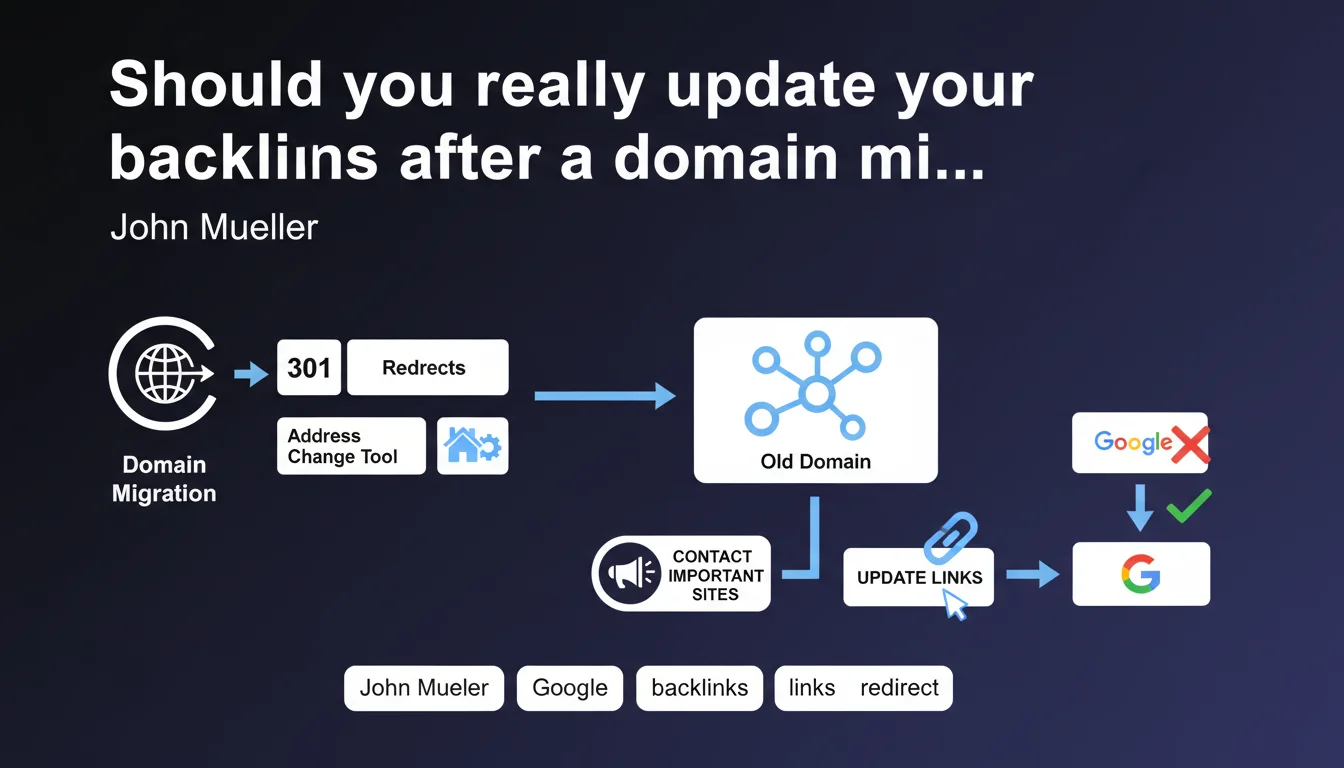
Google confirms that 301 redirects alone are insufficient during a domain migration. If the most important backlinks continue pointing to the old domain, Google may keep the old site in its search results despite technical redirects. Contacting the main referring sites to update their links becomes a critical step in the migration process.
What you need to understand
Why don't redirects alone guarantee migration success?
A migration traditionally relies on two pillars: 301 redirects and the address change tool in Search Console. These two actions signal to Google that the site has moved. Yet Mueller clarifies that this remains insufficient in certain cases.
The problem? The external link signals continue pointing to the old domain. Google interprets these backlinks as a vote of confidence toward the old URL. As long as these signals remain predominant, the search engine may hesitate to fully shift its authority to the new domain.
What does Google mean by "important sites"?
Mueller doesn't provide a numerical threshold — typical of Google. We can reasonably interpret "important" as high-authority backlinks: reference media outlets, institutional sites, strategic partners, links on the homepage of major industry players.
These links have a disproportionate weight in the algorithm. A link from The New York Times or a .gov site is worth infinitely more than 50 links from low-traffic blogs. These are the anchors you must prioritize during a post-migration update campaign.
What is the risk if you don't update these backlinks?
Google continues to consider the old domain as the canonical reference, even after migration. Concretely: the old domain remains indexed longer, the new one struggles to rank, and authority dilution between both versions crushes your rankings.
Some migrations take months to stabilize for this reason. Redirects do the technical job, but user signals and authority remain anchored to the old domain. Google waits for the ecosystem to naturally shift — unless you accelerate the process.
- 301 redirects transmit authority, but unupdated backlinks slow down the transition
- Google prioritizes external signals: as long as third-party sites point to the old domain, it remains "relevant" to the search engine
- High-authority backlinks (media, institutions, partners) must be prioritized in the update
- The address change tool alone is insufficient if the external link ecosystem doesn't follow
- A poorly managed migration can lead to a long and damaging coexistence between old and new domain
SEO Expert opinion
Is this recommendation realistic at scale?
Contact every site that linked to you? Good luck. On a mature site with thousands of backlinks, it's unmanageable in practice. Mueller talks about "important sites," but how many exactly? 10? 50? 200?
The pragmatic approach consists of extracting backlinks via Ahrefs or Semrush, filtering by Domain Rating (DR >50 for example), organic traffic, and thematic relevance. You generally get a shortlist of 20 to 100 truly critical domains. This is where you must concentrate your contact effort.
Shouldn't Google handle this automatically via 301s?
Theoretically, yes. A 301 redirect is supposed to transmit 99% of PageRank according to official statements. But in reality, Google doesn't instantly shift all its authority and contextual signals from one domain to another.
There's an observation period where the search engine verifies the migration is coherent: is the new domain receiving direct traffic? Are users returning? Are external links being updated? If all signals remain frozen on the old domain, Google interprets this as a potential issue. [To verify]: no official source provides the duration of this period nor exact thresholds.
What are cases where this rule doesn't really apply?
A new site or one with few backlinks (fewer than 100 referring domains) can get away without this contact work. Redirects and the address change tool are usually sufficient.
Conversely, on an e-commerce or media site with thousands of backlinks, ignoring this step can kill the migration. Conflicting signals between old and new domain create algorithmic confusion that translates into prolonged traffic drops. And that's where it breaks: many migrations fail because we handle the technical aspect (redirects) but not the ecosystem aspect (third-party backlinks).
Practical impact and recommendations
How do you identify which backlinks to update as a priority?
Export your backlink profile from Ahrefs, Majestic, or Semrush. Filter by Domain Rating (DR >40), monthly organic traffic (>10k visits), and thematic relevance. Ignore crappy directories, footer links, and zombie sites without traffic.
Focus on: reference media outlets (press, influential blogs), commercial partners (sites you have a real relationship with), institutional sites (.gov, .edu, professional organizations), and evergreen content that ranks well and generates traffic to your site.
What method should you use to contact webmasters?
Direct email, straightforward, factual. No marketing fluff. "Hello, our site migrated from old-domain.com to new-domain.com. You have a link to [old URL] in [article X]. Would it be possible to update it? Thank you."
Prepare a customizable template, but adapt each message. Major media outlets often have a generic address like redaction@ or correction@. For partners, contact your usual contact directly. Realistic response rate: 20-30%. Actual update rate: 10-15%.
What if some sites don't respond or refuse?
Keep the 301 redirects in place. For life. Some think they can remove them after a few months — fatal mistake. As long as a backlink points to the old URL, the redirect must work.
For really critical links that don't move, evaluate the option of a complementary link: propose guest content or collaboration that generates a new backlink to the new domain. It doesn't replace the update, but it sends an additional signal to Google.
- Extract the complete backlink profile and filter by authority (DR >40-50)
- Prioritize media, strategic partners, institutional sites, and evergreen content
- Prepare straightforward, factual contact email with customizable template
- Target 20 to 100 referring domains maximum depending on site size
- Maintain 301 redirects for life, even for unupdated links
- Track effective updates in a dashboard (Google Sheets or CRM)
- Follow up once after 2 weeks, then move to the next
- Monitor indexation evolution and organic traffic for 6 months post-migration
❓ Frequently Asked Questions
Combien de temps faut-il garder les redirections 301 après une migration ?
Les redirections 301 transmettent-elles 100% du PageRank ?
Faut-il mettre à jour tous les backlinks ou seulement les principaux ?
Quel est le taux de réponse moyen lors de contacts pour mise à jour de liens ?
Que se passe-t-il si Google continue d'indexer l'ancien domaine après la migration ?
🎥 From the same video 17
Other SEO insights extracted from this same Google Search Central video · published on 04/02/2022
🎥 Watch the full video on YouTube →
💬 Comments (0)
Be the first to comment.