
Official statement
Other statements from this video 5 ▾
- □ Comment indiquer à Google le nom de site que vous souhaitez afficher dans les résultats de recherche ?
- □ Les noms de site Google s'appliquent-ils vraiment aux sous-dossiers de votre domaine ?
- □ Combien de temps Google met-il vraiment à traiter vos mises à jour SEO ?
- □ Peut-on vraiment accélérer l'indexation d'un changement de balisage via Search Console ?
- □ Pourquoi Google insiste-t-il sur l'importance du nom de site dans les résultats de recherche ?
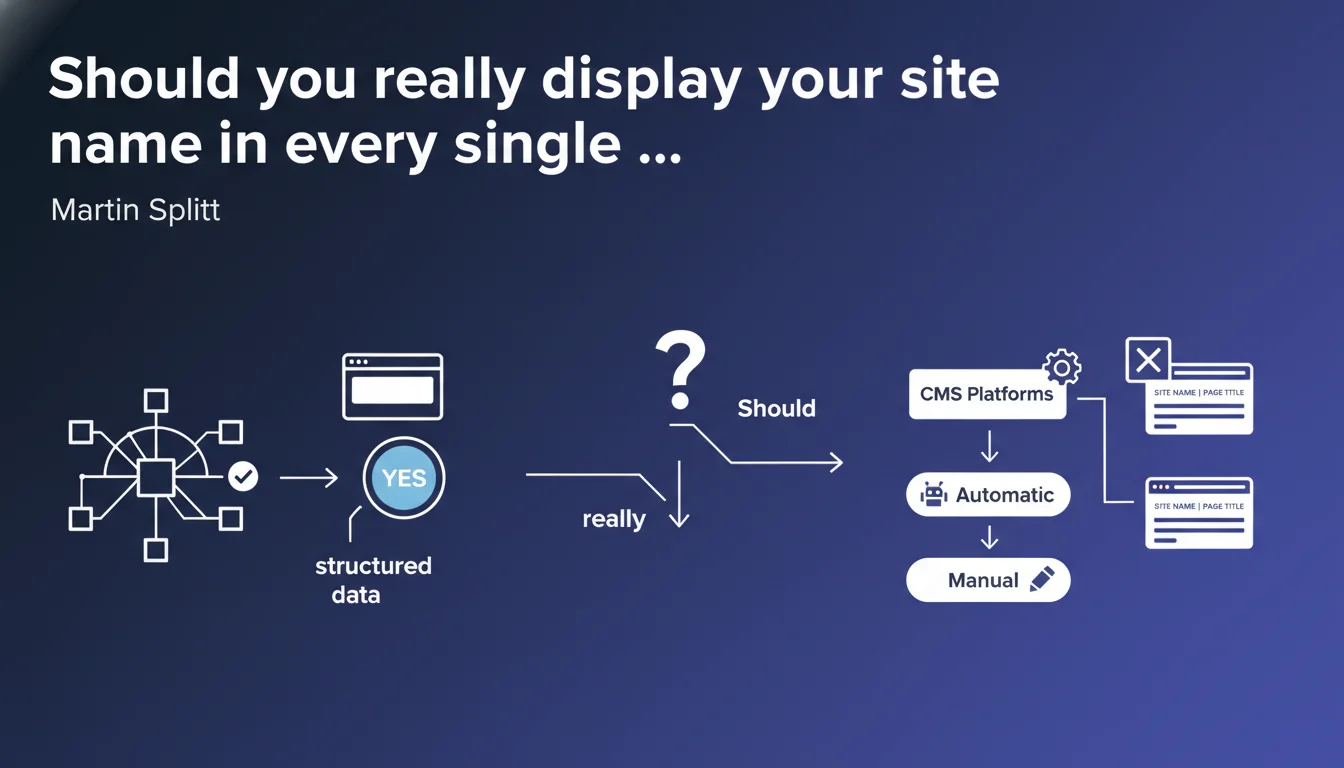
Google recommends systematically displaying your site name in each title tag, either through structured data or by adding it manually. This practice strengthens brand consistency in SERPs and helps Google clearly identify your site — even though the manual method remains a second-best solution compared to structured markup.
What you need to understand
Why does Google insist on displaying the site name in titles?
The logic is straightforward: Google wants to be able to clearly identify your brand in search results. By displaying your site name consistently in each title tag, you strengthen brand recognition and help the algorithm understand that all these pages belong to the same domain.
Splitt's statement is a Plan B. Google prefers WebSite structured data to automatically extract your site name. But if you can't — or don't know how to — implement this markup, then yes, manually displaying the name in each title remains an acceptable solution.
What's the connection to structured data?
The Schema.org WebSite markup allows Google to properly retrieve your site name without having to parse it from the title tag. This is the recommended method as a priority.
Concretely: Google can then reformat the title display in the SERPs by adding or repositioning the site name according to its algorithm. If you provide nothing through structured data, Google will try to guess — and in that case, you might as well make it easier by putting the name in manually.
Do all CMS platforms handle this automatically?
No. Some CMS platforms like WordPress, Shopify, or Wix automatically add the site name to titles through templates. Others, particularly custom-built solutions or certain frameworks, require you to configure this logic manually.
Splitt is clear on this: if your CMS doesn't do it, you must add the name manually before or after the specific title of each page. This isn't optional if you don't control structured data.
- Google prioritizes WebSite structured data to identify your site name
- Manual addition in titles is an acceptable Plan B if markup isn't possible
- Consistency of the name displayed in each title strengthens brand recognition in SERPs
- Some CMS platforms automate this logic, others don't — verify your configuration
SEO Expert opinion
Is this recommendation consistent with real-world observations?
Yes, we've observed for years that Google regularly reformats titles in the SERPs. When the site name is absent or inconsistent, Google tries to guess it from the domain, URL, or even page content. Result: sometimes quirky displays.
On the other hand, when the name is present consistently — whether through Schema.org or in the title tag — Google tends to respect it more. Caveat: "more," not "always." Google remains free to rewrite your titles as it sees fit.
What nuances should we add?
Let's be honest: manually adding your site name to each title tag isn't the optimal solution. It's a workaround for those who don't master structured data. If you can implement WebSite markup, do it — it's cleaner and more flexible.
Another nuance: Google doesn't say where to place the name (before or after the specific title). The standard convention — page title | Site name — is effective, but some sites reverse it to put the name first on strategic pages. [To verify]: no Google statement confirms that one placement is better than another.
In which cases doesn't this rule apply?
For single-page sites or personal websites where the brand and content are inseparable, systematic name addition adds nothing. Similarly, if your brand is already ultra-recognizable and Google identifies it without ambiguity, the impact will be marginal.
Finally, if you've already properly implemented WebSite structured data, adding the name manually in each title is redundant — or even counterproductive if it unnecessarily lengthens your titles.
Practical impact and recommendations
What should you do concretely?
First step: audit your title tags across a sample of pages. Does your site name appear consistently? If not, identify why: is it a CMS template issue, configuration problem, or lack of automated logic?
Second step: prioritize implementing WebSite structured data. It's Google's recommended method and gives you more control over how your name displays in the SERPs. If that's not possible in the short term, move to Plan B: add the name manually in each title tag.
What errors should you avoid?
Don't mindlessly duplicate your site name if your structured data is already in place. You risk redundant displays like "Name | Title | Name" in the SERPs — which is counterproductive.
Also avoid sacrificing the readability of the specific title to fit in your site name. If it exceeds 60 characters and the important part gets truncated, you've failed. Prioritize the page's message, then add the name if space allows.
How do you verify your site is compliant?
Use Google's Rich Result Test tool to validate your WebSite structured data. Verify that the name is properly extracted and recognized.
For manual titles, crawl with Screaming Frog or an equivalent tool: filter pages where the site name doesn't appear in the title tag. Fix it at the template level or page-by-page if necessary.
- Audit your title tags across a representative sample of pages
- Implement WebSite structured data if not already done
- If impossible: configure your CMS to automatically add your site name in each title tag
- Verify that the specific title remains readable and takes priority in the display
- Test actual display in SERPs using the Search Preview tool
- Avoid redundancy if combining structured data and manual addition
❓ Frequently Asked Questions
Dois-je placer le nom du site avant ou après le titre de page ?
Est-ce que Google réécrit les titres même si j'ajoute le nom du site ?
Peut-on se passer d'ajouter le nom dans les titres si on a déjà les données structurées WebSite ?
Comment savoir si mon CMS ajoute automatiquement le nom du site dans les titres ?
Que faire si ajouter le nom du site dépasse les 60 caractères recommandés ?
🎥 From the same video 5
Other SEO insights extracted from this same Google Search Central video · published on 28/09/2023
🎥 Watch the full video on YouTube →
💬 Comments (0)
Be the first to comment.