
Official statement
Other statements from this video 9 ▾
- □ Les exports groupés Search Console vers BigQuery remplacent-ils vraiment l'API Search Analytics ?
- □ L'export groupé Search Console révèle-t-il enfin toutes les métriques de performance ?
- □ Pourquoi la position 0 dans Search Console désigne-t-elle la position la plus haute ?
- □ Comment la table searchdata_url_impression agrège-t-elle les données de performance dans Google Search Console ?
- □ Pourquoi Google anonymise-t-il certaines URLs dans les données Discover de la Search Console ?
- □ Comment exploiter les champs d'apparence de recherche pour optimiser sa visibilité dans les SERP ?
- □ Pourquoi Google impose-t-il l'usage de fonctions d'agrégation dans Search Console ?
- □ Faut-il vraiment limiter les requêtes par date dans Search Console pour optimiser ses performances ?
- □ Pourquoi faut-il impérativement filtrer les requêtes anonymisées dans Google Search Console ?
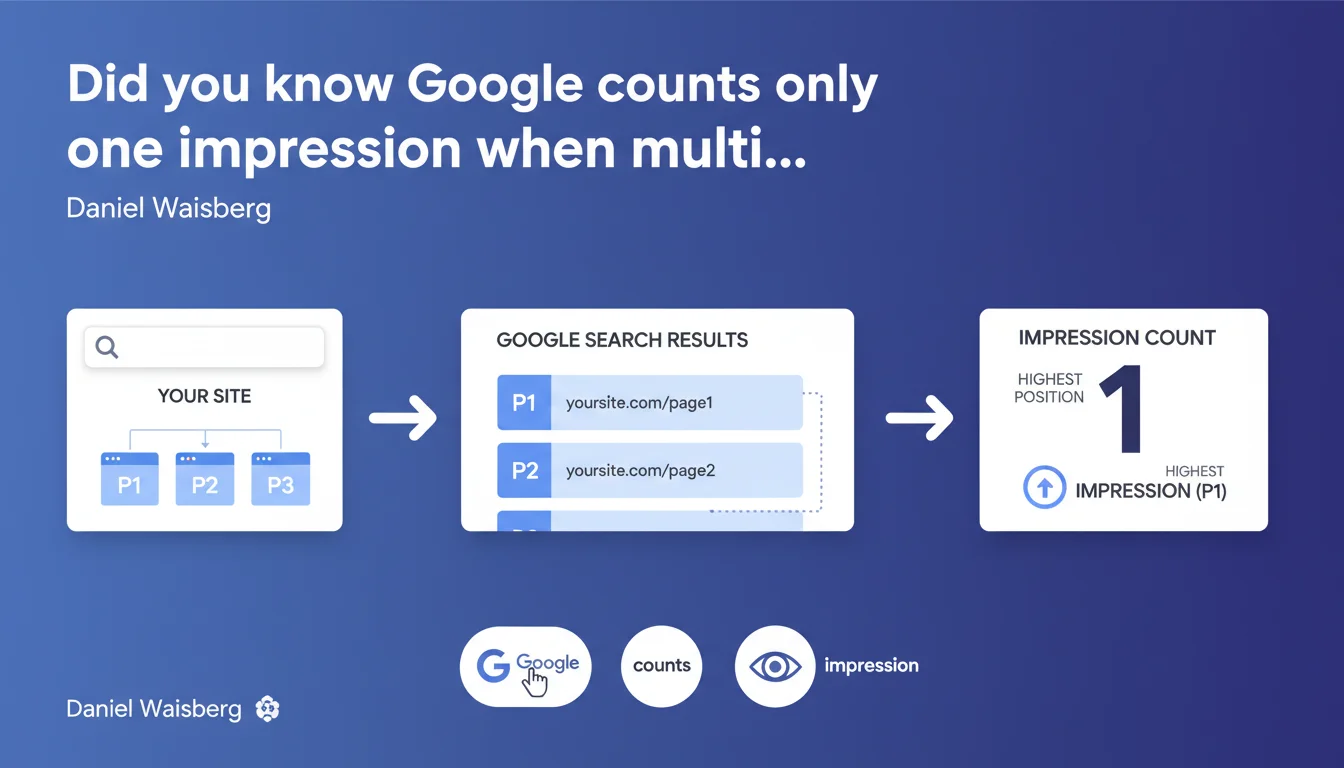
In BigQuery, the searchdata_site_impression table aggregates data by property: if multiple pages from your site appear in the same Google search result, Google counts only one impression. The reported position is always the highest position among your pages. A technical detail that completely changes how you interpret Search Console metrics.
What you need to understand
What does "aggregation by property" actually mean in practice?
When you analyze your data in the BigQuery table searchdata_site_impression, Google applies a specific aggregation logic. If two pages from your site (or more) appear in the same search result for a given query, the impression is counted only once at the property level.
This logic differs from what you might intuitively expect: impressions are not counted page by page, but rather at the level of the entire domain. Two URLs in the SERP = one single recorded impression.
How is position calculated in this case?
Google systematically retains the highest position among all your pages present in the SERP. If your site appears at position 3 and position 7 for the same query, it's position 3 that will be reported in the aggregated data.
This rule makes sense: Google considers that your property occupies the best available position for this search, regardless of how many times it appears in the results.
Why is this distinction important?
Because it directly impacts the interpretation of your metrics. If you analyze impressions without knowing this rule, you risk underestimating the actual visibility of your individual pages.
This aggregation also explains why certain discrepancies can appear between different data views in Search Console or when comparing with third-party tools.
- Only one impression counted per SERP, even if multiple pages from your site appear there
- The reported position always corresponds to your property's best ranking
- This logic specifically applies to the BigQuery searchdata_site_impression table
- Aggregation occurs at the Search Console property level (domain or subdomain depending on your configuration)
SEO Expert opinion
Is this statement consistent with real-world observations?
Yes, and it confirms what several practitioners had already noticed when analyzing BigQuery exports. The discrepancies between aggregated data and page-by-page data now have an official explanation here.
Where it gets sticky: Google doesn't specify whether this rule applies uniformly to all result types. Featured snippets, People Also Ask, image packs — are they treated the same way? [To be verified]
What nuances should be added to this rule?
This aggregation logic specifically concerns BigQuery, not necessarily the standard Search Console interface. In classic GSC, we sometimes observe slightly different behaviors depending on the filters applied.
Another point: Daniel Waisberg talks about "property," but what about multi-domain sites or "domain property" type properties? The documentation remains vague on these specific cases. In practice, if you manage multiple subdomains as separate properties, each will be treated separately.
In what cases can this rule cause problems?
If you drive your optimizations at the individual page level, this aggregation can mask opportunities. A page ranked at position 8 but systematically overshadowed by another at position 2 will never appear clearly in your aggregated reports.
For content sites with a lot of internal cannibalization, this logic complicates identifying true performance by URL. You see a favorable average position while in reality, multiple pages are competing for the same queries without any of them truly standing out.
Practical impact and recommendations
How should you adapt your Search Console data analysis?
First step: clearly distinguish your analyses at the property level from those at the page level. If you work on BigQuery, create separate views for each level of granularity.
Concretely? When you analyze aggregated impressions, keep in mind that the figure does not reflect the total number of appearances of your URLs, but rather the number of SERPs where your site was visible — regardless of the multiplicity of results.
What errors should you avoid in interpreting positions?
Don't take the reported position as an average. It's systematically the best ranking that is displayed. If you compare this data with a third-party rank tracking tool, the gaps can be significant depending on the calculation logic used.
Also avoid jumping to hasty conclusions about individual page performance when looking at aggregated data. An average position of 4 can hide a dominant page at position 3 and another invisible at position 50.
What should you do concretely to leverage this information?
If you use BigQuery, systematically add disaggregation queries to analyze true page-by-page performance. Don't rely on the searchdata_site_impression table alone.
Identify queries where multiple pages from your site appear simultaneously in the results. This is often a sign of cannibalization that needs to be addressed through content consolidation or internal linking optimization.
- Create separate BigQuery views for analysis at property level and page level
- Clearly document the calculation methodology used in your internal reports
- Cross-reference aggregated data with URL-level exports to identify true patterns
- Set up alerts for queries where multiple pages from your site rank simultaneously
- Recalibrate your KPIs if you've been driving them based on incorrect assumptions about aggregation
❓ Frequently Asked Questions
Cette règle d'agrégation s'applique-t-elle aussi dans l'interface standard de Search Console ?
Que se passe-t-il si deux sous-domaines configurés comme propriétés distinctes apparaissent dans la même SERP ?
Comment identifier les cas où plusieurs de mes pages se classent pour la même requête ?
Cette logique impacte-t-elle le calcul du CTR dans Search Console ?
Les featured snippets et autres résultats enrichis sont-ils concernés par cette règle ?
🎥 From the same video 9
Other SEO insights extracted from this same Google Search Central video · published on 01/06/2023
🎥 Watch the full video on YouTube →
💬 Comments (0)
Be the first to comment.