
Official statement
Other statements from this video 7 ▾
- □ Are JavaScript frameworks silently creating soft 404 errors on your high-inventory site?
- □ Is robots.txt silently blocking your critical resources without you knowing?
- □ Is Google's robots.txt version history the game-changer your SEO audits have been waiting for?
- □ Can hosting robots.txt across multiple CDNs silently sabotage your crawl budget?
- □ Can Chrome DevTools reveal the rendering problems that Googlebot encounters on your pages?
- □ Does poor JavaScript error handling really tank your Google rankings?
- □ Does manually resubmitting corrected URLs in Search Console really speed up reindexing?
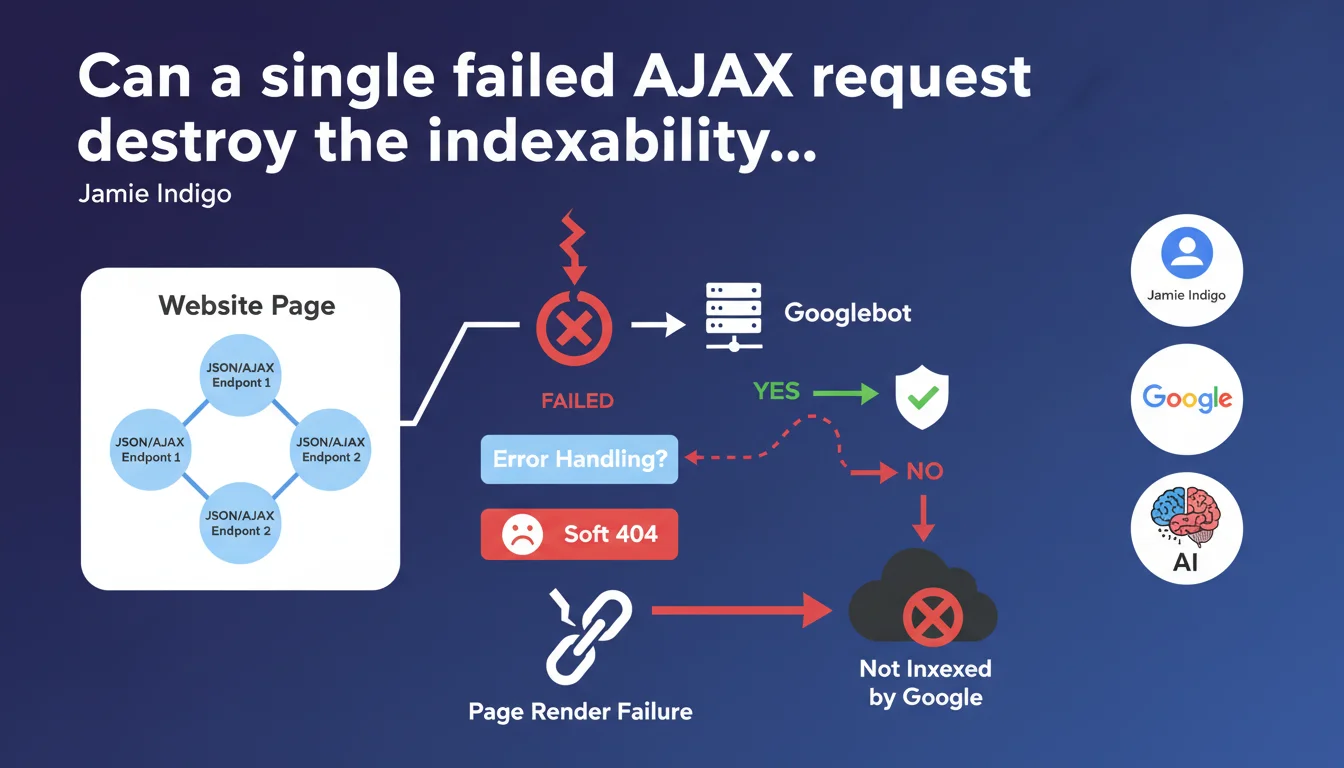
If your site uses multiple JSON/AJAX endpoints to construct a page and a single request fails without proper error handling, Googlebot may fail to render the entire page. Result: a soft 404 that removes the page from the index. The fragility of front-end JavaScript architectures has never been more costly.
What you need to understand
What concrete damage can an AJAX error cause on the Googlebot side?
Googlebot executes the JavaScript on your pages to extract the final content. If your page relies on multiple AJAX calls to assemble the DOM — fetching products, filters, dynamic content blocks — and even one of these requests fails, the engine can end up facing an incomplete or broken render.
Without proper error handling, JavaScript can crash silently, leaving a page empty or broken. To Googlebot, this is a soft 404: a URL that returns a 200 code but contains no usable content.
Why does Google specifically mention "multiple endpoints"?
Modern architectures (React, Vue, Angular) often load data in fragments: one call for the catalog, another for reviews, a third for recommendations. If one of these endpoints times out, returns a 500, or returns malformed data, the concerned component can block the entire render.
The problem isn't AJAX itself — it's the absence of a fallback. If your code doesn't account for failure, it stops. And Googlebot with it.
What is a soft 404 and why is it so serious?
A soft 404 is a page that responds with 200 OK but that Google considers empty or useless. It's technically accessible, but contains nothing indexable. Google eventually removes it from the index.
Unlike a classic 404, the soft 404 is sneaky: on the server side, everything looks normal. You see nothing in your logs, but your pages gradually disappear from the SERP.
- A single AJAX request that fails can compromise the complete page render for Googlebot
- The bot doesn't have access to the network the same way a real browser does — timeouts, latencies, and network errors are more frequent
- Without error handling, JavaScript stops and leaves a page empty or partially loaded
- Google interprets this as a soft 404 and de-indexes the page
- The phenomenon particularly affects poorly architected Single Page Applications (SPAs)
SEO Expert opinion
Is this statement consistent with real-world observations?
Yes, and it's even a classic issue. Poorly secured front-end JavaScript architectures are a recurring source of indexation problems. We regularly see sites where pages display perfectly in human navigation, but return empty DOM in Googlebot's render.
The problem is often invisible to developers: the browser locally masks errors, CDNs hide timeouts, and monitoring reports nothing if a 200 code is sent. Result: entire sections of the site disappear from the index without anyone knowing why.
What nuances should be applied to this rule?
Google doesn't say that every AJAX error systematically causes a soft 404. It all depends on the impact on the final render. If a secondary request fails (e.g., comments widget) but the main content displays, the page can remain indexable.
What kills indexation is a critical error that blocks the render of main content: the title, text, and structural elements. An error on a recommendations block at the bottom of the page? Googlebot doesn't care. An error that prevents the product catalog from displaying? Game over.
[To verify]: Google doesn't specify at what threshold of missing content a page becomes a soft 404. Is it 50% of the DOM? 80%? No public data on this.
In what cases does this rule really not apply?
If your site uses Server-Side Rendering (SSR) or Static Site Generation (SSG), the problem largely disappears. The HTML is already built on the server side, Googlebot doesn't need to execute JavaScript to access the content.
Same thing if you use properly implemented progressive hydration: critical content is already present in the initial DOM, AJAX calls only enhance the user experience without blocking indexation.
Practical impact and recommendations
What should you do concretely to avoid this trap?
First reflex: implement robust error handling on all your AJAX calls. Every fetch() or XMLHttpRequest must have a .catch() that handles failures without breaking the render. Bare minimum: display an error message or fallback rather than leaving the component in limbo.
Next, systematically test your pages under degraded conditions: simulate network timeouts, endpoints returning 500s, malformed JSON responses. Your page must remain functional — or at least display indexable content — even if one or more calls fail.
How do you verify that Googlebot sees the complete content?
Use the URL Inspection tool in Search Console to test the render of your key pages. Compare the raw HTML ("More info" tab) with the final render ("Test Live URL" tab). If main content is missing or incomplete in the render, you have a problem.
Implement automated monitoring: tools like Puppeteer or Playwright can simulate Googlebot and verify that the final DOM contains the critical elements (titles, text, internal links). Alert yourself as soon as a page fails these criteria.
What mistakes should you absolutely avoid?
- Never leave a
fetch()without.catch()ortry/catchin async/await - Avoid cascade dependencies: if request B depends on A and A fails, B must not block the render
- Don't rely solely on CDNs for endpoint availability — plan for local fallbacks
- Implement explicit timeouts on AJAX calls (e.g., 5 seconds max) to prevent Googlebot from waiting indefinitely
- Test pages with Google Search Console's mobile render testing tool
- Monitor soft 404s in Search Console ("Coverage" tab)
- Verify that critical content is present in the initial HTML or loaded synchronously
❓ Frequently Asked Questions
Est-ce que toutes les erreurs AJAX provoquent un soft 404 ?
Le Server-Side Rendering (SSR) résout-il complètement ce problème ?
Comment savoir si mes pages sont touchées par des soft 404 ?
Faut-il préférer le rendu statique (SSG) au JavaScript côté client ?
Est-ce que Googlebot retry les requêtes AJAX qui échouent ?
🎥 From the same video 7
Other SEO insights extracted from this same Google Search Central video · published on 02/03/2023
🎥 Watch the full video on YouTube →
💬 Comments (0)
Be the first to comment.