
Official statement
Other statements from this video 5 ▾
- □ Comment Google recommande-t-il vraiment d'optimiser la vitesse de chargement ?
- □ La vitesse de page améliore-t-elle vraiment le SEO global ?
- □ Pourquoi Google recommande-t-il PageSpeed Insights et Lighthouse pour optimiser la vitesse ?
- □ Le lazy loading est-il vraiment une bonne pratique SEO recommandée par Google ?
- □ L'optimisation des images suffit-elle vraiment à booster la vitesse de page et le SEO ?
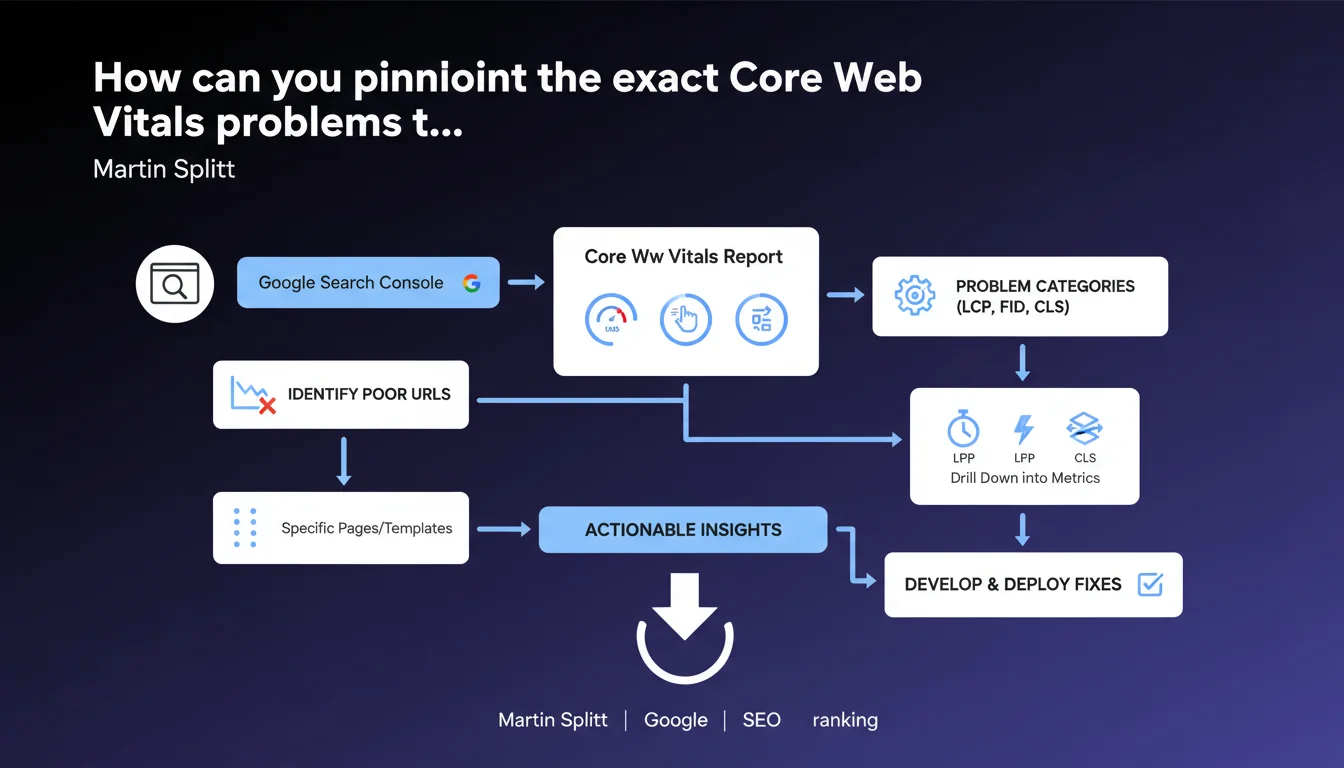
Google officially recommends the Core Web Vitals report as the primary tool for detecting and fixing performance issues. Martin Splitt emphasizes the direct link between these metrics and SEO impact. The key: stop flying blind and target optimizations that genuinely matter.
What you need to understand
Why does Google emphasize this specific report?
The Core Web Vitals report in Search Console isn't just another tool in Google's toolkit. It's their way of saying: "This is exactly what we measure for your ranking."
Unlike generalist audits like PageSpeed Insights that can bury the essentials under mountains of recommendations, this report consolidates real-world data — information collected from your actual users via the Chrome User Experience Report (CrUX).
What sets this report apart from other performance tools?
The fundamental difference: it displays actual user data, not lab simulations. A Lighthouse test shows you what happens in a controlled environment, but the Core Web Vitals report reveals what your visitors actually experience — slow 4G connections, budget devices, browser extensions running amok.
The report also segments URLs by similar page groups, allowing you to spot systemic patterns rather than treating each URL as an isolated case.
Which metrics are monitored and why do they matter?
Three pillars: LCP (Largest Contentful Paint) for perceived loading speed, INP (Interaction to Next Paint, replacing FID) for responsiveness, and CLS (Cumulative Layout Shift) for visual stability.
These metrics aren't there to look pretty on a dashboard. They directly determine the page experience signal Google uses in its ranking algorithm. If your Core Web Vitals are in the red, you're leaving rankings on the table.
- The Core Web Vitals report relies on real user data (CrUX), not simulations
- It groups URLs by patterns, making systemic problem diagnosis easier
- The three metrics (LCP, INP, CLS) are confirmed ranking criteria according to Google
- The report precisely identifies which pages are "Good," "Needs Improvement," or "Poor"
- It's the official tool for monitoring how technical optimizations impact your SEO performance
SEO Expert opinion
Is this statement consistent with real-world practices?
Yes, but with a significant caveat: the Core Web Vitals report won't tell you why your metrics are poor. It diagnoses the problem, not the cure.
We regularly see sites with excellent Lighthouse scores flagged as "Poor" in this report. Why? Because Lighthouse tests under ideal conditions, while CrUX captures brutal reality: servers struggling at peak hours, poorly configured CDNs for certain geographies, JavaScript blocking everything on mobile.
What limitations should you know before relying solely on this tool?
First pitfall: the report requires minimum traffic volume. Launching a new site or working on low-traffic sections? You won't see data for weeks. [To verify]: Google doesn't disclose the exact threshold, but observations suggest you need several hundred monthly visits per URL group.
Second limitation: update lag. CrUX data has a 28-day delay. Deploy an optimization today? Wait a full month to see impact in the report. Frustrating when you want to iterate quickly.
Third point — and this is where things get tricky: the report says "LCP poor," but doesn't specify whether it's slow server response, unoptimized images, blocking CSS, or lazy-loaded JavaScript issues. You must cross-reference with other tools (WebPageTest, Chrome DevTools) to find the root cause.
Does Google actually use these metrics for ranking or is this marketing speak?
Let's be honest: Core Web Vitals impact on rankings is real but moderate. Dozens of A/B tests by different SEO teams show that improving Core Web Vitals won't catapult a site from page 3 to page 1.
It's not a dominant factor like content relevance or domain authority. But in competitive environments where three sites fight for the same position with equivalent content, it's the tiebreaker. And on mobile, where performance counts double, ignoring these metrics is like playing with a handicap.
Practical impact and recommendations
What should you do right now?
First, connect your site to Search Console if you haven't already (and if you haven't, we have bigger problems). Go to the "Experience" section then "Core Web Vitals." Identify URL groups flagged as "Poor" — those are your priorities.
Next, for each problematic group, take a representative URL and run it through PageSpeed Insights in "Field Data" mode to see real user metrics, then "Lab Data" mode for detailed diagnostics. Cross-reference with a WebPageTest audit to identify bottlenecks.
What mistakes should you avoid when interpreting the data?
Classic mistake: treating each URL individually. The report groups similar pages for a reason — if all your product pages have poor LCP, it's a template problem, not isolated URLs. Fix the template, not pages one by one.
Another trap: obsessing over URLs representing 2% of traffic. Prioritize by business impact. A "Poor" group generating 40% of your revenue deserves all your attention. Orphaned pages with 10 monthly visits? Let them go.
Third mistake: thinking strong mobile scores compensate for poor desktop or vice versa. Google evaluates them separately. Flawless mobile with catastrophic desktop? You still lose rankings on desktop.
How do you verify that optimizations are working?
First, patience: the Core Web Vitals report updates with a 28-day lag. Don't panic if nothing changes the first week. Meanwhile, monitor metrics in real-time with the Chrome User Experience Report API or RUM tools like Cloudflare Web Analytics or Google Analytics 4.
Document every change with exact dates. When data updates in Search Console, you can correlate improvements with your actions. No clear correlation? Either the change didn't work or you broke something else.
- Connect the site to Search Console and monitor the Core Web Vitals section weekly
- Identify "Poor" URL groups and prioritize by traffic and business impact
- For each problematic group, analyze a representative URL with PageSpeed Insights and WebPageTest
- Address issues at the template level, not individual URLs
- Prioritize optimization: image compression, lazy loading, CSS/JS minification, CDN
- Measure real-time impact with a RUM tool while waiting for report updates (28 days)
- Never deploy multiple optimizations simultaneously — isolate each variable to understand what works
- Verify optimizations don't degrade other metrics (improved INP that tanks CLS, for example)
❓ Frequently Asked Questions
Le rapport Core Web Vitals remplace-t-il PageSpeed Insights ?
Pourquoi mes scores Lighthouse sont bons mais le rapport Core Web Vitals me classe en « Médiocre » ?
Combien de temps faut-il pour voir l'impact d'une optimisation dans le rapport ?
Un site sans données Core Web Vitals est-il pénalisé par Google ?
Faut-il prioriser mobile ou desktop pour les Core Web Vitals ?
🎥 From the same video 5
Other SEO insights extracted from this same Google Search Central video · published on 20/11/2023
🎥 Watch the full video on YouTube →
💬 Comments (0)
Be the first to comment.