
Official statement
Other statements from this video 5 ▾
- □ Is Google's cache really essential to get indexed and rank in search results?
- □ Should you really trust Google's cache to diagnose indexation issues?
- □ Why doesn't Google cache certain pages on your website?
- □ Why doesn't Google's cache always show your complete JavaScript pages?
- □ Should you worry if Google isn't caching your pages?
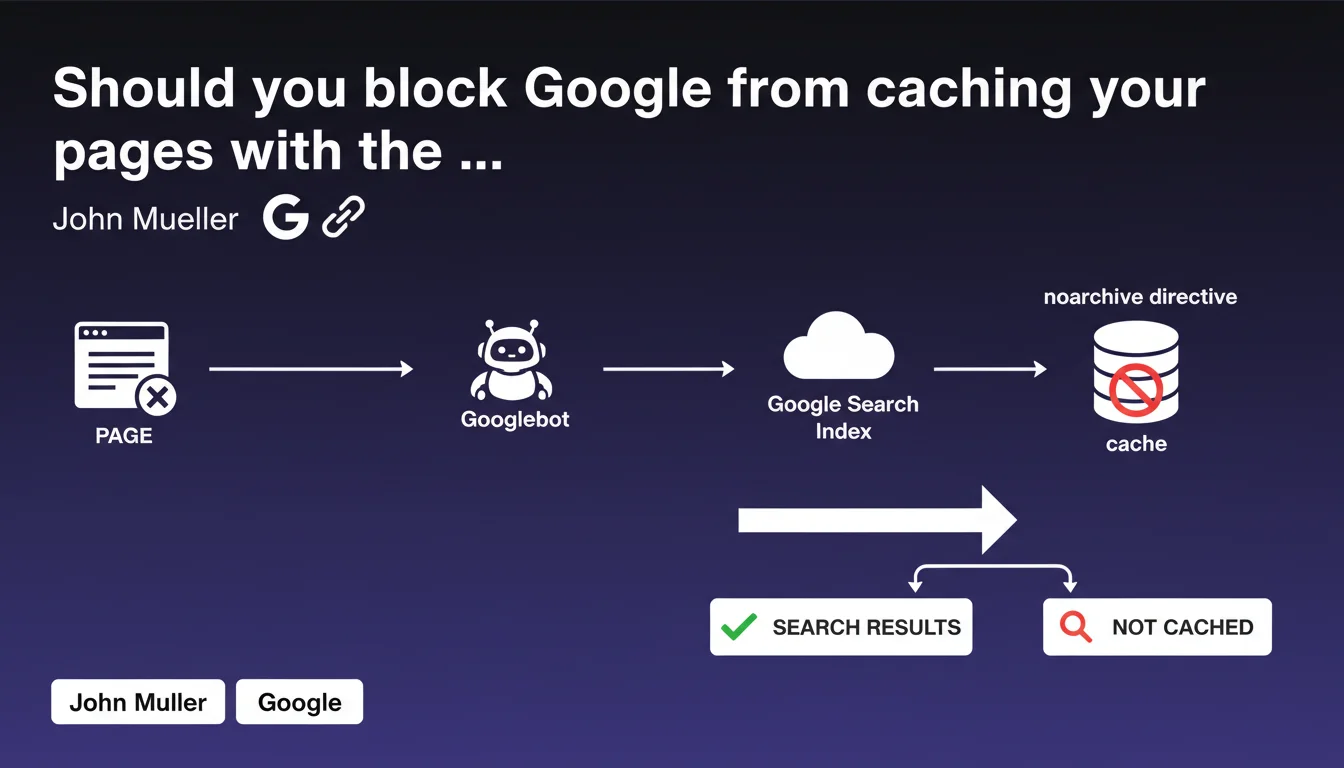
Google allows you to prevent your pages from being cached using the robots 'noarchive' directive. This tag blocks the display of the archived version in search results. Use it only in specific cases where privacy or content freshness requires it.
What you need to understand
What is the noarchive directive and how does it work?
The noarchive directive is a meta robots tag that prevents Google from creating and displaying a cached version of your page. Specifically, it removes the "Cached" link that normally appears in search results.
This directive is integrated into the HTML header of your pages (<meta name="robots" content="noarchive">) or via the X-Robots-Tag HTTP header. It doesn't prevent indexing — your page remains present in results — but Google no longer maintains a publicly accessible archived copy.
Why would you want to prevent caching?
Several scenarios justify using this directive. Sites with sensitive content (personal data, fluctuating prices, confidential information) may want to avoid an outdated version circulating. Platforms with paid content or behind paywalls fear that the cached version bypasses their business model.
News sites or real-time data platforms benefit from ensuring only the most recent version is accessed. Finally, some companies prefer to have complete control over what's visible, without an intermediate version archived by Google.
Does this directive impact search rankings?
No, the noarchive directive does not directly affect your positioning in search results. Google continues to index and rank your page normally. The impact is purely functional: users can no longer access a cached version.
That said, this feature can indirectly affect user experience. If your site is slow or temporarily unavailable, the Google cache sometimes allows visitors to access content anyway. Blocking this option can frustrate some users in these circumstances.
- The noarchive directive only blocks cache display, not indexing
- It applies page by page via meta robots or X-Robots-Tag
- No direct impact on rankings, but removes a backup option for users
- Useful for sensitive, paid, or highly volatile content
- Don't confuse it with noindex (which removes the page from results)
SEO Expert opinion
Is this directive really necessary in most cases?
Let's be honest: the vast majority of sites have no valid reason to use noarchive. The Google cache is rarely consulted by everyday internet users, and its existence has never posed a major problem for the vast majority of web publishers.
Too many webmasters apply this directive out of reflex or lack of knowledge, thinking they're "protecting" their content. In reality, they're removing a feature that can prove useful in case of server downtime or temporary slowness. The cache then becomes a safety net for content accessibility.
In what concrete cases should you really apply it?
E-commerce sites with variable pricing have a valid argument: a cached version displaying obsolete prices can create confusion. SaaS platforms with personalized client spaces must absolutely block the cache to prevent any data leaks.
Paid media outlets (online press, financial analysis sites) can legitimately fear that the cache bypasses their subscription model — although this concern is often exaggerated, the Google cache not being such an effective backdoor. And that's where it gets tricky: many overestimate the actual risk.
For real-time news sites (stock prices, sports results), the argument holds up. But for a standard blog, a brochure website, or even a standard e-commerce site with daily stock updates? Frankly pointless.
Are there any side effects to watch out for?
A rarely mentioned point: the Google cache sometimes serves as a diagnostic tool for SEO professionals. When a page doesn't display correctly or content has disappeared, the cached version helps understand what Google saw during its last crawl. Systematically blocking this option complicates this investigation work.
Additionally, some third-party SEO tools rely on the Google cache to analyze content changes over time. Less critical, certainly, but it's a consideration for teams that regularly audit their sites. [To verify]: the exact impact of noarchive on third-party archival tools (Wayback Machine, etc.) isn't always clear, but they generally operate independently of the Google cache.
Practical impact and recommendations
How to properly implement the noarchive directive?
You have two methods available. The most common: add <meta name="robots" content="noarchive"> in the <head> section of your HTML pages. Simple, direct, effective for isolated pages.
For more global management or on non-HTML content, use the X-Robots-Tag HTTP header: X-Robots-Tag: noarchive. This method is particularly relevant for PDFs, images, or other resources you want to protect from caching without touching the HTML code.
If you use a CMS like WordPress, SEO plugins (Yoast, Rank Math) allow you to activate noarchive page by page via a simple checkbox. Convenient, but always verify the source code to confirm the directive is properly present.
What mistakes should you avoid during implementation?
Classic error: applying noarchive at the same time as noindex. If you block indexing, the noarchive directive becomes unnecessary since the page won't appear in results anyway. It's redundant and often signals confusion about objectives.
Another pitfall: using the directive inconsistently between robots.txt, meta robots, and X-Robots-Tag. If you block crawling in robots.txt, Google will never see your noarchive tag in the HTML. Technical consistency is crucial.
Finally, don't confuse noarchive with unavailable_after, which allows you to remove a page from results after a specific date. These are two different mechanisms for two distinct needs. One concerns the cache, the other the presence itself in the index.
- Identify pages truly sensitive and requiring noarchive (paid content, personal data, volatile prices)
- Choose the appropriate implementation method: meta robots for HTML, X-Robots-Tag for other formats
- Verify the directive isn't applied by default to your entire site without valid reason
- Test the implementation by checking the source code and verifying the absence of the "Cached" link in results
- Document the relevant pages to facilitate future audits and prevent inconsistencies
- Don't combine noarchive with noindex — it's redundant and causes confusion
The noarchive directive is a precise control tool, not a general security measure. Its use should be targeted and justified: e-commerce sites with high price volatility, sensitive content, paid platforms. For any other case, you're removing a useful feature without real benefit.
The technical implementation is simple, but the deployment strategy requires discernment. Incorrect configuration can complicate your SEO diagnostics and frustrate users without providing tangible protection. If managing these robots directives becomes complex at your site's scale, or if you're unsure which pages to target, support from a specialized SEO agency can help you avoid costly mistakes and define a strategy aligned with your business objectives.
❓ Frequently Asked Questions
La directive noarchive empêche-t-elle Google d'indexer ma page ?
Puis-je appliquer noarchive uniquement à certaines sections d'une page ?
Est-ce que noarchive affecte mon positionnement dans Google ?
Combien de temps faut-il pour que la suppression du cache prenne effet ?
La directive noarchive bloque-t-elle aussi les archives tiers comme Wayback Machine ?
🎥 From the same video 5
Other SEO insights extracted from this same Google Search Central video · published on 20/06/2023
🎥 Watch the full video on YouTube →
💬 Comments (0)
Be the first to comment.