
Official statement
Other statements from this video 4 ▾
- □ Do deleted pages really disappear automatically from Google's index?
- □ Should you really eliminate all internal links pointing to your deleted pages?
- □ Why does it take several weeks after deleting a page to see your Google index actually update?
- □ Is Google's URL removal tool really necessary, or just another overrated feature you don't actually need?
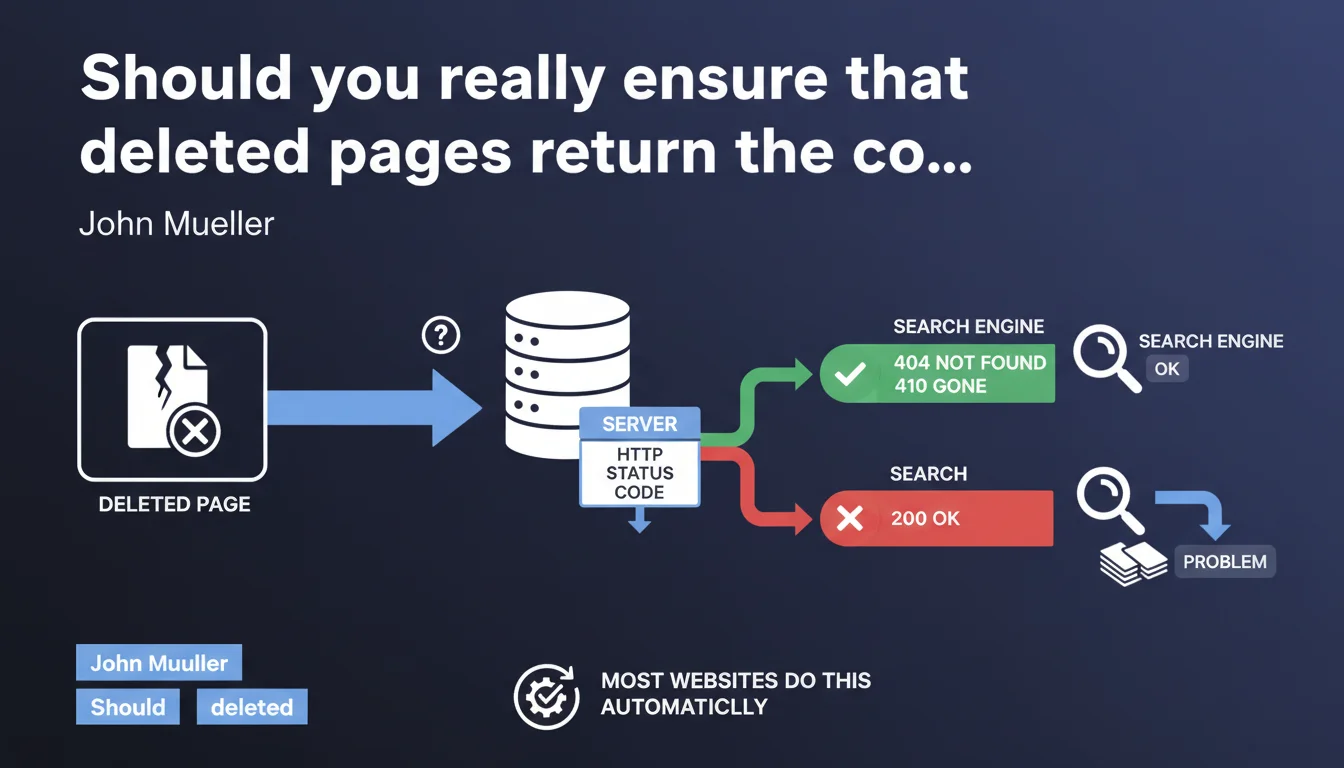
Google confirms that a deleted page must return the appropriate HTTP status code (404 or 410). Most CMS platforms handle this automatically, but some configurations create soft 404 errors that pollute your index. Verify that your non-existent pages actually return a 404, not a 200.
What you need to understand
What is the appropriate HTTP status code for a deleted page?
When a page no longer exists on your site, the server must clearly signal this absence to the crawler. The HTTP status code 404 (Not Found) indicates that a resource doesn't exist temporarily, while the code 410 (Gone) indicates permanent deletion.
Google prefers these clear signals rather than a page that returns a status code 200 (OK) while displaying a "page not found" message. This latter case creates what's called soft 404s: the server claims everything is fine while the page is empty or non-existent.
Why do most sites handle this automatically?
Modern CMS platforms (WordPress, Shopify, Prestashop) return a 404 by default when a URL doesn't exist in their database. It's native behavior — no additional configuration needed in 90% of cases.
The problem arises with custom server configurations, poorly configured redirects, or dynamically generated pages that display empty content without modifying the response code. Some e-commerce sites, for example, display an empty category page with a 200 instead of completely removing the category.
What happens if the HTTP status code is incorrect?
Google continues to explore and potentially index phantom pages. Your crawl budget gets dispersed across useless URLs. In Search Console, you'll see warnings like "Page indexed, though blocked by robots.txt" or "Explored, currently not indexed" that reflect this confusion.
Worse: if a deleted page returns a 200 with little or no content, Google may consider it thin content and downgrade the overall quality perception of your site.
- A 404 tells Google: "this page doesn't exist, stop crawling it"
- A 410 says: "this page has been permanently deleted, forget about it"
- A 200 on an empty page creates a soft 404 that wastes your crawl budget
- Modern CMS platforms handle 404s natively, but verifying remains essential on custom configurations
- Soft 404s can degrade Google's perception of your site's overall quality
SEO Expert opinion
Is this statement consistent with real-world observations?
Yes, and it's actually a classic finding in technical audits. We regularly encounter sites that display "Sorry, this page doesn't exist" with a status code 200. Google identifies these soft 404s in Search Console, but some remain indexed for months before being filtered out.
What often gets stuck: pages with dynamic URL parameters (filters, facets) that generate empty combinations. An e-commerce site can create thousands of filtered product pages that display "0 results" with a 200. Google wastes time crawling all of that.
What nuance should be added regarding the choice between 404 and 410?
Mueller says "appropriate code" without specifying which one. In practice: the 410 does accelerate removal from the index, but its impact remains marginal compared to a 404. Google treats both as deletion signals, with the difference coming down to just a few days of de-indexing.
Using a 410 makes sense for permanently deleted pages (discontinued product, obsolete content). But a 404 is sufficient in 99% of cases. Don't complicate things with complex server rules to distinguish between the two — focus first on eliminating soft 404s.
In what cases doesn't this rule apply strictly?
When you use a 301 redirect to redirect a deleted page to a relevant alternative. If a product no longer exists but an updated version replaces it, a 301 redirect remains preferable to a bare 404. Google transfers some SEO equity and the user lands on useful content.
Another exception: paginated pages at the end of a series. If your blog displays "page 47" empty because you deleted articles, a 404 is correct. But if this page 47 existed and contained indexed content, a 301 to the last valid page (or to the main archive) better preserves link equity. [To verify]: the actual impact of this practice on rankings remains difficult to measure in isolation.
Practical impact and recommendations
How do you verify that your site returns the correct HTTP status codes?
Crawl your site with Screaming Frog or an equivalent tool. Filter URLs by status code and identify those returning a 200 with little or no content. Export the list and cross-reference with Search Console: Coverage section > Excluded > "Explored, currently not indexed" or "Soft 404".
Manually test a non-existent URL (e.g., yoursite.com/page-that-does-not-exist-123456). Use an online tool like httpstatus.io or the HTTP Header Live extension for Firefox. If you see a 200 instead of a 404, your server or CMS is misconfigured.
What errors should you avoid when managing deleted pages?
Don't systematically redirect everything to the homepage with a 301. That's a disguised soft 404: Google understands the page no longer exists, but you waste crawl budget and create a poor user experience. A clean 404 with a useful error page (content suggestions, internal search engine) is better.
Avoid custom 404 pages that load JavaScript to display content. If the HTTP status code remains 404 but the page displays hundreds of links, Google may consider it indexable. Keep your error pages simple and lightweight.
What should you do concretely to clean up existing soft 404s?
Fix the server code or CMS configuration to return a real 404. Remove plugins or .htaccess rules that intercept errors and transform them into 200s. On WordPress, disable themes that display a "post not found" page without modifying the HTTP header.
For legitimately deleted pages that have backlinks or residual traffic, implement targeted 301 redirects to equivalent content. Don't leave 404s on URLs that still receive visits — you're losing conversion opportunities.
- Crawl the site and identify pages with status code 200 and empty or minimal content
- Check Search Console: "Soft 404" and "Explored, currently not indexed" sections
- Manually test non-existent URLs to confirm the HTTP status code returned
- Fix server or CMS configuration to return clean 404s on deleted pages
- Implement targeted 301 redirects for deleted pages with backlinks or traffic
- Simplify 404 error pages: lightweight content, no heavy JavaScript
- Avoid mass redirects to the homepage (disguised soft 404)
❓ Frequently Asked Questions
Quelle différence entre une 404 et une 410 pour Google ?
Une page 404 peut-elle nuire au référencement de mon site ?
Comment savoir si mon CMS gère correctement les 404 ?
Faut-il rediriger toutes les pages supprimées vers la homepage ?
Combien de temps Google met-il à désindexer une page 404 ?
🎥 From the same video 4
Other SEO insights extracted from this same Google Search Central video · published on 14/09/2022
🎥 Watch the full video on YouTube →
💬 Comments (0)
Be the first to comment.