
Official statement
Other statements from this video 4 ▾
- □ Les pages supprimées disparaissent-elles vraiment automatiquement de l'index Google ?
- □ Faut-il vraiment s'assurer que les pages supprimées renvoient le bon code HTTP ?
- □ Faut-il vraiment supprimer tous les liens internes pointant vers vos pages supprimées ?
- □ Pourquoi faut-il attendre plusieurs semaines après la suppression d'une page pour voir l'index Google se mettre à jour ?
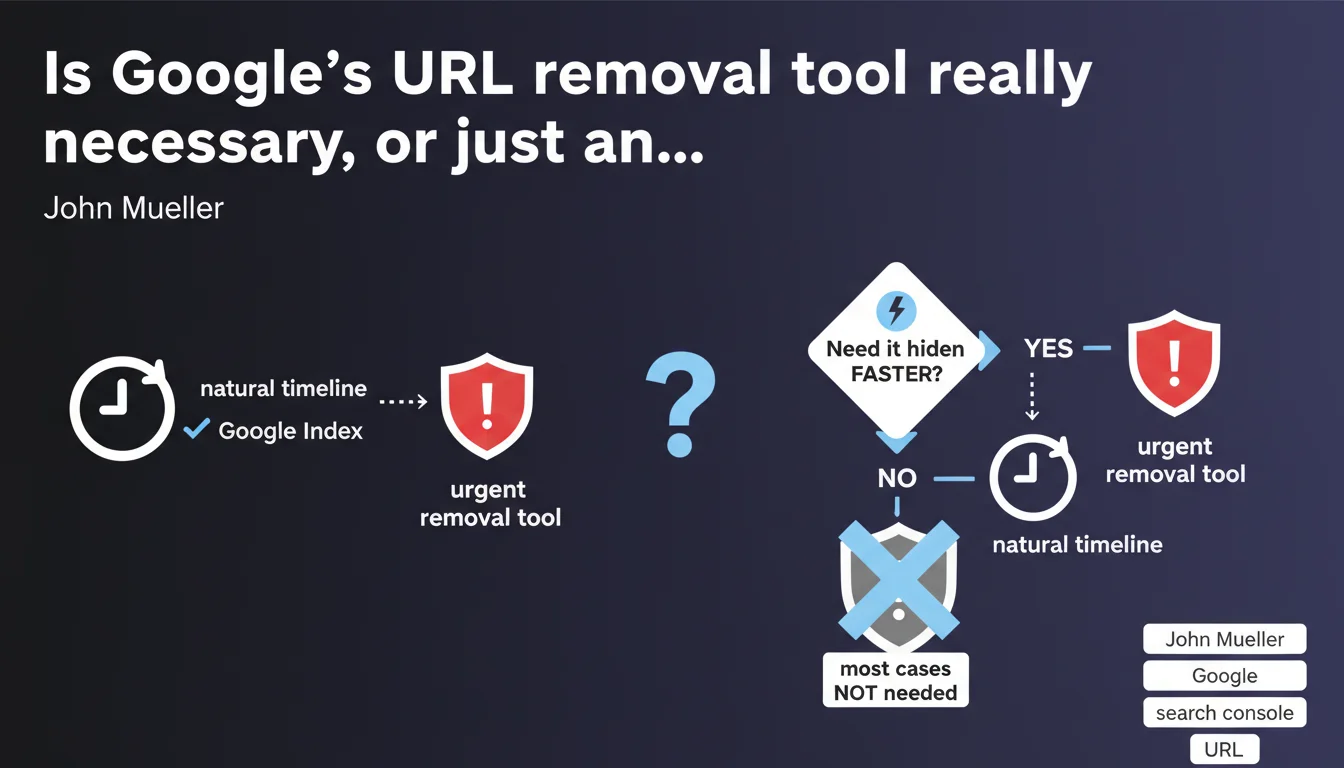
Google offers an urgent URL removal tool in Search Console to hide content faster than the natural delisting process. John Mueller clarifies that this tool is generally unnecessary in most situations. The implicit message: don't panic over every deindexing, natural crawling almost always gets the job done.
What you need to understand
Why does Google even offer this tool if it's not really necessary?
The urgent removal tool exists for genuine emergency scenarios: data breaches, defamatory content, confidential information accidentally indexed. In these cases, waiting for Googlebot to naturally crawl the page again isn't an option.
But Google is insistent: most cases don't justify using it. Removing an outdated page, fixing duplicate content, or taking down a stale article? robots.txt, the noindex tag, or outright deletion work just fine. The natural crawl and deindexing timeline (anywhere from a few hours to a few days depending on crawl frequency) is acceptable.
What is this "natural timeline" Mueller keeps mentioning?
Google never gives exact numbers — obviously. For a frequently crawled site (news outlets, active e-commerce), a change can be detected within a few hours. For less dynamic sites, it could take several days, even a week.
The urgent removal tool acts within minutes to a few hours, but it's a temporary cache: the URL disappears from search results for roughly six months. If the page is still accessible and crawlable after that period, it gets reindexed. It's not permanent deletion, just emergency masking.
In what specific cases should you actually use it?
Legitimate situations are rare but critical:
- Sensitive personal data: social security numbers, bank details, medical information accidentally indexed
- Defamatory or illegal content: abusive comments, content violating a court order
- Security breaches: config files, API tokens, credentials exposed in source code
- Publishing incidents: article published before embargo by mistake, incorrect pricing creating immediate business problems
Everything else — a lingering 404, an old out-of-stock product, an empty category — doesn't need any urgency. The natural process handles it.
SEO Expert opinion
Does this recommendation actually match real-world practice?
Yes, and this is where many junior SEOs mess up. Deindexing anxiety pushes people to overreact: the moment an URL causes trouble, instinct kicks in to jump into Search Console and hit "Remove." Result? A removal history filled with unnecessary actions and a complete misunderstanding of how crawling works.
Experienced SEOs know that urgent removal is never an SEO solution. It's a band-aid. If the URL remains accessible after the removal period expires (six months), Google reindexes it. So if the structural problem isn't fixed (missing noindex, misconfigured robots.txt, page still live), it comes back.
What are the classic mistakes with this tool?
First mistake: confusing URL removal with proper deindexing. Using the tool doesn't fix anything on your site. The page still exists; it's just temporarily hidden. Google crawls nothing for six months, then tries again.
Second mistake: using it for duplicate content. "I have two versions of my product page, I'll urgently remove the bad one." Except that doesn't solve canonicalization, URL structure, or internal linking. The duplicate comes right back when the cache expires.
Third mistake: panicking over a sudden traffic drop and removing pages thinking it helps. It never helps. You're masking symptoms, not curing the disease (penalty, technical bug, poor content).
What do you do when Google won't specify how long the "natural timeline" lasts?
It's deliberately vague, and it's frustrating — but logical. Google doesn't want SEOs calculating windows of opportunity to manipulate the index. [To verify]: some field reports suggest crawl frequency obviously matters, but so does URL "priority" (core pages vs. deep pages).
In practice? If your site is well-crawled (clean logs, updated XML sitemap, good internal linking), a status code change (200 → 404 or 410) or adding a noindex is detected within 24-48 hours on active sections. For zombie pages rarely visited, it could drag on for a week.
Practical impact and recommendations
What should you actually do before touching this tool?
First, assess real urgency. Ask yourself: "Will leaving this URL visible for another 48 hours create an immediate legal, financial, or reputational risk?" If the answer is no, use normal channels.
Next, fix the problem at the source on your site. Add a noindex, physically delete the page, return a 410 (Gone) rather than a 404 if it's permanent, or block it in robots.txt if needed. The removal tool should only come in as a supplement, never as a replacement.
What mistakes should you avoid with this tool?
Never use it as a routine solution. If you catch yourself removing dozens of URLs per month, your real problem is elsewhere: poorly managed crawl budget, runaway auto-generated content, explosive pagination, unblocked facets.
Don't assume removing = permanently deindexing. It's temporary caching. After six months, if the URL is still accessible and crawlable, Google brings it back. So if you haven't fixed things on your server, you're stuck in a loop.
Avoid removing strategic URLs out of panic. "My competitor is beating me, I'll remove my page to republish it fresh." That's not how it works. You lose history, accumulated signals, and start from scratch.
How do you verify your site is properly configured without needing this tool?
A healthy SEO site should never need recurring urgent removals. A few basic checks:
- Review your server logs: Is Googlebot visiting critical sections regularly? If yes, the natural timeline will be short.
- Check index coverage in Search Console: Are unwanted URLs regularly slipping in? If so, diagnose the source (polluted sitemap, internal linking to useless content).
- Test crawl responsiveness: change a meta description on a key page and time it. If it takes more than 72 hours to show up in SERPs, your site has a freshness problem.
- Use the noindex tag proactively on temporary content (event pages, expired flash sales) instead of letting them sit and panicking later.
- Set up clean 301 redirects for moved or merged content, rather than leaving 404s or removing in a crisis.
The urgent removal tool is a fire extinguisher, not maintenance equipment. If you're using it every day, your site is burning — and the problem isn't Google, it's your technical stack or editorial strategy.
Mature SEO management relies on anticipation: preventive noindex, planned redirects, optimized crawl budget. Google's natural timeline becomes a non-issue. For complex sites (multi-category e-commerce, high-volume media, international architectures), working with a specialized SEO agency often prevents recurring pitfalls and industrializes best practices without weeks of troubleshooting.
❓ Frequently Asked Questions
L'outil de suppression urgente supprime-t-il définitivement une URL de l'index Google ?
Combien de temps met Google à traiter une demande de suppression urgente ?
Peut-on utiliser cet outil pour corriger du contenu dupliqué ?
Supprimer une URL via cet outil impacte-t-il le crawl budget ?
Faut-il toujours combiner suppression urgente et correction technique côté site ?
🎥 From the same video 4
Other SEO insights extracted from this same Google Search Central video · published on 14/09/2022
🎥 Watch the full video on YouTube →
💬 Comments (0)
Be the first to comment.