
Official statement
Other statements from this video 6 ▾
- □ How can you fully leverage data exports from Search Console to boost your SEO strategy?
- □ Why does Google cap Search Console exports at just 1000 rows?
- □ How can you leverage Search Console exported data to build custom SEO dashboards that reveal hidden insights?
- □ How can you effectively analyze the SEO performance of each section on your website?
- □ Should you really be steering your SEO budget based on geographic performance data?
- □ How can you leverage Search Console metrics to pinpoint your highest-potential markets?
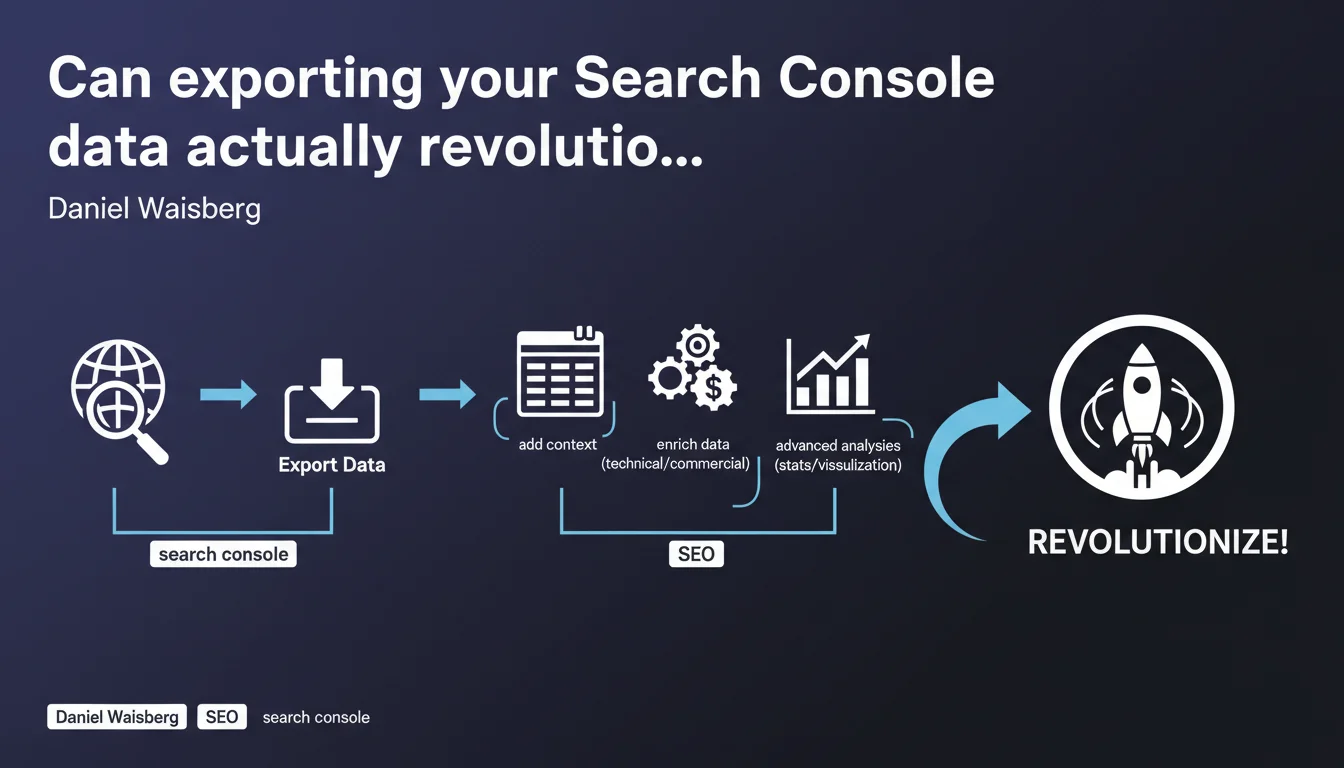
Google encourages Search Console data export to cross-reference this information with other sources (technical, business) and conduct advanced analyses. The goal: go beyond standard reports to uncover opportunities that the native interface doesn't reveal. Concretely, it opens the door to much more sophisticated statistical and contextual data exploitation.
What you need to understand
What exactly does Google offer with this export feature?
Daniel Waisberg reminds us that the Search Console API allows you to export raw data to spreadsheets or third-party tools. The idea: enrich these SEO metrics (clicks, impressions, CTR, position) with context — dates of technical modifications, marketing campaigns, business seasonality.
In other words, instead of just consulting reports in the interface, you retrieve the data to merge it with your own sources. This transforms a performance table into exploitable analysis material.
Why doesn't the native Search Console interface always suffice?
Standard Search Console reports show what's happening, but struggle to explain why. It's nearly impossible to easily cross-reference with an editorial calendar, server logs, or product data.
Export allows you to compare a drop in organic traffic with a technical migration, a change in site architecture, or inventory changes. Without this context, you're flying blind.
What kinds of advanced analyses become possible?
With exported data, you can apply statistical models: correlations between rankings and conversions, segmentation by semantic clusters, anomaly detection on time series. BI or data visualization tools (Looker Studio, Tableau, Power BI) then become truly valuable.
You can also identify patterns that the GSC interface hides: cannibalization between URLs on the same query, gradual CTR decline on certain page types, real impact of title tag optimization.
- Search Console API export: retrieval of raw data (queries, pages, countries, devices)
- Contextual enrichment: merging with editorial calendar, logs, CRM, product data
- Advanced analyses: statistics, segmentation, anomaly detection, BI and data visualization
- Limitations of native interface: impossible to easily cross-reference with other sources
SEO Expert opinion
Does this recommendation really change the game for seasoned SEO professionals?
Let's be honest: Search Console data export isn't new. Serious SEOs have been doing this for years via the API or tools like Search Analytics for Sheets. What Google is doing here is officially endorsing a best practice without introducing breakthrough functionality.
The real issue is that this statement reinforces a crucial point: native GSC reports are intentionally simplified. Google will never give you full context in its interface — that's up to you to create. This is where the gap widens between a junior SEO who consults dashboards and an expert who cross-references sources.
What are the real limitations of this approach?
First pitfall: the quality of exported data depends on what Google is willing to share. Long-tail query anonymization, forced aggregation on certain segments, privacy thresholds… You'll never have 100% of the picture. [Needs verification] whether Google adjusts these thresholds based on site traffic volume.
Second limitation: raw export won't do the heavy lifting for you. Without data analysis skills, you're left with millions of unusable rows. Merging sources requires mastery of joins, filters, pivots — and most importantly, having a clear working hypothesis. Otherwise, it's just noise.
In what scenarios does this export become truly strategic?
Concretely? When you manage a site with thousands of active pages and need to segment finely: by content type, by search intent, by conversion funnel maturity. Example: comparing organic behavior between product pages, category pages, and informational pages.
Another critical use case: post-migration or post-redesign audits. Exporting data before/after lets you quantify the impact precisely, page by page, query by query. Impossible to do this properly in the native interface. And here's the catch: if you haven't anticipated export before switchover, you'll have no reliable baseline to measure the damage.
Practical impact and recommendations
What should you actually do to leverage this export?
First step: define an exploitable data structure. Don't just export everything at random. Identify relevant dimensions (page, query, device, country) and metrics to track (clicks, impressions, CTR, average position). Build a base data schema or master spreadsheet that serves as your reference framework.
Next, automate the export. Use the Search Console API with a Python script or Google Apps Script if you're on Sheets. The goal: retrieve data regularly (daily or weekly depending on volume) to feed your dashboards without manual intervention.
Finally, cross-reference with your other sources: server logs, Google Analytics 4, CRM data, editorial calendar, technical modification history. It's this cross-referencing that creates value. An isolated traffic drop tells you nothing — correlated with content updates or structure changes, it becomes meaningful.
What mistakes should you avoid when exploiting exported data?
Classic error: confusing correlation with causation. Just because two curves move simultaneously doesn't mean one causes the other. Always cross-check with additional indicators before drawing conclusions.
Another trap: failing to document methodological changes. If you modify your export filters, segments, or intermediate calculations, document it. Otherwise, six months later, you won't understand your own analyses. Temporal consistency is critical.
Final point: overlooking data freshness. Search Console sometimes applies retroactive corrections. Plan for update mechanisms to avoid working with outdated figures.
How do you verify your export setup is reliable?
Start by testing on a small sample. Export one week's data and manually compare it with the Search Console interface. Totals should match — if they don't, your script or aggregation method has an issue.
Then implement anomaly alerts: sudden drops in exported rows, aberrant values (CTR at 100%, average position at 0), temporal gaps in series. These signals often indicate technical bugs or API quota limits reached.
- Define a structured data schema before exporting at scale
- Automate export via API (Python, Apps Script, third-party tools) to avoid manual work
- Systematically cross-reference with server logs, GA4, CRM, editorial calendar
- Document every methodological change to ensure temporal consistency
- Validate exported data by occasionally comparing it with native GSC interface
- Implement alerts for anomalies (temporal gaps, aberrant values, API quotas reached)
- Plan for permanent, scalable storage of historical data
❓ Frequently Asked Questions
Quels outils utiliser pour exporter les données Search Console efficacement ?
Combien de temps Google conserve-t-il les données dans Search Console ?
L'export des données Search Console ralentit-il les performances de mon compte ?
Peut-on exporter les données de toutes les propriétés Search Console en une seule fois ?
Faut-il exporter quotidiennement ou hebdomadairement les données Search Console ?
🎥 From the same video 6
Other SEO insights extracted from this same Google Search Central video · published on 28/02/2023
🎥 Watch the full video on YouTube →
💬 Comments (0)
Be the first to comment.