
Official statement
Other statements from this video 8 ▾
- □ Comment l'outil d'inspection d'URL révèle-t-il la source de découverte de vos pages ?
- □ Google respecte-t-il vraiment votre balise canonical ou décide-t-il seul ?
- □ Comment vérifier efficacement les directives X-Robots dans vos en-têtes HTTP ?
- □ Les ressources JavaScript bloquées par robots.txt sabotent-elles vraiment votre indexation ?
- □ Faut-il vraiment s'inquiéter des erreurs de ressources dans la Search Console ?
- □ Les messages console JavaScript sont-ils devenus un signal SEO à surveiller ?
- □ Pourquoi le test d'URL en direct de Google Search Console donne-t-il des résultats différents à chaque fois ?
- □ Faut-il vraiment ignorer les captures d'écran dans les outils de test de Google ?
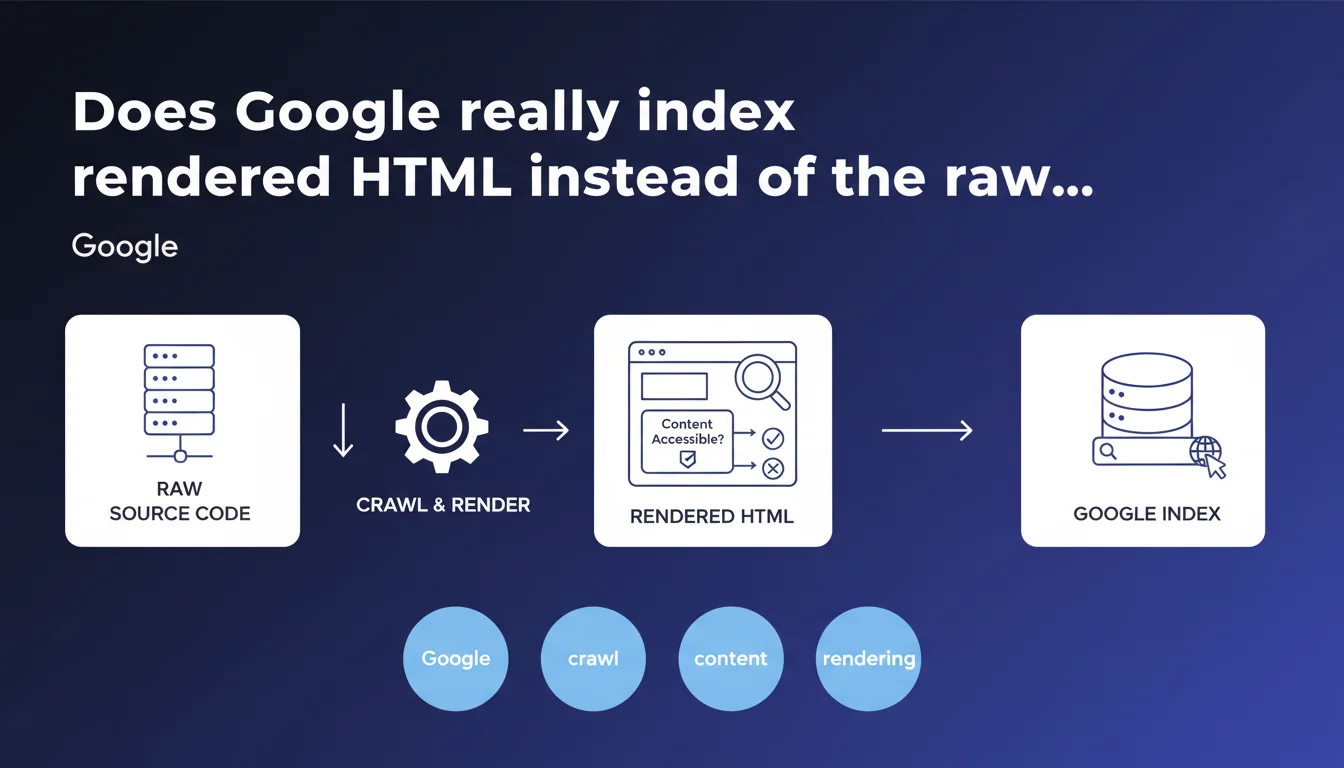
Google claims to use rendered HTML (after JavaScript execution) for indexing, not raw source code. This technical distinction has direct implications for the visibility of all client-side generated content. You can verify what Google actually sees through search functionality in the rendered HTML.
What you need to understand
What's the difference between source HTML and rendered HTML?
The source HTML is the raw code sent by the server at the time of the initial request. The rendered HTML is the final result after the browser (or Googlebot) has executed all JavaScript, loaded resources, and performed DOM modifications.
This distinction becomes critical on modern sites using React, Vue, Angular, or any framework that injects content dynamically. If your h1, paragraphs, or links only appear after JS execution, they won't be in the source HTML — but Google claims to account for them through rendering.
Why does Google insist on this point?
Because many SEO professionals still test indexability by looking only at source code or using curl. These methods miss everything the engine actually sees after the rendering process.
Google reminds us that its infrastructure crawls AND renders pages — two distinct steps with potential delays between them. The rendered HTML represents the ground truth for indexation, not the initial HTML.
How do you verify what Google actually sees?
The URL inspection tool in Search Console displays precisely the rendered HTML as Googlebot processed it. You can perform a text search to confirm that a specific element is accessible.
This is the official method recommended by Google for diagnosing indexing issues related to JavaScript. Forget about "viewing page source" in your browser for this diagnosis.
- Google indexes rendered HTML, not raw source HTML
- Rendering includes all content generated by JavaScript
- A delay may exist between initial crawl and complete rendering
- The URL inspection tool shows exactly what Google saw
- A search in rendered HTML allows you to verify the accessibility of specific elements
SEO Expert opinion
Does this statement really match real-world observations?
Yes — and it's been documented for years. Tests with fully JavaScript sites show that Google does indeed index rendered content. But with important nuances that this statement glosses over.
The timing of rendering remains a gray area. Google never specifies how much time it allows for JavaScript to execute, or what happens if rendering fails partially. Sites with heavy external dependencies or long timers risk incomplete rendering — and therefore partial indexation.
What limitations doesn't this statement mention?
Google claims to use rendered HTML, but says nothing about blocked resources that prevent rendering. If your critical JS files are blocked by robots.txt, rendering will fail — and you'll end up with empty source HTML.
Another silence: the server load of rendering. Googlebot must allocate CPU resources to execute JavaScript. On a large site with thousands of JS-heavy pages, how many pages does Google actually render on each crawl? [To verify] — no official data on this.
Does rendered HTML guarantee optimal indexation?
No. Google can index rendered content, but that doesn't mean it does so as efficiently as static HTML. Tests show that sites with server-side rendering (SSR) or static generation generally achieve faster and more reliable indexation.
Rendered HTML remains an acceptable fallback solution, not a best practice. If you have the technical choice, always prioritize content present in the source HTML for critical elements.
Practical impact and recommendations
What should you check first on your site?
Inspect strategic pages through Search Console. Compare the rendered HTML with what you see in your browser. If elements are missing (titles, product descriptions, CTAs), you have a rendering problem.
Specifically test dynamically generated content: search filters, modals, tabs, lazy-loaded content. Search for these elements in the rendered HTML to confirm their accessibility.
- Use the URL inspection tool on your key pages
- Perform a text search in rendered HTML to verify the presence of critical elements
- Compare source HTML and rendered HTML to identify JS-dependent content
- Verify that essential JavaScript files are not blocked by robots.txt
- Test pages with network throttling to simulate degraded network conditions
- Monitor the delay between crawl and rendering in server logs combined with Search Console data
What technical errors should you absolutely avoid?
Never block JavaScript and CSS resources in robots.txt — it's the surest way to break rendering. Google cannot execute your code if it doesn't have access.
Avoid client-side JavaScript redirects for main navigation. Google follows them, but with longer delays and lower reliability than server-side 301/302 redirects. Same logic for critical content: don't hide it behind user events (clicks, scroll) that Googlebot won't trigger.
How do you optimize for Google rendering?
Prioritize server-side rendering (SSR) or static generation for important content. If you stay with pure client-side rendering, minimize JavaScript execution time and avoid blocking external dependencies.
Implement rendering monitoring: regularly export rendered HTML from your strategic pages and compare it to your expectations. Tools like Puppeteer or Playwright can automate this control.
❓ Frequently Asked Questions
Le HTML rendu est-il vraiment identique à ce que je vois dans mon navigateur ?
Combien de temps Google attend-il pour rendre une page JavaScript ?
Dois-je abandonner le rendu côté client pour mon site ?
Comment savoir si mon JavaScript bloque l'indexation ?
Les contenus dans des iframes sont-ils inclus dans le HTML rendu ?
🎥 From the same video 8
Other SEO insights extracted from this same Google Search Central video · published on 02/08/2023
🎥 Watch the full video on YouTube →
💬 Comments (0)
Be the first to comment.