
Official statement
Other statements from this video 10 ▾
- □ Le CLS est-il vraiment un facteur de classement Google à part entière ?
- □ Vos images sabotent-elles votre CLS sans que vous le sachiez ?
- □ Faut-il vraiment spécifier les dimensions des images pour corriger le CLS ?
- □ Les données de laboratoire suffisent-elles vraiment pour optimiser vos Core Web Vitals ?
- □ Pourquoi le Chrome User Experience Report change-t-il la donne pour mesurer les performances réelles de votre site ?
- □ Le LCP mesure-t-il vraiment la vitesse d'affichage du contenu principal ?
- □ Faut-il vraiment prioriser le chargement de vos images héros pour améliorer le LCP ?
- □ Faut-il vraiment désactiver le lazy loading sur les images above the fold ?
- □ Pourquoi PageSpeed Insights est-il l'outil de performance à privilégier pour le SEO ?
- □ Faut-il vraiment passer toutes ses images en WebP pour le SEO ?
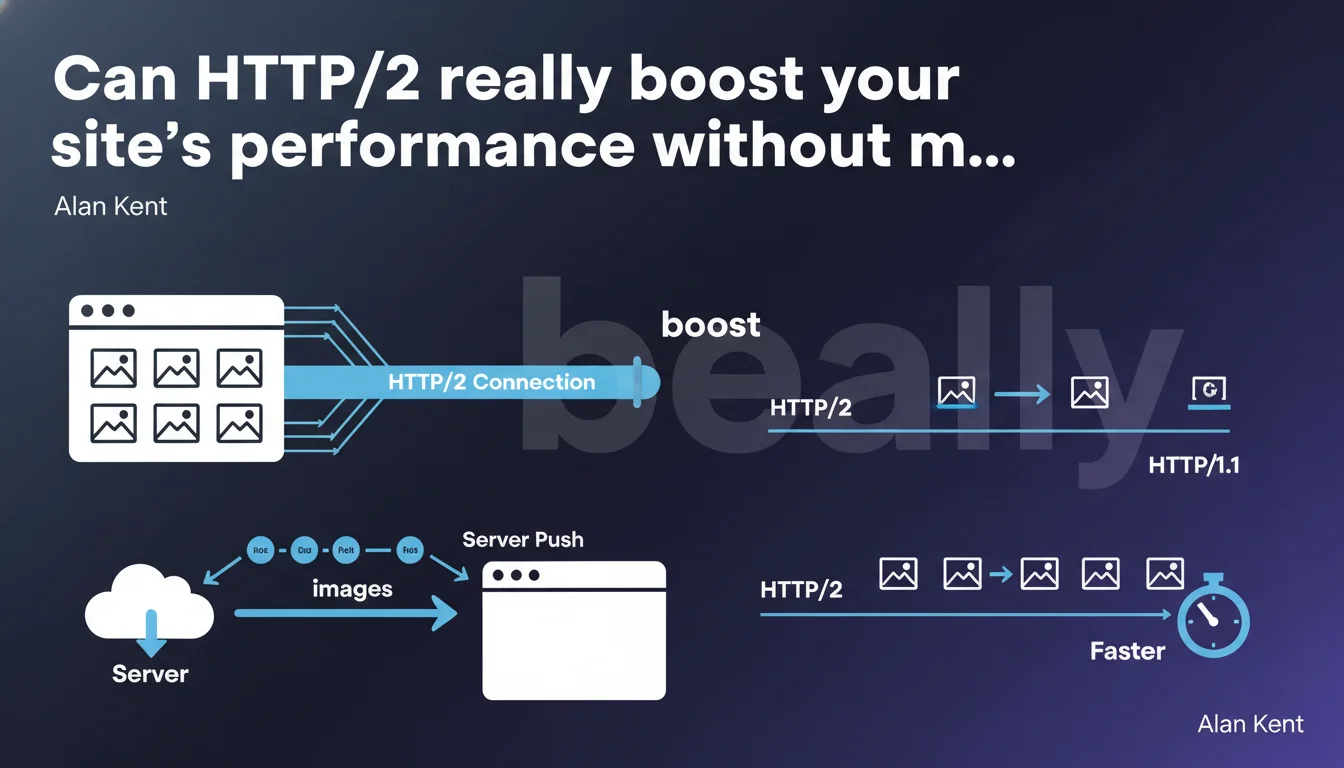
HTTP/2 allows the browser to download multiple resources simultaneously over a single connection, and even push images before they're requested. Concretely: less latency, fewer network round trips, better loading time — but only if your hosting and technical stack support it.
What you need to understand
Google claims that HTTP/2 improves resource download efficiency through multiplexing and server push. On paper, it's a technological leap forward compared to HTTP/1.1, where each file required a separate connection or queued up.
In practice, this means your site can load dozens of images, scripts, and CSS in parallel without bottlenecks. The browser doesn't just sit idle waiting for one resource to download before requesting the next.
What does multiplexing concretely change for SEO?
HTTP/2 multiplexing allows you to send multiple requests and responses over a single TCP connection without blocking. Goodbye to the head-of-line blocking that slowed everything down under HTTP/1.1.
For Google, this translates to faster crawling and pages that load better for users — two factors that weigh on rankings. Core Web Vitals, notably LCP, directly benefit from smoother image loading.
Is server push really a decisive advantage?
Server push allows you to send resources to the browser before it even requests them. In theory, that's great: you save a network round trip.
In reality, it's more tricky. If you push resources the browser already has cached, you waste bandwidth. Misconfigured, push can actually slow down loading. [To verify] — many sites have disabled server push after seeing mixed results.
Do all hosting providers support HTTP/2 correctly?
Most modern hosting providers have supported HTTP/2 for several years. But beware: some only enable it over HTTPS, others throttle it with poorly configured Apache or Nginx setups.
Check with tools like KeyCDN HTTP/2 Test or Chrome DevTools (Network tab, Protocol column). If you still see h2c or HTTP/1.1, there's a problem.
- Multiplexing: multiple simultaneous requests over a single connection = less latency
- Server push: pushes resources to the browser before the request — handle with care
- HTTPS required: HTTP/2 works almost exclusively over secure connections
- SEO impact: improved loading time, better LCP, smoother crawling
- Hosting: verify that your stack truly supports HTTP/2 and configuration is optimal
SEO Expert opinion
Is this claim consistent with real-world observations?
Yes, HTTP/2 objectively improves performance on resource-heavy sites — e-commerce, image-heavy blogs, media portals. Gains are measurable on LCP and overall loading time.
But it's not magic. If your site suffers from structural issues — uncompressed images, render-blocking JavaScript, undersized server — HTTP/2 won't fix anything. It's an amplifier of good practices, not a band-aid on a wooden leg.
What nuances should we add about server push?
Google remains vague on server push, for good reason: its use is controversial. Cloudflare even disabled support by default in 2022 after finding it degraded performance in most cases.
The problem? You need to know exactly which resources to push, and intelligently manage browser cache. Otherwise, you're sending unnecessary files that saturate bandwidth. [To verify] — I recommend testing with and without, measuring LCP under real network conditions (3G/4G throttling).
When does HTTP/2 make no difference?
If your site loads only a few lightweight resources, or you're already using a performant CDN with HTTP/3, gains will be marginal. HTTP/2 shines most when there are many parallel requests.
Another case: sites behind proxies or misconfigured load balancers that degrade HTTP/2 to HTTP/1.1 internally. Check the entire chain, not just the front end.
Practical impact and recommendations
What should you actually do to benefit from HTTP/2?
First step: enable HTTPS if you haven't already — HTTP/2 only works over HTTPS in browsers. Next, verify your hosting supports HTTP/2 natively.
If you're on Apache, ensure mod_http2 is enabled. On Nginx, check the listen 443 ssl http2; directive in your config. Cloudflare and most CDNs enable HTTP/2 by default, but verify anyway.
What mistakes should you avoid when switching to HTTP/2?
Don't assume HTTP/2 makes HTTP/1.1 optimizations obsolete. Domain sharding (multiplying domains to parallelize downloads) becomes counterproductive under HTTP/2, but CSS/JS concatenation remains relevant in some cases.
Also avoid pushing resources haphazardly with server push. Test first without it, measure, then cautiously experiment on critical resources (above-the-fold CSS, logo, fonts).
How do you verify your site is truly leveraging HTTP/2?
Open Chrome DevTools, Network tab, Protocol column. You should see "h2" or "h3" for HTTP/3. If it's "http/1.1", dig deeper: hosting issue, CDN issue, or reverse proxy problem.
Also test with WebPageTest enabling filmstrip and waterfall. Compare resource timing before/after enabling HTTP/2. A good indicator: resources download in parallel with no visible gaps.
- Enable HTTPS across the entire site (HTTP/2 requires it)
- Verify hosting and CDN support HTTP/2
- Check server config (mod_http2 on Apache, http2 on Nginx)
- Test with Chrome DevTools (Protocol column = h2)
- Measure LCP and loading time before/after
- Avoid domain sharding, now pointless under HTTP/2
- Experiment with server push cautiously (measure impacts)
- Monitor TTFB — HTTP/2 doesn't improve server response times
HTTP/2 is a real performance lever, but it requires a well-configured technical stack and a measured approach. Gains are real on resource-heavy sites, provided you avoid server push pitfalls and don't neglect other fundamental optimizations.
If you lack time or expertise to thoroughly audit your infrastructure, diagnose bottlenecks, and optimize each link in the loading chain, support from a specialized SEO agency can save you weeks of trial-and-error and guarantee a performant implementation.
❓ Frequently Asked Questions
HTTP/2 fonctionne-t-il sans HTTPS ?
Faut-il encore concaténer CSS et JS sous HTTP/2 ?
Le server push améliore-t-il toujours les performances ?
HTTP/2 améliore-t-il le crawl de Googlebot ?
Dois-je passer directement à HTTP/3 ou rester sur HTTP/2 ?
🎥 From the same video 10
Other SEO insights extracted from this same Google Search Central video · published on 06/05/2022
🎥 Watch the full video on YouTube →
💬 Comments (0)
Be the first to comment.