
Official statement
Other statements from this video 9 ▾
- □ Does a simple trailing slash really trigger a complete site migration according to Google?
- □ Can a rushed URL migration destroy your search rankings before you even realize what's happening?
- □ Should you really document every single URL during an SEO migration?
- □ Should you really redirect EVERY single URL when migrating your website?
- □ Do you really need to update ALL internal elements after a URL migration?
- □ Is Google Search Console really essential for a successful site migration?
- □ Does Google really treat all URLs the same way during a migration?
- □ How long does a URL migration really take before Google fully processes it?
- □ Should you really keep 301 redirects live for a full year or more?
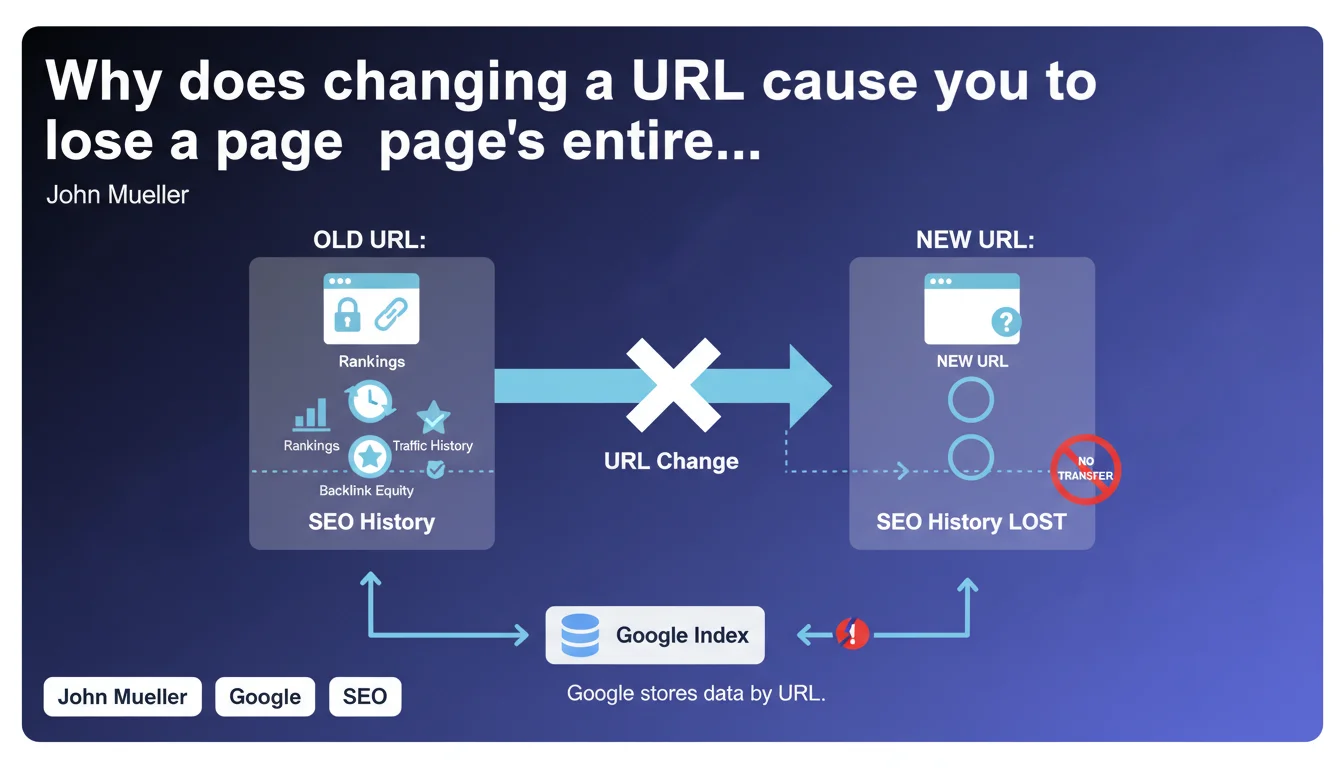
Google indexes each URL individually. When a URL changes, all accumulated data (authority, rankings, signals) remains attached to the old address. If you don't transfer this data to the new URL via a 301 redirect, you're starting from scratch. It's that simple and brutal.
What you need to understand
This statement from John Mueller underscores a fundamental principle of Google's index architecture: the URL is the basic unit. Not the content, not the domain — the exact URL.
Concretely? If you change your URL from /product-123 to /new-product-123, Google treats this as two distinct pages. The old one keeps its history, backlinks, and authority. The new one starts with a reset counter.
What does this actually mean for indexing?
Google doesn't automatically follow your content from one URL to another. There's no magic recognition like "this page looks a lot like that one, let's transfer everything." The index works like a relational database where the URL is the primary key.
When you modify a URL without implementing a transfer mechanism (permanent redirect), you create a break. The old URL keeps all its signals — backlinks, click history, user data, PageRank — while the new one launches as a freshly created page.
Why does this URL-centric logic persist?
Because the web is built on hyperlinks, and hyperlinks point to URLs. Google can't guess your editorial intentions or internal restructuring. It simply crawls the links it finds and indexes the URLs it discovers.
This approach has an advantage: it remains predictable and deterministic. You know exactly what Google sees, because it's what you serve it. The downside? Any unmanaged URL change becomes a drain on your SEO signals.
- The URL is the unique identifier in Google's index
- Changing a URL without a redirect = creating a brand new blank page
- SEO data (backlinks, authority, user signals) stays attached to the old URL
- There is no automatic content recognition between two different URLs
- Data transfer requires explicit action (301 redirect)
SEO Expert opinion
This statement is perfectly consistent with what we've observed in the field for years. Poorly managed migrations systematically produce traffic collapses, even when content remains identical.
Does this rule really apply in every situation?
Almost always, with a few nuances. When a page receives external backlinks, their value stays anchored to the exact URL they point to. If you change that URL, the links continue pointing to the old address — which now returns a 404 or, at best, a redirect.
301 redirects work, but with non-zero friction. Google has long claimed they transfer all PageRank, but field observations suggest slight loss. How much? Hard to quantify — probably between 0 and 15% depending on context. [Needs verification]
What about URL parameters and minor variations?
Google handles URL parameters more flexibly than Mueller suggests here. Search Console lets you specify how to treat certain parameters, and Googlebot can recognize patterns (pagination, filters, sessions).
But — and this is crucial — this flexibility only applies to variations of the same base URL. Switching from /page to /new-page remains a total break. Adding ?utm_source=twitter to an existing URL, however, generally doesn't create a new index entry.
Is data transfer via redirect instantaneous?
No, and this is a point Google rarely clarifies. A 301 redirect gives the instruction to transfer signals, but the process takes time. Googlebot must recrawl the old URL, notice the redirect, crawl the new one, then consolidate the data.
On sites with low crawl frequency, this process can stretch over several weeks. During this transition period, you may see ranking fluctuations, even a temporary drop — even with technically perfect redirects.
Practical impact and recommendations
What should you do before modifying a URL?
The golden rule: never change a URL without a valid reason. "Making it cleaner" or "having a more logical structure" doesn't cut it if the existing URL works and generates traffic. The cost in SEO risk usually outweighs the aesthetic benefit.
If you absolutely must modify URLs — platform migration, structural redesign, content consolidation — prepare an exhaustive redirect plan. Map every old URL to its new destination. Not "most of them", not "the main ones" — all of them.
How do you technically manage these URL transfers?
Implement permanent 301 redirects, not temporary 302s. Configure them at the server level (Apache, Nginx, IIS), not in JavaScript or via meta refresh. Google follows JavaScript redirects, but with delay and less reliability.
Verify each redirect points directly to its final destination. Avoid chains where A redirects to B which redirects to C. Googlebot may abandon after 3-5 hops, and each link dilutes signal transfer.
- Audit all URLs that will change (use server logs and Search Console)
- Create a 1:1 mapping between old and new URLs
- Configure permanent 301 redirects at the server level
- Eliminate any redirect chains — redirect directly to the final destination
- Test each redirect before deployment (tools: Screaming Frog, curl, httpstatus.io)
- Submit the new XML sitemap via Search Console
- Keep redirects in place for at least 1 year, ideally indefinitely
- Monitor 404s in Search Console after migration — fix immediately
What indicators should you monitor after a URL change?
Track the crawl rate in server logs. If Googlebot continues hitting the old URLs heavily several weeks after migration, it hasn't fully consolidated the data yet. Also check impression and position trends in Search Console — by individual URL, not just overall.
Expect temporary fluctuations. Even a perfectly executed migration often produces a 10-20% traffic dip for 2-4 weeks. If the drop exceeds 30% or persists beyond 6 weeks, there's likely a technical problem (missing redirects, chains, server errors).
Changing URLs is never trivial. Every modification carries an SEO risk cost, even with flawless redirects. If your situation involves a major redesign, platform migration, or complex restructuring, support from a specialized SEO agency can make the difference between a smooth transition and a visibility disaster. The stakes rarely justify flying blind.
❓ Frequently Asked Questions
Combien de temps faut-il maintenir une redirection 301 après un changement d'URL ?
Une redirection 301 transfère-t-elle 100% du PageRank ?
Que se passe-t-il si je change une URL sans redirection ?
Google peut-il reconnaître qu'un contenu identique a simplement changé d'URL ?
Les paramètres d'URL créent-ils toujours de nouvelles entrées d'index ?
🎥 From the same video 9
Other SEO insights extracted from this same Google Search Central video · published on 18/01/2022
🎥 Watch the full video on YouTube →
💬 Comments (0)
Be the first to comment.